2026.10: You are here 📍
 Franck Nijhof
Home Assistant 2026.10! 🎉
Last week, Nabu Casa dropped: Big Tech ruined the cloud, so we’re renaming ours. Home Assistant Cloud is on its way to becoming Home Assistant Link. Same service, new name. I love that title, by the way. If you haven’t read the story behind it yet, go have a look, and tell us what you think. The change is planned for the December release, so there is still time. 🏎️
Now, I’ll let you in on a secret: I’m an automation person. Dashboards are lovely and I admire everyone who builds a pretty one, but for me, automationsAutomations in Home Assistant allow you to automatically respond to things that happen in and around your home. [Learn more] are what make a smart home actually smart. So you can imagine how happy I am with what’s in this release. One of the most powerful features you never thought you’d need has been sitting in Home Assistant for years: trigger IDs. Give your triggersA trigger is the part of an automation that makes the automation start when something specific happens, for example, when the sun sets, a door opens, or a button is pressed. [Learn more] an ID, and one automation can do the job of two, three, or five. It was also tucked away in a menu, you had to invent the IDs yourself, and then remember which was which. Plenty of you never found it, and that’s on us.
Not anymore. Trigger IDs finally get a proper UI: you check the triggers you want in the condition, and Home Assistant takes care of the IDs behind the scenes. And if you like writing your own IDs in YAMLYAML is a human-readable data serialization language. It is used to store and transmit data in a structured format. In Home Assistant, YAML is used for configuration, for example in the configuration.yaml or automations.yaml files. [Learn more], nothing changes. Those keep working exactly as before. That makes it my favorite of this release. 🧠
Don’t get me wrong, the map is absolutely a cool feature too. Last release, every map in Home Assistant broke overnight when our map provider wanted an API key. We moved to OpenStreetMap, and it turns out that swapping out the map opens a lot of doors: a vector map that stays sharp at every zoom level, redesigned markers, and an overview of where everyone has been. You are here. 📍
There’s more: a tidier profile page, a panel for your Modbus connections, connecting your AI in one click, and 15 new integrationsIntegrations connect and integrate Home Assistant with your devices, services, and more. [Learn more]! 🚀
Enjoy the release!
../Frenck
- Cloud becomes Link
- A whole new map
- A tidier profile page
- The best automation feature you never used
- Integrations
- Other noteworthy changes
- Need help? Join the community
- Backward-incompatible changes
- All changes
A huge thank you to all the contributors who made this release possible! And a special shout-out to @googanhiem and @piitaya who helped write these release notes. Also, @grischard, @moryoav, and @RaHehl for putting effort into tweaking its contents. Thanks to them, these release notes are in great shape. ❤️
Cloud becomes Link
In case you missed it, we’re making the move to rename Home Assistant Cloud to Home Assistant Link. Same service, new name.
We’re all pretty annoyed by how Big Tech has been ruining perfectly good smart home devices by making them reliant on the cloud. Ours has never locked anyone in, harvested their data, or turned working devices into e-waste, so a new name was in order. Home Assistant Link is all about being clearer that it does things differently. The change is planned for the December release, so tell us your thoughts before then.
The best link is a fast link. 🏎️ Nabu Casa has been hard at work making remote access even faster across the globe. They recently migrated all of their servers to bare metal and added more servers to boost their coverage of the world. This month, they added a latency checker that pings multiple servers on boot and picks the best connection for you.
A whole new map
Last release, something changed underneath every map in Home Assistant, and we barely mentioned it in the release notes. The map provider we relied on started stamping an “API key required” message across its map images, breaking every map in Home Assistant at once. Instead of hunting for another free tile provider, we switched from pre-rendered map images to vector tiles generated and served by the OpenStreetMap Foundation. Both maps use OpenStreetMap data, but your device now draws the map itself. The new Map tiles integration fetches and caches the tiles through your Home Assistant instance, so your browser does not contact external tile servers directly. Recently viewed parts of the map remain available through a short internet hiccup.
Guillaume Rischard (@grischard), the former chair of the OpenStreetMap Foundation who initiated and led its vector-tile initiative, joined us during the 2026.9 release party.
Swapping out the map underneath opened a lot of doors. This release walks through the first few.
Crisp at every zoom level
The map is drawn entirely on your device, as vectors, instead of being stitched together from pictures. Streets and labels stay sharp at any zoom level, and zooming in and out is smooth. The map also has a dedicated dark style, with colors designed for dark mode. Older devices that can’t render vector maps, like the old tablet on your wall, automatically fall back to the classic map.
Redesigned markers
The markers on the map got a complete redesign. People show up with their picture, zonesZones allow you to specify certain regions on a map. They enable zone presence-detection and can be used in automations. For example, to start the vacuum after you left home or start the heating at home when you leave the office. [Learn more] get a marker with their icon in their own color, and everyone in the same zone shares a single bubble on that zone, instead of a pile of markers stacked on top of each other. Zoom out far enough, and bubbles that would overlap merge into one.
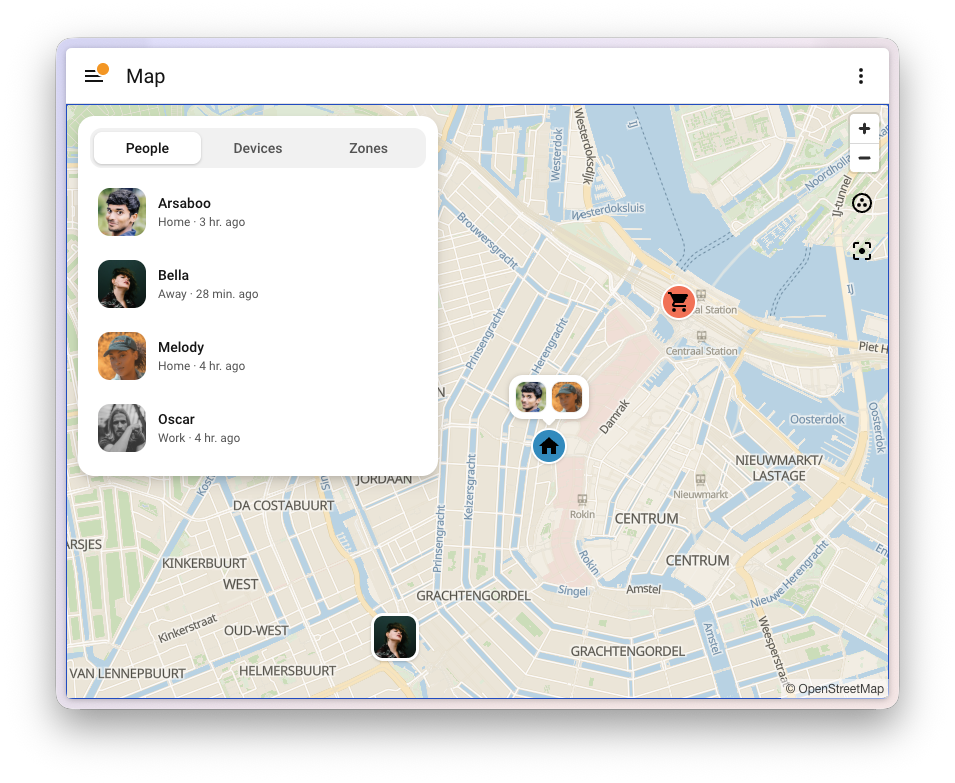
An overview for the Map dashboard
The Map dashboard now comes with an overview, next to the map on a desktop and as a sheet you pull up on your phone. It has three tabs: People, Devices, and Zones. Select someone to see their recent activity, with each stop colored by the zone they were in. Select a zone to see who’s there. On a phone, the map now also fills the whole screen, edge to edge.
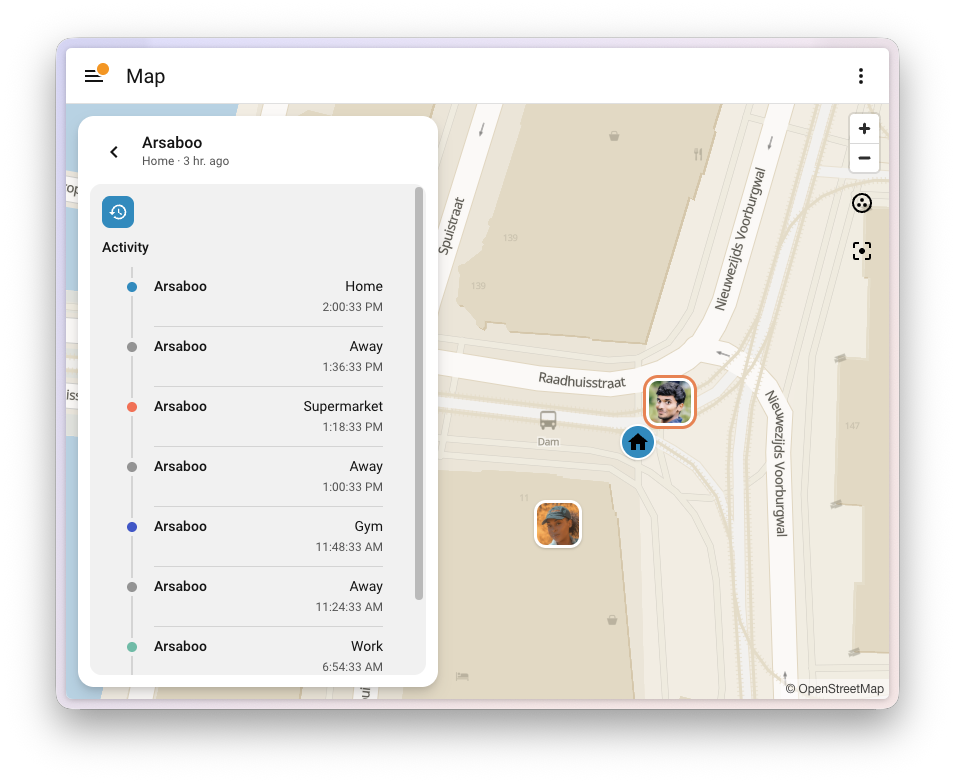
The same overview shows up when you put a map card in a panel view on your own dashboard.
Zones on the new map
The zone editor in Settings > Areas, labels & zones now uses the same new map. Your zones are sorted alphabetically, with Home always at the top, and they show the same icons and colors you see on the map.
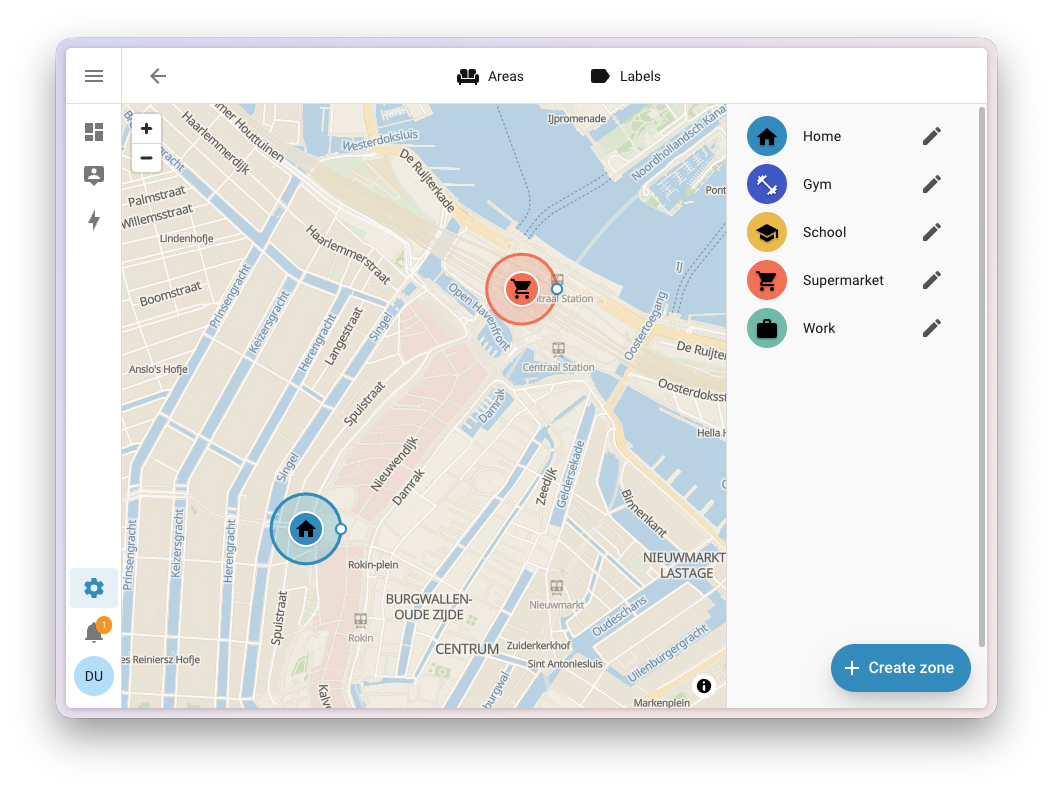
The redesign follows an Open Home Foundation design concept for the Map dashboard.
Thanks to @maartenla, @matthiasdebaat, @bramkragten, and @bgoncal; @grischard for initiating vector maps on the OpenStreetMap side and for assisting us; and Paul Norman (@pnorman) for developing Tilekiln and the tile service. Thanks also to the OpenStreetMap Foundation and the MapLibre, Shortbread, and VersaTiles communities.
Like Home Assistant, OpenStreetMap is built in the open by people like you. Spot something in your neighborhood that’s missing or out of date? You can leave a note or edit the map yourself.
A tidier profile page
Select your name at the bottom of the sidebar, and you land on your User profile. Over the years, that page quietly turned into a bit of a junk drawer. Language, theme, date formats, sidebar order, push notifications, keyboard shortcuts: all stacked in one long General tab, with Security as its only neighbor. Everything was there. You just had to scroll past most of it to find the one thing you came for.
The profile page is now an overview, using the same kind of navigation you already know from Settings. At the top is a card with your account, followed by your Theme, and a short list of sections that each hold a handful of related settings:
- Appearance: Your default dashboard and the order of your sidebar
- Localization: Your language, time zone, and how dates, times, and numbers are shown
- This browser (or This mobile app in the companion app): Notifications, display, and shortcuts for the device you’re using right now
- Security: Your password, multi-factor authentication, and access tokens
Nothing was taken away. Every setting is still there, just grouped so it’s easier to find. Thanks, @pcan08 and @maartenla!
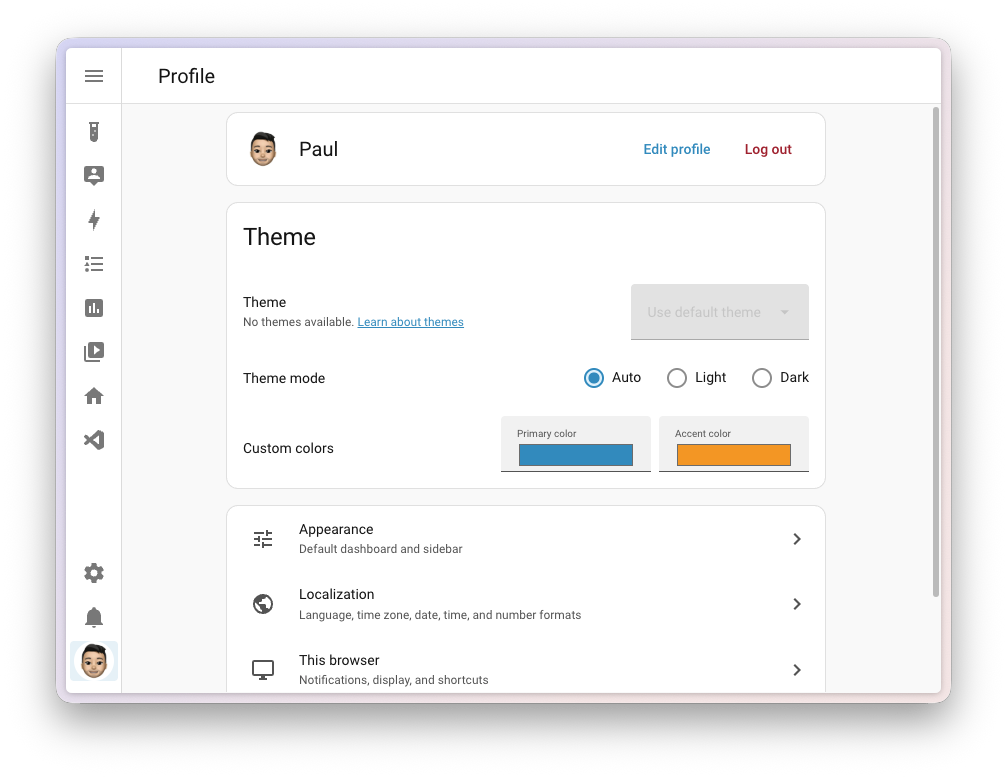
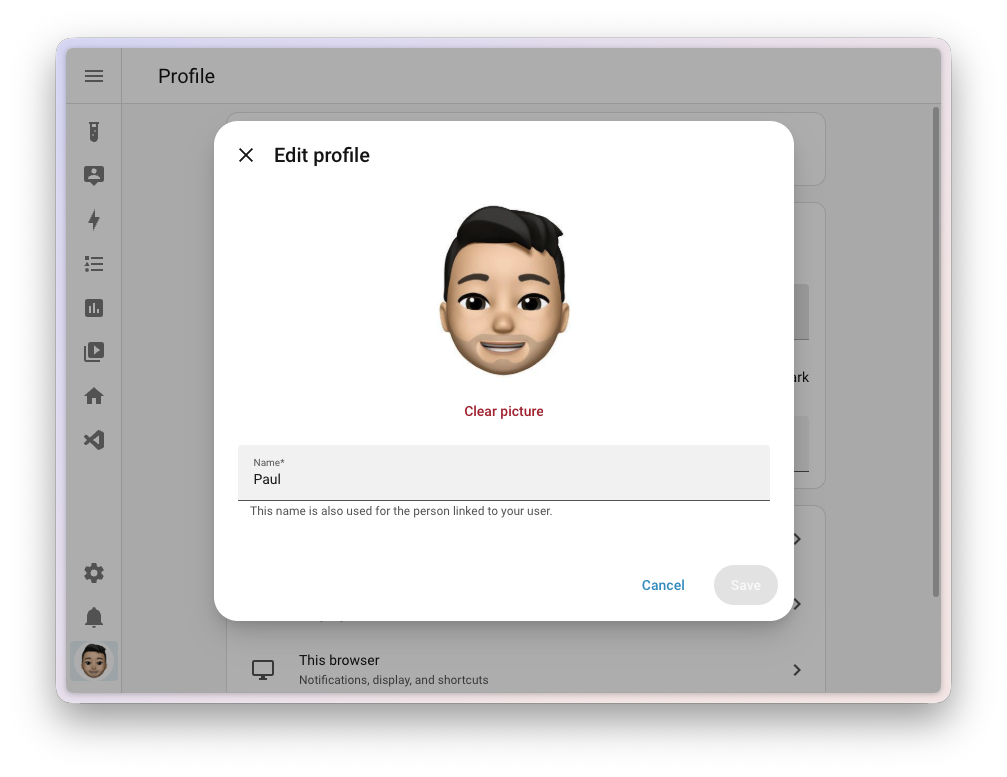
That account card at the top learned a new trick, too. Until now, your own name and picture weren’t actually yours to change. Only an administrator could set them, tucked away in the person settings. Not an administrator, but you wanted a nicer picture of yourself in the sidebar? You had to go ask whoever runs your Home Assistant. A bit odd, for something that is literally your face.
Every user, administrator or not, now has an Edit profile button right next to Log out. Upload and crop a picture, change your name, and save. Your name is used for both your user and the person linked to it, so it’s the same everywhere you show up, from the sidebar to your dashboards and Assist. Your new picture shows up in the sidebar right away.
The best automation feature you never used
Take a look at your automationsAutomations in Home Assistant allow you to automatically respond to things that happen in and around your home. [Learn more], and chances are you’ll find a few that come in pairs. One turns the hallway light on when motion is detected, the other turns it off again when the motion stops. One sends a notification when the washing machine starts, the other when it’s done. Two automations, doing one job.
Home Assistant has had a way to combine those into one for years. Give each triggerA trigger is the part of an automation that makes the automation start when something specific happens, for example, when the sun sets, a door opens, or a button is pressed. [Learn more] an ID, and use the Triggered by conditionConditions check whether something is true at that moment, for example, whether a door is closed. You can use them in automations and scripts. If a condition is not met, the actions that come after it in the same sequence do not run. At the top level of an automation or script, this stops the automation or script. [Learn more] to do something different depending on which trigger fired. It’s one of the most powerful things you can do in the automation editor, and also one of the best-hidden. The trigger ID field sat in the menu of each trigger. You had to come up with an ID, type it in yourself, and then remember which ID belonged to which trigger when you picked them in the condition. Most people never found it, and honestly, we can’t blame them.
Not anymore. Add a Triggered by condition, and you check the triggers it should match. You see the triggers themselves, not some ID you made up, and each one is numbered by its position in your list, with the same number shown next to the trigger itself. So you always know which one is which. There are no IDs to come up with at all. Home Assistant takes care of those behind the scenes, and cleans up after itself when you remove a trigger.
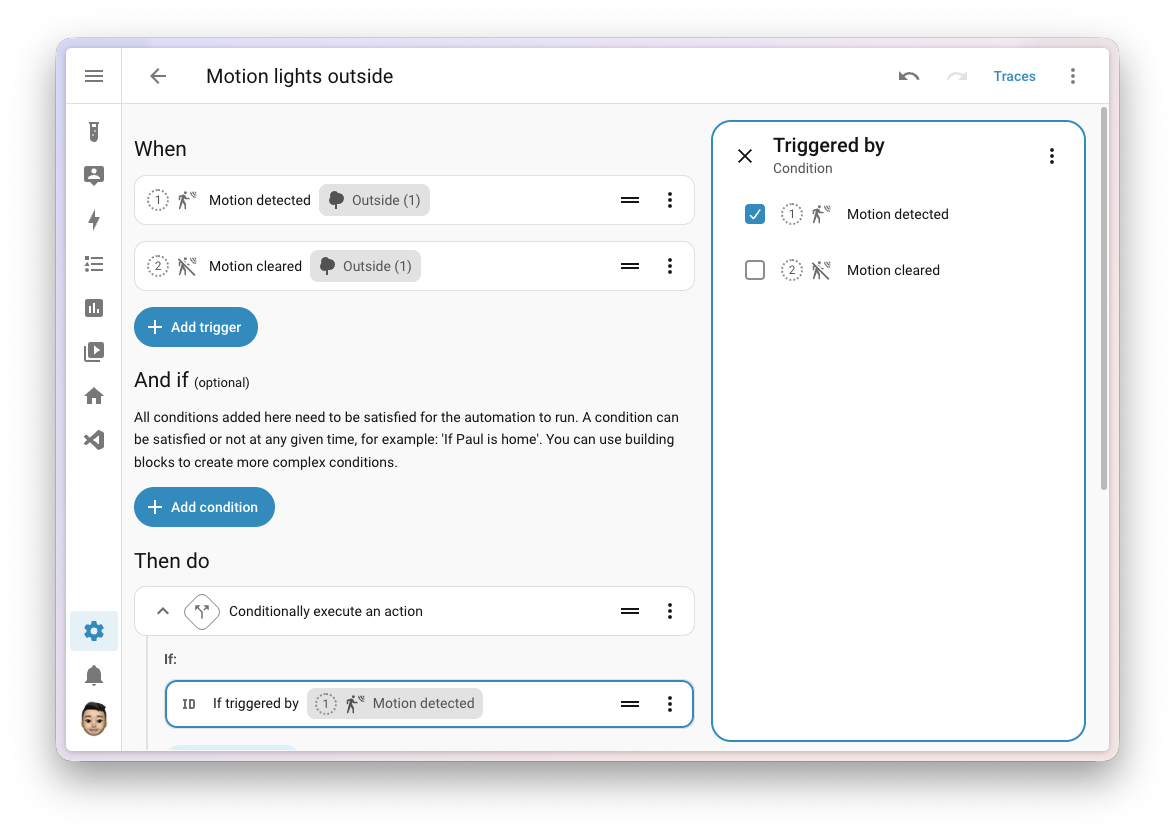
If you set your trigger IDs yourself in YAMLYAML is a human-readable data serialization language. It is used to store and transmit data in a structured format. In Home Assistant, YAML is used for configuration, for example in the configuration.yaml or automations.yaml files. [Learn more], nothing changes. Those IDs keep working exactly as they did, sharing one ID between several triggers is still fine, and Home Assistant won’t add IDs to your YAML for you. The trigger ID field is gone from the automation editor, because you no longer need it there: to run the same actions for several triggers, check them all in one Triggered by condition.
The editor does keep an eye out for two things, but only in the Triggered by condition. If a condition points to a trigger that no longer exists, it flags it, so you can clear it. And if several triggers share the same ID, it shows a warning with a Fix that gives each trigger its own ID and updates your conditions to match. It’s a suggestion, not a repair, so if sharing an ID is what you want, you can leave it as it is.
This completes an Open Home Foundation roadmap opportunity to make referencing triggers in automations a lot easier. Thanks, @jpbede, @wendevlin, @marcinbauer-ohf, and @nielsrowinbik!
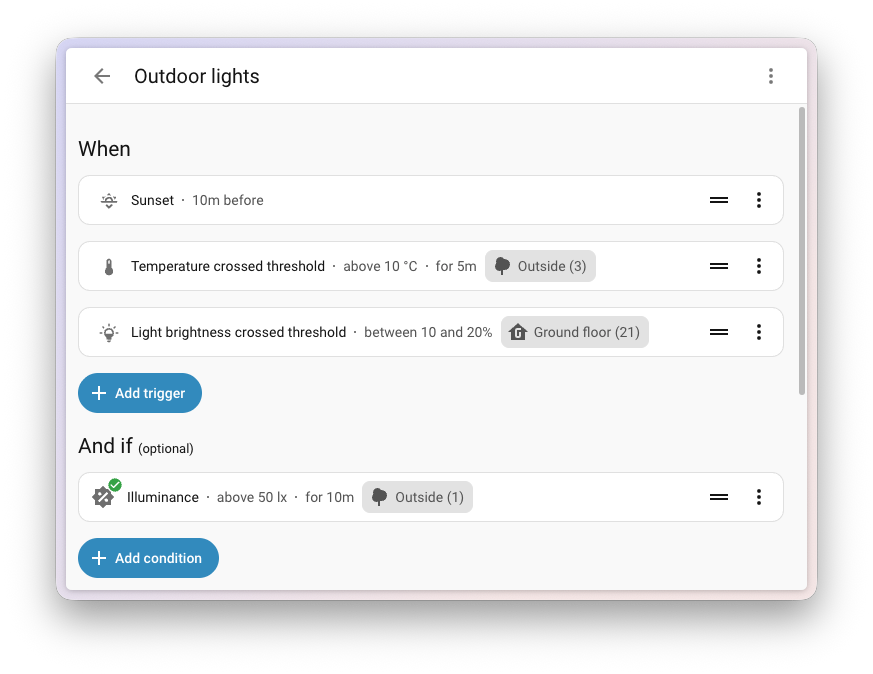
While you’re in the automation editor, you’ll notice your triggersA trigger is the part of an automation that makes the automation start when something specific happens, for example, when the sun sets, a door opens, or a button is pressed. [Learn more], conditionsConditions check whether something is true at that moment, for example, whether a door is closed. You can use them in automations and scripts. If a condition is not met, the actions that come after it in the same sequence do not run. At the top level of an automation or script, this stops the automation or script. [Learn more], and actionsAn action makes Home Assistant do something, for example, turn on a light, send a notification, or activate a scene. Automations and scripts run a list of actions. [Learn more] tell you a bit more at a glance. Each row now shows the details that used to be hidden until you opened it: the threshold a trigger or condition checks for, like “above 10 °C”, how long something needs to stay that way, the offset on a sunrise or sunset, and how long a wait action waits before it gives up. Thanks, @wendevlin and @MindFreeze!
Integrations
Thanks to our community for keeping pace with the new integrationsIntegrations connect and integrate Home Assistant with your devices, services, and more. [Learn more] and improvements to existing ones! You’re all awesome 🥰
New integrations
We welcome the following new integrations in this release:
-
Axle Energy, added by @Herbertmt978
Bring the grid event schedule of your Axle Energy account into Home Assistant. It tells you whether an upcoming event asks you to import from or export to the grid, and exactly when it starts and ends, so your automationsAutomations in Home Assistant allow you to automatically respond to things that happen in and around your home. [Learn more] can get your home ready in time. -
Bitvis Power Hub, added by @MandusBorjesson
Read real-time electricity data from your smart meter using a Bitvis Power Hub, which plugs into the meter’s HAN port. The Power Hub pushes its measurements, like power, voltage, and current per phase, straight to Home Assistant over your local network. No cloud, no pollingData polling is the process of querying a device or service at regular intervals to check for updates or retrieve data. By defining a custom polling interval, you can control how frequently your system checks for new data, which can help optimize performance and reduce unnecessary network traffic. [Learn more]. -
Gree Infrared, added by @Dr-Blank, launching at 🥈 silver quality
Control a Gree air conditioner using any infrared transmitter you already have set up in Home Assistant, like an ESPHome device with an infrared LED. Add an infrared receiver, and the climateThe Climate entity allows you to control and monitor HVAC (heating, ventilating, and air conditioning) devices and thermostats. [Learn more] entity follows along when someone uses the physical Gree remote. Gree builds air conditioners for many brands, so units sold as Onida, Sinclair, and others work as well. -
INDI Allsky, added by @TN-1
Connect your INDI Allsky camera server, an allsky camera system for astrophotography and keeping an eye on cloud cover. You get the latest capture as a camera, plus sensors for sky quality, the number of stars detected, exposure time, and whether it’s night. -
KACO Modbus, added by @g4bri3lDev
Connect a KACO new energy solar inverter directly over your local network using Modbus TCP. It shows what the inverter is producing right now, its lifetime energy counter for the Energy dashboard, and what it is doing, without any cloud account or manufacturer portal involved. -
my-PV, added by @rrooggiieerr
Control my-PV devices, like the AC•THOR range and AC ELWA 2, which turn your surplus solar power into hot water. Home Assistant talks to them locally and discovers them on your network automatically. -
OSRAM Infrared, added by @freeDom-, launching at 🥈 silver quality
Control OSRAM and LEDVANCE RGB lights that come with a 24-button infrared remote, using an infrared transmitter set up in Home Assistant. With an infrared receiver, the lightA light has a brightness you can control, and optionally color temperature or RGB color control. [Learn more] entity also picks up commands from the physical remote. -
Persang Infrared, added by @Dr-Blank
Control a Persang Bluetooth speaker using an infrared transmitter set up in Home Assistant, giving you a media player and buttons for its remote functions. -
SolarEdge Modbus, added by @frenck, launching at 🏆 platinum quality
Connect to your SolarEdge solar inverter over your own network, using the Modbus TCP interface built into the inverter. No account, no API key, no cloud. Readings arrive every few seconds instead of every few minutes, and keep arriving when your internet connection is down. You can also change the export limit and how your battery charges. -
Sunsynk, added by @jamesridgway
Bring your Sunsynk hybrid solar inverter and battery into Home Assistant using your Sunsynk Connect account. You get sensors for solar production, grid import and export, and your battery. Home Assistant can even discover the Sunsynk data logger on your network. -
Theben Conexa Smart Meter Gateway, added by @mdluhosch
Read your meter data locally from a Theben Conexa 3.0 smart meter gateway, using its built-in Home Area Network (HAN) interface. No cloud needed. -
Threema, added by @LukasQ
Send end-to-end encrypted messages from your automationsAutomations in Home Assistant allow you to automatically respond to things that happen in and around your home. [Learn more] to people on Threema, the privacy-focused messenger that doesn’t need a phone number. It uses the Threema Gateway service, and each person you add as a recipient gets their own notify entity. -
Vitesy, added by @chemelli74
Connect the Vitesy Shelfy, an air purifier that lives in your refrigerator. See the air quality and temperature inside your fridge, how often the door was opened, and when the filter needs cleaning or replacing. You can even switch the purifier mode, for example to boost it after a grocery run. -
Willow, added by @PaxPrz
Keep an eye on the health of your indoor plants with Willow sensors. Temperature, humidity, soil moisture, and light levels come from the Willow cloud into Home Assistant, ready for your dashboards and automationsAutomations in Home Assistant allow you to automatically respond to things that happen in and around your home. [Learn more]. Your plants can’t tell you they’re thirsty, but now Home Assistant can. -
Zonneplan, added by @erwindouna
Get the electricity and gas prices of your Zonneplan contract, a Dutch provider of dynamic energy contracts. Handy for running your appliances when energy is cheapest.
This release also has new virtual integrations. Virtual integrations are stubs that are handled by other (existing) integrations to help with findability. These ones are new:
- Austroflamm, provided by Fumis, added by @frenck
- EcoSpar, provided by Fumis, added by @frenck
- HAAS+SOHN, provided by Fumis, added by @frenck
- HETA, provided by Fumis, added by @frenck
- O General, provided by FGLair, added by @Dr-Blank
- Onida Infrared, provided by Gree Infrared, added by @Dr-Blank
- Steinway & Lyngdorf, provided by Lyngdorf, added by @fishloa
Noteworthy improvements to existing integrations
It is not just new integrationsIntegrations connect and integrate Home Assistant with your devices, services, and more. [Learn more] that have been added; existing ones keep getting better too. Here are some of the noteworthy improvements this release:
- Matter added switchesSwitches are things that have two states you can select between, such as turning on or off a socket. [Learn more] to turn the visual and audible alarms of supported leak sensors on or off, like the IKEA KLIPPBOK, and a switch for one-touch locking, so you decide whether a single touch on the keypad of your lock is enough to lock the door. DevicesA device is a model representing a physical or logical unit that contains entities. that measure electrical power now also report the frequency and power factor. Thanks, @wardmatter, @mmmspatz, and @lboue!
- Tuya supports a lot more devicesA device is a model representing a physical or logical unit that contains entities. this release: two-channel DIN rail energy meters with readings per channel, circuit breakers, EV chargers (with their charging current, charging mode, and session energy), water valves (with water usage and temperature), and the keypad tone and alarm push settings of the Duosmart C30 alarm panel. Three-phase electricity meters now also report reactive power, apparent power, and power factor for each phase. Thanks, @keranm, @tmunzer, @o-borovets, @syl-craft, @ChayoteJarocho, @huangrenwei79, and @epenet!
- Internet Printing Protocol (IPP) added page counters, so you can keep track of how many pages, impressions, and sheets your printer has gone through, split into color and black and white on printers that report it. Thanks, @brianegge!
-
ESPHome devicesA device is a model representing a physical or logical unit that contains entities. can now open the connection to Home Assistant themselves, so they work even when Home Assistant can’t reach them directly. Turn on the
outgoing_connectionoption on your ESPHome device, and Home Assistant takes it from there, with the same encryption as always. Thanks, @bdraco! - HomeKit Bridge can now show your valve entitiesAn entity represents a sensor, actor, or function in Home Assistant. Entities are used to monitor physical properties or to control other entities. An entity is usually part of a device or a service. [Learn more] in the Home app as a faucet, shower head, or sprinkler. How long a valve runs can now also come from any number entity, not just a number helperA helper is a virtual entity you create inside Home Assistant. It is not backed by a physical device. Helpers store values, track state, or do calculations that your automations and dashboards need. [Learn more]. Thanks, @louwii17!
- Philips Hue added a switch to turn each MotionAware zone on or off, just like you can in the Hue app. Rooms and zones also gained a sceneScenes capture the states you want certain entities to be. For example, a scene can specify that light A should be turned on and light B should be bright red. [Learn more] select, showing which scene (or smart scene) is currently active, and letting you pick another one. Thanks, @marcelveldt and @sliekens!
- Reolink can now control the pan and tilt lens of cameras that combine multiple lenses in one device, when connected to a Reolink NVR or Home Hub. Thanks, @starkillerOG!
-
Music Assistant announcements can now speak a message, not only play an audio file. The announcement action takes a message and a “text-to-speech”TTS (text-to-speech) allows Home Assistant to talk to you. [Learn more] entity to speak it, while keeping the pre-announcement chime and announcement volume that
tts.speakdoesn’t offer. The AI search tool can now also search inside artists, albums, and playlists. Thanks, @marcelveldt and @balloob! - Roborock wet and dry vacuums now update in real time, so docking or starting a cleaning shows up in Home Assistant right away. The Roborock Q10 can now also clean specific zones, drive to a spot you pick, and report where it is. Thanks, @piitaya and @hmmbob!
- Z-Wave added three new conditionsConditions check whether something is true at that moment, for example, whether a door is closed. You can use them in automations and scripts. If a condition is not met, the actions that come after it in the same sequence do not run. At the top level of an automation or script, this stops the automation or script. [Learn more] to the automation editor, with proper fields to fill in: check a device’s node status, the value of a configuration parameter, or any other Z-Wave value. Z-Wave triggersA trigger is the part of an automation that makes the automation start when something specific happens, for example, when the sun sets, a door opens, or a button is pressed. [Learn more] got the same treatment. Thanks, @raman325!
- UniFi Network now reports the battery level and runtime of your UniFi UPS, along with its output power, current, voltage, and power factor. Thanks, @jimstrang!
- Broadlink now supports the RM5 Plus, which used to fail with a “device not supported” error. Thanks, @DAB-LABS!
- UniFi Protect now supports the key fob, with an event entityAn event entity represents a momentary occurrence without a lasting state, for example, when you press a doorbell or a button on a remote control. Instead of a state such as on or off, the event entity keeps track of when the last event was detected and its event type, such as a single press or a long press. [Learn more] that fires on every button press, and shows each relay input as its own binary sensorA binary sensor is an entity that reports one of two mutually exclusive states, on or off. The device class determines how those states are labeled in the UI. For example, open/closed for a door or detected/clear for motion. [Learn more]. The API key only mode now also handles motion and smart detections, smart sensors, sirens, relays, and several camera and floodlight settings. Thanks, @sbesh91, @igoraugustynski, and @RaHehl!
- OpenAI added support for the GPT-6 Astra and GPT-Image-2.5 models. GPT-Image-2.5 Flare is now the default for generating images with AI Task. Thanks, @Shulyaka!
- SwitchBot Bluetooth added support for the Lock Ultra Max, the Universal Remote, and the RGBICWW Light Bars, and lets you set how fast your SwitchBot curtains move. Thanks, @Onero-testdev and @joostlek!
- SwitchBot Cloud added support for the Lock Ultra Max. Thanks, @XiaoLing-git!
- LIFX now supports LIFX lights that connect over ThreadThread is a low-power mesh networking standard that is specifically designed for smart home applications. It is a protocol that defines how devices communicate. [Learn more], and the signal strength sensor works for those lights too. Thanks, @Djelibeybi!
- Proxmox VE added “update entities”An update entity is an entity that indicates if an update is available for a device or service. [Learn more] for your Proxmox nodes, showing when updates are available and how many Proxmox and other packages are waiting. Installing them from Home Assistant is not possible yet. Thanks, @CoMPaTech!
- LinkPlay speakers that follow another speaker in a multiroom group now show the title, artist, album, and album art of what’s playing. Each speaker keeps its own volume. Thanks, @MagicMicky!
- Apple iCloud brings your iCloud calendars and Reminders into Home Assistant. Each calendar shows up as a calendar entityA calendar entity represents a schedule of events coming from a local or external calendar source. It can be used to trigger automations based on the start or end of an event, react to offsets (like 15 minutes before), or retrieve event details through services. [Learn more], and each Reminders list as a to-do list, where you can add, complete, and remove items that sync right back to your Apple devices. Thanks, @FezVrasta!
- Hikvision added “event entities”An event entity represents a momentary occurrence without a lasting state, for example, when you press a doorbell or a button on a remote control. Instead of a state such as on or off, the event entity keeps track of when the last event was detected and its event type, such as a single press or a long press. [Learn more] that tell you what triggered a smart event: a human, a vehicle, or a pet. Great for getting notified about people at your gate, while ignoring passing traffic. Thanks, @ptarjan!
- Opower now uses the import and export readings from your meter itself for your grid statistics. Before, grid import was worked out from your net usage, which undercounted it for homes with solar panels, and could even show no import at all on a sunny day. Thanks, @tronikos!
- TP-Link Omada now shows your Omada controller as a deviceA device is a model representing a physical or logical unit that contains entities., with its status and an “update entity”An update entity is an entity that indicates if an update is available for a device or service. [Learn more] for its firmware. Thanks, @rubempoli!
- EnergyZero can now use quarter-hourly electricity prices, and added all-in electricity prices next to the market prices. Thanks, @klaasnicolaas!
- Bosch SHC grew a lot this release. Micromodule shutters, awnings, and blinds now show up as coversCovers are devices such as blinds, garage doors, etc that can be opened and closed and optionally set to a specific position. [Learn more], and there are new switches for child locks, the alarm bypass of door and window contacts, the silent mode of thermostats, the intrusion alarm of the Smoke Detector II, and the settings of the Motion Detector 2, Door/Window Contact II Plus, Micromodule Relay, and Camera Eyes. A new sensor counts the open doors and windows in your home, thermostats show their valve position, and motion detectors now fire an event for every motion. Thanks, @mosandlt!
- Midea added water heaters, a lock switch, a pump switch for dehumidifiers, a sensor for when the water pump of an air conditioner is running, and salt, AI mode, time remaining, and door warning entities for the appliances that support them. Thanks, @chemelli74, @rokam, @mattrossman, and @peterdey!
- Teslemetry can now control things locally: your Powerwall over your own network, and your vehicle over Bluetooth. Commands try the local route first and fall back to the cloud, so they are faster, and vehicle commands even work when the car has no connection. Thanks, @Bre77!
- Peblar chargers can now install firmware updates from Home Assistant, and you can manage the RFID cards and the autocharge vehicles allowed to charge, and authorize a charge session, all from actionsAn action makes Home Assistant do something, for example, turn on a light, send a notification, or activate a scene. Automations and scripts run a list of actions. [Learn more]. Chargers with a buzzer or status light also get selects for the buzzer volume and LED brightness. Thanks, @syphernl and @frenck!
- MELCloud Home added the outdoor temperature and a switch to put your unit in standby. Thanks, @erwindouna!
- Universal Devices ISY/IoX added “event entities”An event entity represents a momentary occurrence without a lasting state, for example, when you press a doorbell or a button on a remote control. Instead of a state such as on or off, the event entity keeps track of when the last event was detected and its event type, such as a single press or a long press. [Learn more] for Insteon buttons and keypads, so you can automate on a press, a double press, or a long press. Thanks, @shbatm!
- LG Infrared air conditioners gained swing modes, switches for the ion generator and auto clean, a select for the energy limit, and buttons for features like Jet mode and Eco mode. Thanks, @Dr-Blank!
- Samsung Infrared now supports air conditioners. Thanks, @elax46!
- Weheat added the air outlet temperature, domestic hot water target and control method, the electricity used by the indoor unit, and what your heat pump is doing while it cools. Thanks, @barryvdh!
- LED Infrared added support for generic 10-key LED candle remotes. Thanks, @tr4nt0r!
- Collection image gained actionsAn action makes Home Assistant do something, for example, turn on a light, send a notification, or activate a scene. Automations and scripts run a list of actions. [Learn more] to jump to the first, last, next, or previous image in the folder, alongside picking a random one. Thanks, @karwosts!
- Homevolt added a select to change the battery mode, and controls for the power setpoint and grid import and export limits. Thanks, @Danielhiversen!
Integration quality scale achievements
One thing we are incredibly proud of in Home Assistant is our integration quality scale. This scale helps us and our contributors to ensure integrations are of high quality, maintainable, and provide the best possible user experience.
This release, we celebrate several integrationsIntegrations connect and integrate Home Assistant with your devices, services, and more. [Learn more] that have improved their quality scale:
-
11 integrations reached platinum 🏆
- Besen, thanks to @moryoav
- Dropbox, thanks to @bdr99
- easyEnergy, thanks to @klaasnicolaas
- Google Assistant SDK, thanks to @tronikos
- Lyngdorf, thanks to @fishloa
- Monzo, thanks to @JakeMartin-ICL
- NeoPool, thanks to @svasek
- OpenEVSE, thanks to @c00w
- Sofar, thanks to @darkrain-nl
- TechnoVE, thanks to @Moustachauve
- VIZIO SmartCast, thanks to @raman325
-
4 integrations reached gold 🥇
- Midea, thanks to @chemelli74
- MikroTik, thanks to @chemelli74
- Proxmox VE, thanks to @erwindouna
- WattWächter Plus, thanks to @smartcircuits
-
6 integrations reached silver 🥈
- Airly, thanks to @bieniu
- Collection image, thanks to @karwosts
- Imou, thanks to @Imou-OpenPlatform
- LibreNMS, thanks to @mib1185
- MELCloud Home, thanks to @erwindouna
- Solarman, thanks to @Yves-Xu
-
4 integrations reached bronze 🥉
- DNS IP, thanks to @gjohansson-ST
- Met Office, thanks to @TCWORLD
- Subaru, thanks to @jpettitt
- Wolf SmartSet Service, thanks to @EnjoyingM
This is a huge achievement for these integrations and their maintainers. The effort and dedication required to reach these quality levels is significant, as it involves extensive testing, documentation, error handling, and often complete rewrites of parts of the integration.
A big thank you to all the contributors involved! 👏
Now available to set up from the UI
While most integrationsIntegrations connect and integrate Home Assistant with your devices, services, and more. [Learn more] can be set up directly from the Home Assistant user interface, some were only available using YAML configuration. We keep moving more integrations to the UI, making them more accessible for everyone to set up and use.
The following integrations are now available via the Home Assistant UI:
- Discogs, done by @zackwag
- Rejseplanen, done by @Jawar19
- Volkszaehler, done by @StefanSchoof
Farewell to the following
Time for a little cleaning, and no, we did not wait for spring! The following “integrations”Integrations connect and integrate Home Assistant with your devices, services, and more. [Learn more] are no longer available as of this release:
- Dublin Bus has been removed. It relied on the Real-Time Passenger Information API, which the National Transport Authority shut down in September 2020, so it has not worked since. For scheduled departures, the GTFS integration can use the timetable data published by Transport for Ireland.
-
Etherscan has been removed. It relied on version 1 of the Etherscan API, which has been shut down, so its sensors only showed
Falseinstead of a balance. To keep tracking a wallet balance, you can use the RESTful sensor with the Etherscan V2 API and your own free API key. - Melnor RainCloud has been removed. Melnor discontinued the original RainCloud WiFi Timer in April 2026, and its cloud service no longer responds.
- Orange and Rockland Utility (ORU) has been removed. The endpoint it relied on stopped returning meter data years ago. Orange and Rockland customers can use the Opower integration instead.
- Sigfox has been removed. It relied on version 1 of the Sigfox backend API, which Sigfox retired.
- SolarEdge Local has been removed. It relied on a local web API that SolarEdge disabled in inverter firmware updates starting in 2020. Use the SolarEdge integration, or the new SolarEdge Modbus integration if you want to keep things local.
- Travis-CI has been removed. It relied on the travis-ci.org API, which Travis CI shut down in June 2021.
- Zestimate has been removed. Zillow retired the API it relied on, and its replacement is aimed at commercial use, so the integration could not simply be updated.
If you still have any of these in your YAMLYAML is a human-readable data serialization language. It is used to store and transmit data in a structured format. In Home Assistant, YAML is used for configuration, for example in the configuration.yaml or automations.yaml files. [Learn more] configuration, you can remove them.
Other noteworthy changes
There is even more packed into this release. Here are some of the other changes worth a mention:
- The Home dashboard now shows active alerts too. The alerts you set up for the Security dashboard last release, like a door left open or a smoke detector going off, now also show up right on your Home dashboard, so you don’t miss them. Thanks, @timmo001!
- Tile cards gained a slider feature for input selects and select entities, so you can slide between options, in the same style as the toggle for input booleans. This was @Jump-333’s very first contribution to Home Assistant. Thanks, and welcome!
- The Energy dashboard now shows the discharge of each battery separately in the energy usage graph, just like it already did for charging. Thanks, @MindFreeze!
- Calendar cards can show a button to add an event again, so you can put something on the calendar right from your dashboard, and you pick where the button sits. Thanks, @Phil0L!
- Lawn mower entities gained a stop action and an idle state, so you can cancel a mower’s current task instead of only pausing it or sending it home. The automation editor has a matching trigger and condition, too. MQTT lawn mowers support it as well, and Husqvarna Automower and Husqvarna Automower BLE mowers already report when they are idle. Thanks, @piitaya, @Thomas55555, and @alistair23!
- Binary sensor has a new glass break device class. Glass break sensors are treated as security sensors, so they show up on the Security dashboard and in your home security summary. HomematicIP Cloud, SimpliSafe, Z-Wave, and Hive already use it. Thanks, @catellie!
-
Template got two nice additions this release. Thanks, @Petro31!
- Template entities can now be climate entities, so you can build your own thermostat from other entities. Think of a heat pump or air conditioner that an integration only exposes as a loose collection of switches, sensors, and numbers. Create one as a helperA helper is a virtual entity you create inside Home Assistant. It is not backed by a physical device. Helpers store values, track state, or do calculations that your automations and dashboards need. [Learn more] from the UI, pick templatesA template is an automation definition that can include variables for the action or data from the trigger values. This allows automations to generate dynamic actions. [Learn more] for the current temperature, target temperature, and HVAC mode, and choose the actions that run when you change them. In YAMLYAML is a human-readable data serialization language. It is used to store and transmit data in a structured format. In Home Assistant, YAML is used for configuration, for example in the
configuration.yamlorautomations.yamlfiles. [Learn more], you can take it further with fan, preset, and swing modes, and humidity. The template climate documentation has all the details. - Binary sensor template helpers now let you set a delay before they turn on or off, right from the UI. Until now, that was only possible in YAMLYAML is a human-readable data serialization language. It is used to store and transmit data in a structured format. In Home Assistant, YAML is used for configuration, for example in the
configuration.yamlorautomations.yamlfiles. [Learn more].
- Template entities can now be climate entities, so you can build your own thermostat from other entities. Think of a heat pump or air conditioner that an integration only exposes as a loose collection of switches, sensors, and numbers. Create one as a helperA helper is a virtual entity you create inside Home Assistant. It is not backed by a physical device. Helpers store values, track state, or do calculations that your automations and dashboards need. [Learn more] from the UI, pick templatesA template is an automation definition that can include variables for the action or data from the trigger values. This allows automations to generate dynamic actions. [Learn more] for the current temperature, target temperature, and HVAC mode, and choose the actions that run when you change them. In YAMLYAML is a human-readable data serialization language. It is used to store and transmit data in a structured format. In Home Assistant, YAML is used for configuration, for example in the
-
Templates gained a
timedelta_stringfunction, which turns a duration into readable text like “1 hour 30 minutes”, the same waytime_sinceandtime_untildo. Thanks, @cnotin! - Automation traces got a fresh look that matches the automation editor, with the real icon for each triggerA trigger is the part of an automation that makes the automation start when something specific happens, for example, when the sun sets, a door opens, or a button is pressed. [Learn more], conditionConditions check whether something is true at that moment, for example, whether a door is closed. You can use them in automations and scripts. If a condition is not met, the actions that come after it in the same sequence do not run. At the top level of an automation or script, this stops the automation or script. [Learn more], and actionAn action makes Home Assistant do something, for example, turn on a light, send a notification, or activate a scene. Automations and scripts run a list of actions. [Learn more], and a clear view of branches that didn’t finish. Drag the divider to give the graph or the details more room, the step buttons now float on top of the graph, and screen readers describe each step. Thanks, @jpbede!
- The Z-Wave network map can now show the real mesh. Turn on the new neighbors toggle, and it draws the connections between your devices, not just the routes they use. It’s off by default, because large networks get busy fast. Thanks, @MindFreeze!
- Calendar events from CalDAV, Local calendar, and Google Calendar now include whether they are confirmed or tentative, so your automationsAutomations in Home Assistant allow you to automatically respond to things that happen in and around your home. [Learn more] can tell the difference. Remote calendar now also leaves out canceled events. Thanks, @1358!
- Climate fan modes can now be set by voice, through a conversation agent, like “set the fan mode to auto”. Thanks, @synesthesiam!
- Units keep growing: atmospheres (atm) for pressure, and therms (thm) for energy, the unit many US utilities bill natural gas in. Weather entities can now also report pressure in kilopascals (kPa), which most weather services in Canada use. Thanks, @Bre77, @virtitnerd, and @RussellAult!
- Password managers, including the one built into Firefox, can fill in your details on the Home Assistant login page again. Thanks, @MindFreeze!
- On phones with a notch or rounded corners, tables, filter bars, settings cards, headers, and pop-up messages now reach the edges of the screen, while everything you read or tap stays clear of the cutout. Thanks, @bgoncal!
- Tables, like the ones listing your devicesA device is a model representing a physical or logical unit that contains entities. and entitiesAn entity represents a sensor, actor, or function in Home Assistant. Entities are used to monitor physical properties or to control other entities. An entity is usually part of a device or a service. [Learn more], now show placeholder rows while they load. And if something fails to load, you now see an error, instead of an empty list that looks like you have nothing set up. Thanks, @timmo001!
-
YAML configuration errors now suggest what you probably meant. Mistype
command_topci, and the error asks: did you meancommand_topic? Error messages also show the path to the file relative to your configuration folder, so they are easier to read. Thanks, @frenck and @emontnemery!
Show a card only when it matters
Dashboards can show or hide a card, badge, or section based on conditionsConditions check whether something is true at that moment, for example, whether a door is closed. You can use them in automations and scripts. If a condition is not met, the actions that come after it in the same sequence do not run. At the top level of an automation or script, this stops the automation or script. [Learn more]: only on a phone, only for a certain user, only when the washing machine is running. Those conditions were always a smaller set than the ones you know from automations.
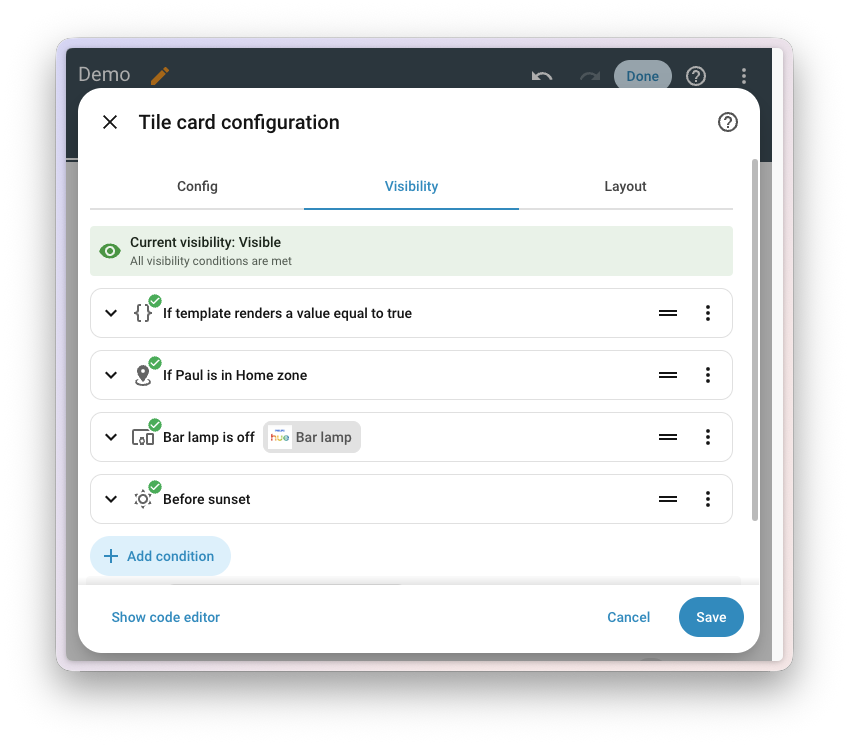
This release, the Visibility tab offers the same conditions as the automation editor, including Template, Sun, Zone, and Device, and the conditions integrations bring along. They sit right next to the ones that only make sense on a dashboard, like Screen and User, and you can mix them freely. Show the garden lights card only after sunset, and only on a phone. Each row now also describes what it checks, just like in the automation editor, and you can drag the rows into a different order. Your existing visibility conditions keep working as they are.
And no more guessing why a card is hiding. The top of the Visibility tab tells you whether the card is visible right now, and each condition shows whether it currently passes. Thanks, @MindFreeze and @timmo001!
A panel for your Modbus connections
Last release, we started modernizing Modbus: integrations that already know how your device talks Modbus, so you pick your device in the UI instead of writing register maps by hand. Those integrations share a single connection to each device, which is great for devices that only accept a few connections at once. It also meant there was no single place to see which integrations were talking to what.
The new Modbus panel under Settings > Connectivity fixes that. It lists every Modbus connection Home Assistant has, serial ports and network gateways alike, along with the devicesA device is a model representing a physical or logical unit that contains entities. on it and the integrations using them. Connections set up in YAMLYAML is a human-readable data serialization language. It is used to store and transmit data in a structured format. In Home Assistant, YAML is used for configuration, for example in the configuration.yaml or automations.yaml files. [Learn more] show up here too. A connection that’s closed isn’t a problem, by the way. It opens again the next time an integration needs it. The Serial panel links straight to it for ports that carry Modbus. Thanks, @balloob!
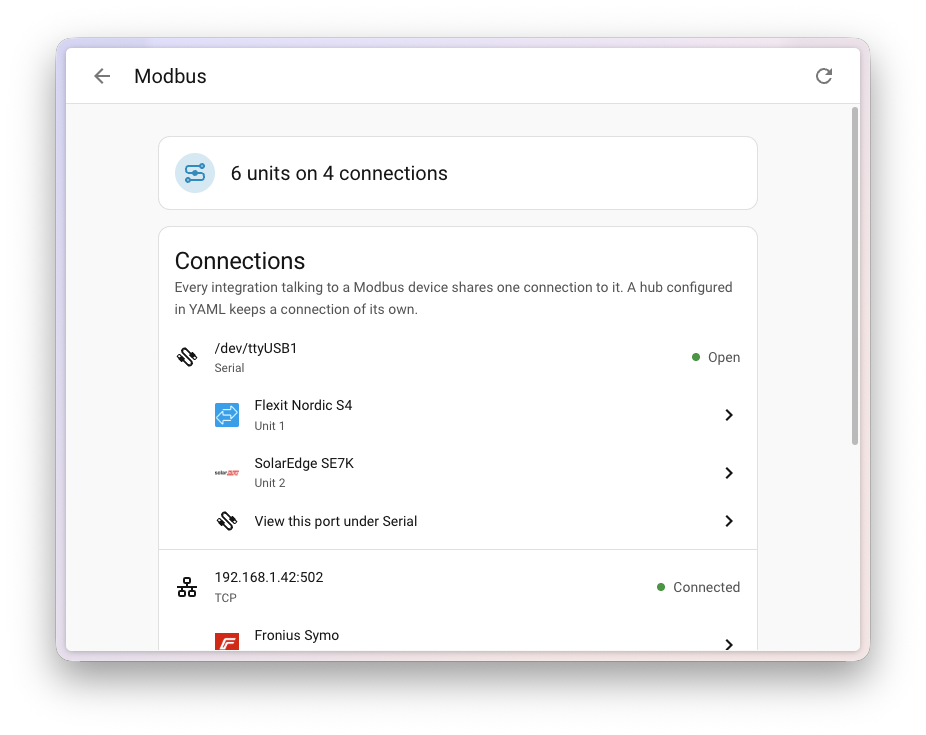
The list of integrations built this way keeps growing. This release adds two new ones: SolarEdge Modbus, launching straight at platinum, and KACO Modbus, thanks to @g4bri3lDev. STIEBEL ELTRON now shares its connection through the Modbus integration as well, and Sofar climbed all the way to platinum, thanks to @darkrain-nl.
Connect your AI in one click
Home Assistant can act as a Model Context Protocol server, which lets AI apps like Claude, ChatGPT, or Cursor talk to your home. Getting there was a bit of a hunt, though: add the integrationIntegrations connect and integrate Home Assistant with your devices, services, and more. [Learn more], pick which parts of Home Assistant to expose, and then figure out which URL to hand to your AI app.
The AI tasks page under Settings > System is now called AI, and it gained a Model Context Protocol card. Turn the server on in a single click, and the card lists the URLs to paste into your AI app, each with a button to copy it. New setups expose everything Home Assistant has to offer, including anything added later, and only allow administrator accounts to connect. You can change both whenever you like, without removing and re-adding the integration.
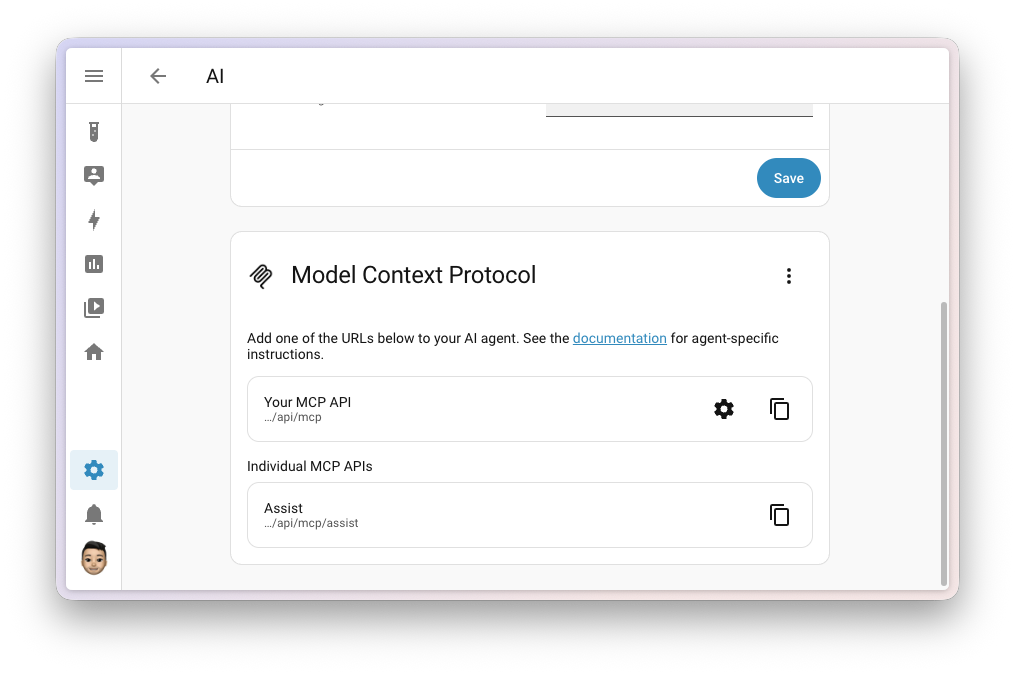
It also works the other way around. Apps that run their own MCP server are now discovered automatically by the Model Context Protocol integration, so connecting Home Assistant to them only takes a confirmation.
And your AI got a lot better at finding music. Ask it to play something, and instead of blindly playing the first search result, it now gets a list of results and picks the best match. It can even search inside an artist, album, or playlist to find that one specific song. Search itself improved along the way: artists, albums, and playlists from Music Assistant can now be searched inside, just like results from Jellyfin and Squeezebox, local media now finds matching folders too, and Radio Browser puts the 100 most popular stations first.
Thanks, @balloob!
If your home runs on KNX, your AI can now dig into that too. The KNX integration brings its own set of AI tools, which you can hand to your conversation agent, or to your AI app through the Model Context Protocol server. Ask about the group addresses, devices, and functions in your ETS project, go through the history of telegrams on your bus, or decode a value you don’t recognize. It can even read and write values on the bus directly. Thanks, @martinhoefling!
Name an entity after its device
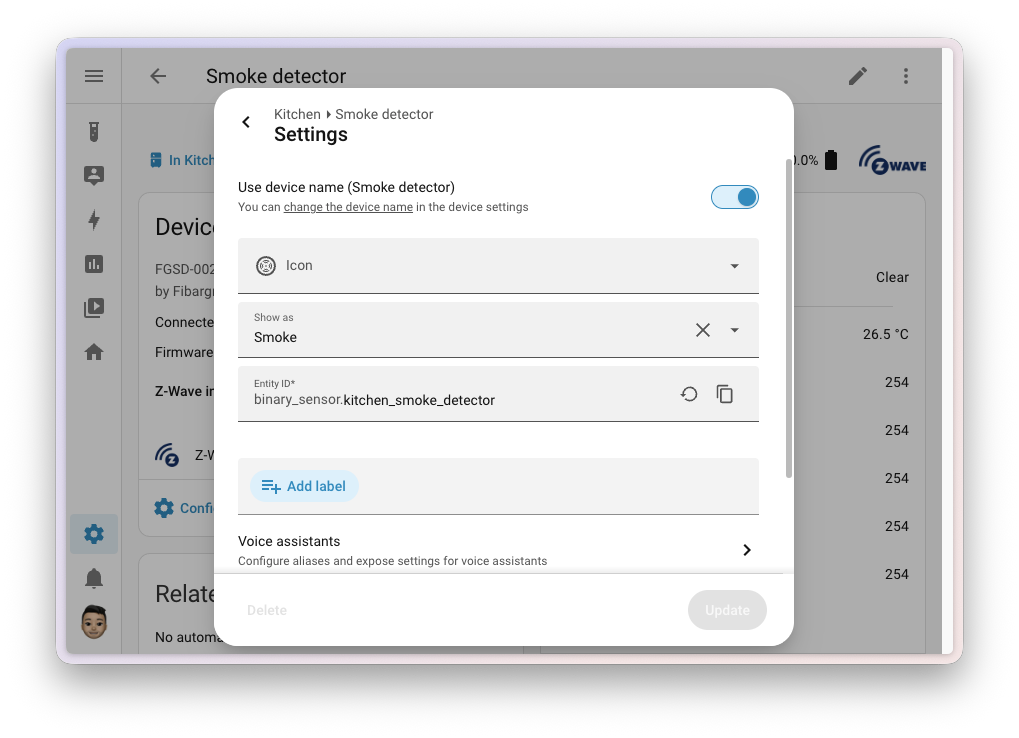
Some entitiesAn entity represents a sensor, actor, or function in Home Assistant. Entities are used to monitor physical properties or to control other entities. An entity is usually part of a device or a service. [Learn more] are the whole point of their deviceA device is a model representing a physical or logical unit that contains entities.. Calling the smoke sensor of a smoke detector “Smoke detector Smoke detected” doesn’t help anyone. Integrations already give their main entity the name of the device, but if you wanted to do the same for another entity, there was no clean way to do it. If you cleared its name, it jumped right back to the name the integration gave it.
The entity settings now have a Use device name switch. Turn it on, and the entity goes by the name of its device. The switch also shows you what that device name is, with a link to rename the device if you’d like. Turn it off, and you’re back to the entity’s own name, filled in with the default from the integration. If you change your mind, a restore button takes you back to the default. Thanks, @piitaya and @matthiasdebaat!
Timers, one tap away
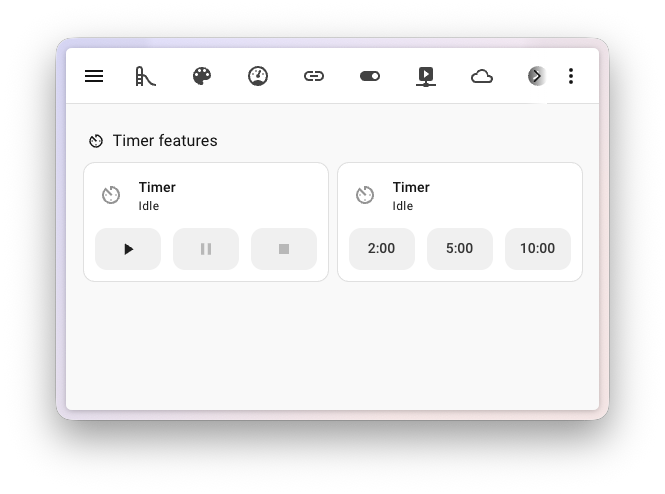
Timer helpersA helper is a virtual entity you create inside Home Assistant. It is not backed by a physical device. Helpers store values, track state, or do calculations that your automations and dashboards need. [Learn more] are now a lot easier to control from your dashboard. Tile cards have two new features for them: Timer actions adds buttons to start, pause, and cancel a timer (and optionally finish it), and Timer presets starts a timer with a preset duration in a single tap. Presets show up as a row of buttons, or as a dropdown, handy for a longer list. You manage the presets from the timer itself: open its more info dialog and select Edit presets from the menu.
That more info dialog got a fresh look too, and when a timer finishes, you’ll see a small animation. Thanks, @maartenla!
Need help? Join the community
Home Assistant has a great community of users who are all more than willing to help each other out. So, join us!
Our very active Discord chat server is an excellent place to be, and don’t forget to join our amazing forums.
Found a bug or issue? Please report it in our issue tracker to get it fixed! Or check our help page for guidance on more places you can go.
Are you more into email? Sign up for the Open Home Foundation Newsletter to get the latest news about features, things happening in our community, and other projects that support the Open Home straight into your inbox.
Backward-incompatible changes
We do our best to avoid making changes to existing functionality that might unexpectedly impact your Home Assistant installation. Unfortunately, sometimes it is inevitable.
We always make sure to document these changes to make the transition as easy as possible for you. This release has the following backward-incompatible changes:
Authentication
The deprecated legacy mode of the Home Assistant authentication provider has been removed. Usernames are now always handled in their normalized form: lowercase, and without spaces at the start or end. If Home Assistant showed you a repair about usernames that are not normalized, change those usernames to match.
easyEnergy
The hours_priced_equal_or_lower and hours_priced_equal_or_higher sensors are now named Periods priced equal or lower and Periods priced equal or higher, and no longer have h as their unit of measurement. Their values count price periods, not hours.
If you have “templates”A template is an automation definition that can include variables for the action or data from the trigger values. This allows automations to generate dynamic actions. [Learn more] or dashboard cards that rely on the unit of these sensors, update them to handle a count without a unit. The values, entity IDs, and unique IDs are unchanged, so automationsAutomations in Home Assistant allow you to automatically respond to things that happen in and around your home. [Learn more] that only compare the numbers need no changes.
EnergyFlip
EnergyFlip shut down the API version the integration used, so the integration has moved to the new version. The new API no longer provides the additional electricity measurements, so only the current power sensor remains for electricity.
EnergyZero
The hours_priced_equal_or_lower electricity sensor is now named Periods priced equal or lower, and no longer has h as its unit of measurement. Its value counts price periods, not hours.
If you have “templates”A template is an automation definition that can include variables for the action or data from the trigger values. This allows automations to generate dynamic actions. [Learn more] or dashboard cards that rely on the unit of this sensor, update them to handle a count without a unit. The value, entity ID, and unique ID are unchanged, so automationsAutomations in Home Assistant allow you to automatically respond to things that happen in and around your home. [Learn more] that only compare the number need no changes.
Google Sheets
Reading an empty worksheet now returns {"range": [[]]} instead of {"range": []}. If you have automationsAutomations in Home Assistant allow you to automatically respond to things that happen in and around your home. [Learn more], scriptsA script is a saved list of steps that runs when you start it, for example, from a dashboard, with Assist, or from an automation. Unlike an automation, a script has no triggers, so it doesn’t start by itself. [Learn more], or “templates”A template is an automation definition that can include variables for the action or data from the trigger values. This allows automations to generate dynamic actions. [Learn more] that check for an empty worksheet, update them to match.
Google Wifi
The uptime sensor is deprecated and will be removed in a future release. Use the new last restart sensor instead.
IoTaWatt
Reactive power sensors now use the reactive power device class, which changes their unit of measurement from VAR to var. You have these sensors if an output on your IoTaWatt is configured with the unit VAR.
If such a sensor has recorded long-term statisticsHome Assistant keeps statistics for sensors that have a state class, such as measurement, total, or total increasing. Every 5 minutes, it saves short-term statistics, which are deleted after 10 days by default. Every hour, it saves long-term statistics, which are never deleted automatically. The Energy dashboard and statistics cards use them. [Learn more], Home Assistant creates a repair about the changed unit after the update. Pick the offered option to update the statistics to the new unit. No data is lost. In return, these sensors are now shown as reactive power, and you can display them in mvar, var, or kvar.
Libre Hardware Monitor
Libre Hardware Monitor versions older than 0.9.5 are no longer supported. If you run an older version, update Libre Hardware Monitor to keep using the integration.
Linode and Tank Utility
The Linode and Tank Utility integrationsIntegrations connect and integrate Home Assistant with your devices, services, and more. [Learn more] have been disabled and no longer start.
Both depend on Python libraries that have not been maintained for years (the Linode one was last updated in 2018, the Tank Utility one in 2023) and no longer work with current Python packaging tools. Keeping them running meant holding back those tools for every other integration, so they have been switched off instead.
If you use either integration, you can remove it from your configuration. If the underlying libraries are updated, or replaced with maintained alternatives, the integrations can be activated again. Community contributions to make this happen are very welcome.
(@frenck - #182842) (Linode documentation) (Tank Utility documentation)
Mealie
Mealie 3.2 or newer is now required. Version 3.2 was released in September 2025, and the Mealie appApps are additional standalone third-party software packages that can be installed on Home Assistant OS. [Learn more] and official container are already well past it, so most of you don’t need to do anything. If your Mealie server runs an older version, update it before you update Home Assistant.
MQTT
The mqtt.publish and mqtt.dump actions now require an administrator account, just like mqtt.reload already did.
AutomationsAutomations in Home Assistant allow you to automatically respond to things that happen in and around your home. [Learn more], scriptsA script is a saved list of steps that runs when you start it, for example, from a dashboard, with Assist, or from an automation. Unlike an automation, a script has no triggers, so it doesn’t start by itself. [Learn more], and scenesScenes capture the states you want certain entities to be. For example, a scene can specify that light A should be turned on and light B should be bright red. [Learn more] that publish on their own are not affected, because they run without a user context. What changes is a call a non-admin user makes themselves: from a dashboard button, from the developer tools, or by starting a script or automation by hand. Those now fail with “Unauthorized”. If a non-admin user needs to be able to publish, let the automation run on its own trigger instead of having that user start it.
(@frenck - #182045) (MQTT documentation)
OpenEVSE
The Charging status sensor now reports a fixed set of states in snake_case, such as charging, not_connected, and gfci_self_test_failure, instead of the raw values from the charger, such as Charging or not connected. If you have automationsAutomations in Home Assistant allow you to automatically respond to things that happen in and around your home. [Learn more] or scriptsA script is a saved list of steps that runs when you start it, for example, from a dashboard, with Assist, or from an automation. Unlike an automation, a script has no triggers, so it doesn’t start by itself. [Learn more] that check for the old values, update them to match the new ones.
Proxmox VE
The Uptime sensor of nodes, virtual machines, and containers now shows a timestamp of when it started, instead of the time since it started in seconds. If you have automationsAutomations in Home Assistant allow you to automatically respond to things that happen in and around your home. [Learn more], scriptsA script is a saved list of steps that runs when you start it, for example, from a dashboard, with Assist, or from an automation. Unlike an automation, a script has no triggers, so it doesn’t start by itself. [Learn more], or “templates”A template is an automation definition that can include variables for the action or data from the trigger values. This allows automations to generate dynamic actions. [Learn more] that use the number of seconds, update them to work with the timestamp.
Rejseplanen
Rejseplanen now uses version 2.0 of the Rejseplanen API, which requires an API key. You can apply for an API key with Rejseplanen Labs. The integration is now set up from the UI instead of YAMLYAML is a human-readable data serialization language. It is used to store and transmit data in a structured format. In Home Assistant, YAML is used for configuration, for example in the configuration.yaml or automations.yaml files. [Learn more].
All extra attributes have been removed from the sensors. If you have “templates”A template is an automation definition that can include variables for the action or data from the trigger values. This allows automations to generate dynamic actions. [Learn more] or dashboard cards that use them, you need to update them.
Sofar
Sofar inverters that report no energy meter no longer get these six energy sensors: Load consumption today, Load consumption total, Import energy today, Import energy total, Export energy today, and Export energy total.
They never held real readings on those inverters. The inverter itself marks those values as invalid, and on a PV-only inverter, Load consumption total simply repeated the solar generation total. If you used these sensors on your Energy dashboard, or in “templates”A template is an automation definition that can include variables for the action or data from the trigger values. This allows automations to generate dynamic actions. [Learn more] or automationsAutomations in Home Assistant allow you to automatically respond to things that happen in and around your home. [Learn more], remove them. Hybrid inverters and PV inverters with a meter keep all six.
State conditions
State conditionsConditions check whether something is true at that moment, for example, whether a door is closed. You can use them in automations and scripts. If a condition is not met, the actions that come after it in the same sequence do not run. At the top level of an automation or script, this stops the automation or script. [Learn more] that combine the for option with a state attribute, a list of states, or a state taken from another entity now fail validation. These combinations don’t support a duration, so you get an error when the configuration is checked, instead of a condition that doesn’t do what you expect.
(@emontnemery - #174083)
Synology DSM
The synology_dsm.reboot and synology_dsm.shutdown actions now require an administrator account.
AutomationsAutomations in Home Assistant allow you to automatically respond to things that happen in and around your home. [Learn more] and scriptsA script is a saved list of steps that runs when you start it, for example, from a dashboard, with Assist, or from an automation. Unlike an automation, a script has no triggers, so it doesn’t start by itself. [Learn more] that run on their own triggers are not affected, because they run without a user context. What changes is a call a non-admin user makes themselves: from a dashboard button, from the developer tools, or by starting a script or automation by hand. Those now fail with “Unauthorized”. If a non-admin user needs to be able to restart or shut down the NAS, let the automation run on its own trigger instead of having that user start it.
Telegram bot
When you pass a directory_path to the telegram_bot.download_file action, that directory now has to be in your allowlist_external_dirs. If the action starts failing, add the directory to your configuration:
homeassistant:
  allowlist_external_dirs:
    - /media/telegram
If you leave out directory_path, nothing changes. Files are still saved to the telegram_bot folder in your configuration directory, without an allowlist entry.
Teslemetry
Vehicles that stream their data no longer get the entitiesAn entity represents a sensor, actor, or function in Home Assistant. Entities are used to monitor physical properties or to control other entities. An entity is usually part of a device or a service. [Learn more] that can only be updated by pollingData polling is the process of querying a device or service at regular intervals to check for updates or retrieve data. By defining a custom polling interval, you can control how frequently your system checks for new data, which can help optimize performance and reduce unnecessary network traffic. [Learn more]. Updating those required a paid API call, which most people did not expect.
UniFi Network
You can no longer reconfigure the UniFi Network integrationIntegrations connect and integrate Home Assistant with your devices, services, and more. [Learn more] by adding the same site again through Add integration. Use the dedicated Reconfigure option of the integration instead.
UpCloud
The option to configure the pollingData polling is the process of querying a device or service at regular intervals to check for updates or retrieve data. By defining a custom polling interval, you can control how frequently your system checks for new data, which can help optimize performance and reduce unnecessary network traffic. [Learn more] interval has been removed from UpCloud. The integration now always polls every 60 seconds. If you had set a longer interval, this means more API calls: a 300 second interval, for example, becomes five times as many calls.
If you need a different update frequency, you can set your own polling interval.
Xbox
The Subscribed to Xbox Game Pass binary sensorA binary sensor is an entity that reports one of two mutually exclusive states, on or off. The device class determines how those states are labeled in the UI. For example, open/closed for a door or detected/clear for motion. [Learn more] has been removed, because it never worked. The Xbox API always reported false, whether you or your friends were subscribed to Game Pass or not.
If you are a custom integration developer and want to learn about changes and new features available for your integration: Be sure to follow our developer blog. The following changes are the most notable for this release:
DeviceEntry.config_entriesdeprecation is now enforced- Deprecating
modbus.get_hubin favor ofasync_get_unit - LLM tools return a ToolResult and declare their integration
- New device and state class selectors
- New stop action and idle activity for lawn mowers
- OAuth2 error handling moved into the helper
- Probatio is our validation engine
- Shared config flow abort reasons are translated centrally
- Use Config Entry exceptions in integration migration method
All changes
Of course, there is a lot more in this release. You can find a list of all changes made here: Full changelog for Home Assistant Core 2026.10.