Sun
The Sun condition checks whether the current time is before or after sunrise or sunset. You can move these times earlier or later with an offset. For example, the condition can pass from one hour before sunset.
This is an older condition. When you select Add condition, it isn’t in the list anymore, but automations that use it keep working. For new automations, use the conditions in the Sun group, such as Sun is up or Sun elevation. This page helps you read and change automations that already use the Sun condition.
Choosing a sun condition for new automations
For new automations, use these conditions instead:
- During the day, from sunrise until sunset: Sun is up
- During the night, from sunset until sunrise: Sun is set
- Around sunrise or sunset, instead of an offset: Sun elevation
- An angle follows the light outside through the seasons better than a fixed offset in time.
- From sunset until midnight: Sun is set, together with a Time condition with After set to 12:00
- This works wherever the sun rises before 12:00 and sets after 12:00.
- From midnight until sunrise: Sun is set, together with a Time condition with Before set to 12:00
- This works wherever the sun rises before 12:00 and sets after 12:00.
Editing this condition in the UI
When you open an automation that uses the Sun condition, the editor shows its options:
Whether the condition checks the time before an event, after an event, or between two events.
For After and Between. The condition passes from this event on. Select Sunrise or Sunset.
Moves the After time. By default, there is no offset. A positive duration makes the time later, and a negative duration makes it earlier.
For Before and Between. The condition passes until this event. Select Sunrise or Sunset.
To switch to a newer condition, delete the Sun condition, then add one from the Sun group.
Using this condition in YAML
If you work directly in YAML, or you want to know exactly what Home Assistant does under the hood, this section has the technical reference. It lists the field names you use in YAML, their types, and which ones are required.
In YAML, the condition uses condition: sun. A basic example looks like this:
condition: sun
after: sunset
after_offset: "-01:00:00"
This passes from one hour before sunset until midnight.
Options in YAML
The options in YAML are the same as in the UI. Instead of Condition type, you set before, after, or both.
The event from which the condition passes. Use sunrise or sunset. You must set after, before, or both.
Moves the after time. Use HH:MM:SS, a number of seconds, or a duration with days, hours, minutes, and seconds. A negative value makes the time earlier, for example, "-01:00:00".
The event until which the condition passes. Use sunrise or sunset. You must set after, before, or both.
Good to know
- The condition uses the sunrise and sunset of the current day. The day starts and ends at midnight.
- If only Before is set, the condition passes from midnight until that time.
- If only After is set, the condition passes from that time until midnight.
- With After set to sunrise and Before set to sunset, the condition passes during the day.
- With After set to sunset and Before set to sunrise, the condition passes during the night. In this combination, it passes from sunset until midnight, and from midnight until sunrise.
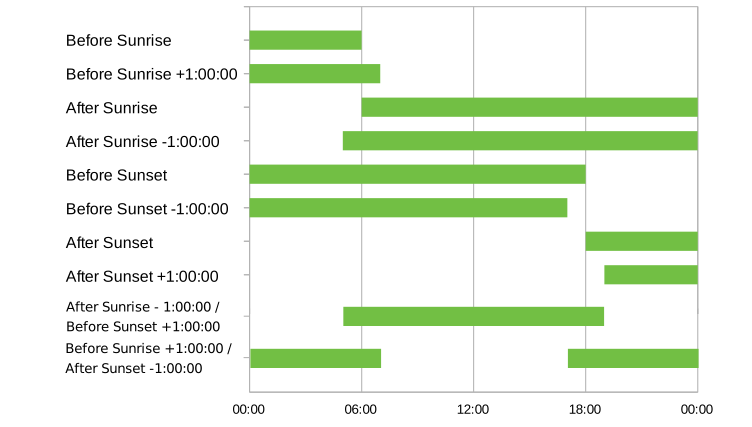
- The following chart shows when each combination passes. In this example, sunrise is at 06:00, and sunset is at 18:00. The green areas show when the condition passes.
- Near the poles, there are days without a sunrise or a sunset. On those days, a condition that uses the missing event doesn’t pass. Sun is up and Sun elevation work on those days too.
Examples
These examples show automations that use the Sun condition, and what to use instead in a new automation.
Automation: turn on the porch light at night when there is motion
When the porch motion sensor detects motion, this automation turns on the porch light, but only between sunset and sunrise.
-
Trigger: State changed
-
Entity: Porch motion (
binary_sensor.porch_motion) - To: Detected
-
Entity: Porch motion (
-
Condition: Sun
- Condition type: Between
- After: Sunset
- Before: Sunrise
-
Action: Turn on light
-
Target: Porch light (
light.porch)
-
Target: Porch light (
In a new automation, use Sun is set instead.
YAML example for a porch light at night
alias: "Porch light on motion at night"
triggers:
  - trigger: state
    entity_id: binary_sensor.porch_motion
    to: "on"
conditions:
  - condition: sun
    after: sunset
    before: sunrise
actions:
  - action: light.turn_on
    target:
      entity_id: light.porch
Automation: open the blinds at 07:00, but only after sunrise
At 07:00, this automation opens the bedroom blinds, but only if the sun rose at least 30 minutes ago. In winter, when the sun rises later, the automation doesn’t open the blinds.
-
Trigger: Time
- At time: 07:00:00
-
Condition: Sun
- Condition type: After
- After: Sunrise
- After offset: 00:30:00
-
Action: Open cover
-
Target: Bedroom blinds (
cover.bedroom_blinds)
-
Target: Bedroom blinds (
In a new automation, use Sun elevation instead. Pick an angle that matches the light you want, for example, above 5°. The time when the sun reaches that angle changes with the seasons. If you need exactly 30 minutes after sunrise, keep the Sun condition in YAML.
YAML example for opening the blinds after sunrise
alias: "Open the blinds after sunrise"
triggers:
  - trigger: time
    at: "07:00:00"
conditions:
  - condition: sun
    after: sunrise
    after_offset: "00:30:00"
actions:
  - action: cover.open_cover
    target:
      entity_id: cover.bedroom_blinds
Still stuck?
The Home Assistant community is quick to help: join Discord for real-time chat, post on the community forum with the condition you’re using and what you expected to happen, or share on our subreddit /r/homeassistant.
AI assistants like ChatGPT or Claude can also explain conditions or suggest the right one when you describe what you want in plain language.
Related conditions
Explore related conditions:
-
Sun is up: Tests if the sun is up.
-
Sun is set: Tests if the sun is set.
-
Sun elevation: Tests the sun’s elevation against a threshold you set.