

Matter
Matter is a new smart home connectivity standard for home automation products and IoT (Internet of Things) devices, see its Wikipedia article.
The initial version 1.0 release of Matter was published in October of 2022. Matter is still in the process of being adopted in the smart home market. It has gotten much publicity because of its promise of interoperability across all ecosystems. The largest tech companies like Google, Apple and Amazon teamed up to develop this new smart home connectivity standard under the roof of the CSA (Connectivity Standards Alliance). The largest tech companies that are already active in the home automation market have announced that they are or will be working on Matter-compatible products and also joined the development effort.
Matter products run locally and always allow local control, with device control done without the need for any internet connection or cloud services. From a technical perspective, you can use a Matter-compatible device with Home Assistant without connecting to a vendor-specific cloud. However, some vendors may require you to set up an account before you can enable Matter support for some products, (especially for commercial manufacturer’s own branded gateways/bridges/hubs/controllers sold as appliances).
Unlike other common radio-based protocols for IoT, (like Zigbee, Z-Wave, and Bluetooth), the Matter standard specification itself does not contain its own proprietary radio protocol or network transport protocol, but instead, it is a service control protocol that runs on top of the existing network infrastructure at the application level, with all Matter devices communicating using standard IP-based (IPv6) communication over your existing local area network (that is, LAN networks like Wi-Fi and Ethernet) or Thread (Low-Power Wireless Personal Area Network) depending on the type of device.
Home Assistant is a so-called “controller” in a Matter ecosystem, meaning that it can control Matter-based devices. Other examples of Matter controllers are the Google Nest products, Apple HomePod speakers, Samsung SmartThings Station, and some newer Amazon Echo devices.
This page explains what Matter is, how it relates to Thread, and how a Matter device can work with several platforms at the same time. To add a Matter device, refer to Adding a Matter device to Home Assistant.
What does Thread have to do with Matter?
ThreadThread is a low-power mesh networking standard that is specifically designed for smart home applications. It is a protocol that defines how devices communicate. [Learn more] is a low power radio mesh networking technology. Much like Zigbee, but with the key difference that it is IP-addressable, making it a suitable transport protocol option for Matter.
The figure below illustrates the landscape of MatterMatter is an open-source standard that defines how to control smart home devices on a Wi-Fi or Thread network. [Learn more], ThreadThread is a low-power mesh networking standard that is specifically designed for smart home applications. It is a protocol that defines how devices communicate. [Learn more], and Border routers. The Thread border router forwards traffic from the devices in the Thread network to devices outside that network.
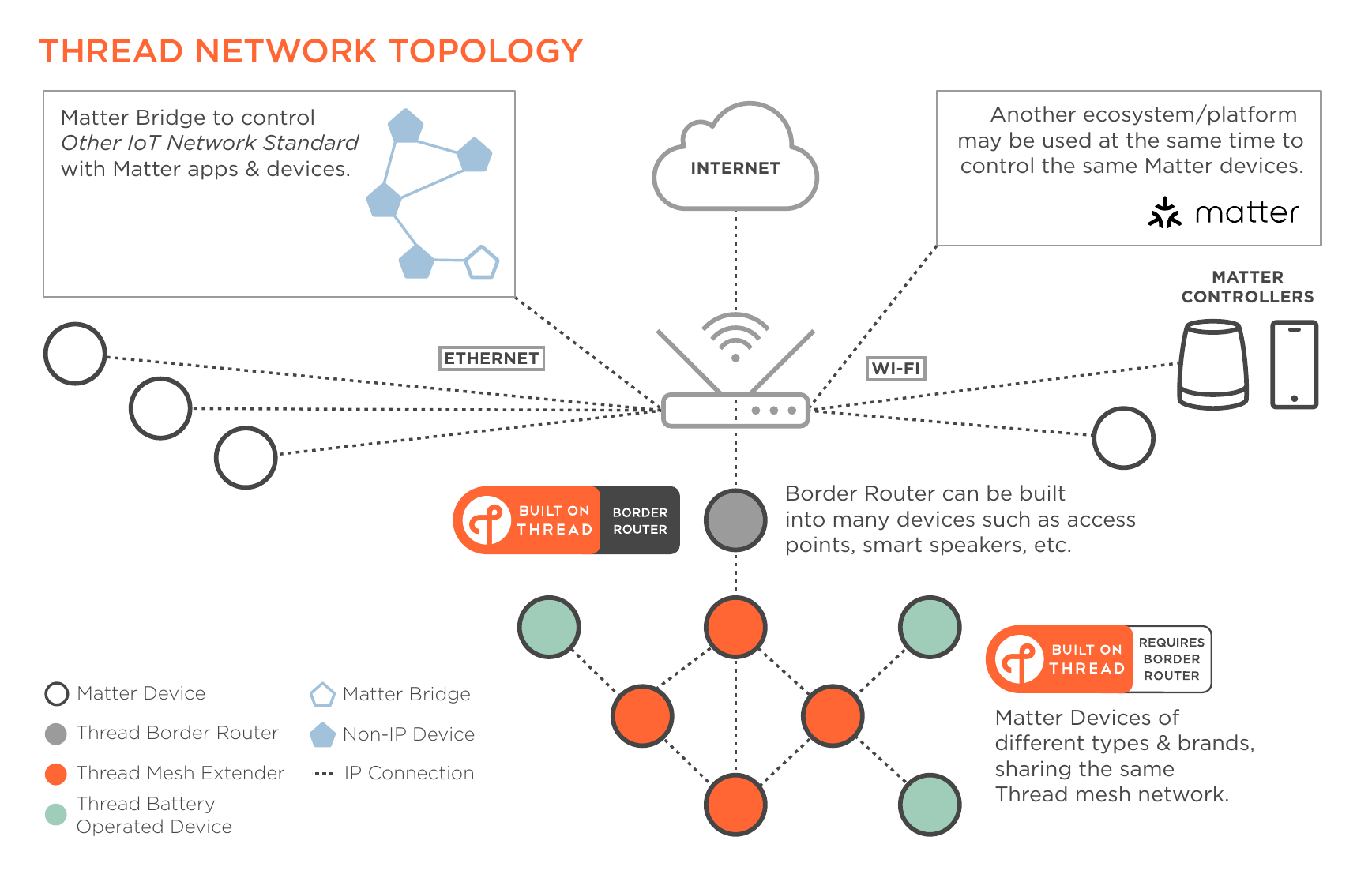
Image taken from the Thread Smart Home Fact Sheet by the Thread Group.
For more information about Thread, refer to Thread.
Thread devices don’t necessarily support Matter
Many devices on the market use ThreadThread is a low-power mesh networking standard that is specifically designed for smart home applications. It is a protocol that defines how devices communicate. [Learn more] for radio communication and Matter as a control protocol. But this is not guaranteed. Some Thread-based devices support Apple HomeKit or another vendor-specific communication protocol.
Don’t assume Matter support when you see a Thread logo on a device. Always look for the Matter logo itself (on either Wi-Fi/Ethernet-based devices or ThreadThread is a low-power mesh networking standard that is specifically designed for smart home applications. It is a protocol that defines how devices communicate. [Learn more]) or any other confirmation by the manufacturer that the device supports Matter.
Bluetooth used during commissioning
Most (if not all) Matter-compliant devices have a Bluetooth chip onboard to ease commissioningIn the context of Matter devices, commissioning is the process of adding a device to a Matter controller. It is the equivalent of pairing a device in Zigbee or Z-Wave. [Learn more]. Bluetooth is not used to control but to pair a device after unboxing or after factory resetting. The Home Assistant controller uses the Home Assistant Companion app for commissioningIn the context of Matter devices, commissioning is the process of adding a device to a Matter controller. It is the equivalent of pairing a device in Zigbee or Z-Wave. [Learn more]. During commissioning, you need to bring your phone close to the device. The controller then sends your network credentials to your device over Bluetooth. Once that is done, the device communicates over its native interface: Wi-Fi or Thread.
Although your Home Assistant server might have a Bluetooth adapter on board that the controller can use to commissionIn the context of Matter devices, commissioning is the process of adding a device to a Matter controller. It is the equivalent of pairing a device in Zigbee or Z-Wave. [Learn more] devices, Home Assistant does not use that adapter. Mainly to prevent issues with the built-in Bluetooth integration but also because it is easier to bring your mobile devices close to the Matter device than bringing the device near your server.
Multi fabric: join to multiple controllers
One of the great features of Matter is the so-called Multi Fabric feature: you can join the same device to multiple controllers. For example, simultaneously add it to Google Home, Apple Home, and Home Assistant. The standard describes that each device should be able to at least support 5 different fabrics simultaneously.
For devices where Home Assistant provides a native integration (with local API), Matter may not be the best option. Matter, being a universal standard, might not have the nitty-gritty features that come with a product-specific protocol. A good example is Philips Hue: the communication over Matter only provides the basic controls over lights, while the official Hue integration brings all Hue unique features like (dynamic) scenes or entertainment mode.