Sunricher DALI
The Sunricher DALI integrationIntegrations connect and integrate Home Assistant with your devices, services, and more. [Learn more] allows you to control and monitor DALI lighting devices connected to Sunricher gateways. The integration receives real-time push updates to keep entity states synchronized.
Prerequisites
This integration communicates with DALI lighting devices through a Sunricher gateway. You will need:
- Sunricher SR-GW-EDA DALI gateway on the same network as Home Assistant
- DALI lighting devices connected to and configured on the gateway
Configuration
To add the Sunricher DALI hub to your Home Assistant instance, use this My button:

Sunricher DALI can be auto-discovered by Home Assistant. If an instance was found, it will be shown as Discovered. You can then set it up right away.
If it wasn’t discovered automatically, don’t worry! You can set up a manual integration entry:
-
Browse to your Home Assistant instance.
-
In the bottom right corner, select the
Add Integration button. -
From the list, select Sunricher DALI.
-
Follow the instructions on screen to complete the setup.
To add the Sunricher DALI integration to your Home Assistant instance:
- Ensure the gateway is powered on and connected to the same network as Home Assistant.
- Select Submit to start discovery. Home Assistant will search for gateways for up to 3 minutes.
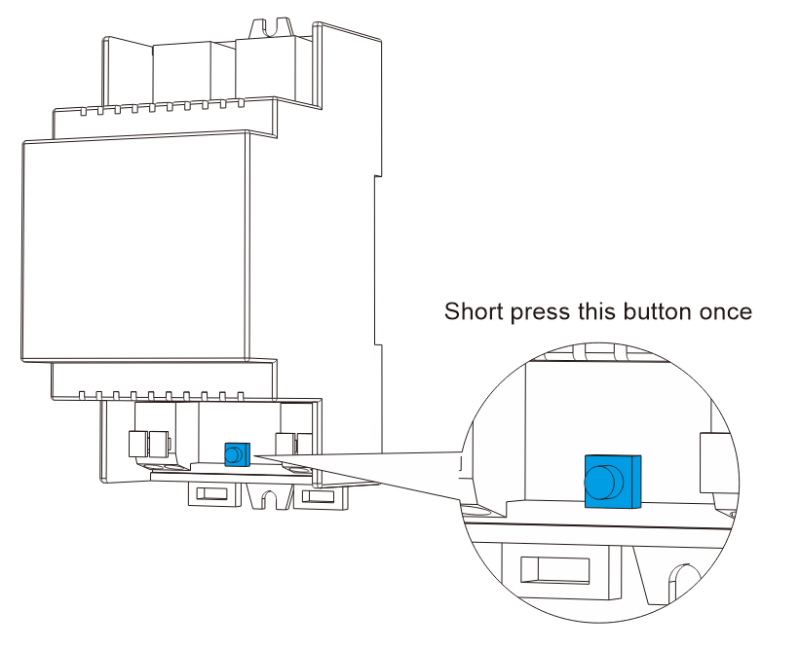
- While discovery is in progress, press the Reset button on your DALI gateway device once. The gateway will respond immediately after the button press.
After setup, the gateway appears under Settings > Devices & services. Multiple gateways are supported, each with its own set of entities.
Supported functionality
The Sunricher DALI integration provides the following entities.
Lights
Each DALI lighting device connected to the gateway is represented as a light entity in Home Assistant. Supported features depend on the device type:
- On/off and brightness control (all DALI DT6 and DT8 devices)
- Color temperature (DALI DT8 Tc devices)
- Color control (DALI DT8 RGB, XY, RGBW, and RGBWA devices)
Scenes
DALI scenes configured on the gateway are automatically imported into Home Assistant as scene entities. Each scene can be activated to apply pre-configured lighting settings to the associated DALI devices. Scenes must be created and edited on the Sunricher DALI gateway; creating or editing scenes from Home Assistant is not supported.
Sensors
DALI sensor devices connected to the gateway are represented as sensor entities:
- Illuminance sensor: Reports ambient light level in lux
Each DALI light device also provides:
- Energy sensor: Tracks cumulative energy consumption in Wh. This sensor is compatible with the Energy Dashboard and updates when the device reports energy data.
Binary sensors
DALI motion sensor devices create two binary sensor entities:
- Motion: Instantaneous motion detection. Turns on when movement is detected and off when movement stops.
- Occupancy: Persistent presence detection. Turns on when any activity is detected (motion, occupancy, or presence) and remains on until the area becomes vacant.
| Device event | Motion sensor | Occupancy sensor |
|---|---|---|
| MOTION | On | On |
| NO_MOTION | Off | No change |
| OCCUPANCY | No change | On |
| PRESENCE | No change | On |
| VACANT | No change | Off |
Buttons
Each DALI lighting device has an Identify button. Pressing this button triggers the physical device to blink briefly, helping you locate a specific fixture in an installation with many lights. This is useful during initial setup or troubleshooting.
Data updates
The integration receives real-time push updates from the gateway, ensuring changes made outside Home Assistant are reflected immediately.
Removing the integration
This integration follows standard integration removal; no extra steps are required.
To remove an integration instance from Home Assistant
- Go to Settings > Devices & services and select the integration card.
- From the list of devices, select the integration instance you want to remove.
- Next to the entry, select the three dots
menu. Then, select Delete.