Emoncms
The Emoncms integrationIntegrations connect and integrate Home Assistant with your devices, services, and more. [Learn more] creates sensors for the feeds available in your local or cloud based version of Emoncms.
To write information from Home Assistant to Emoncms, you can use the emoncms_history integrationIntegrations connect and integrate Home Assistant with your devices, services, and more. [Learn more].
Prerequisites
To use this service, you need an Emoncms account and an API key. You can find the API key in your local or cloud-based Emoncms account settings.
Configuration
To add the Emoncms service to your Home Assistant instance, use this My button:

If the above My button doesn’t work, you can also perform the following steps manually:
-
Browse to your Home Assistant instance.
-
In the bottom right corner, select the
Add Integration button. -
From the list, select Emoncms.
-
Follow the instructions on screen to complete the setup.
The URL of the Emoncms server starting with the protocol (http or https). For cloud installations, use https://emoncms.org (trailing slash optional). For local installations, use your local server address (e.g., http://localhost:8080). Ensure the server is accessible from your Home Assistant instance.
The 32-character read-only API key needed for authentication is found under “My Account > Read Only API Key” in Emoncms. The key should be a hexadecimal string. The read-and-write API key is not needed as this integration reads data from Emoncms. If you receive authentication errors, verify that you’ve copied the entire key correctly.
Options
To define options for Emoncms, follow these steps:
-
In Home Assistant, go to Settings > Devices & services.
-
If multiple instances of Emoncms are configured, choose the instance you want to configure.
-
On the card, select the cogwheel
. - If the card does not have a cogwheel, the integration does not support options for this device.
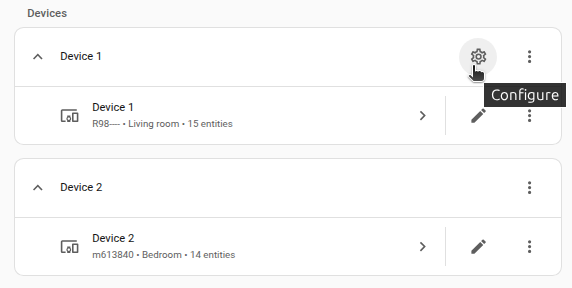
-
Edit the options, then select Submit to save the changes.
Sensors
- energy in Wh, kWh
- power in W
- voltage in V
- current in A
- apparent power in VA
- temperature in °C, °F or K
- frequency in Hz
- pressure in hPa
Data updates
This integration retrieves data from Emoncms every 60 seconds.
Troubleshooting
The Emoncms integration relies on an active local network or internet connection to communicate with your local or cloud based version of Emoncms. If you encounter issues, verify that your connection is stable.
Removing the integration
This integration can be removed by following these steps:
To remove an integration instance from Home Assistant
- Go to Settings > Devices & services and select the integration card.
- From the list of devices, select the integration instance you want to remove.
- Next to the entry, select the three dots
menu. Then, select Delete.