<?xml version="1.0" encoding="utf-8"?>
<feed xmlns="http://www.w3.org/2005/Atom">
  <title><![CDATA[Home Assistant]]></title>
  <link href="https://www.home-assistant.io/atom.xml" rel="self"/>
  <link href="https://www.home-assistant.io/"/>
  <updated>2026-08-14T11:57:09+00:00</updated>
  <id>https://www.home-assistant.io/</id>
  <author>
    <name><![CDATA[Home Assistant]]></name>
    
  </author>
  <generator uri="http://octopress.org/">Octopress</generator>

  
  <entry>
    <title type="html"><![CDATA[Community Day 2026: Save the date!]]></title>
    <link href="https://www.openhomefoundation.org/blog/community-day-2026-save-the-date/"/>
    <updated>2026-08-13T00:00:01+00:00</updated>
    <id>https://www.home-assistant.io/blog/2026/08/13/community-day-2026-save-the-date</id>
    <content type="html"><![CDATA[<p>You’ve been asking all year, and the wait is over… Mark your calendars, because Community Day 2026 will be held on Saturday, November 7! 🎉<!--more--></p>
]]></content>
  </entry>
  
  <entry>
    <title type="html"><![CDATA[Get ready to start building: The ESPHome Starter Kit is here!]]></title>
    <link href="https://esphome.io/blog/2026/08/12/the-esphome-starter-kit-is-here/"/>
    <updated>2026-08-12T00:00:01+00:00</updated>
    <id>https://www.home-assistant.io/blog/2026/08/12/the-esphome-starter-kit-is-here</id>
    <content type="html"><![CDATA[<p>Back in April during State of the Open Home 2026, we gave you a sneak peek of ESPHome’s very first official product… And after months of hard work alongside the community, the ESPHome Starter Kit is here! 🎉<!--more--></p>
]]></content>
  </entry>
  
  <entry>
    <title type="html"><![CDATA[2026.8: Approachable by design]]></title>
    <link href="https://www.home-assistant.io/blog/2026/08/05/release-20268/"/>
    <updated>2026-08-05T00:00:00+00:00</updated>
    <id>https://www.home-assistant.io/blog/2026/08/05/release-20268</id>
    <content type="html"><![CDATA[<p><lite-youtube videoid="Pu7JLCxZmaI" videotitle="Home Assistant 2026.8 Release Party"></lite-youtube></p>
<div class="alert alert-tip">
  <p class="alert-title"><iconify-icon inline icon='mdi:lightbulb-outline'></iconify-icon> Tip</p>
  <div class="alert-content">
<p>Don’t forget to <a href="https://www.youtube.com/watch?v=Pu7JLCxZmaI">join our release party live stream on YouTube</a> on August 5, 2026, at 20:00 GMT / 12:00 PT / 21:00 CET!</p>
  </div>
</div>
<div class="alert alert-tip">
  <p class="alert-title"><iconify-icon inline icon='mdi:lightbulb-outline'></iconify-icon> Tip</p>
  <div class="alert-content">
<p><a href='https://youtube.com/live/aK2HMY9-Tzo'><img src='/images/blog/2026-08/ESPH-2607-starterkit-livestream-thumbnail.png' alt='ESPHome Starter Kit launch party livestream on August 12' class='no-shadow' style='float: right; width: 40%; max-width: 340px; margin: 0 0 8px 16px;' /></a>
There’s more to look forward to next week: the <strong>ESPHome Starter Kit</strong> is launching, and you’re invited to the official launch party! 🚀 Join the ESPHome team and their partners at Apollo Automation on the <a href="https://youtube.com/live/aK2HMY9-Tzo">ESPHome YouTube channel</a> on August 12 at 21:00 CEST. Familiar faces are dropping by to celebrate lift-off, too: <a href="https://www.youtube.com/c/SmartHomeSolver">Reed</a> from Smart Home Solver, <a href="https://www.youtube.com/@simonsayshomeassistant">Simon</a> from Simon Says Home Assistant, and <a href="https://www.hometech.fm/">Gavin</a> from HomeTech.fm.</p>
  </div>
</div>
<p>Home Assistant 2026.8! 🎉</p>
<p>Hi, I’m <a href="https://github.com/abb848">Ashley</a>, the Technical Program Manager at the Open Home Foundation. With <a href="https://github.com/frenck">Frenck</a> taking a well-deserved break, <a href="https://github.com/bramkragten">Bram</a> and I are teaming up to handle things this time around.</p>
<p>We have been working on a lot over the past few weeks, and I’m excited to share some of what we have done for this release!</p>
<p>If there’s one thread tying this release together, it’s a direction we care about: making Home Assistant something you don’t need to be technical to use. This release is another step along that path.</p>
<p>Enjoy the release!</p>
<p>- Ashley</p>
<!--more-->
<ul>
<li><a href="#making-home-assistant-more-approachable">Making Home Assistant more approachable</a></li>
<li><a href="#the-same-home-assistant-minus-the-magic-number">The same Home Assistant, minus the magic number</a>
<ul>
<li><a href="#your-current-setup-keeps-working">Your current setup keeps working</a></li>
<li><a href="#want-to-change-the-port-weve-got-you-covered">Want to change the port? We’ve got you covered</a></li>
<li><a href="#what-this-means-for-yaml">What this means for YAML</a></li>
</ul>
</li>
<li><a href="#less-advanced-more-approachable">Less “advanced”, more approachable</a>
<ul>
<li><a href="#describing-the-feature-not-the-user">Describing the feature, not the user</a></li>
<li><a href="#just-tools-no-developer-required">Just Tools, no developer required</a></li>
</ul>
</li>
<li><a href="#home-assistant-cloud-now-easier-to-explore">Home Assistant Cloud, now easier to explore</a></li>
<li><a href="#your-entity-ids-your-choice">Your entity IDs, your choice</a></li>
<li><a href="#a-cleaner-way-to-handle-your-devices">A cleaner way to handle your devices</a></li>
<li><a href="#we-cant-stop-adding-triggers-and-conditions">We can’t stop adding triggers and conditions</a></li>
<li><a href="#integrations">Integrations</a>
<ul>
<li><a href="#new-integrations">New integrations</a></li>
<li><a href="#noteworthy-improvements-to-existing-integrations">Noteworthy improvements to existing integrations</a></li>
<li><a href="#integration-quality-scale-achievements">Integration quality scale achievements</a></li>
<li><a href="#now-available-to-set-up-from-the-ui">Now available to set up from the UI</a></li>
<li><a href="#farewell-to-the-following">Farewell to the following</a></li>
</ul>
</li>
<li><a href="#other-noteworthy-changes">Other noteworthy changes</a>
<ul>
<li><a href="#tell-us-how-setup-went">Tell us how setup went</a></li>
<li><a href="#a-roomier-template-editor">A roomier template editor</a></li>
<li><a href="#taps-that-land-where-you-mean-them">Taps that land where you mean them</a></li>
<li><a href="#a-combined-battery-level-you-can-trust">A combined battery level you can trust</a></li>
<li><a href="#search-your-media">Search your media</a></li>
<li><a href="#find-your-favorite-cards-faster">Find your favorite cards faster</a></li>
<li><a href="#z-wave-lock-credentials-properly-managed">Z-Wave lock credentials, properly managed</a></li>
<li><a href="#and-a-few-more">And a few more</a></li>
</ul>
</li>
<li><a href="#patch-releases">Patch releases</a>
<ul>
<li><a href="#202681---august-7">2026.8.1 - August 7</a></li>
</ul>
</li>
<li><a href="#need-help-join-the-community">Need help? Join the community</a></li>
<li><a href="#backward-incompatible-changes">Backward-incompatible changes</a></li>
<li><a href="#all-changes">All changes</a></li>
</ul>
<p><em>A huge thank you to all the contributors who made this release possible! And a special shout-out to <a href="https://github.com/frenck">@frenck</a> and <a href="https://github.com/bramkragten">@bramkragten</a> who helped write the release notes this release. Also, <a href="https://github.com/piitaya">@piitaya</a>, <a href="https://github.com/RaHehl">@RaHehl</a>, and <a href="https://github.com/farmio">@farmio</a> for putting effort into tweaking its contents. Thanks to them, these release notes are in great shape. ❤️</em></p>
<h2>Making Home Assistant more approachable</h2>
<p>One of the directions we care about most for Home Assistant is making it simpler to pick up and use, without compromising on capability. It’s something we have been working toward for a long time, and it runs through our <a href="https://github.com/OpenHomeFoundation/roadmap">roadmap</a> and <a href="https://github.com/OpenHomeFoundation/goals">goals</a> for this year. We cannot do it overnight though, so we keep listening to your feedback to make sure we are fixing the things that actually get in your way. If there is something you would like to see, we would love for you to weigh in. Every comment helps shape what comes next.</p>
<p>This release brings together some of that work. It may never be truly finished, and that is fine, but it is something we hold close: the more people who can use Home Assistant, whatever their technical ability, the better.</p>
<h2>The same Home Assistant, minus the magic number</h2>
<p>Ever wondered why the address for your own home has a random number stuck on the end? So did we. For years, reaching Home Assistant meant remembering to add <code>:8123</code> to the address, a little piece of technical trivia that everyone simply had to learn. This release starts to put that right.</p>
<p>New installations of <span class='terminology'>“Home Assistant OS”<span class='terminology-tooltip'>Home Assistant OS, the Home Assistant Operating System, is an embedded, minimalistic, operating system designed to run the Home Assistant ecosystem on single board computers (like the Raspberry Pi) or Virtual Machines. It includes Home Assistant Core, the Home Assistant Supervisor, and supports apps. Home Assistant Supervisor keeps it up to date, removing the need for you to manage an operating system. Home Assistant Operating System is the recommended installation type for most users.</span></span> now use a normal web address by default, with no number to add on the end. You reach your home the same way you reach any website. Nothing extra to remember, nothing extra to type.</p>
<h3>Your current setup keeps working</h3>
<p>If you are already running Home Assistant, nothing changes and there is nothing you need to do. This only affects new installations of Home Assistant OS. Your existing installation is completely unchanged, keeps the exact port it has always used, and keeps working just as before. If everything works today, the simplest thing is to leave it exactly as it is.</p>
<h3>Want to change the port? We’ve got you covered</h3>
<p>You do not have to change anything, but if you would like the cleaner address, or need to change the port for another reason, you can now do it yourself from the interface. The same screen also holds a few more options, like choosing which network connection Home Assistant listens on and setting trusted proxies, for the setups that need them.</p>
<img src='/images/blog/2026-08/web-server-settings.png' alt='Screenshot of the web server settings in the Home Assistant interface, showing options for the port, the network connection to listen on, and trusted proxies.' class='no-shadow' />
<p>Changing something as fundamental as the port your home lives on can feel nerve-wracking, so we made it hard to get stuck. When you change the web server settings, Home Assistant applies the new configuration and then waits for you to confirm everything still works. If you do not confirm within five minutes, it assumes something went wrong, puts your previous settings back, and restarts. And if the new settings cannot be applied at all, it falls back right away. So if you ever lock yourself out with the wrong setting, you do not have to do anything: wait a few minutes, and Home Assistant returns you to where you were.</p>
<div class="alert alert-note">
  <p class="alert-title"><iconify-icon inline icon='mdi:information-outline'></iconify-icon> Note</p>
  <div class="alert-content">
<p>One thing to keep in mind: anything that reaches Home Assistant using the old address may need updating to match the new port, such as your bookmarks or other services and tools you have connected, including the mobile app. If your setup works today, that is a good reason to leave it as it is.</p>
  </div>
</div>
<img src='/images/blog/2026-08/web-server-revert.png' alt='Screenshot of the confirmation prompt shown after changing the web server settings, asking you to confirm everything still works before the new settings are kept.' class='no-shadow' />
<h3>What this means for YAML</h3>
<p>If you currently set up the web server in <span class='terminology'>YAML<span class='terminology-tooltip'>YAML is a human-readable data serialization language. It is used to store and transmit data in a structured format. In Home Assistant, YAML is used for configuration, for example in the <code>configuration.yaml</code> or <code>automations.yaml</code> files.<a class='terminology-link' href='/docs/configuration/yaml/'> [Learn more]</a></span></span>, you do not need to change anything. The first time you start Home Assistant after updating, your settings move into the interface for you, and you manage them there from then on. You might also see a <a href="/integrations/repairs/">repair</a> appear, just to let you know your settings were imported; it can point you to tidying up the old YAML if you like, but nothing breaks either way.</p>
<h2>Less “advanced”, more approachable</h2>
<p>A word comes up around Home Assistant a lot: advanced. But what does it actually mean, and who gets to decide what counts as advanced and what does not? Too often it is a label that quietly tells people a feature is not for them. We want Home Assistant to be approachable for everyone, so this release removes some of that language.</p>
<h3>Describing the feature, not the user</h3>
<p>The clearest place to start is the words themselves. Labels like <em>advanced</em> and <em>expert</em> were dotted around Home Assistant. Words like these can be discouraging: they suggest a feature is not for you and steer you away from trying it, even when it is perfectly approachable. This release removes that wording in around 43 places, across the app, its documentation, and the companion apps. None of these features changed. Instead of rating your skill, the wording now simply describes what each one does.</p>
<p>A big thank you to everyone who helped comb through and clean this up! 👏</p>
<h3>Just Tools, no developer required</h3>
<p>In the same spirit, <strong>Developer Tools</strong> is now simply <strong>Tools</strong>. It has always been a useful spot for everyone, whether you are checking the <span class='terminology'>state<span class='terminology-tooltip'>The state holds the information of interest of an entity, for example, if a light is on or off. Each entity has exactly one state and the state only holds one value at a time. However, entities can store attributes related to that state such as brightness, color, or a unit of measurement.<a class='terminology-link' href='/docs/configuration/state_object/'> [Learn more]</a></span></span> of your <span class='terminology'>“devices”<span class='terminology-tooltip'>A device is a model representing a physical or logical unit that contains entities.</span></span>, testing a <span class='terminology'>template<span class='terminology-tooltip'>A template is an automation definition that can include variables for the action or data from the trigger values. This allows automations to generate dynamic actions.<a class='terminology-link' href='/docs/automation/templating/'> [Learn more]</a></span></span>, or reloading part of your setup, and you never needed to be a developer to use it. The shorter name matches how people actually use it, and feels a little friendlier to open.</p>
<h2>Home Assistant Cloud, now easier to explore</h2>
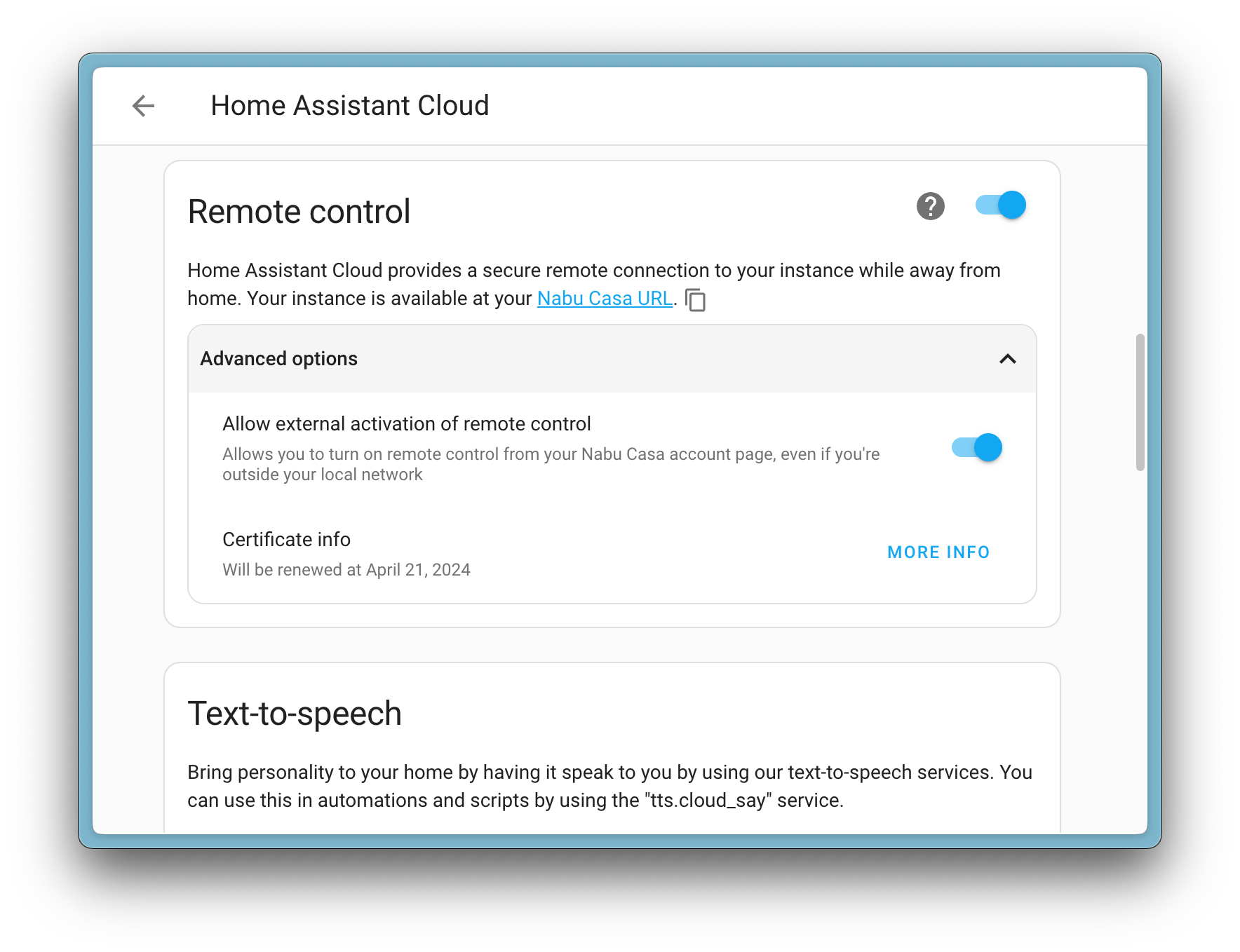
<p><a href="/integrations/cloud/">Home Assistant Cloud</a> by <a href="https://www.nabucasa.com/">Nabu Casa</a> is how many people add remote access, fast and private voice, encrypted <span class='terminology'>backups<span class='terminology-tooltip'>Home Assistant has built-in functionality to create files containing a copy of your configuration. This can be used to restore your Home Assistant as well as migrate to a new system. The backup feature is available for all <a href="/installation/#about-installation-types">installation types</a>.<a class='terminology-link' href='/common-tasks/general/#backups'> [Learn more]</a></span></span>, and more to their home, all while supporting the project at the same time. Until now, everything it offers lived on a single long page of switches and settings. This release gives that page a proper redesign.</p>
<p>The main page is now a clean overview. Each feature (remote access, backups, voice assistants, the companion app, and more) has its own space, so you can see what you have turned on at a glance. The settings for each one move onto their own page, which keeps the overview tidy and makes every feature easier to understand on its own.</p>
<p>The bigger change is for anyone just getting started. There is now a guided setup that walks you through Home Assistant Cloud step by step, instead of leaving you to find your way around a wall of options. If it is not a good moment, you can put it off and pick it up again later.</p>
<div>
  <img src='/images/blog/2026-08/cloud_page_top.png' alt='Screenshot of the top of the redesigned Home Assistant Cloud page, showing the overview with each cloud feature in its own space.' class='no-shadow' style='display: block; margin: 0;' />
  <img src='/images/blog/2026-08/cloud_page_bottom.png' alt='Screenshot of the lower part of the redesigned Home Assistant Cloud page, showing more cloud features and their settings.' class='no-shadow' style='display: block; margin: 0;' />
</div>
<p>A big thank you to <a href="https://github.com/klejejs">@klejejs</a> for this redesign!</p>
<h2>Your entity IDs, your choice</h2>
<p>Behind every <span class='terminology'>device<span class='terminology-tooltip'>A device is a model representing a physical or logical unit that contains entities.</span></span> and <span class='terminology'>sensor<span class='terminology-tooltip'>Sensors return information about a thing, for instance the level of water in a tank.<a class='terminology-link' href='/integrations/sensor/'> [Learn more]</a></span></span> sits an entity ID, a short name such as <code>light.kitchen_ceiling</code> that your <span class='terminology'>automations<span class='terminology-tooltip'>Automations in Home Assistant allow you to automatically respond to things that happen in and around your home.<a class='terminology-link' href='/docs/automation/'> [Learn more]</a></span></span>, <span class='terminology'>scripts<span class='terminology-tooltip'>Scripts are components that allow you to specify a sequence of actions to be executed by Home Assistant when turned on.<a class='terminology-link' href='/docs/scripts/'> [Learn more]</a></span></span>, and dashboards use to refer to it. Most of the time they look after themselves. But when you do want them neat and consistent, you should be the one deciding how they read.</p>
<p>Some earlier work looked at building entity IDs automatically from the <span class='terminology'>area<span class='terminology-tooltip'>An area in Home Assistant is a <a href="/docs/organizing/">logical grouping</a> of devices and entities that represents a room or space in your home, such as the living room, kitchen, or garage.<a class='terminology-link' href='/docs/organizing/areas/'> [Learn more]</a></span></span> a device belongs to. Your feedback told us this suited some people but not everyone. So this release takes a more flexible route and puts you in charge: you can rename an entity ID yourself, and control how it is ordered, so your <span class='terminology'>entities<span class='terminology-tooltip'>An entity represents a sensor, actor, or function in Home Assistant. Entities are used to monitor physical properties or to control other entities. An entity is usually part of a device or a service.<a class='terminology-link' href='/docs/configuration/entities_domains/'> [Learn more]</a></span></span> follow whatever naming pattern makes sense to you.</p>
<img src='/images/blog/2026-08/entity-id-rename.gif' alt='Screen recording showing how to rename an entity ID and change how it is ordered in the Home Assistant interface.' class='no-shadow' />
<p>Thanks to <a href="https://github.com/arturpragacz">@arturpragacz</a> and <a href="https://github.com/piitaya">@piitaya</a> for this work.</p>
<h2>A cleaner way to handle your devices</h2>
<p>Home Assistant is changing how it keeps track of your devices behind the scenes. Until now, if one physical <span class='terminology'>device<span class='terminology-tooltip'>A device is a model representing a physical or logical unit that contains entities.</span></span> was set up through two different <span class='terminology'>integrations<span class='terminology-tooltip'>Integrations connect and integrate Home Assistant with your devices, services, and more.<a class='terminology-link' href='/getting-started/concepts-terminology/#integrations'> [Learn more]</a></span></span>, Home Assistant merged them into a single device. Details that can only hold one value, such as the model or serial number, could then clash. From this release, each integration keeps its own device entry, so nothing gets collapsed together.</p>
<p>When you update, any devices that were merged this way are separated automatically, and their <span class='terminology'>entities<span class='terminology-tooltip'>An entity represents a sensor, actor, or function in Home Assistant. Entities are used to monitor physical properties or to control other entities. An entity is usually part of a device or a service.<a class='terminology-link' href='/docs/configuration/entities_domains/'> [Learn more]</a></span></span> move to the right device for you. Most people will not notice a thing. In the rarer cases where a device was set up through more than one integration, you might see it appear twice, once per integration, and Home Assistant may raise a <a href="/integrations/repairs/">repair</a> to let you know.</p>
<p>There is nothing you need to do. Your <span class='terminology'>automations<span class='terminology-tooltip'>Automations in Home Assistant allow you to automatically respond to things that happen in and around your home.<a class='terminology-link' href='/docs/automation/'> [Learn more]</a></span></span> and <span class='terminology'>scripts<span class='terminology-tooltip'>Scripts are components that allow you to specify a sequence of actions to be executed by Home Assistant when turned on.<a class='terminology-link' href='/docs/scripts/'> [Learn more]</a></span></span> keep working, because Home Assistant still sends actions to the right devices after the split. The only things that might need a second look are automations that point to a device by its ID directly, or the occasional unusual setup. If a repair appears, just follow it.</p>
<p>This is groundwork for more flexible device handling we are building toward over the coming months, so think of it as a step along the way rather than the finished picture.</p>
<p>If you build a <span class='terminology'>custom integration<span class='terminology-tooltip'>A custom integration is an integration that has been created by someone from the Home Assistant community and has been published for others to use at their own risk. Custom integrations are not supported by the Home Assistant project. They are not reviewed or tested by the Home Assistant development team and thus may negatively impact the stability of your Home Assistant instance. An example of a custom integration is the <a href="https://spook.boo/">Spook</a> integration.</span></span>, most need no changes at all. If yours works with device details directly, the <a href="https://developers.home-assistant.io/blog/2026/07/21/device-registry-single-config-entry">developer blog</a> walks through what changed. There is no rush: the previous approach keeps working for now, so you have plenty of time.</p>
<p>Thanks to <a href="https://github.com/emontnemery">@emontnemery</a> for this work.</p>
<h2>We can’t stop adding triggers and conditions</h2>
<p>Last release, purpose-specific <a href="/triggers/">triggers</a> and <a href="/conditions/">conditions</a> became the friendlier way to build <span class='terminology'>automations<span class='terminology-tooltip'>Automations in Home Assistant allow you to automatically respond to things that happen in and around your home.<a class='terminology-link' href='/docs/automation/'> [Learn more]</a></span></span>: you describe the moment you care about, like <em>when the front door opens</em>, instead of piecing it together from the technical parts underneath. This release adds two more of them.</p>
<p><strong>Vibration</strong> now has conditions to match its triggers. On top of reacting the moment vibration starts or stops, you can check whether something is vibrating (or not) as part of a bigger automation, for example, only sending a “laundry is done” message once the washing machine has actually stopped shaking.</p>
<p><strong>Moon</strong> gains a trigger and matching conditions. You can start an automation the moment the moon enters a new phase, or check the current phase as part of a bigger automation. Point it at the full moon, the new moon, or any change of phase, and let your home take it from there, whether that is mood lighting, a reminder, or just a bit of fun. 🌙</p>
<p>Thanks, <a href="https://github.com/nielsrowinbik">@nielsrowinbik</a>!</p>
<h2>Integrations</h2>
<p>Thanks to our community for keeping pace with the new <span class='terminology'>integrations<span class='terminology-tooltip'>Integrations connect and integrate Home Assistant with your devices, services, and more.<a class='terminology-link' href='/getting-started/concepts-terminology/#integrations'> [Learn more]</a></span></span> and improvements to existing ones! You’re all awesome 🥰</p>
<h3>New integrations</h3>
<p>We welcome the following new integrations in this release:</p>
<ul>
<li>
<p><strong><a href="/integrations/dyson_infrared">Dyson Infrared</a></strong>, added by <a href="https://github.com/elax46">@elax46</a><br />
Control your Dyson fans through any infrared transmitter you already have set up in Home Assistant. Because the connection only goes one way, Home Assistant shows the last command you sent rather than the fan’s live state.</p>
</li>
<li>
<p><strong><a href="/integrations/fuelprices_dk">Fuelprices.dk</a></strong>, added by <a href="https://github.com/MTrab">@MTrab</a><br />
Track current fuel prices from Danish fuel companies in Home Assistant. The integration pulls prices from the <a href="https://fuelprices.dk">Fuelprices.dk</a> service and creates a sensor for each product you select at a station, so you can watch prices and build automations around them.</p>
</li>
<li>
<p><strong><a href="/integrations/gatus">Gatus</a></strong>, added by <a href="https://github.com/TN-1">@TN-1</a>, launching at 🥈 silver quality<br />
Bring the health of your services into Home Assistant from your <a href="https://gatus.io">Gatus</a> monitoring instance. Each monitored endpoint shows up as a <span class='terminology'>binary sensor<span class='terminology-tooltip'>A binary sensor is an entity that reports one of two mutually exclusive states, on or off. The device class determines how those states are labeled in the UI. For example, open/closed for a door or detected/clear for motion.<a class='terminology-link' href='/integrations/binary_sensor'> [Learn more]</a></span></span>, so you can put service status on a dashboard or trigger automations when something goes down or comes back up.</p>
</li>
<li>
<p><strong><a href="/integrations/geosphere_austria_warnings">GeoSphere Austria Warnings</a></strong>, added by <a href="https://github.com/tklecka">@tklecka</a><br />
Bring official weather warnings for Austria into Home Assistant from <a href="https://www.geosphere.at">GeoSphere Austria</a> (formerly ZAMG), the national weather service. Warnings are issued per municipality and cover events like storms, heavy rain, snow, black ice, thunderstorms, heat, and cold, so you can get notified or trigger automations when the warning level rises.</p>
</li>
<li>
<p><strong><a href="/integrations/google_health">Google Health</a></strong>, added by <a href="https://github.com/allenporter">@allenporter</a><br />
Bring your health and fitness data into Home Assistant from Google Health and the Fitbit Web API. After you connect your Google account, you get sensors such as steps, distance, weight, and resting heart rate, and it can run alongside the existing Fitbit integration.</p>
</li>
<li>
<p><strong><a href="/integrations/harbor">Harbor Sleep</a></strong>, added by <a href="https://github.com/Lash-L">@Lash-L</a><br />
Keep an eye on your <a href="https://harbor.co/">Harbor Sleep</a> baby monitor from Home Assistant. The integration connects to the device on your local network and exposes sensors like temperature, Wi-Fi strength, and stream quality.</p>
</li>
<li>
<p><strong><a href="/integrations/harman_luxury">Harman Luxury Audio</a></strong>, added by <a href="https://github.com/sbesh91">@sbesh91</a><br />
Control network streamers built on the Harman Luxury Audio platform, such as the Arcam Radia ST5 and ST60, and equivalent JBL and Mark Levinson streamers. The integration talks to the device directly on your local network, so no cloud account is required.</p>
</li>
<li>
<p><strong><a href="/integrations/karakeep">Karakeep</a></strong>, added by <a href="https://github.com/sli-cka">@sli-cka</a><br />
Connect your self-hosted <a href="https://karakeep.app/">Karakeep</a> bookmarking service to Home Assistant and keep track of your bookmark statistics. Karakeep helps you save, organize, and tag links, notes, and images, and this integration surfaces those numbers as sensors.</p>
</li>
<li>
<p><strong><a href="/integrations/led_infrared">LED Infrared</a></strong>, added by <a href="https://github.com/tr4nt0r">@tr4nt0r</a><br />
Control LED lights through any infrared emitter you already have set up in Home Assistant. It supports many branded and unbranded bulbs and strip controllers that use generic infrared remotes. Communication is one-way, so the integration uses assumed states.</p>
</li>
<li>
<p><strong><a href="/integrations/litellm">LiteLLM</a></strong>, added by <a href="https://github.com/luismalves">@luismalves</a><br />
Use a <a href="https://www.litellm.ai/">LiteLLM</a> proxy as a conversation agent in Home Assistant. LiteLLM puts a single OpenAI-compatible API in front of many model providers, so you can reach almost any model through one endpoint, hosted or self-hosted. Home Assistant creates a conversation agent for each model you configure.</p>
</li>
<li>
<p><strong><a href="/integrations/llama_cpp">llama.cpp</a></strong>, added by <a href="https://github.com/allenporter">@allenporter</a><br />
Use a local <a href="https://github.com/ggml-org/llama.cpp">llama.cpp</a> server, or any OpenAI-compatible endpoint, as a conversation agent in Home Assistant. You can set up several agents, each with its own model and instructions, and keep everything running on your own hardware.</p>
</li>
<li>
<p><strong><a href="/integrations/lyngdorf">Lyngdorf</a></strong>, added by <a href="https://github.com/fishloa">@fishloa</a>, launching at 🥈 silver quality<br />
Control <a href="https://lyngdorf.steinwaylyngdorf.com/">Lyngdorf</a> audio processors and amplifiers from Home Assistant, including power, volume, source selection, and sound modes. The integration keeps in sync with the device over your local network.</p>
</li>
<li>
<p><strong><a href="/integrations/midea">Midea</a></strong>, added by <a href="https://github.com/chemelli74">@chemelli74</a><br />
Bring devices that use the Midea protocol, such as air conditioners and air purifiers, into Home Assistant. The integration provides information on the connected devices and lets you control their main features.</p>
</li>
<li>
<p><strong><a href="/integrations/neopool">NeoPool</a></strong>, added by <a href="https://github.com/svasek">@svasek</a>, launching at 🥈 silver quality<br />
Monitor and manage pool controllers built on the NeoPool system, originally from Sugar Valley and sold under many brands like Hidrolife, Aquarite, and Oxilife. It talks to your controller locally over Modbus TCP, exposing water chemistry, filtration, and hydrolysis data with no cloud needed.</p>
</li>
<li>
<p><strong><a href="/integrations/scorpiontrack">ScorpionTrack</a></strong>, added by <a href="https://github.com/Herbertmt978">@Herbertmt978</a>, launching at 🥈 silver quality<br />
Follow vehicles shared through a public ScorpionTrack location-share link on your Home Assistant map. The integration reads the shared vehicle feed and creates a <span class='terminology'>device tracker<span class='terminology-tooltip'>Device trackers are used to track the presence, or location, of a device.<a class='terminology-link' href='/integrations/device_tracker'> [Learn more]</a></span></span> for each vehicle, without needing your private account credentials.</p>
</li>
</ul>
<h3>Noteworthy improvements to existing integrations</h3>
<p>It is not just new <span class='terminology'>integrations<span class='terminology-tooltip'>Integrations connect and integrate Home Assistant with your devices, services, and more.<a class='terminology-link' href='/getting-started/concepts-terminology/#integrations'> [Learn more]</a></span></span> that have been added; existing ones keep getting better too. Here are some of the noteworthy improvements this release:</p>
<ul>
<li><strong><a href="/integrations/shelly">Shelly</a></strong> now supports Enhanced Security, the HTTPS-only mode on firmware 2.0 for gen2 and newer devices, and added support for Shelly circuit breakers, with on/off control plus output-state and safety-switch sensors. Thanks, <a href="https://github.com/bieniu">@bieniu</a> and <a href="https://github.com/thecode">@thecode</a>!</li>
<li><strong><a href="/integrations/reolink">Reolink</a></strong> gained pre-siren entities and a motion device class on its AI-detection binary sensors. Thanks, <a href="https://github.com/starkillerOG">@starkillerOG</a> and <a href="https://github.com/abmantis">@abmantis</a>!</li>
<li><strong><a href="/integrations/overkiz">Overkiz</a></strong> added window and tilt binary sensors for contact sensors, boost and drying-duration numbers for the Atlantic electrical towel dryer, and support for the Somfy Thermostat PRO. Thanks, <a href="https://github.com/iMicknl">@iMicknl</a>!</li>
<li><strong><a href="/integrations/switchbot">SwitchBot</a></strong> added support for the Candle Warmer Lamp and the RGBIC Neon Rope Light, plus fan and select controls for the Standing Fan. Thanks, <a href="https://github.com/Onero-testdev">@Onero-testdev</a>!</li>
<li><strong><a href="/integrations/roborock">Roborock</a></strong> got plenty of love for the Q10, with a do-not-disturb switch, switch entities, a map image, and a volume control. Thanks, <a href="https://github.com/lboue">@lboue</a> and <a href="https://github.com/tubededentifrice">@tubededentifrice</a>!</li>
<li><strong><a href="/integrations/whirlpool">Whirlpool</a></strong> added an oven light, an oven cook-mode select, and an oven target-temperature number. Thanks, <a href="https://github.com/matthewdias">@matthewdias</a> and <a href="https://github.com/bdlcalvin">@bdlcalvin</a>!</li>
<li><strong><a href="/integrations/mqtt">MQTT</a></strong> gained an infrared platform, so you can send infrared commands over MQTT. Thanks, <a href="https://github.com/jbouwh">@jbouwh</a>!</li>
<li><strong><a href="/integrations/knx">KNX</a></strong> got a whole set of improvements. Button and notify entities can now be configured from the interface, the KNX panel gained a <strong>Send telegram</strong> dialog (keyboard shortcut <kbd>s</kbd>), plus a datapoint type (DPT) reference and a device view for your project data. On top of that, all KNX entities now restore their state after a reload or restart. Thanks, <a href="https://github.com/farmio">@farmio</a>!</li>
<li><strong><a href="/integrations/enphase_envoy">Enphase Envoy</a></strong> added ACB battery sensors, along with sleep and wake controls. Thanks, <a href="https://github.com/genestealer">@genestealer</a>!</li>
<li><strong><a href="/integrations/melcloud">MELCloud</a></strong> gained on/off control, an operation-mode select, and a flow-temperature number for air-to-water heat pump zones. Thanks, <a href="https://github.com/imilchev">@imilchev</a>!</li>
<li><strong><a href="/integrations/melcloud_home">MELCloud Home</a></strong> added energy-consumption reporting and a number platform. Thanks, <a href="https://github.com/erwindouna">@erwindouna</a>!</li>
<li><strong><a href="/integrations/portainer">Portainer</a></strong> added an update platform and container health status. Thanks, <a href="https://github.com/erwindouna">@erwindouna</a>!</li>
<li><strong><a href="/integrations/mikrotik">Mikrotik</a></strong> gained sensor, button, and update platforms. Thanks, <a href="https://github.com/chemelli74">@chemelli74</a>!</li>
<li><strong><a href="/integrations/imou">Imou</a></strong> added switch and sensor platforms. Thanks, <a href="https://github.com/Imou-OpenPlatform">@Imou-OpenPlatform</a>!</li>
<li><strong><a href="/integrations/fronius">Fronius</a></strong> added a binary sensor for backup mode. Thanks, <a href="https://github.com/farmio">@farmio</a>!</li>
<li><strong><a href="/integrations/openai_conversation">OpenAI Conversation</a></strong> now supports GPT-5.6. Thanks, <a href="https://github.com/Shulyaka">@Shulyaka</a>!</li>
<li><strong><a href="/integrations/wiim">WiiM</a></strong> added multi-room grouping and metadata synchronization. Thanks, <a href="https://github.com/Linkplay2020">@Linkplay2020</a>!</li>
<li><strong><a href="/integrations/smlight">SMLIGHT</a></strong> added Bluetooth proxy support and an infrared receiver for SMLIGHT Ultima devices. Thanks, <a href="https://github.com/tl-sl">@tl-sl</a>!</li>
<li><strong><a href="/integrations/vizio">Vizio</a></strong> added command aliases for its remote. Thanks, <a href="https://github.com/raman325">@raman325</a>!</li>
<li><strong><a href="/integrations/tesla_wall_connector">Tesla Wall Connector</a></strong> added an option to switch total power calculation between single-phase / split-phase and three-phase electrical service, along with vehicle current and Wi-Fi signal sensors. Thanks, <a href="https://github.com/sarabveer">@sarabveer</a>!</li>
<li><strong><a href="/integrations/teslemetry">Teslemetry</a></strong> added control for seat coolers. Thanks, <a href="https://github.com/Bre77">@Bre77</a>!</li>
<li><strong><a href="/integrations/tessie">Tessie</a></strong> added a navigation-destination text entity. Thanks, <a href="https://github.com/Mattheinrichs">@Mattheinrichs</a>!</li>
<li><strong><a href="/integrations/gardena_bluetooth">Gardena Bluetooth</a></strong> added tank pressure and water temperature sensors. Thanks, <a href="https://github.com/icereed">@icereed</a>!</li>
<li><strong><a href="/integrations/duco">Duco</a></strong> added ventilation temperature sensors. Thanks, <a href="https://github.com/ronaldvdmeer">@ronaldvdmeer</a>!</li>
<li><strong><a href="/integrations/victron_ble">Victron BLE</a></strong> added support for Orion XS and inverter devices. Thanks, <a href="https://github.com/rajlaud">@rajlaud</a>!</li>
<li><strong><a href="/integrations/omie">OMIE</a></strong> added an action to get prices for a specific date. Thanks, <a href="https://github.com/abmantis">@abmantis</a>!</li>
<li><strong><a href="/integrations/ecowitt">Ecowitt</a></strong> added soil conductivity sensor support. Thanks, <a href="https://github.com/GSzabados">@GSzabados</a>!</li>
<li><strong><a href="/integrations/steam_online">Steam</a></strong> added an image platform, plus new Last online, Level, and Now playing sensors. Thanks, <a href="https://github.com/tr4nt0r">@tr4nt0r</a>!</li>
<li><strong><a href="/integrations/lg_infrared">LG Infrared</a></strong> added support for LG air conditioners. Thanks, <a href="https://github.com/Dr-Blank">@Dr-Blank</a>!</li>
<li><strong><a href="/integrations/unifiprotect">UniFi Protect</a></strong> now supports the USL smart sensors (USL Entry, USL Environmental, and USL GlassBreak) on UniFi Protect 7.2 and newer, and cameras gained <strong>Motion detection</strong>, <strong>Smart detection</strong>, and <strong>Sound detection</strong> event entities that fire for any detection the camera reports, such as a person, a package, or barking, with the detected type as an attribute. Thanks, <a href="https://github.com/RaHehl">@RaHehl</a>!</li>
</ul>
<h3>Integration quality scale achievements</h3>
<p>One thing we are incredibly proud of in Home Assistant is our <a href="/docs/quality_scale/">integration quality scale</a>. This scale helps us and our contributors to ensure integrations are of high quality, maintainable, and provide the best possible user experience.</p>
<p>This release, we celebrate several <span class='terminology'>integrations<span class='terminology-tooltip'>Integrations connect and integrate Home Assistant with your devices, services, and more.<a class='terminology-link' href='/getting-started/concepts-terminology/#integrations'> [Learn more]</a></span></span> that have improved their quality scale:</p>
<ul>
<li>
<p><strong>2 integrations reached platinum</strong> 🏆</p>
<ul>
<li><a href="/integrations/anthropic">Anthropic</a>, thanks to <a href="https://github.com/Shulyaka">@Shulyaka</a></li>
<li><a href="/integrations/smlight">SMLIGHT SLZB</a>, thanks to <a href="https://github.com/tl-sl">@tl-sl</a></li>
</ul>
</li>
<li>
<p><strong>1 integration reached gold</strong> 🥇</p>
<ul>
<li><a href="/integrations/nobo_hub">Nobø Ecohub</a>, thanks to <a href="https://github.com/oyvindwe">@oyvindwe</a></li>
</ul>
</li>
<li>
<p><strong>5 integrations reached silver</strong> 🥈</p>
<ul>
<li><a href="/integrations/dropbox">Dropbox</a>, thanks to <a href="https://github.com/bdr99">@bdr99</a></li>
<li><a href="/integrations/kiosker">Kiosker</a>, thanks to <a href="https://github.com/Claeysson">@Claeysson</a></li>
<li><a href="/integrations/luci">OpenWrt (luci)</a>, thanks to <a href="https://github.com/kristbaum">@kristbaum</a></li>
<li><a href="/integrations/stiebel_eltron">STIEBEL ELTRON</a>, thanks to <a href="https://github.com/ThyMYthOS">@ThyMYthOS</a></li>
<li><a href="/integrations/wattwaechter">WattWächter Plus</a>, thanks to <a href="https://github.com/smartcircuits">@smartcircuits</a></li>
</ul>
</li>
<li>
<p><strong>2 integrations reached bronze</strong> 🥉</p>
<ul>
<li><a href="/integrations/ccm15">Midea ccm15 AC Controller</a>, thanks to <a href="https://github.com/ocalvo">@ocalvo</a></li>
<li><a href="/integrations/netatmo">Netatmo</a>, thanks to <a href="https://github.com/cgtobi">@cgtobi</a></li>
</ul>
</li>
</ul>
<p>This is a huge achievement for these integrations and their maintainers. The effort and dedication required to reach these quality levels is significant, as it involves extensive testing, documentation, error handling, and often complete rewrites of parts of the integration.</p>
<p>A big thank you to all the contributors involved! 👏</p>
<h3>Now available to set up from the UI</h3>
<p>While most <span class='terminology'>integrations<span class='terminology-tooltip'>Integrations connect and integrate Home Assistant with your devices, services, and more.<a class='terminology-link' href='/getting-started/concepts-terminology/#integrations'> [Learn more]</a></span></span> can be set up directly from the Home Assistant user interface, some were only available using YAML configuration. We keep moving more integrations to the UI, making them more accessible for everyone to set up and use.</p>
<p>The following integrations are now available via the Home Assistant UI:</p>
<ul>
<li><strong><a href="/integrations/aqualogic">AquaLogic</a></strong>, done by <a href="https://github.com/j-mutter">@j-mutter</a></li>
<li><strong><a href="/integrations/luci">OpenWrt (luci)</a></strong>, done by <a href="https://github.com/kristbaum">@kristbaum</a></li>
</ul>
<h3>Farewell to the following</h3>
<p>Time for a little cleaning, and no, we did not wait for spring! The following <span class='terminology'>“integrations”<span class='terminology-tooltip'>Integrations connect and integrate Home Assistant with your devices, services, and more.<a class='terminology-link' href='/getting-started/concepts-terminology/#integrations'> [Learn more]</a></span></span> are no longer available as of this release:</p>
<ul>
<li><strong>Permobil</strong> has been removed. Permobil deprecated the API it relied on, so the integration could no longer retrieve any data, and there is no replacement available.</li>
<li><strong>Volvo On Call</strong> has been removed. If you have a supported Volvo, set up the newer <a href="/integrations/volvo/">Volvo</a> integration instead.</li>
</ul>
<h2>Other noteworthy changes</h2>
<p>There are many more improvements in this release; here are some of the other noteworthy changes:</p>
<h3>Tell us how setup went</h3>
<p>If you have set up Home Assistant recently, you might notice a short, optional survey asking how your first experience went. It is entirely up to you, and every response helps us make getting started smoother for the next person. Thank you to everyone who shares their thoughts! 💛</p>
<h3>A roomier template editor</h3>
<p>The template tool in <strong>Tools</strong> is where you try out <span class='terminology'>“templates”<span class='terminology-tooltip'>A template is an automation definition that can include variables for the action or data from the trigger values. This allows automations to generate dynamic actions.<a class='terminology-link' href='/docs/automation/templating/'> [Learn more]</a></span></span> and watch the result update as you type. This release gives it a more comfortable layout: the editor and the result now sit in a split view you can drag to resize, and you can switch between side by side and stacked, whichever suits what you are working on. Your choice is remembered for next time.</p>
<p>Thanks, <a href="https://github.com/maartenla">@maartenla</a>!</p>
<h3>Taps that land where you mean them</h3>
<p>On the picture elements card, a tap could trigger the element next to the one you meant, or hit nothing at all, and some elements could not be tapped. Taps now go to the nearest icon or label, so every element can be reached, and tapping a label’s text always triggers that label. Thanks, <a href="https://github.com/RaHehl">@RaHehl</a>!</p>
<h3>A combined battery level you can trust</h3>
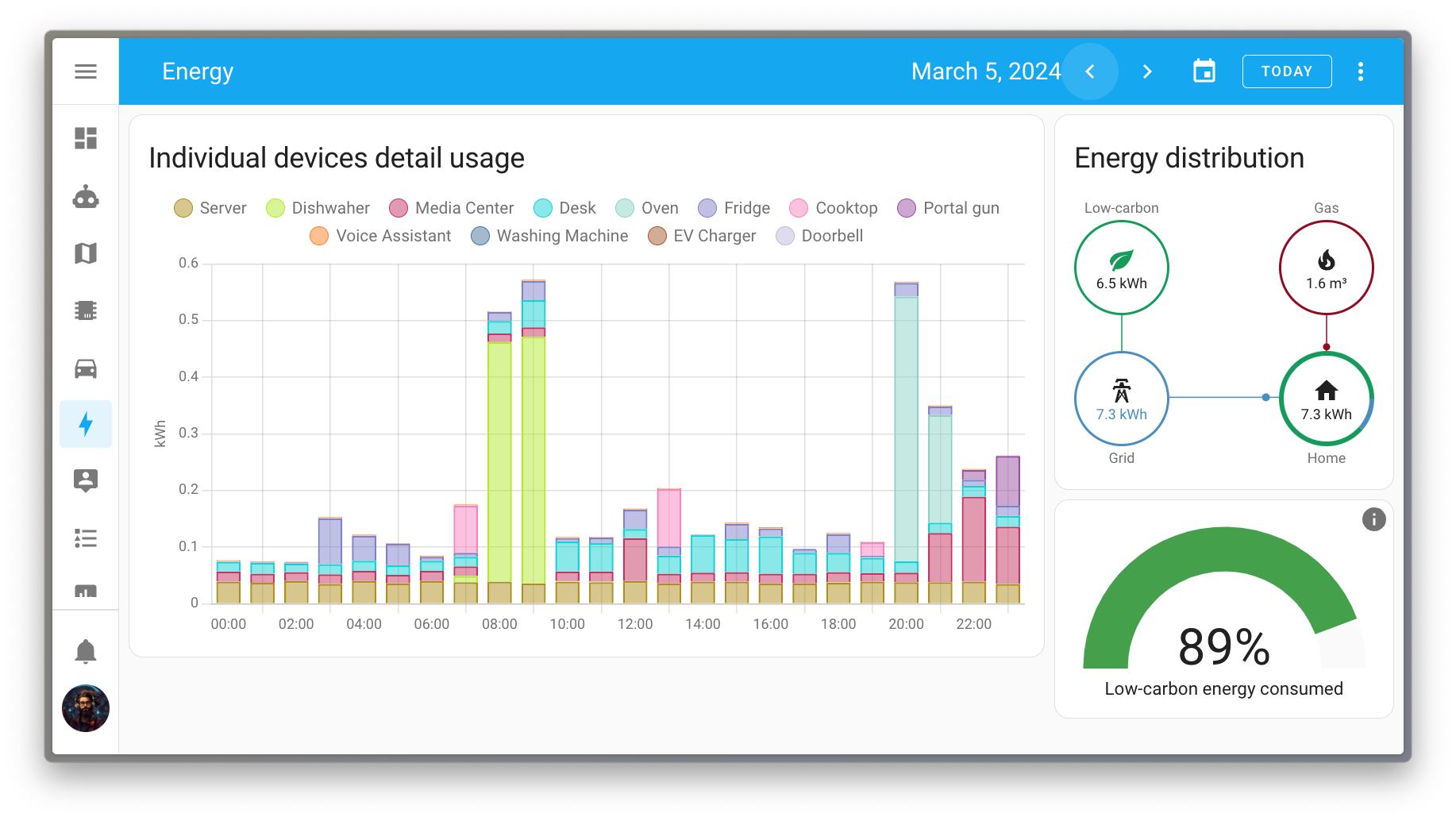
<p>If you track more than one battery in the energy dashboard, you can now give each one a capacity. The combined state of charge is then weighted by size, so a small full battery and a large empty one no longer average out to a misleading number. Batteries without a capacity set keep using the plain average, so nothing changes unless you want it to. Thanks, <a href="https://github.com/MindFreeze">@MindFreeze</a>!</p>
<h3>Search your media</h3>
<p>Browsing for the right song, photo, or film used to mean clicking through folder after folder. Now, <span class='terminology'>integrations<span class='terminology-tooltip'>Integrations connect and integrate Home Assistant with your devices, services, and more.<a class='terminology-link' href='/getting-started/concepts-terminology/#integrations'> [Learn more]</a></span></span> that provide media can offer search right in the media browser, so you type what you are looking for and jump straight to it.</p>
<p>What you can search depends on the media source. <a href="/integrations/immich">Immich</a>, for example, gained a smart search that finds photos by what is actually in them rather than by their filename, and <a href="/integrations/overseerr">Overseerr</a> lets you search for and request movies and shows without leaving Home Assistant.</p>
<p>Thanks, <a href="https://github.com/zweckj">@zweckj</a>, <a href="https://github.com/mib1185">@mib1185</a>, and <a href="https://github.com/felixschndr">@felixschndr</a>!</p>
<h3>Find your favorite cards faster</h3>
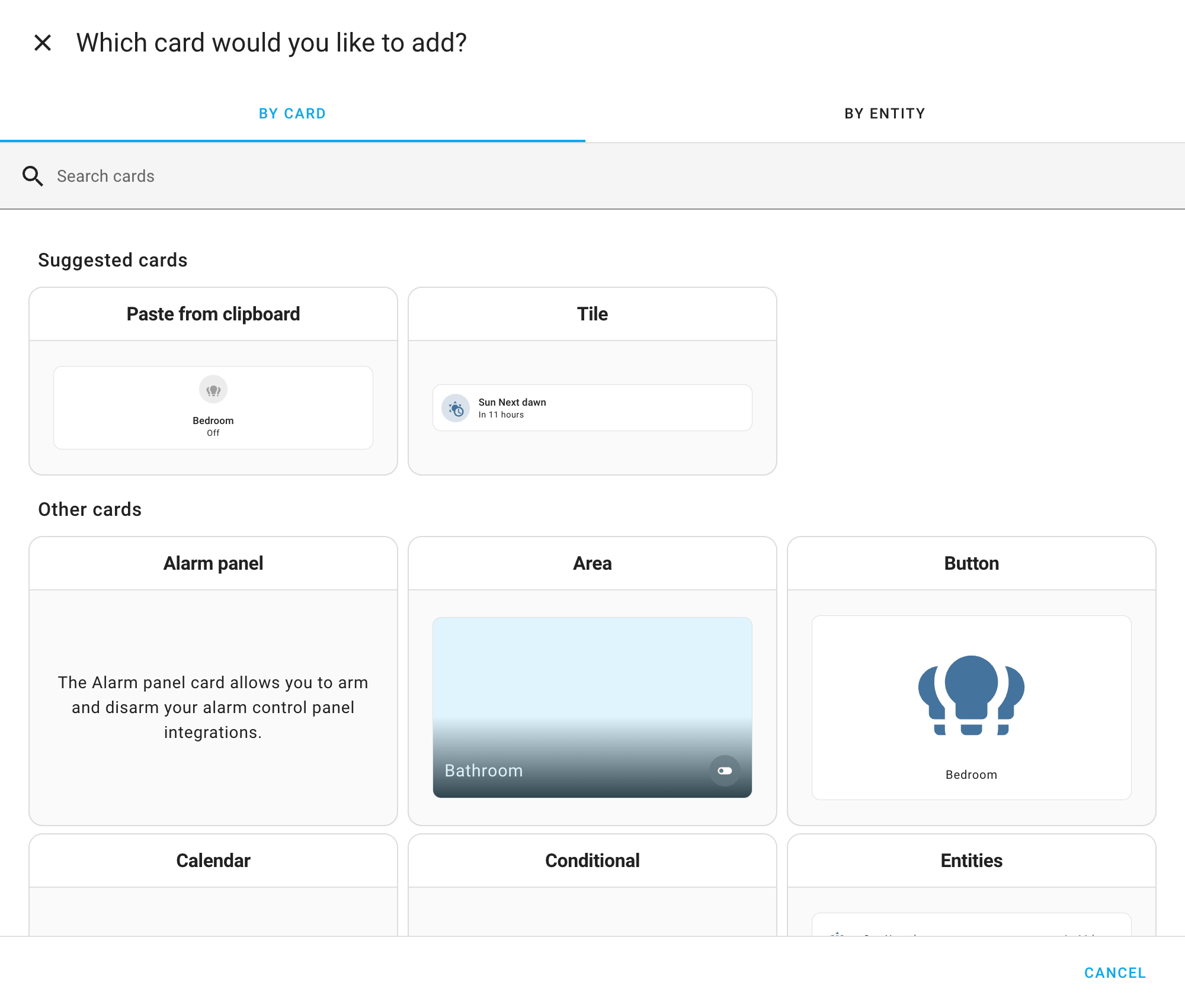
<p>Your most-used cards are now easier to find. In the card picker’s “By Card” tab, you can now mark the cards you use most as favorites using the icon in the corner of each card. Favorited cards float to the top of the section, so if you reach for the same card again and again while building similar dashboards, it’s always right there waiting for you. Tap the icon again to remove a card from your favorites.</p>
<img src='/images/blog/2026-08/favorite-cards.png' alt='Screenshot of the card picker&apos;s By Card tab, with the Tile, Area, and Entities cards marked as favorites with a star icon.' class='no-shadow' />
<p>Thanks, <a href="https://github.com/piitaya">@piitaya</a>, <a href="https://github.com/laupalombi">@laupalombi</a>, and everyone who suggested this at a Release Party!</p>
<h3>Z-Wave lock credentials, properly managed</h3>
<p>Managing who can unlock your Z-Wave lock just got a lot more capable. Powered by Z-Wave JS’s new Access Control API, the Z-Wave JS app 1.6.0 brings a heavily revised interface: every supported lock now gets a dedicated <strong>Access Control</strong> tab. For now, this lives in Z-Wave JS UI rather than in the Z-Wave panel in Home Assistant.</p>
<p class='img'>
  <img class='no-shadow' src='/images/blog/2026-08/zwave-access-control.png' alt='The new Access Control tab in Z-Wave JS UI, showing users and their credentials'>
  Users, their credentials, and a full audit trail, all in one place.
</p>
<p>Depending on what your lock supports, you can now give each user several credentials of more than one type, so the same person can have a PIN and a fingerprint, or multiple of both. New credentials can be learned on the lock itself: start the enrollment from the interface, then present the finger or type the PIN. There is also an audit log of every change, admin code management for locks that use one, and the ability to move credentials between users or delete them in bulk.</p>
<p>Update the Z-Wave JS app to 1.6.0 or later, then open Z-Wave JS UI to find the new tab. Thanks, <a href="https://github.com/AlCalzone">@AlCalzone</a>!</p>
<h3>And a few more</h3>
<p>There is even more packed into this release. Here are some of the other changes worth a mention:</p>
<ul>
<li><strong>Templates keep getting faster.</strong> Another round of <span class='terminology'>“templates”<span class='terminology-tooltip'>A template is an automation definition that can include variables for the action or data from the trigger values. This allows automations to generate dynamic actions.<a class='terminology-link' href='/docs/automation/templating/'> [Learn more]</a></span></span> performance work landed: templates with a numeric result are up to 40% faster, and templates used on dashboards can now be cached. Thanks, <a href="https://github.com/frenck">@frenck</a>!</li>
<li><strong>Template entities remember their state.</strong> Fan, <span class='terminology'>cover<span class='terminology-tooltip'>Covers are devices such as blinds, garage doors, etc that can be opened and closed and optionally set to a specific position.<a class='terminology-link' href='/integrations/cover'> [Learn more]</a></span></span>, and <span class='terminology'>device tracker<span class='terminology-tooltip'>Device trackers are used to track the presence, or location, of a device.<a class='terminology-link' href='/integrations/device_tracker'> [Learn more]</a></span></span> template entities now restore their previous state after a restart, so they pick up right where they left off. Thanks, <a href="https://github.com/Petro31">@Petro31</a>!</li>
<li><strong>Search finds more of what is connected.</strong> When you search or open a device or entity, Home Assistant now digs deeper into what is related, so scenes, scripts, groups, the people behind a person entity, and anything sharing a label or area all show up where you would expect them. It is a small change that makes it much easier to see how your setup fits together. Thanks, <a href="https://github.com/frenck">@frenck</a>!</li>
<li><strong>A reboot heads-up on Home Assistant OS.</strong> The system <span class='terminology'>update<span class='terminology-tooltip'>An update entity is an entity that indicates if an update is available for a device or service.<a class='terminology-link' href='/integrations/update'> [Learn more]</a></span></span> entity now lets you know when an update needs a reboot to finish. Thanks, <a href="https://github.com/mdegat01">@mdegat01</a>!</li>
<li><strong>A new radon device class.</strong> Sensors and numbers can now be classified as radon, so radon measurements get the right units and display. Thanks, <a href="https://github.com/abmantis">@abmantis</a>!</li>
<li><strong>Filter entities by manufacturer and model.</strong> The entity filter can now narrow entities by manufacturer, model, and model ID. Thanks, <a href="https://github.com/Skaronator">@Skaronator</a>!</li>
<li><strong>Ask Assist from quick search.</strong> You can now start an Assist command straight from quick search. Thanks, <a href="https://github.com/timmo001">@timmo001</a>!</li>
<li><strong>A date on the clock card.</strong> The clock card can now show the date alongside the time. Thanks, <a href="https://github.com/timmo001">@timmo001</a>!</li>
<li><strong>More from the Activity panel.</strong> The Activity panel gained a CSV download and a clear-and-reset action. Thanks, <a href="https://github.com/karwosts">@karwosts</a> and <a href="https://github.com/timmo001">@timmo001</a>!</li>
</ul>
<h2>Patch releases</h2>
<p>We will also release patch releases for Home Assistant 2026.8 in August. These patch releases only contain bug fixes. Our goal is to release a patch release once a week, aiming for Friday.</p>
<h3>2026.8.1 - August 7</h3>
<ul>
<li>Fixes #173399 Seerr webhook registration (<a href="https://github.com/shtefko">@shtefko</a> - <a href="https://github.com/home-assistant/core/pull/177201">#177201</a>) (<a href="/integrations/overseerr/">overseerr docs</a>)</li>
<li>Debounce Matter cover state writes to coalesce split attribute updates (<a href="https://github.com/agners">@agners</a> - <a href="https://github.com/home-assistant/core/pull/177540">#177540</a>) (<a href="/integrations/matter/">matter docs</a>)</li>
<li>Bump pydaikin to 2.18.4 (<a href="https://github.com/fredrike">@fredrike</a> - <a href="https://github.com/home-assistant/core/pull/178001">#178001</a>) (<a href="/integrations/daikin/">daikin docs</a>)</li>
<li>Adapt vicare to set via_device_id in DeviceInfo (<a href="https://github.com/emontnemery">@emontnemery</a> - <a href="https://github.com/home-assistant/core/pull/178229">#178229</a>) (<a href="/integrations/vicare/">vicare docs</a>)</li>
<li>Adapt mqtt to set via_device_id in DeviceInfo (<a href="https://github.com/emontnemery">@emontnemery</a> - <a href="https://github.com/home-assistant/core/pull/178234">#178234</a>) (<a href="/integrations/mqtt/">mqtt docs</a>)</li>
<li>bump pyenphase to 3.2.1 (<a href="https://github.com/catsmanac">@catsmanac</a> - <a href="https://github.com/home-assistant/core/pull/178273">#178273</a>) (<a href="/integrations/enphase_envoy/">enphase_envoy docs</a>)</li>
<li>Bump lyngdorf to 1.4.3 (<a href="https://github.com/fishloa">@fishloa</a> - <a href="https://github.com/home-assistant/core/pull/178323">#178323</a>) (<a href="/integrations/lyngdorf/">lyngdorf docs</a>)</li>
<li>Track shielded service call task in REST API (<a href="https://github.com/arturpragacz">@arturpragacz</a> - <a href="https://github.com/home-assistant/core/pull/178377">#178377</a>) (<a href="/integrations/api/">api docs</a>)</li>
<li>Bump aiowebostv to v0.9.1 (<a href="https://github.com/thecode">@thecode</a> - <a href="https://github.com/home-assistant/core/pull/178384">#178384</a>) (<a href="/integrations/webostv/">webostv docs</a>)</li>
<li>chore: update python-picnic-api2 to v2.0.1 (<a href="https://github.com/codesalatdev">@codesalatdev</a> - <a href="https://github.com/home-assistant/core/pull/178395">#178395</a>) (<a href="/integrations/picnic/">picnic docs</a>)</li>
<li>Bump lyngdorf to 1.4.4 (<a href="https://github.com/fishloa">@fishloa</a> - <a href="https://github.com/home-assistant/core/pull/178401">#178401</a>) (<a href="/integrations/lyngdorf/">lyngdorf docs</a>)</li>
<li>Use SmartThings cooling setpoint range for air conditioners (<a href="https://github.com/StellarSea">@StellarSea</a> - <a href="https://github.com/home-assistant/core/pull/178430">#178430</a>) (<a href="/integrations/smartthings/">smartthings docs</a>)</li>
<li>Bump solaredge-web to 0.3.1 (<a href="https://github.com/tronikos">@tronikos</a> - <a href="https://github.com/home-assistant/core/pull/178437">#178437</a>) (<a href="/integrations/solaredge/">solaredge docs</a>)</li>
<li>Bump pytrydan to 1.0.5 (<a href="https://github.com/dgomes">@dgomes</a> - <a href="https://github.com/home-assistant/core/pull/178447">#178447</a>) (<a href="/integrations/v2c/">v2c docs</a>)</li>
<li>mikrotik: Don’t reuse a string from Vodafone Station (<a href="https://github.com/reedy">@reedy</a> - <a href="https://github.com/home-assistant/core/pull/178455">#178455</a>) (<a href="/integrations/mikrotik/">mikrotik docs</a>)</li>
<li>Update frontend to 20260729.6 (<a href="https://github.com/bramkragten">@bramkragten</a> - <a href="https://github.com/home-assistant/core/pull/178470">#178470</a>) (<a href="/integrations/frontend/">frontend docs</a>)</li>
</ul>
<!-- TODO after release: append one dated block per patch release (for example, "### 2026.8.1 - August 8"), each a list of PRs with author and number. Copy the format from the previous release. -->
<h2>Need help? Join the community</h2>
<p>Home Assistant has a great community of users who are all more than willing to help each other out. So, join us!</p>
<p>Our very active <a href="/join-chat">Discord chat server</a> is an excellent place to be, and don’t forget to join our amazing <a href="https://community.home-assistant.io/">forums</a>.</p>
<p>Found a bug or issue? Please report it in our <a href="https://github.com/home-assistant/core/issues">issue tracker</a> to get it fixed! Or check <a href="/help">our help page</a> for guidance on more places you can go.</p>
<p>Are you more into email? <a href="/newsletter">Sign up for the Open Home Foundation Newsletter</a> to get the latest news about features, things happening in our community, and other projects that support the Open Home straight into your inbox.</p>
<p>If you would like to wear your support: the Open Home Foundation store just added new T-shirts featuring ESPHome, Music Assistant, and a fresh Home Assistant design, all in classic black (or Dark Mode, if you prefer!). They are versatile, built to last, and best of all, every purchase helps fund the foundation’s work. <a href="https://store.openhomefoundation.org/shop/t-shirts">Grab yours from the store</a>.</p>
<p><a href='https://store.openhomefoundation.org/shop/t-shirts'><img src='/images/blog/2026-08/Black-shirts-newsletter.png' alt='Three black T-shirts from the Open Home Foundation store, featuring the ESPHome, Music Assistant, and Home Assistant designs.' class='no-shadow' /></a></p>
<h2>Backward-incompatible changes</h2>
<p>We do our best to avoid making changes to existing functionality that might unexpectedly impact your Home Assistant installation. Unfortunately, sometimes it is inevitable.</p>
<p>We always make sure to document these changes to make the transition as easy as possible for you. This release has the following backward-incompatible changes:</p>
<div class="details-block">
  <details class='details-block-item'>
    <summary class='details-block-title'>
      <span>AirNow</span>
      <div class='details-block-arrow'>
      <svg class="down" width="24" height="24" viewBox="0 0 24 24"><path d="M7.41,8.58L12,13.17L16.59,8.58L18,10L12,16L6,10L7.41,8.58Z" /></svg>
      <svg class="up" width="24" height="24" viewBox="0 0 24 24"><path d="M7.41,15.41L12,10.83L16.59,15.41L18,14L12,8L6,14L7.41,15.41Z" /></svg>
      </div>
    </summary>
    <div class='details-block-content' id="content_0">
<p>The station radius option has been removed. The 2026 AirNow API no longer uses a distance parameter, so the radius had no effect on which reporting station was used. Existing entries are updated automatically, and any radius you had set is discarded. No action is needed.</p>
<p>(<a href="https://github.com/derekcentrico">@derekcentrico</a> - <a href="https://github.com/home-assistant/core/pull/176740">#176740</a>) (<a href="/integrations/airnow/">AirNow documentation</a>)</p>
</div>
  </details>
</div>
<div class="details-block">
  <details class='details-block-item'>
    <summary class='details-block-title'>
      <span>Gardena Bluetooth</span>
      <div class='details-block-arrow'>
      <svg class="down" width="24" height="24" viewBox="0 0 24 24"><path d="M7.41,8.58L12,13.17L16.59,8.58L18,10L12,16L6,10L7.41,8.58Z" /></svg>
      <svg class="up" width="24" height="24" viewBox="0 0 24 24"><path d="M7.41,15.41L12,10.83L16.59,15.41L18,14L12,8L6,14L7.41,15.41Z" /></svg>
      </div>
    </summary>
    <div class='details-block-content' id="content_1">
<p>The valve’s <code>activation_reason</code> sensor now reports a fixed set of values instead of free-form text. If you have <span class='terminology'>automations<span class='terminology-tooltip'>Automations in Home Assistant allow you to automatically respond to things that happen in and around your home.<a class='terminology-link' href='/docs/automation/'> [Learn more]</a></span></span>, <span class='terminology'>scripts<span class='terminology-tooltip'>Scripts are components that allow you to specify a sequence of actions to be executed by Home Assistant when turned on.<a class='terminology-link' href='/docs/scripts/'> [Learn more]</a></span></span>, or <span class='terminology'>“templates”<span class='terminology-tooltip'>A template is an automation definition that can include variables for the action or data from the trigger values. This allows automations to generate dynamic actions.<a class='terminology-link' href='/docs/automation/templating/'> [Learn more]</a></span></span> that match on the old text values, update them to match the new ones.</p>
<p>(<a href="https://github.com/elupus">@elupus</a> - <a href="https://github.com/home-assistant/core/pull/177187">#177187</a>)</p>
</div>
  </details>
</div>
<div class="details-block">
  <details class='details-block-item'>
    <summary class='details-block-title'>
      <span>Edifier Infrared</span>
      <div class='details-block-arrow'>
      <svg class="down" width="24" height="24" viewBox="0 0 24 24"><path d="M7.41,8.58L12,13.17L16.59,8.58L18,10L12,16L6,10L7.41,8.58Z" /></svg>
      <svg class="up" width="24" height="24" viewBox="0 0 24 24"><path d="M7.41,15.41L12,10.83L16.59,15.41L18,14L12,8L6,14L7.41,15.41Z" /></svg>
      </div>
    </summary>
    <div class='details-block-content' id="content_2">
<p>If you set up the Edifier Infrared integration for the R2000DB or R2730DB speakers, some buttons were mapped to the wrong infrared codes (on the R2730DB, power and mute were swapped). The mappings are now corrected and migrated automatically. If you built <span class='terminology'>automations<span class='terminology-tooltip'>Automations in Home Assistant allow you to automatically respond to things that happen in and around your home.<a class='terminology-link' href='/docs/automation/'> [Learn more]</a></span></span> or <span class='terminology'>scripts<span class='terminology-tooltip'>Scripts are components that allow you to specify a sequence of actions to be executed by Home Assistant when turned on.<a class='terminology-link' href='/docs/scripts/'> [Learn more]</a></span></span> around the old, incorrect buttons, update them to match.</p>
<p>(<a href="https://github.com/abmantis">@abmantis</a> - <a href="https://github.com/home-assistant/core/pull/177472">#177472</a>) (<a href="/integrations/edifier_infrared/">Edifier Infrared documentation</a>)</p>
</div>
  </details>
</div>
<div class="details-block">
  <details class='details-block-item'>
    <summary class='details-block-title'>
      <span>Ohme</span>
      <div class='details-block-arrow'>
      <svg class="down" width="24" height="24" viewBox="0 0 24 24"><path d="M7.41,8.58L12,13.17L16.59,8.58L18,10L12,16L6,10L7.41,8.58Z" /></svg>
      <svg class="up" width="24" height="24" viewBox="0 0 24 24"><path d="M7.41,15.41L12,10.83L16.59,15.41L18,14L12,8L6,14L7.41,15.41Z" /></svg>
      </div>
    </summary>
    <div class='details-block-content' id="content_3">
<p>The Ohme energy sensor has been removed. It reported an estimate of the energy stored in the car’s battery rather than the energy delivered by the charger, which caused confusing jumps in the energy dashboard, and the vendor’s API no longer provides a useful value.</p>
<p>If you tracked this sensor, use an <a href="/integrations/integration/">Integration - Riemann sum</a> <span class='terminology'>helper<span class='terminology-tooltip'>A helper is a virtual entity you create inside Home Assistant. It is not backed by a physical device. Helpers store values, track state, or do calculations that your automations and dashboards need.<a class='terminology-link' href='/integrations/#helper'> [Learn more]</a></span></span> on a power sensor to estimate the energy instead.</p>
<p>(<a href="https://github.com/dan-r">@dan-r</a> - <a href="https://github.com/home-assistant/core/pull/174664">#174664</a>) (<a href="/integrations/ohme/">Ohme documentation</a>)</p>
</div>
  </details>
</div>
<div class="details-block">
  <details class='details-block-item'>
    <summary class='details-block-title'>
      <span>Paperless-ngx</span>
      <div class='details-block-arrow'>
      <svg class="down" width="24" height="24" viewBox="0 0 24 24"><path d="M7.41,8.58L12,13.17L16.59,8.58L18,10L12,16L6,10L7.41,8.58Z" /></svg>
      <svg class="up" width="24" height="24" viewBox="0 0 24 24"><path d="M7.41,15.41L12,10.83L16.59,15.41L18,14L12,8L6,14L7.41,15.41Z" /></svg>
      </div>
    </summary>
    <div class='details-block-content' id="content_4">
<p>Paperless-ngx now requires a newer version of your Paperless-ngx server. The minimum supported server version is raised to 2.19, which also restores compatibility with Paperless-ngx 3.0. If your Paperless-ngx server is on version 2.18 or older, update it before you update Home Assistant.</p>
<p>(<a href="https://github.com/IngmarStein">@IngmarStein</a> - <a href="https://github.com/home-assistant/core/pull/176889">#176889</a>) (<a href="/integrations/paperless_ngx/">Paperless-ngx documentation</a>)</p>
</div>
  </details>
</div>
<div class="details-block">
  <details class='details-block-item'>
    <summary class='details-block-title'>
      <span>Robot vacuums</span>
      <div class='details-block-arrow'>
      <svg class="down" width="24" height="24" viewBox="0 0 24 24"><path d="M7.41,8.58L12,13.17L16.59,8.58L18,10L12,16L6,10L7.41,8.58Z" /></svg>
      <svg class="up" width="24" height="24" viewBox="0 0 24 24"><path d="M7.41,15.41L12,10.83L16.59,15.41L18,14L12,8L6,14L7.41,15.41Z" /></svg>
      </div>
    </summary>
    <div class='details-block-content' id="content_5">
<p>The deprecated <code>battery_level</code> property has been removed from the vacuum <span class='terminology'>entities<span class='terminology-tooltip'>An entity represents a sensor, actor, or function in Home Assistant. Entities are used to monitor physical properties or to control other entities. An entity is usually part of a device or a service.<a class='terminology-link' href='/docs/configuration/entities_domains/'> [Learn more]</a></span></span> of several integrations. If you use a robot vacuum’s battery level in an <span class='terminology'>automation<span class='terminology-tooltip'>Automations in Home Assistant allow you to automatically respond to things that happen in and around your home.<a class='terminology-link' href='/docs/automation/'> [Learn more]</a></span></span>, <span class='terminology'>script<span class='terminology-tooltip'>Scripts are components that allow you to specify a sequence of actions to be executed by Home Assistant when turned on.<a class='terminology-link' href='/docs/scripts/'> [Learn more]</a></span></span>, or on a dashboard, use the vacuum’s battery sensor instead.</p>
<p>This affects the following integrations:</p>
<ul>
<li><a href="/integrations/lg_thinq/">LG ThinQ</a></li>
<li><a href="/integrations/neato/">Neato</a></li>
<li><a href="/integrations/romy/">Romy</a></li>
<li><a href="/integrations/sharkiq/">Shark IQ</a></li>
<li><a href="/integrations/switchbot_cloud/">SwitchBot Cloud</a></li>
<li><a href="/integrations/template/">Template</a></li>
<li><a href="/integrations/tplink/">TP-Link</a></li>
<li><a href="/integrations/xiaomi_miio/">Xiaomi Miio</a></li>
</ul>
<p>(<a href="https://github.com/gjohansson-ST">@gjohansson-ST</a> - <a href="https://github.com/home-assistant/core/pull/175681">#175681</a>, <a href="https://github.com/home-assistant/core/pull/175684">#175684</a>, <a href="https://github.com/home-assistant/core/pull/175685">#175685</a>, <a href="https://github.com/home-assistant/core/pull/175686">#175686</a>, <a href="https://github.com/home-assistant/core/pull/175687">#175687</a>, <a href="https://github.com/home-assistant/core/pull/175688">#175688</a>, <a href="https://github.com/home-assistant/core/pull/175691">#175691</a>, <a href="https://github.com/home-assistant/core/pull/175764">#175764</a>)</p>
</div>
  </details>
</div>
<div class="details-block">
  <details class='details-block-item'>
    <summary class='details-block-title'>
      <span>ScreenLogic</span>
      <div class='details-block-arrow'>
      <svg class="down" width="24" height="24" viewBox="0 0 24 24"><path d="M7.41,8.58L12,13.17L16.59,8.58L18,10L12,16L6,10L7.41,8.58Z" /></svg>
      <svg class="up" width="24" height="24" viewBox="0 0 24 24"><path d="M7.41,15.41L12,10.83L16.59,15.41L18,14L12,8L6,14L7.41,15.41Z" /></svg>
      </div>
    </summary>
    <div class='details-block-content' id="content_6">
<p>The option to configure the <span class='terminology'>polling<span class='terminology-tooltip'>Data polling is the process of querying a device or service at regular intervals to check for updates or retrieve data. By defining a custom polling interval, you can control how frequently your system checks for new data, which can help optimize performance and reduce unnecessary network traffic.<a class='terminology-link' href='/common-tasks/general/#defining-a-custom-polling-interval'> [Learn more]</a></span></span> interval has been removed from ScreenLogic. Home Assistant now polls the integration at a fixed interval. If you need a different update frequency, you can <a href="/common-tasks/general/#defining-a-custom-polling-interval">set your own polling interval</a> or trigger an update with the <code>homeassistant.update_entity</code> action.</p>
<p>(<a href="https://github.com/Pinball3D">@Pinball3D</a> - <a href="https://github.com/home-assistant/core/pull/175576">#175576</a>) (<a href="/integrations/screenlogic/">ScreenLogic documentation</a>)</p>
</div>
  </details>
</div>
<div class="details-block">
  <details class='details-block-item'>
    <summary class='details-block-title'>
      <span>UniFi Protect</span>
      <div class='details-block-arrow'>
      <svg class="down" width="24" height="24" viewBox="0 0 24 24"><path d="M7.41,8.58L12,13.17L16.59,8.58L18,10L12,16L6,10L7.41,8.58Z" /></svg>
      <svg class="up" width="24" height="24" viewBox="0 0 24 24"><path d="M7.41,15.41L12,10.83L16.59,15.41L18,14L12,8L6,14L7.41,15.41Z" /></svg>
      </div>
    </summary>
    <div class='details-block-content' id="content_7">
<p>Support for UniFi Protect AI Port devices has been removed. These devices only ever exposed diagnostic sensors, all disabled by default, and are not part of the UniFi Protect public API the integration is moving to. The AI Port device and its sensors are removed automatically when you update. You can still configure the AI Port directly in UniFi Protect.</p>
<p>(<a href="https://github.com/RaHehl">@RaHehl</a> - <a href="https://github.com/home-assistant/core/pull/174378">#174378</a>) (<a href="/integrations/unifiprotect/">UniFi Protect documentation</a>)</p>
<p>Detection scores are no longer available. The detection binary sensors (motion, person, vehicle, animal, and the smart-audio alarm sensors) now take their state from the UniFi Protect public API, which carries no per-event score, so their <code>event_score</code> attribute is gone and automations that filter on it need another condition. The event id and the detected types moved to the new <strong>Motion detection</strong>, <strong>Smart detection</strong>, and <strong>Sound detection</strong> event entities.</p>
<p>(<a href="https://github.com/RaHehl">@RaHehl</a> - <a href="https://github.com/home-assistant/core/pull/174948">#174948</a>) (<a href="/integrations/unifiprotect/">UniFi Protect documentation</a>)</p>
<p>UniFi Protect 7.1 or newer is now required. On an older console the integration reports that the version is too old instead of setting up. Update UniFi Protect to 7.1 or newer to keep using it.</p>
<p>(<a href="https://github.com/RaHehl">@RaHehl</a> - <a href="https://github.com/home-assistant/core/pull/177620">#177620</a>) (<a href="/integrations/unifiprotect/">UniFi Protect documentation</a>)</p>
</div>
  </details>
</div>
<div class="details-block">
  <details class='details-block-item'>
    <summary class='details-block-title'>
      <span>Volvo On Call</span>
      <div class='details-block-arrow'>
      <svg class="down" width="24" height="24" viewBox="0 0 24 24"><path d="M7.41,8.58L12,13.17L16.59,8.58L18,10L12,16L6,10L7.41,8.58Z" /></svg>
      <svg class="up" width="24" height="24" viewBox="0 0 24 24"><path d="M7.41,15.41L12,10.83L16.59,15.41L18,14L12,8L6,14L7.41,15.41Z" /></svg>
      </div>
    </summary>
    <div class='details-block-content' id="content_8">
<p>The Volvo On Call integration has been removed. If you have a supported Volvo, set up the newer <a href="/integrations/volvo/">Volvo</a> integration instead.</p>
<p>(<a href="https://github.com/gjohansson-ST">@gjohansson-ST</a> - <a href="https://github.com/home-assistant/core/pull/175677">#175677</a>)</p>
</div>
  </details>
</div>
<p>If you are a custom integration developer and want to learn about changes and new features available for your integration: Be sure to follow our <a href="https://developers.home-assistant.io/blog/">developer blog</a>. The following changes are the most notable for this release:</p>
<ul>
<li><a href="https://developers.home-assistant.io/blog/2026/07/21/device-registry-single-config-entry">Devices are restricted to a single config entry and at most one subentry</a></li>
<li><a href="https://developers.home-assistant.io/blog/2026/07/20/ai-policy">Introducing the Open Home Foundation AI Policy</a></li>
<li><a href="https://developers.home-assistant.io/blog/2026/07/03/media-source-search">Media sources can now be searched</a></li>
<li><a href="https://developers.home-assistant.io/blog/2026/07/05/modernizing-modbus">Modernizing Modbus in Home Assistant</a></li>
<li><a href="https://developers.home-assistant.io/blog/2026/07/22/button-standard-event-types">Standard event types for button event entities</a></li>
</ul>
<h2>All changes</h2>
<p>Of course, there is a lot more in this release. You can find a list of all changes made here: <a href="/changelogs/core-2026.8">Full changelog for Home Assistant Core 2026.8</a>.</p>
]]></content>
  </entry>
  
  <entry>
    <title type="html"><![CDATA[A big win for Android interoperability]]></title>
    <link href="https://www.openhomefoundation.org/blog/a-big-win-for-android-interoperability/"/>
    <updated>2026-07-31T00:00:01+00:00</updated>
    <id>https://www.home-assistant.io/blog/2026/07/31/a-big-win-for-android-interoperability</id>
    <content type="html"><![CDATA[<p>Something big just happened. As the Open Home Foundation’s Android developer for Home Assistant, I was invited by the European Commission to consult on Android interoperability. On July 16, 2026, the Commission adopted a decision requiring Alphabet to open up eleven Android features — including always-on wake word detection, ambient sensor access, and screen automation — to all assistants, on equal terms.<!--more--></p>
]]></content>
  </entry>
  
  <entry>
    <title type="html"><![CDATA[Making our web analytics open source with Plausible]]></title>
    <link href="https://www.openhomefoundation.org/blog/making-our-web-analytics-open-source-with-plausible/"/>
    <updated>2026-07-29T00:00:01+00:00</updated>
    <id>https://www.home-assistant.io/blog/2026/07/29/making-our-web-analytics-open-source-with-plausible</id>
    <content type="html"><![CDATA[<p>The Open Home Foundation fights for privacy, choice, and sustainability. These principles are at the heart of everything we do, including how we handle website analytics. Our position is clear: we reject tools that track individuals across the web to monetize their data. Instead, we want aggregated, anonymized analytics that show how our websites are performing overall — without identifying who our visitors are, or compromising their privacy.<!--more--></p>
]]></content>
  </entry>
  
  <entry>
    <title type="html"><![CDATA[FireAvert joins Works with Home Assistant]]></title>
    <link href="https://www.home-assistant.io/blog/2026/07/28/fireavert-joins-works-with-home-assistant/"/>
    <updated>2026-07-28T00:00:01+00:00</updated>
    <id>https://www.home-assistant.io/blog/2026/07/28/fireavert-joins-works-with-home-assistant</id>
    <content type="html"><![CDATA[<img src="/images/blog/2026-07-fireavert/art.webp" alt="FireAvert joins Works with Home Assistant" style="border: 0;box-shadow: none;">
<p>Sound the alarm, because Works with Home Assistant just welcomed our newest partner to the program: <a href="https://fireavert.com/" target="_blank" rel="noopener">FireAvert</a>! 🎉 Specialists in fire safety, FireAvert are on a mission to keep you and your home out of harm’s way. They bring the very first gas and electric appliance shutoff devices to the program, and with them, a whole lot of peace of mind.<!--more--></p>
<h2>Where there’s smoke, there’s FireAvert</h2>
<p>As ex-firefighter Peter Thorpe knows too well, a moment of forgetfulness is all it takes for a kitchen to end up in flames. And after close to twenty years of service witnessing the same devastating scenario repeat itself, he knew something had to be done. So he founded FireAvert, launching with the Auto Stove Shutoff for electric stovetops.</p>
<p>The device was already gaining momentum before <a href="https://www.youtube.com/watch?v=-g9Xt_IYACU" target="_blank" rel="noopener">FireAvert’s pitch</a> caught the attention of <a href="https://www.sharktankblog.com/business/fireavert/" target="_blank" rel="noopener">Shark Tank</a>, and for good reason. They say there’s no smoke without fire, but years on the job taught Thorpe that in the kitchen, that isn’t always the case. Smoke can build well before a flame takes hold – and that’s the window FireAvert’s shutoff works in. By listening for your standard smoke alarm, the device automatically shuts off your stove when the alarm sounds – cutting the heat at the source before a fire can catch.</p>
<div class="alert">
<p>“Excited to see FireAvert join the Home Assistant community. Smart homes shouldn’t just be convenient – they should help keep families safer too. This is exactly the kind of innovation the ecosystem needs.”</p>
<em style="text-align: right; display: block;">- Chasen Tolbert, FireAvert</em>
</div>
<p>Since their launch, FireAvert’s range has expanded to include gas stove and small appliance shutoffs (think microwaves, air fryers, hot plates), so whatever’s most likely to be left on in your kitchen, there’s a shutoff for it. And with Z-Wave units now among them, it’s easier than ever to bring that protection straight into your Home Assistant setup.</p>
<h2>On the same frequency</h2>
<p>The FireAvert shutoffs joining the program run on <a href="/integrations/zwave_js/">Z-Wave</a>. For anyone unfamiliar, here’s a quick rundown: Z-Wave is an open smart home protocol that allows your devices to talk to each other regardless of the brand, without locking you into one ecosystem. It’s also a mesh network, where each device relays signals for the others to extend coverage across your home, reinforcing your connection.</p>
<p>While Z-Wave wasn’t a part of FireAvert’s initial product line, since then we’ve been pleased to see the company prioritize local control by producing shutoff devices with the open standard, and certifying them with the <a href="https://z-wavealliance.org/" target="_blank" rel="noopener">Z-Wave Alliance</a>. We first met the FireAvert team at a San Diego alliance meeting back in 2025, and it was clear from the get-go that we were on the same wavelength: driven to build open, interoperable smart home tech that doesn’t require a cloud to keep your home protected.</p>
<p class='img'><img src="/images/blog/2026-07-fireavert/image2.webp" alt="FireAvert automatic shutoffs for electric and gas stoves">
FireAvert automatic shutoffs for electric and gas stoves
</p>
<h2>Safe as houses</h2>
<p>It’s important to note that FireAvert’s shutoffs don’t rely purely on Z-Wave to do their job, and they’ll keep protecting your kitchen even if your network drops out entirely. That kind of safety net is reassuring for anyone, but even more so for those with caring responsibilities or aging relatives to worry about.</p>
<p>Likewise, FireAvert’s shutoffs don’t depend on a battery to function: just plug your stove or small appliance into the shutoff device, and the device into your wall socket – and you’re all set. As long as your appliance has power, the shutoff is on duty. And FireAvert back up that dependability where it counts: all four devices come with a lifetime warranty, and are independently tested to CSA and UL standards – confirming the hardware meets strict, recognized electrical safety requirements.</p>
<h2>Devices</h2>
<p>Just like every device certified by the Works with Home Assistant program, FireAvert’s shutoffs have also been rigorously tested by our in-house team to ensure they are up to code with our core requirements of local control and privacy.</p>
<p>Check out the devices that made the grade:</p>
<ul>
<li><a href="https://fireavert.com/products/z-wave-auto-stove-shutoff?variant=48680090468603" target="_blank" rel="noopener">FireAvert Electric 240V 3 Prong Auto Stove Shutoff</a></li>
<li><a href="https://fireavert.com/products/z-wave-auto-stove-shutoff?variant=48680090435835" target="_blank" rel="noopener">FireAvert Electric 240V 4 Prong Auto Stove Shutoff</a></li>
<li><a href="https://fireavert.com/products/z-wave-auto-stove-shutoff?variant=48680330756347" target="_blank" rel="noopener">FireAvert 120V Auto Appliance Shutoff</a></li>
<li><a href="https://fireavert.com/products/z-wave-auto-stove-shutoff?variant=48680090403067" target="_blank" rel="noopener">FireAvert Gas Shutoff</a></li>
</ul>
<p>But it’s not just about adding devices to a list – our community is the engine of everything we do, and by joining it FireAvert commits to providing long-term support to make certain their devices continue to work smoothly within your setup.</p>
<h2>Building the brigade</h2>
<p>While there are already certified water shutoff devices in the program, stove shutoffs are a first, bringing a brand-new category of safety tech to Home Assistant users. It’s exactly the kind of innovation we love to see: more ways for our community to manage their smart homes, on their own terms.</p>
<p>That expansion is core to what the <a href="https://www.openhomefoundation.org/" target="_blank" rel="noopener">Open Home Foundation</a> – which operates the Works with Home Assistant program – is about: keeping smart homes local, private, and safe. If you’d like to see more safety-focused partners like FireAvert join the program, consider subscribing to <a href="/cloud/">Home Assistant Cloud</a> or buying official hardware like the <a href="/connect/zwa-2/">Home Assistant Connect ZWA-2</a>. Every bit of support helps us expand and maintain the program for all ⚒️.</p>
<h2>Geared up and ready to respond</h2>
<p>Forged to protect the community, FireAvert are a natural match for ours. We’re thrilled to have them join the ranks, and excited for Home Assistant users to be able to add another line of defense for their smart homes, and the people and pets who live in them. Head to our <a href="https://works-with.home-assistant.io/certified-products/" target="_blank" rel="noopener">certified device list</a> to discover the full range of devices to safeguard your home.</p>
<h2>FAQs</h2>
<p>Q: If I have a device that is not listed under Works with Home Assistant does this mean it’s not supported?</p>
<p>A: No! It just means that it hasn’t gone through a testing schedule with our team or doesn’t fit the requirements of the program. It might function perfectly well but be added to the testing schedule later down the road, or it might work under a different connectivity type that we don’t currently test under the program.</p>
<p>Q: OK, so what’s the point of the Works with program?</p>
<p>A: It highlights the devices we know work well with Home Assistant and the brands that make a long-term commitment to keeping support for these devices going. The certification agreement specifies that the devices must have the functionality you would expect within Home Assistant, operate locally without the need for the cloud, and that they will continue to do so long term.</p>
<p>Q: How were these devices tested?</p>
<p>A: All devices in this list were tested using a standard Home Assistant Green Hub with the Home Assistant Connect ZWA-2 as the Z-Wave adapter and with our Z-Wave integration. If you have another hub/adapter/integration that’s not a problem but we test against these as they are the most effective way for our team to certify within our ecosystem.</p>
<p>Q: Will you be adding more FireAvert devices to the program?</p>
<p>A: Why not! We’re thrilled to foster a close relationship with the team at FireAvert to work together on any upcoming releases or add in further products that are not yet listed here.</p>
]]></content>
  </entry>
  
  <entry>
    <title type="html"><![CDATA[Building the device database together: Public preview now live]]></title>
    <link href="https://www.openhomefoundation.org/blog/building-the-device-database-together/"/>
    <updated>2026-07-23T00:00:01+00:00</updated>
    <id>https://www.home-assistant.io/blog/2026/07/23/building-the-device-database-together</id>
    <content type="html"><![CDATA[<p>Ever since we introduced the idea of a community-powered device database at State of the Open Home 2025, our goal has been clear: create a “Wikipedia of smart home devices” based on real-world usage. In February, we took the first step by inviting Home Assistant users to voluntarily share anonymized device data to help us build it.<!--more--></p>
]]></content>
  </entry>
  
  <entry>
    <title type="html"><![CDATA[IoTorero joins Works with Home Assistant]]></title>
    <link href="https://www.home-assistant.io/blog/2026/07/09/iotorero-joins-works-with-home-assistant/"/>
    <updated>2026-07-09T00:00:01+00:00</updated>
    <id>https://www.home-assistant.io/blog/2026/07/09/iotorero-joins-works-with-home-assistant</id>
    <content type="html"><![CDATA[<img src="/images/blog/2026-07-iotorero/art.webp" alt="IoTorero joins Works with Home Assistant" style="border: 0;box-shadow: none;">
<p>The Works with Home Assistant program powers up this month as we welcome our new partner, <a href="https://www.athom.tech/" target="_blank" rel="noopener noreferrer">IoTorero</a>! 🎉 Experts in pre-flashed smart home hardware, IoTorero bring the very first ESPHome-ready smart plugs and relays to the program (and that’s not all).<!--more--></p>
<h2>IoTorero enters the ring</h2>
<p>If you’ve spent any time browsing pre-flashed smart home tech online, there’s a good chance you’ve come across IoTorero. And if you haven’t, let us introduce you! Founded in 2020, the company (formerly Athom Technology) was tinkering with <a href="https://esphome.io/" target="_blank" rel="noopener noreferrer">ESPHome</a> right out of the gate. Their new name is a nod to the Internet of Things (IoT), but unlike standard IoT gadgets that stop working if your internet drops or a company closes its servers, IoTorero champion open source firmware.</p>
<p>Other smart devices run manufacturer-written software, which is tuned to work well with Home Assistant for certification to the program. IoTorero go a step further to make sure their tech is accessible for all: all seven of their certified devices are pre-flashed with ESPHome, meaning there’s no installation required – the devices will integrate into your Home Assistant setup straight out of the box. And because their devices are genuinely open, you can always tweak and customize them if you want to.</p>
<div class="alert">
<p>“Since inception in 2020, IoTorero (Athom Technology) has been dedicated to the research, development, and manufacturing of open source smart home hardware products. We provide Home Assistant users with high-quality devices pre-flashed with ESPHome firmware. By joining the Works with Home Assistant program, we ensure that customers can select and purchase our products with complete confidence.”</p>
<em style="text-align: right; display: block;">- Aiden Tang, CTO and Co-Founder, IoTorero</em>
</div>
<p>That same spirit of openness carried over to last year’s Community Day, where IoTorero donated a stack of samples for attendees to try – a gesture we loved to see, and one that speaks to how seriously they take supporting our community 💪. It shows up in their approach to code, too: IoTorero maintain a public <a href="https://github.com/athom-tech/esp32-configs" target="_blank" rel="noopener noreferrer">GitHub repository</a> of configs for all their devices, free for anyone to learn from or build on.</p>
<p>Speaking of community, the development of projects like ESPHome from the <a href="https://www.openhomefoundation.org/" target="_blank" rel="noopener noreferrer">Open Home Foundation</a> is supported by Home Assistant Cloud subscribers and anyone who purchases Home Assistant hardware. While all of IoTorero’s devices work locally, if you’re interested in remote access – for example to check your energy use or open the garage door from a distance – check out <a href="/cloud/">Home Assistant Cloud</a>.</p>
<h2>Right on (Io)Time</h2>
<p>For anyone new to it, ESPHome is a powerful platform that allows smart home devices to operate completely locally via the chip inside, with no cloud required. Because IoTorero’s devices arrive pre-flashed, you get all that local power without having to learn how to build or compile firmware yourself. And it <em>just</em> got a major upgrade. The ESPHome team recently released a <a href="https://esphome.io/blog/2026/07/02/unbox-your-creativity-with-esphome-2026-6-0/" target="_blank" rel="noopener noreferrer">new UI and Device Builder</a>, swapping the old code editor-inspired dashboard for a visual workspace that can suggest components and layouts as you build.</p>
<p>Since IoTorero’s devices arrive pre-flashed, there’s nothing to set up in advance: just connect them, and they’ll show up in Home Assistant like any other device, ready to control and automate from your normal dashboard. The ESPHome Device Builder is there if you ever want to go further: it allows you to do things like renaming a device or tweaking its config, without needing to touch any code… unless you want to. Whether you’re new to the arena or a seasoned pro, it means a lot less guesswork (and a lot more fun!).</p>
<h2>Devices</h2>
<p>Every device that earns Works with Home Assistant certification goes through our in-house testing process, checked against our core requirements of local control, privacy, and long-term support – and IoTorero meets that bar across the board. Their devices also carry the <a href="https://devices.esphome.io/made-for-esphome/" target="_blank" rel="noopener noreferrer">Made for ESPHome</a> certification, a separate badging program and prerequisite for any ESPHome devices joining Works with Home Assistant.</p>
<p>Here’s the full list of IoTorero’s certified devices:</p>
<ul>
<li><a href="https://www.athom.tech/blank-1/esp32-c3-eu-plug-for-esphome" target="_blank" rel="noopener">IoTorero ESP32-C3 EU Plug</a></li>
<li><a href="https://www.athom.tech/blank-1/esp32-c3-us-plug-for-esphome" target="_blank" rel="noopener">IoTorero ESP32-C3 US Plug</a></li>
<li><a href="https://www.athom.tech/blank-1/esp32-c3-uk-plug-for-esphome" target="_blank" rel="noopener">IoTorero ESP32-C3 UK Plug</a></li>
<li><a href="https://www.athom.tech/blank-1/esp32-c3-au-plug-for-esphome" target="_blank" rel="noopener">IoTorero ESP32-C3 AU Plug</a></li>
<li><a href="https://www.athom.tech/blank-1/esp32c3-3-way-relay-for-esphome" target="_blank" rel="noopener">IoTorero Power Monitoring Mini Relay</a></li>
<li><a href="https://www.athom.tech/blank-1/garage-door-opener-for-esphome" target="_blank" rel="noopener">IoTorero Garage Door Opener</a></li>
<li><a href="https://www.athom.tech/blank-1/eu-wall-socket-for-esphome" target="_blank" rel="noopener">IoTorero EU Wall Socket</a></li>
</ul>
<p>Sustainability is one of the Open Home Foundation’s core principles, and IoTorero’s ESP32-C3 plugs are a great example of what that looks like in practice. They turn an ordinary appliance into something smart and measurable, with all four regional variants monitoring voltage, current, power, and total consumption – making it easy to spot energy waste and cut your home’s carbon footprint, as well as your bill.</p>
<p>The Power Monitoring Mini Relay brings that same convenience to hardwired setups. At roughly the size of a matchbox, it’s small enough to tuck behind a wall switch or inside a cabinet, and it’s built for switch control, garage and appliance automation, and other local smart home workflows a standard plug can’t reach.</p>
<h2>Proxy points</h2>
<p>Another nifty feature across IoTorero’s devices is that they double as Bluetooth proxies. This means they pick up signals from nearby Bluetooth low-energy (BLE) devices and pass them on to Home Assistant, extending your Bluetooth range without having to buy an extra, dedicated device. The Open Home Foundation’s recent blog post, <a href="https://www.openhomefoundation.org/blog/proxy-all-the-things-no-device-left-behind/" target="_blank" rel="noopener noreferrer">Proxy all the things: no device left behind</a>, explains why this is so important: turning everyday hardware into a “bridge” for other devices means getting more out of what you already own, instead of buying something new for every job. And one less gadget to buy means one less device ending up as e-waste ♻️.</p>
<h2>Old friends, new badge</h2>
<p>As one of ESPHome’s earliest adopters, IoTorero have well and truly earned our formal badging, and we’re thrilled to bring their devices to the Home Assistant community – tested, certified, and ready to make the path from unboxing to automating that much smoother. Check out the full lineup of IoTorero’s devices, along with the full range of Works with Home Assistant-compatible tech over at our <a href="https://works-with.home-assistant.io/certified-products/" target="_blank" rel="noopener noreferrer">certified device list</a>.</p>
<h2>FAQs</h2>
<p>Q: If I have a device that is not listed under Works with Home Assistant does this mean it’s not supported?</p>
<p>A: No! It just means that it hasn’t gone through a testing schedule with our team or doesn’t fit the requirements of the program. It might function perfectly well but be added to the testing schedule later down the road, or it might work under a different connectivity type that we don’t currently test under the program. We do not certify anything that relies on cloud control.</p>
<p>Q: OK, so what’s the point of the Works with program?</p>
<p>A: It highlights the devices we know work well with Home Assistant and the brands that make a long-term commitment to keeping support for these devices going. The certification agreement specifies that the devices must have the functionality you would expect within Home Assistant, operate locally without the need for cloud and that they will continue to do so long-term.</p>
<p>Q: How were these devices tested?</p>
<p>A: All devices in this list were tested using a standard <a href="/green/">Home Assistant Green</a> as a hub and using the <a href="/integrations/esphome/">ESPHome integration</a>. If you have a different set-up that’s not a problem, but we test against these as they are the most effective way for our team to certify within our ecosystem.</p>
<p>Q: Will you be adding more IoTorero devices to the program?</p>
<p>A: Why not! We’re thrilled to foster a close relationship with the team at IoTorero to work together on any upcoming releases or add in further products that are not yet listed here.</p>
]]></content>
  </entry>
  
  <entry>
    <title type="html"><![CDATA[Companion app: Changing support for Apple platforms]]></title>
    <link href="https://www.home-assistant.io/blog/2026/07/07/companion-app-changing-support-for-apple-platforms/"/>
    <updated>2026-07-07T00:00:00+00:00</updated>
    <id>https://www.home-assistant.io/blog/2026/07/07/companion-app-changing-support-for-apple-platforms</id>
    <content type="html"><![CDATA[<img src="/images/blog/2026-07-companion-app-changing-support-for-apple-platforms/art.webp" alt="Companion app: Changing support for Apple platforms" style="border: 0;box-shadow: none;">
<p>We’re updating which Apple platforms the <a href="https://apps.apple.com/us/app/home-assistant/id1099568401" target="_blank" rel="noopener noreferrer">Home Assistant Companion app</a> supports, and because transparency is core to how we work, we want to be upfront about what’s changing.</p>
<p>Starting with version 2026.8.0 of the Companion app, we will no longer support iOS 15, watchOS 8, or macOS 11. The last supported version for these platforms will be 2026.7.1.</p>
<!--more-->
<p>Here’s everything you need to know:</p>
<h2>Why we’re making the change</h2>
<p>At Home Assistant, we’re committed to helping you use your devices for the long haul. We know your hardware is something you rely on every day, which is why we try to keep the Companion app running on older devices for as long as possible. However, supporting older OS versions indefinitely comes at a cost, limiting our ability to adapt to modern technology.</p>
<p>From September this year, <a href="https://developer.apple.com/xcode/system-requirements/" target="_blank" rel="noopener noreferrer">Apple’s developer tools</a> will officially stop supporting watchOS 8 and macOS 11, making it technically difficult for us to keep building for them. With less than 1% of our users currently running these older OS versions, this update allows us to future-proof the Companion app for the vast majority of our community.</p>
<p>By focusing our efforts on current operating system versions, we can keep our codebase maintainable for the long term. This shift removes some long-standing constraints, since older OS versions had been limiting our ability to make UX, stability, and performance improvements, including adding features such as Apple Watch complications and more advanced widgets.</p>
<h2>What this means for you</h2>
<p>A recap of what’s changing:</p>
<ul>
<li>The last Companion app update for these platforms will be version 2026.7.1.</li>
<li>After version 2026.7.1, the minimum supported versions for the Companion app will be iOS 16.4, watchOS 9, and macOS 12.</li>
</ul>
<p>Importantly, this <em>doesn’t mean</em> your older iOS devices will become unusable. You can still control your home using the Home Assistant frontend in your device’s web browser, which remains fully supported and receives regular monthly updates.</p>
<p>The last compatible Companion app version (2026.7.1) will also remain available on the App Store, and the <a href="https://github.com/home-assistant/iOS" target="_blank" rel="noopener noreferrer">source code</a> will stay accessible on GitHub for any users who want to compile the app themselves.</p>
<h2>Looking ahead</h2>
<p>This update means a stronger, more capable Companion app for everyone going forward, and it’s part of how we keep Home Assistant evolving. We appreciate your understanding and support through this change, and are looking forward to building what’s next.</p>
]]></content>
  </entry>
  
  <entry>
    <title type="html"><![CDATA[2026.7: Automations that speak your language]]></title>
    <link href="https://www.home-assistant.io/blog/2026/07/01/release-20267/"/>
    <updated>2026-07-01T00:00:00+00:00</updated>
    <id>https://www.home-assistant.io/blog/2026/07/01/release-20267</id>
    <content type="html"><![CDATA[<p><lite-youtube videoid="ZinHM68qDHQ" videotitle="Home Assistant 2026.7 Release Party"></lite-youtube></p>
<div class="alert alert-tip">
  <p class="alert-title"><iconify-icon inline icon='mdi:lightbulb-outline'></iconify-icon> Tip</p>
  <div class="alert-content">
<p>Don’t forget to <a href="https://www.youtube.com/watch?v=REUxx6fZ97Y">join our release party live stream on YouTube</a> on July 1, 2026, at 20:00 GMT / 12:00 PT / 21:00 CET!</p>
  </div>
</div>
<p>Home Assistant 2026.7! 🎉</p>
<p>This is one of those releases I’ve been looking forward to for a long time. My favorite by far is what we’ve done with automations. Purpose-specific triggers and conditions graduate from Labs and become the new default for everyone. 🎉</p>
<p>It comes down to something we’ve been chasing for years: more power, less complexity. Instead of starting from Home Assistant’s internals, which entity, which state, which kind of trigger, you start from what you actually want your home to do. <em>When the bedroom drops below 18°C, turn on the heating.</em> That’s it. No technical traps, no quirks to memorize. And because integrations can teach the automation engine their own triggers and conditions, it only gets better from here. All of it right there in our beautiful user interface.</p>
<p>The nice thing is, nothing breaks. All your existing automations keep working, worry-free. We’ve also written tons of great documentation explaining every single trigger, condition, and action, with examples to learn from. And if you’re one of those people who prefers writing automations in YAML instead of the UI, you’re in for an amazing experience too. User experience is not a synonym for “the UI”. YAML users deserve good user experience too.</p>
<p>But honestly? I’ve got a second favorite this release, and that surprised me a little. Activity, what many of you still know as the logbook, has been rebuilt into a slick and clean timeline. 😍 It reads top to bottom like a feed, groups entries by day, and finally speaks the same language as the rest of Home Assistant. I keep opening it just to look at it.</p>
<p>And that’s just the start. There’s a new update-all button, dedicated panels for infrared and radio frequency, an overhauled ZHA Zigbee device management, and 10 new integrations from our community.</p>
<p>One more thing before you dive in: the Open Home Foundation is exhibiting at <a href="https://www.openhomefoundation.org/blog/ifa-berlin-2026-save-the-date/">IFA Berlin</a> for the first time, from September 4 to 8, 2026. We’d love to meet you there, so come say hello. There’s also a <a href="https://luma.com/6f8seuhh">community meetup</a> on Sunday, September 6, and everyone’s welcome. You can <a href="https://www.openhomefoundation.org/blog/ifa-berlin-2026-save-the-date/">read all about it here</a>.</p>
<p>Enjoy the release!</p>
<p>../Frenck</p>
<!--more-->
<ul>
<li><a href="#creating-automations-just-became-easier-natural-and-more-powerful">Creating automations just became easier, natural and more powerful</a>
<ul>
<li><a href="#start-with-what-you-want-not-how-it-works">Start with what you want, not how it works</a></li>
<li><a href="#built-around-areas-not-one-device-or-entity-at-a-time">Built around areas, not one device or entity at a time</a></li>
<li><a href="#more-than-friendlier-wording">More than friendlier wording</a></li>
<li><a href="#no-technical-traps">No technical traps</a></li>
<li><a href="#your-automations-are-safe-and-yaml-isnt-going-anywhere">Your automations are safe, and YAML isn’t going anywhere</a></li>
<li><a href="#documentation-is-part-of-the-feature">Documentation is part of the feature</a></li>
</ul>
</li>
<li><a href="#activity-logbook">Activity logbook</a></li>
<li><a href="#update-all">Update all</a></li>
<li><a href="#integrations">Integrations</a>
<ul>
<li><a href="#new-integrations">New integrations</a></li>
<li><a href="#noteworthy-improvements-to-existing-integrations">Noteworthy improvements to existing integrations</a></li>
<li><a href="#integration-quality-scale-achievements">Integration quality scale achievements</a></li>
<li><a href="#now-available-to-set-up-from-the-ui">Now available to set up from the UI</a></li>
<li><a href="#farewell-to-the-following">Farewell to the following</a></li>
</ul>
</li>
<li><a href="#other-noteworthy-changes">Other noteworthy changes</a>
<ul>
<li><a href="#time-format-selection">Time format selection</a></li>
<li><a href="#dedicated-panels-for-infrared-and-radio-frequency">Dedicated panels for infrared and radio frequency</a></li>
<li><a href="#the-zha-zigbee-device-management-got-an-overhaul">The ZHA Zigbee device management got an overhaul</a></li>
<li><a href="#keeping-your-raspberry-pi-firmware-up-to-date">Keeping your Raspberry Pi firmware up to date</a></li>
</ul>
</li>
<li><a href="#patch-releases">Patch releases</a>
<ul>
<li><a href="#202671---july-3">2026.7.1 - July 3</a></li>
<li><a href="#202672---july-10">2026.7.2 - July 10</a></li>
<li><a href="#202673---july-21">2026.7.3 - July 21</a></li>
<li><a href="#202674---july-24">2026.7.4 - July 24</a></li>
</ul>
</li>
<li><a href="#need-help-join-the-community">Need help? Join the community</a></li>
<li><a href="#backward-incompatible-changes">Backward-incompatible changes</a></li>
<li><a href="#all-changes">All changes</a></li>
</ul>
<p><em>A huge thank you to all the contributors who made this release possible! And a special shout-out to <a href="https://github.com/piitaya">@piitaya</a>, <a href="https://github.com/sairon">@sairon</a>, and <a href="https://github.com/agners">@agners</a> who helped write the release notes this release. Thanks to them, these release notes are in great shape. ❤️</em></p>
<h2>Creating automations just became easier, natural and more powerful</h2>
<p>This is, hands down, one of the biggest and best changes we’ve made to the automation editor in years. It has been roughly eight months in the making, built and refined release after release by a lot of people, and shaped by a mountain of your feedback along the way. As of this release, it is here for everyone, and we could not be more excited to finally hand it over.</p>
<p>Why are we this excited? Because automations have always asked you to meet Home Assistant halfway. Some people still talk about it like you need YAML, a coding background, and a free evening just to automate a light. That hasn’t been true for a while, and this release takes the biggest step yet toward closing that gap for good.</p>
<p>Back in Home Assistant 2025.12, we <a href="/blog/2025/12/03/release-202512/#purpose-specific-triggers-and-conditions">introduced</a> <strong>purpose-specific triggers and conditions</strong> in <a href='https://my.home-assistant.io/redirect/labs' class='my' target='_blank'><strong>Settings</strong> &gt; <strong>System</strong> &gt; <strong>Labs</strong></a>. Every release since has added more of them and polished the experience. This release, they graduate: this new way of building <span class='terminology'>automations<span class='terminology-tooltip'>Automations in Home Assistant allow you to automatically respond to things that happen in and around your home.<a class='terminology-link' href='/docs/automation/'> [Learn more]</a></span></span> is out of Labs and becomes the new default for everyone. 🎉</p>
<p>It is tempting to read this as a nicer set of menu options. It is much more than that. It is a different starting point: you describe what you want your home to react to, rather than starting from the technical building blocks underneath.</p>
<h3>Start with what you want, not how it works</h3>
<p>An automation engine thinks in primitives. People don’t. You think “when the front door opens”, “when the last person leaves”, or “when a battery runs low”.</p>
<p>The old path started somewhere else, with Home Assistant’s internals. Which entity? Which state? Does it become <code>on</code>, <code>detected</code>, <code>home</code>, or <code>not_home</code>? Do I need a state trigger, a numeric state trigger, a device trigger, or a system event? If you know Home Assistant well, those questions are second nature. If you don’t, they are the wall you hit before you even start. 😤</p>
<p>The new triggers and conditions speak the language of the thing you care about. <em>When the bedroom drops below 18°C, turn on the heating.</em> You don’t think about numeric state triggers, attributes, or units. You pick <strong>Temperature crossed threshold</strong> and say what matters. Or <strong>Battery low</strong>: no need to know whether a device reports its battery as a percentage sensor, or what counts as “low”. You build around the moment itself.</p>
<img src='/images/blog/2026-07/automation-purpose-specific-trigger.png' alt='Screenshot of the automation editor showing the new purpose-specific triggers, described by what they do rather than their underlying state.' class='no-shadow' />
<h3>Built around areas, not one device or entity at a time</h3>
<p>The new building blocks also support targets, and that is a bigger deal than it sounds.</p>
<p>You can build an <span class='terminology'>automation<span class='terminology-tooltip'>Automations in Home Assistant allow you to automatically respond to things that happen in and around your home.<a class='terminology-link' href='/docs/automation/'> [Learn more]</a></span></span> around motion in the living room, instead of around one specific motion sensor. One sensor in that room, fine. Ten, also fine. Swap one out next year, add another, or remove the one that kept seeing the cat, and the automation keeps describing the same intent: motion in the living room.</p>
<p><em>When motion is detected outside, turn on the lights outside.</em> The trigger points at the outside <span class='terminology'>area<span class='terminology-tooltip'>An area in Home Assistant is a <a href="/docs/organizing/">logical grouping</a> of devices and entities that represents a room or space in your home, such as the living room, kitchen, or garage.<a class='terminology-link' href='/docs/organizing/areas/'> [Learn more]</a></span></span>, the action points at the outside lights. Change which sensors or lights live there later, and the automation follows along. It reads like a sentence, and it is one less fragile list of entities to maintain forever.</p>
<img src='/images/blog/2026-07/automation-area-target.png' alt='Screenshot of an automation built around motion in an area instead of a single sensor entity.' class='no-shadow' />
<h3>More than friendlier wording</h3>
<p>Here is the part that is easy to miss: this isn’t just a friendly wrapper around the old triggers.</p>
<p>These triggers and conditions can be extended by <span class='terminology'>integrations<span class='terminology-tooltip'>Integrations connect and integrate Home Assistant with your devices, services, and more.<a class='terminology-link' href='/getting-started/concepts-terminology/#integrations'> [Learn more]</a></span></span>, including custom and community ones. Integrations have long been able to add their own actions; now they can add their own triggers and conditions too. Picture a washing machine integration offering a plain “laundry is done” trigger, with no need to know which state value or attribute actually means finished. An integration knows things you would otherwise have to figure out yourself: which state changes matter, which to ignore, which edge cases are normal, and what a useful automation moment looks like in its world.</p>
<p>A sensor can tell you the electricity price. The integration can tell you <em>when the price is lowest today</em>. Instead of everyone rebuilding the same template, or learning the quirks of one particular heat pump, <abbr title="electric vehicle">EV</abbr> charger, or alarm panel, the integration can offer the triggers, conditions, and actions that make sense for it. That turns the automation engine into something integrations can teach. It is where “more power, less complexity” stops being a slogan.</p>
<h3>No technical traps</h3>
<p>There is a quieter benefit too: No technical traps. 💪</p>
<p>With these new triggers, you don’t need to care about <code>unknown</code> or <code>unavailable</code> states. The building block handles those in the way that makes sense for its purpose. The moment you have to decide whether one specific automation should ignore <code>unavailable</code>, wait it out, or treat it as false, we have already made you think about the wrong thing.</p>
<p>Event entities are another classic. Automate around one with a plain state trigger and you may discover it doesn’t fire the second time the same event happens, because the state didn’t change the way you expected. A purpose-specific trigger expresses the event directly, so that whole class of surprise simply goes away.</p>
<img src='/images/blog/2026-07/automation-event-trigger.png' alt='Screenshot of the automation editor reacting to an event entity directly, instead of working around its state.' class='no-shadow' />
<h3>Your automations are safe, and YAML isn’t going anywhere</h3>
<p>Before anyone opens a forum thread in mild panic: <strong>no, you don’t need to rewrite anything.</strong></p>
<p>Existing automations keep working. Generic triggers, conditions, templates, and YAML all keep working. The new triggers and conditions are simply the better starting point for the next automation you build, and a nicer option when you decide to improve an old one. It is not a migration tax.</p>
<p>And this isn’t Home Assistant walking away from YAML. We put real effort into making the new building blocks read well in YAML too, the same way we did when automations moved to <code>triggers</code>, <code>conditions</code>, and <code>actions</code> and swapped <code>service</code> for <code>action</code>. If text is your interface, it should feel just as natural. If you use YAML to write automations, we are sure you’ll love the new triggers and conditions just as much!</p>
<h3>Documentation is part of the feature</h3>
<p>We also did the less flashy work, which on a project like this is often the work that matters most. Every trigger, condition, and action now has its own documentation page over at <a href="/triggers/">triggers</a>, <a href="/conditions/">conditions</a>, and <a href="/actions/">actions</a>. Each one explains what the building block is, when you would reach for it, how to use it from the automation editor, how it looks in YAML, and includes real examples to learn from.</p>
<img src='/images/blog/2026-07/documentation.png' alt='Screenshot of a trigger documentation page, explaining what the building block does, how to use it in the UI, and how it looks in YAML.' class='no-shadow' />
<p>There is a lot of it, on purpose. Approachability is not only about a friendlier button in the UI. It is also about helping you understand what that button does, and when to use it. Good documentation is product work, even when it does not get its own screenshot.</p>
<p>There is an AI angle here too, and it belongs in the right place: this is for people first. But many of you already use AI to help build automations, and clearer, well-described building blocks give those tools much better material to work with. Their suggestions can become more consistent, because there is less Home Assistant-specific guesswork to invent. It will not happen overnight, since most models are trained on older examples and may keep suggesting the old patterns for a while. The better the documentation, the faster both people and machines pick up the new way.</p>
<p>Haven’t tried building automations this way yet? Open the automation editor and start with what you want to happen. We think you’ll like where it begins. 😎</p>
<h2>Activity logbook</h2>
<p>Activity, the feature many of you still know as the logbook, has always been there to answer a simple question: what happened, and when? The way it answered, though, was a flat list of full sentences. “Living room lamp turned on.” “Auto lights was triggered by motion.” Every row was a complete sentence, the device name was repeated on every line, and it used its own wording (“turned on”, “changed to”) that didn’t quite match how states are written everywhere else in Home Assistant. Reading back a busy day meant reading every single line.</p>
<p>This release rebuilds it from the ground up into a timeline.</p>
<img src='/images/blog/2026-07/activity-timeline.png' alt='Screenshot of the redesigned Activity timeline, with entries grouped by day on a vertical rail with colored state dots.' class='no-shadow' />
<p>Each entry now sits on a vertical rail: the time on the left, a colored dot with the <span class='terminology'>entity<span class='terminology-tooltip'>An entity represents a sensor, actor, or function in Home Assistant. Entities are used to monitor physical properties or to control other entities. An entity is usually part of a device or a service.<a class='terminology-link' href='/docs/configuration/entities_domains/'> [Learn more]</a></span></span>’s icon, and the text beside it. You read it top to bottom, like a feed. Entries are grouped by day, with <strong>Today</strong>, <strong>Yesterday</strong>, and dated headers, so you never lose track of where you are in time. The dot takes on the state color too, so an <code>on</code> and an <code>off</code> are easy to tell apart at a glance, without reading a word.</p>
<p>It also shows only the context you actually need. The timeline trims the name down to where you’re looking: on an entity page you just see the value, on a device page the device name is dropped, and on an area page the area is left out. No more reading the same device name on every row.</p>
<p>A few more touches make it feel right at home:</p>
<ul>
<li><strong>The same words as the rest of the app.</strong> State text now comes from the backend, the same source the rest of Home Assistant uses, so it reads identically everywhere and in every language. No more logbook-only verbs.</li>
<li><strong>It shows the cause.</strong> When something was set in motion by a person, you see their avatar. An automation shows what triggered it, and an integration shows its brand icon. The “why” sits right next to the “what”.</li>
<li><strong>Time the way you want it.</strong> In the compact views, like the more info dialog, device and area pages, and on cards, select the timestamp to flip between absolute time and a relative “2 hours ago”. A quick glance when you want it, exact precision when you need it.</li>
</ul>
<img src='/images/blog/2026-07/activity-compact.png' alt='Screenshot of the compact Activity timeline inside a more info dialog, showing the cause icon and trailing time.' class='no-shadow' />
<p>The same component powers all of this, so the timeline stays consistent whether it’s filling the full Activity page on a wide screen or tucked into a card on your phone. Wide screens get the full timeline with the time column and icons; narrow screens and cards get a compact version with the cause icon and the time trailing the entry.</p>
<h2>Update all</h2>
<p>We’ve all been there. You open <strong>Settings</strong> &gt; <strong>Updates</strong> after being away for a bit, and there it is: a wall of pending updates. A new Home Assistant release, a handful of apps, that one integration, and seven ESPHome devices that all decided to ship new firmware in the same week. Keeping up used to mean working down that list one entry at a time, selecting, waiting, selecting the next, and repeating until your finger got tired.</p>
<p>Not anymore. This release reorganizes the updates page around how you actually think about your system, and adds a single button that does the heavy lifting: <strong>Update all</strong>.</p>
<img src='/images/blog/2026-07/update-all-grouped.png' alt='Screenshot of the redesigned Updates page showing pending updates grouped into cards.' class='no-shadow' />
<p>Instead of one long, flat list, your pending updates are now grouped into clear cards, each covering a part of your setup:</p>
<ul>
<li><strong>Home Assistant</strong> sits right at the top, with Core, the Operating System, and the Supervisor. These run the core of your system, so they’re kept on their own, without an <strong>Update all</strong> button. You apply them yourself, on purpose.</li>
<li><strong>Integrations with several pending updates</strong> get a card of their own. Those seven ESPHome devices? Bundled together, so a single selection brings them all up to date. The same goes for a stack of <abbr title="Home Assistant Community Store">HACS</abbr> integrations waiting on a new version.</li>
<li><strong>Integrations</strong> gathers the remaining one-off integration updates into one tidy card.</li>
<li><strong>Apps</strong> does the same for your apps (used to be called add-ons).</li>
<li><strong>Skipped</strong> updates show up in their own card once you turn on <strong>Show skipped updates</strong>. Keeping them separate means they never get swept along by an <strong>Update all</strong> you didn’t intend for them.</li>
</ul>
<p>Select <strong>Update all</strong> on any card, and Home Assistant takes it from there, updating everything in that group in one go. No ticking boxes, no confirmation dialog to step through, just done.</p>
<p>It’s a small change to a page you only visit now and then, but it turns a recurring chore into a couple of taps.</p>
<h2>Integrations</h2>
<p>Thanks to our community for keeping pace with the new <span class='terminology'>integrations<span class='terminology-tooltip'>Integrations connect and integrate Home Assistant with your devices, services, and more.<a class='terminology-link' href='/getting-started/concepts-terminology/#integrations'> [Learn more]</a></span></span> and improvements to existing ones! You’re all awesome 🥰</p>
<h3>New integrations</h3>
<p>We welcome the following new integrations in this release:</p>
<ul>
<li>
<p><strong><a href="/integrations/aqvify">Aqvify</a></strong>, added by <a href="https://github.com/astrandb">@astrandb</a>, launching at 🏆 platinum quality<br />
Monitor your <a href="https://www.aqvify.com">Aqvify</a> water well and tank sensors in Home Assistant. The integration connects through Aqvify’s public cloud API and exposes sensors for your well water level, so you can keep an eye on your supply and build automations around it.</p>
</li>
<li>
<p><strong><a href="/integrations/chef_iq">Chef iQ</a></strong>, added by <a href="https://github.com/Invader444">@Invader444</a><br />
Read the temperatures from your Chef iQ wireless cooking probes directly over Bluetooth. No cloud account, base station, or hub is needed: the probe broadcasts its readings and Home Assistant listens passively.</p>
</li>
<li>
<p><strong><a href="/integrations/dropbox">Dropbox</a></strong>, added by <a href="https://github.com/bdr99">@bdr99</a><br />
Store your Home Assistant backups straight to your <a href="https://dropbox.com">Dropbox</a> account. Setup runs through the Home Assistant Cloud Account Linking service, so you do not need a Home Assistant Cloud subscription or your own application credentials to get started. Once connected, Dropbox shows up as a backup location alongside the rest.</p>
</li>
<li>
<p><strong><a href="/integrations/edifier_infrared">Edifier Infrared</a></strong>, added by <a href="https://github.com/abmantis">@abmantis</a><br />
Control your Edifier speaker with any infrared transmitter you already have set up in Home Assistant. Built on the <a href="/integrations/infrared">Infrared</a> entity platform, so you can pair it with an ESPHome device with an IR <abbr title="light-emitting diode">LED</abbr>, or any other supported IR emitter. Communication is one-way, so the integration uses assumed states.</p>
</li>
<li>
<p><strong><a href="/integrations/energieleser">energieleser</a></strong>, added by <a href="https://github.com/AjinkyaGokhale">@AjinkyaGokhale</a><br />
Bring real-time energy readings into Home Assistant from energieleser devices, such as stromleser, gasleser, wasserleser, and wärmeleser. The integration reads consumption data over a local HTTP API, so all communication stays on your network.</p>
</li>
<li>
<p><strong><a href="/integrations/envertech_evt800">Envertech EVT800</a></strong>, added by <a href="https://github.com/daniel-bergmann-00">@daniel-bergmann-00</a><br />
Monitor your <a href="https://www.envertec.com/">Envertech EVT800</a> solar microinverter in Home Assistant. The integration receives data locally over your network, exposing energy and power readings you can track on dashboards and use in automations.</p>
</li>
<li>
<p><strong><a href="/integrations/greencell">Greencell</a></strong>, added by <a href="https://github.com/BrzezowskiGC">@BrzezowskiGC</a><br />
Connect your Greencell <abbr title="electric vehicle">EV</abbr> charging devices to Home Assistant over <abbr title="Message Queuing Telemetry Transport">MQTT</abbr>. It monitors charger status and electrical measurements like voltage, current, and power, and exposes real-time telemetry and charging-session data for dashboards and automations.</p>
</li>
<li>
<p><strong><a href="/integrations/helty">Helty Flow</a></strong>, added by <a href="https://github.com/ebaschiera">@ebaschiera</a><br />
Control your <a href="https://www.heltyair.com/">Helty Flow</a> decentralized heat-recovery ventilation units with the smart Wi-Fi interface. The integration talks to each unit directly on your local network, so it keeps working without an internet connection.</p>
</li>
<li>
<p><strong><a href="/integrations/klik_aan_klik_uit">KlikAanKlikUit</a></strong>, added by <a href="https://github.com/Phunkafizer">@Phunkafizer</a><br />
Control self-learning KlikAanKlikUit 433.92 MHz <abbr title="radio frequency">RF</abbr> devices from Home Assistant. Because the integration sends commands over RF without a feedback channel, it uses assumed states.</p>
</li>
<li>
<p><strong><a href="/integrations/melcloud_home">MELCloud Home</a></strong>, added by <a href="https://github.com/erwindouna">@erwindouna</a><br />
Bring your Mitsubishi Electric air conditioning and heat pump products into Home Assistant through <a href="https://www.melcloudhome.com/">MELCloud Home</a>, Mitsubishi Electric’s cloud service. Monitor and control your devices alongside the rest of your home automations.</p>
</li>
</ul>
<p>This release also has new virtual integrations. Virtual integrations are stubs that are handled by other (existing) integrations to help with findability. These ones are new:</p>
<ul>
<li><strong><a href="/integrations/avosdim">Avosdim</a></strong>, provided by <a href="/integrations/motion_blinds">Motionblinds</a>, added by <a href="https://github.com/mbo18">@mbo18</a></li>
<li><strong><a href="/integrations/bwt">BWT</a></strong>, provided by <a href="/integrations/pooldose">SEKO PoolDose</a>, added by <a href="https://github.com/lmaertin">@lmaertin</a></li>
<li><strong><a href="/integrations/gitter">Gitter</a></strong>, provided by <a href="/integrations/matrix">Matrix</a>, added by <a href="https://github.com/tr4nt0r">@tr4nt0r</a></li>
<li><strong><a href="/integrations/nexen">Nexen</a></strong>, provided by <a href="/integrations/hypontech">Hypontech Cloud</a>, added by <a href="https://github.com/jcisio">@jcisio</a></li>
</ul>
<h3>Noteworthy improvements to existing integrations</h3>
<p>It is not just new <span class='terminology'>integrations<span class='terminology-tooltip'>Integrations connect and integrate Home Assistant with your devices, services, and more.<a class='terminology-link' href='/getting-started/concepts-terminology/#integrations'> [Learn more]</a></span></span> that have been added; existing ones keep getting better too. Here are some of the noteworthy improvements this release:</p>
<ul>
<li><strong><a href="/integrations/alexa_devices">Alexa Devices</a></strong> gained switches to toggle announcements and communications on your Amazon Echo devices, thanks to <a href="https://github.com/chemelli74">@chemelli74</a>. It also added a to-do list platform, so you can manage your Alexa shopping and to-do lists from Home Assistant, thanks to <a href="https://github.com/lonlazer">@lonlazer</a>.</li>
<li><strong><a href="/integrations/switchbot">SwitchBot</a></strong> added a button event entity for the Contact Sensor, plus switch controls for the Standing Fan. Thanks, <a href="https://github.com/prmx">@prmx</a> and <a href="https://github.com/Onero-testdev">@Onero-testdev</a>!</li>
<li><strong><a href="/integrations/overkiz">Overkiz</a></strong> now supports <a href="https://www.energeasy-connect.com/">Rexel Energeasy Connect</a>, through both its cloud and local API. Thanks, <a href="https://github.com/iMicknl">@iMicknl</a>!</li>
<li><strong><a href="/integrations/switchbot_cloud">SwitchBot Cloud</a></strong> can now upload images to the SwitchBot AI Art Frame. Thanks, <a href="https://github.com/XiaoLing-git">@XiaoLing-git</a>!</li>
<li><strong><a href="/integrations/smtp">SMTP</a></strong> gained notify entities, the modern way to send email notifications. Thanks, <a href="https://github.com/tr4nt0r">@tr4nt0r</a>!</li>
<li><strong><a href="/integrations/github">GitHub</a></strong> added entities that track GitHub user accounts. Thanks, <a href="https://github.com/joostlek">@joostlek</a>!</li>
<li><strong><a href="/integrations/environment_canada">Environment Canada</a></strong> gained a <code>get_alerts</code> action to fetch active weather alerts on demand. Thanks, <a href="https://github.com/gwww">@gwww</a>!</li>
<li><strong><a href="/integrations/wallbox">Wallbox</a></strong> added a button to resume the charging schedule, handy alongside EcoSmart solar charging. Thanks, <a href="https://github.com/Rayman223">@Rayman223</a>!</li>
<li><strong><a href="/integrations/powerwall">Tesla Powerwall</a></strong> now supports the Powerwall 3, and gained sensors for the operation mode and the maximum charge and discharge power. Thanks, <a href="https://github.com/Bre77">@Bre77</a> and <a href="https://github.com/BrettLynch123">@BrettLynch123</a>!</li>
<li><strong><a href="/integrations/tedee">Tedee</a></strong> added a connectivity binary sensor, so you can tell when a lock drops off the network. Thanks, <a href="https://github.com/zweckj">@zweckj</a>!</li>
<li><strong><a href="/integrations/blebox">BleBox</a></strong> added support for openSensor and drutexSmart devices, including <abbr title="carbon dioxide">CO2</abbr> sensors. Thanks, <a href="https://github.com/bkobus-bbx">@bkobus-bbx</a>!</li>
<li><strong><a href="/integrations/droplet">Droplet</a></strong> now reports leak alerts. Thanks, <a href="https://github.com/sarahseidman">@sarahseidman</a>!</li>
<li><strong><a href="/integrations/whirlpool">Whirlpool Appliances</a></strong> added a button to stop the oven. Thanks, <a href="https://github.com/bdlcalvin">@bdlcalvin</a>!</li>
<li><strong><a href="/integrations/yoto">Yoto</a></strong> got a lot of attention this release: a media browser, plus new sensors, binary sensors, a time entity, and number controls for display brightness and maximum volume. Thanks, <a href="https://github.com/piitaya">@piitaya</a>!</li>
<li><strong><a href="/integrations/samsung_infrared">Samsung Infrared</a></strong> added buttons for individual remote commands. Thanks, <a href="https://github.com/lmaertin">@lmaertin</a>!</li>
<li><strong><a href="/integrations/opensensemap">openSenseMap</a></strong> now exposes its environmental measurements as sensors. Thanks, <a href="https://github.com/AlCalzone">@AlCalzone</a>!</li>
<li><strong><a href="/integrations/openevse">OpenEVSE</a></strong> added binary sensors for your charger’s status. Thanks, <a href="https://github.com/firstof9">@firstof9</a>!</li>
<li><strong><a href="/integrations/rabbitair">Rabbit Air</a></strong> added an air quality sensor. Thanks, <a href="https://github.com/MagikalUnicorn">@MagikalUnicorn</a>!</li>
<li><strong><a href="/integrations/green_planet_energy">Green Planet Energy</a></strong> gained actions to find the cheapest stretch of energy prices. Thanks, <a href="https://github.com/petschni">@petschni</a>!</li>
<li><strong><a href="/integrations/duco">Duco</a></strong> added a select to set the ventilation state on your Duco box nodes. Thanks, <a href="https://github.com/ronaldvdmeer">@ronaldvdmeer</a>!</li>
<li><strong><a href="/integrations/hypontech">Hypontech Cloud</a></strong> added load, grid, and battery sensors. Thanks, <a href="https://github.com/jcisio">@jcisio</a>!</li>
<li><strong><a href="/integrations/xthings_cloud">Xthings Cloud</a></strong> added a switch platform. Thanks, <a href="https://github.com/zhangluofeng">@zhangluofeng</a>!</li>
<li><strong><a href="/integrations/kiosker">Kiosker</a></strong> added a button to clear the blackout, plus binary sensors and sensors with blackout details. Thanks, <a href="https://github.com/Claeysson">@Claeysson</a>!</li>
<li><strong><a href="/integrations/paj_gps">PAJ GPS</a></strong> added battery sensors for your trackers. Thanks, <a href="https://github.com/skipperro">@skipperro</a>!</li>
<li><strong><a href="/integrations/vistapool">Vistapool</a></strong> grew a lot, with new button, number, light, and binary sensor entities for your pool controller. Thanks, <a href="https://github.com/fdebrus">@fdebrus</a>!</li>
<li><strong><a href="/integrations/fluss">Fluss+</a></strong> now supports covers, like gates and garage doors. Thanks, <a href="https://github.com/Marcello17">@Marcello17</a>!</li>
<li><strong><a href="/integrations/imou">Imou</a></strong> added live camera streaming. Thanks, <a href="https://github.com/Imou-OpenPlatform">@Imou-OpenPlatform</a>!</li>
</ul>
<h3>Integration quality scale achievements</h3>
<p>One thing we are incredibly proud of in Home Assistant is our <a href="/docs/quality_scale/">integration quality scale</a>. This scale helps us and our contributors to ensure integrations are of high quality, maintainable, and provide the best possible user experience.</p>
<p>This release, we celebrate several <span class='terminology'>integrations<span class='terminology-tooltip'>Integrations connect and integrate Home Assistant with your devices, services, and more.<a class='terminology-link' href='/getting-started/concepts-terminology/#integrations'> [Learn more]</a></span></span> that have improved their quality scale:</p>
<ul>
<li>
<p><strong>1 integration reached platinum</strong> 🏆</p>
<ul>
<li><a href="/integrations/yoto">Yoto</a>, thanks to <a href="https://github.com/piitaya">@piitaya</a></li>
</ul>
</li>
<li>
<p><strong>2 integrations reached gold</strong> 🥇</p>
<ul>
<li><a href="/integrations/anthropic">Anthropic</a>, thanks to <a href="https://github.com/Shulyaka">@Shulyaka</a></li>
<li><a href="/integrations/growatt_server">Growatt</a>, thanks to <a href="https://github.com/johanzander">@johanzander</a></li>
</ul>
</li>
<li>
<p><strong>3 integrations reached silver</strong> 🥈</p>
<ul>
<li><a href="/integrations/openevse">OpenEVSE</a>, thanks to <a href="https://github.com/c00w">@c00w</a></li>
<li><a href="/integrations/ovhcloud_ai_endpoints">OVHcloud AI Endpoints</a>, thanks to <a href="https://github.com/Crocmagnon">@Crocmagnon</a></li>
<li><a href="/integrations/splunk">Splunk</a>, thanks to <a href="https://github.com/Bre77">@Bre77</a></li>
</ul>
</li>
<li>
<p><strong>1 integration reached bronze</strong> 🥉</p>
<ul>
<li><a href="/integrations/opensensemap">openSenseMap</a>, thanks to <a href="https://github.com/AlCalzone">@AlCalzone</a></li>
</ul>
</li>
</ul>
<p>This is a huge achievement for these integrations and their maintainers. The effort and dedication required to reach these quality levels is significant, as it involves extensive testing, documentation, error handling, and often complete rewrites of parts of the integration.</p>
<p>A big thank you to all the contributors involved! 👏</p>
<h3>Now available to set up from the UI</h3>
<p>While most <span class='terminology'>integrations<span class='terminology-tooltip'>Integrations connect and integrate Home Assistant with your devices, services, and more.<a class='terminology-link' href='/getting-started/concepts-terminology/#integrations'> [Learn more]</a></span></span> can be set up directly from the Home Assistant user interface, some were only available using YAML configuration. We keep moving more integrations to the UI, making them more accessible for everyone to set up and use.</p>
<p>The following integrations are now available via the Home Assistant UI:</p>
<ul>
<li><strong><a href="/integrations/saj">SAJ Solar Inverter</a></strong>, done by <a href="https://github.com/edurenye">@edurenye</a></li>
<li><strong><a href="/integrations/smtp">SMTP</a></strong>, done by <a href="https://github.com/tr4nt0r">@tr4nt0r</a></li>
<li><strong><a href="/integrations/swisscom">Swisscom Internet-Box</a></strong>, done by <a href="https://github.com/anatosun">@anatosun</a></li>
<li><strong><a href="/integrations/unifi_direct">UniFi AP</a></strong>, done by <a href="https://github.com/PaulVanSchayck">@PaulVanSchayck</a></li>
</ul>
<h3>Farewell to the following</h3>
<p>Time for a little cleaning, and no, we did not wait for spring. The following <span class='terminology'>integrations<span class='terminology-tooltip'>Integrations connect and integrate Home Assistant with your devices, services, and more.<a class='terminology-link' href='/getting-started/concepts-terminology/#integrations'> [Learn more]</a></span></span> are no longer available as of this release. Most had been broken for a while, leaning on libraries or services that went unmaintained or offline years ago:</p>
<ul>
<li><strong>Acer projector</strong> has been removed. It had been broken since 2019.</li>
<li><strong>Ampio Smog</strong> has been removed. The air quality service it polled is offline and its library has been unmaintained since 2019, so it no longer works.</li>
<li><strong>ATEN Rack PDU</strong> has been removed. It had been broken since 2024 over a dependency conflict, and its maintainer stepped down with no one to take over.</li>
<li><strong>Avi-on</strong> has been removed. It depended on the <code>bluepy</code> library, which Home Assistant dropped back in 2022.7, and which has been unmaintained since 2018.</li>
<li><strong>BeeWi SmartClim</strong> has been removed for the same reason: it relied on the long-unmaintained <code>bluepy</code> library that Home Assistant dropped in 2022.7.</li>
<li><strong>BlinkStick</strong> has been removed. It was disabled in 2024 because it relied on a non-open-source library that has been unmaintained since 2020.</li>
<li><strong>Clementine</strong> has been removed. It had been broken since 2023, and its library has been unmaintained since 2018.</li>
<li><strong>Dovado</strong> has been removed. It was disabled in 2024.7 because it relied on a non-open-source library that has been unmaintained since 2017.</li>
<li><strong>ELIQ Online</strong> has been removed. Its API endpoint no longer exists, and the underlying library has been unmaintained for years.</li>
<li><strong>Gitter</strong> has been removed. Gitter migrated to Matrix back in 2023 and its old API no longer works, so it is now a virtual integration handled by the <a href="/integrations/matrix/">Matrix</a> integration, which you can use to connect instead.</li>
<li><strong>Greenwave Reality</strong> has been removed. It had been broken since around 2022, because the devices use an outdated encryption key that modern systems reject, and its library has been unmaintained since 2018.</li>
<li><strong>Logentries</strong> has been removed. The service was rebranded to InsightOps years ago and is no longer offered, and its API endpoint no longer responds.</li>
<li><strong>Microsoft Face</strong> has been removed, together with the Microsoft Face Detect and Microsoft Face Identify integrations that built on it. They had been broken since 2022 after a change to Microsoft’s Azure face API.</li>
<li><strong>MS Teams</strong> has been removed. The integration relied on Office 365 Connectors, which Microsoft <a href="https://devblogs.microsoft.com/microsoft365dev/retirement-of-office-365-connectors-within-microsoft-teams/">discontinued on May 22, 2026</a>, so it no longer works.</li>
<li><strong>Mycroft</strong> has been removed. It was disabled in 2023.6 over an unresolvable dependency conflict, and its library has not been updated since.</li>
<li><strong>SCSGate</strong> has been removed. It required obscure DIY hardware that is no longer available, its library has been unmaintained for a decade, and it had effectively no users left.</li>
<li><strong>ThermoWorks Smoke</strong> has been removed. It was disabled in 2024.10 over a dependency conflict, and its library has been unmaintained since 2019.</li>
<li><strong>Tikteck</strong> has been removed.</li>
<li><strong>UniFi LED</strong> has been removed. The hardware is discontinued and the integration had no remaining users.</li>
<li><strong>Watson TTS</strong> has been removed. It was disabled in 2023 over a dependency conflict, and no one stepped up to update it since.</li>
</ul>
<h2>Other noteworthy changes</h2>
<p>There are many more improvements in this release; here are some of the other noteworthy changes:</p>
<ul>
<li><strong>Edit a running timer’s duration.</strong> Change a timer’s duration straight from its dialog, no need to cancel and start over. Thanks, <a href="https://github.com/chli1">@chli1</a>!</li>
<li><strong>A faster frontend.</strong> A big batch of performance work landed this release, most noticeably across the energy, history, and statistics graphs, so they draw quicker and feel snappier. Thanks, <a href="https://github.com/MindFreeze">@MindFreeze</a>!</li>
<li><strong>Device and area pages adapt to your screen.</strong> They now use a responsive column layout, and the device page lists its main entities first, so the important controls sit right at the top.</li>
<li><strong>More context in the scene editor.</strong> Entity rows now show their type and the integration they belong to, making large scenes easier to read. Thanks, <a href="https://github.com/pszypowicz">@pszypowicz</a>!</li>
<li><strong>Tags in the Apps store.</strong> The Apps store now shows tags and marks which apps you already have installed. Thanks, <a href="https://github.com/bramkragten">@bramkragten</a>!</li>
<li><strong>A sub-editor for the statistics graph card.</strong> Tune each entity right from the card’s visual editor. Thanks, <a href="https://github.com/ildar170975">@ildar170975</a>!</li>
<li><strong>Live condition testing keeps improving.</strong> Conditions now show clearer status icons (addressing the red and green only accessibility concern from last release), the indicator works on mobile in the visibility editor, and live testing now covers conditions inside actions too. Thanks, <a href="https://github.com/silamon">@silamon</a> and <a href="https://github.com/marcinbauer-ohf">@marcinbauer-ohf</a>!</li>
<li><strong>Hide columns in Developer tools.</strong> The <strong>States</strong> tab can now hide the Device and Area columns. Thanks, <a href="https://github.com/vingerha">@vingerha</a>!</li>
<li><strong>Matter soil moisture sensors.</strong> Matter-certified soil moisture sensors now show up in Home Assistant. Thanks, <a href="https://github.com/lboue">@lboue</a>!</li>
<li><strong>A projector device class for media players.</strong> Projectors are now a proper media player device class, surfaced through Google Assistant, HomeKit, and SmartThings too. Thanks, <a href="https://github.com/jtjart">@jtjart</a>!</li>
<li><strong>Template lights gain xy color.</strong> Build template lights with full xy color support. Thanks, <a href="https://github.com/Petro31">@Petro31</a>!</li>
<li><strong>Clean a specific room from Google Assistant.</strong> Ask Google to send your robot vacuum to a particular room. Thanks, <a href="https://github.com/joostlek">@joostlek</a>!</li>
<li><strong>Snappier templates.</strong> Under the hood, a template engine optimization makes templates render up to 40% faster. Thanks, <a href="https://github.com/frenck">@frenck</a>!</li>
<li><strong>Clearer automation traces.</strong> When you debug an automation or script, its trace now always includes template errors, making it easier to spot what went wrong. Thanks, <a href="https://github.com/emontnemery">@emontnemery</a>!</li>
</ul>
<h3>Time format selection</h3>
<p>Some <span class='terminology'>entities<span class='terminology-tooltip'>An entity represents a sensor, actor, or function in Home Assistant. Entities are used to monitor physical properties or to control other entities. An entity is usually part of a device or a service.<a class='terminology-link' href='/docs/configuration/entities_domains/'> [Learn more]</a></span></span> tell time. A sensor with the next sunrise, the timestamp of your last backup, a countdown to the next calendar event. How that moment should be shown is a matter of taste: sometimes you want the exact date and time, and sometimes a friendly “in 3 hours” or “2 days ago” is far more useful at a glance.</p>
<p>Until now, picking how a timestamp was displayed meant editing YAML. This release brings that choice into the UI. When you add a timestamp entity to a <a href="/dashboards/tile/">tile card</a>, the <a href="/dashboards/entities/">entities card</a>, or as an entity badge, a <strong>Time format</strong> option shows up in the editor, so you can choose how the time is presented, including a new short or long style for the relative format.</p>
<img src='/images/blog/2026-07/time-format.png' alt='Screenshot of the tile card editor showing the new Time format option for a timestamp entity.' class='no-shadow' />
<p>Thanks, <a href="https://github.com/karwosts">@karwosts</a>!</p>
<h3>Dedicated panels for infrared and radio frequency</h3>
<p>Earlier this year, Home Assistant gained dedicated entity platforms for <a href="/integrations/infrared/">infrared</a> and radio frequency devices, the building blocks behind integrations that reach your gear through an <abbr title="infrared">IR</abbr> blaster or a 433 MHz transmitter. This release gives them a proper home.</p>
<p>Two new panels show up in the <strong>Settings</strong> menu, one for infrared and one for radio frequency. Each lists the proxies and transmitters you’ve set up, so you can see your IR blasters and <abbr title="radio frequency">RF</abbr> bridges at a glance and jump straight to the one you’re looking for, instead of hunting for them among everything else. The panels only appear when you actually have such devices, so they stay out of the way if you don’t.</p>
<img src='/images/blog/2026-07/infrared-rf-panels.png' alt='Screenshot of the new infrared and radio frequency panels in the Settings menu, each listing the configured proxies.' class='no-shadow' />
<p>Thanks, <a href="https://github.com/balloob">@balloob</a>!</p>
<h3>The ZHA Zigbee device management got an overhaul</h3>
<p>Managing a Zigbee device through <a href="/integrations/zha/">ZHA</a> used to mean squinting at a cramped dialog. The clusters, bindings, signature, and neighbors tools were all there, but crammed into a small popup that left little room to breathe.</p>
<p>This release moves all of that onto a dedicated, full-page device view. The same tools are now laid out across tabbed navigation, with a device summary card up top, and the loading, empty, and error states have been cleaned up throughout. It’s the same powerful Zigbee management, just far easier to work with.</p>
<img src='/images/blog/2026-07/zha-device-management.png' alt='Screenshot of the revamped ZHA device management page, with a device summary card and tabbed navigation for clusters, bindings, signature, and neighbors.' class='no-shadow' />
<p>Thanks, <a href="https://github.com/jpbede">@jpbede</a>!</p>
<h3>Keeping your Raspberry Pi firmware up to date</h3>
<p>Running Home Assistant Operating System on a Raspberry Pi? You are in good company: per our public, opt-in <a href="https://analytics.home-assistant.io/">analytics</a>, the Raspberry Pi platform currently powers about a third of all installations. As of this release, there is an <span class='terminology'>“update entity”<span class='terminology-tooltip'>An update entity is an entity that indicates if an update is available for a device or service.<a class='terminology-link' href='/integrations/update'> [Learn more]</a></span></span> for the Pi’s bootloader firmware, also often referred to as the <abbr title="electrically erasable programmable read-only memory">EEPROM</abbr> update. You can keep it current right from <a href='https://my.home-assistant.io/redirect/updates' class='my' target='_blank'><strong>Settings</strong> &gt; <strong>Updates</strong></a>, the same place you handle every other update.</p>
<p>This is more than a nice-to-have. Especially on the Raspberry Pi 5 and Compute Module 5, the firmware contains bug fixes, compatibility improvements for <abbr title="Non-Volatile Memory Express">NVMe</abbr> drives, thermal improvements, and much more. Until now, updating that firmware was cumbersome: you had to flash another SD card with a special image, or connect a keyboard and a display and run the <code>rpi-eeprom-update</code> command by hand. Now it takes a single step.</p>
<img src='/images/blog/2026-07/rpi-firmware-update.png' alt='Screenshot of the Raspberry Pi firmware update entity on the Settings, Updates page.' class='no-shadow' />
<p>A few things to keep in mind:</p>
<ul>
<li>This needs <a href="https://github.com/home-assistant/operating-system/releases/tag/18.0">Home Assistant Operating System 18</a> or newer, which provides the support the update entity builds on. On older versions, the entity simply isn’t there.</li>
<li>On a Raspberry Pi 4, the firmware can only be updated when the board boots from an SD card. If your Pi 4 boots from USB storage, the update isn’t available. This is a limitation of the update system, and one more reason we recommend using USB only as a data disk while keeping an SD card as the main boot device.</li>
<li>Not every board can update its firmware this way. Besides a Raspberry Pi 4 booting from USB storage, the Home Assistant Yellow with a Compute Module 4 isn’t supported either. Where an update can’t be applied, the entity doesn’t appear at all, so you don’t see an update that wouldn’t work.</li>
<li>After the update is applied, Home Assistant prompts you to reboot to complete it.</li>
</ul>
<p>Thanks, <a href="https://github.com/sairon">@sairon</a>!</p>
<h2>Patch releases</h2>
<p>We will also release patch releases for Home Assistant 2026.7 in July.
These patch releases only contain bug fixes. Our goal is to release a patch
release once a week, aiming for Friday.</p>
<h3>2026.7.1 - July 3</h3>
<ul>
<li>Proximity: Fix/improve matching against trackers with <code>in_zones</code> attributes (<a href="https://github.com/kbuck1">@kbuck1</a> - <a href="https://github.com/home-assistant/core/pull/172602">#172602</a>)</li>
<li>Fix HomeKit Controller doorbell event entity to use ring event type (<a href="https://github.com/frenck">@frenck</a> - <a href="https://github.com/home-assistant/core/pull/173621">#173621</a>)</li>
<li>Retry ecobee setup on transient refresh failure (<a href="https://github.com/frenck">@frenck</a> - <a href="https://github.com/home-assistant/core/pull/173720">#173720</a>)</li>
<li>Handle cname records in dnsip (<a href="https://github.com/gjohansson-ST">@gjohansson-ST</a> - <a href="https://github.com/home-assistant/core/pull/175313">#175313</a>)</li>
<li>Bump habluetooth to 6.26.2 (<a href="https://github.com/bdraco">@bdraco</a> - <a href="https://github.com/home-assistant/core/pull/175317">#175317</a>)</li>
<li>Fix airOS advanced settings migration (<a href="https://github.com/CoMPaTech">@CoMPaTech</a> - <a href="https://github.com/home-assistant/core/pull/175319">#175319</a>)</li>
<li>Fix SolarEdge energy sensors losing unit of measurement (<a href="https://github.com/frenck">@frenck</a> - <a href="https://github.com/home-assistant/core/pull/175335">#175335</a>)</li>
<li>Switchbot_cloud: fixed cloud hook error (<a href="https://github.com/XiaoLing-git">@XiaoLing-git</a> - <a href="https://github.com/home-assistant/core/pull/175336">#175336</a>)</li>
<li>Homee: fix unavailable entities (<a href="https://github.com/Taraman17">@Taraman17</a> - <a href="https://github.com/home-assistant/core/pull/175367">#175367</a>)</li>
<li>catch SMTPException and TimeoutError in SMTP config flow (<a href="https://github.com/tr4nt0r">@tr4nt0r</a> - <a href="https://github.com/home-assistant/core/pull/175369">#175369</a>)</li>
<li>Fix Hitachi Yutaki DHW turn-on command in Overkiz (<a href="https://github.com/iMicknl">@iMicknl</a> - <a href="https://github.com/home-assistant/core/pull/175374">#175374</a>)</li>
<li>Homee: fix unavailable entities - FollowUp (<a href="https://github.com/Taraman17">@Taraman17</a> - <a href="https://github.com/home-assistant/core/pull/175380">#175380</a>)</li>
<li>Bump py-synologydsm-api to 2.10.2 (<a href="https://github.com/mib1185">@mib1185</a> - <a href="https://github.com/home-assistant/core/pull/175383">#175383</a>)</li>
<li>Fix KNX telegram history migration for data of 2026.3 and earlier (<a href="https://github.com/martinhoefling">@martinhoefling</a> - <a href="https://github.com/home-assistant/core/pull/175396">#175396</a>)</li>
<li>Fall back to PyPI when the extra index is down (<a href="https://github.com/bdraco">@bdraco</a> - <a href="https://github.com/home-assistant/core/pull/175404">#175404</a>)</li>
<li>Fix Overkiz Rexel gateway setup failing with Local API (<a href="https://github.com/iMicknl">@iMicknl</a> - <a href="https://github.com/home-assistant/core/pull/175409">#175409</a>)</li>
<li>Bump pylamarzocco to 2.4.1 (<a href="https://github.com/zweckj">@zweckj</a> - <a href="https://github.com/home-assistant/core/pull/175468">#175468</a>)</li>
<li>Redact debug output in FRITZ!Box Tools (<a href="https://github.com/mib1185">@mib1185</a> - <a href="https://github.com/home-assistant/core/pull/175469">#175469</a>)</li>
<li>Update frontend to 20260624.4 (<a href="https://github.com/bramkragten">@bramkragten</a> - <a href="https://github.com/home-assistant/core/pull/175490">#175490</a>)</li>
</ul>
<h3>2026.7.2 - July 10</h3>
<ul>
<li>Store recovery HTTP config with the full trusted proxy network (<a href="https://github.com/agners">@agners</a> - <a href="https://github.com/home-assistant/core/pull/176075">#176075</a>)</li>
<li>Trigger reauth on Teslemetry LoginRequired errors (<a href="https://github.com/Bre77">@Bre77</a> - <a href="https://github.com/home-assistant/core/pull/174255">#174255</a>)</li>
<li>Bump ical to 13.3.0 (<a href="https://github.com/FuNK3Y">@FuNK3Y</a> - <a href="https://github.com/home-assistant/core/pull/175090">#175090</a>)</li>
<li>Bump uiprotect to 15.4.0 (<a href="https://github.com/RaHehl">@RaHehl</a> - <a href="https://github.com/home-assistant/core/pull/175347">#175347</a>)</li>
<li>Correct availability check for Huntedouglas Powerview tilt-only shades (<a href="https://github.com/kingy444">@kingy444</a> - <a href="https://github.com/home-assistant/core/pull/175350">#175350</a>)</li>
<li>Bump uiprotect to 15.4.1 (<a href="https://github.com/RaHehl">@RaHehl</a> - <a href="https://github.com/home-assistant/core/pull/175540">#175540</a>)</li>
<li>Bump aioamazondevices to 14.1.9 (<a href="https://github.com/chemelli74">@chemelli74</a> - <a href="https://github.com/home-assistant/core/pull/175563">#175563</a>)</li>
<li>Bump pylamarzocco to 2.4.2 (<a href="https://github.com/zweckj">@zweckj</a> - <a href="https://github.com/home-assistant/core/pull/175564">#175564</a>)</li>
<li>Homee: fix covers not reacting correctly to commands (<a href="https://github.com/Taraman17">@Taraman17</a> - <a href="https://github.com/home-assistant/core/pull/175565">#175565</a>)</li>
<li>Add options update listener to Rain Bird integration (<a href="https://github.com/allenporter">@allenporter</a> - <a href="https://github.com/home-assistant/core/pull/175571">#175571</a>)</li>
<li>Bump habluetooth to 6.26.5 (<a href="https://github.com/bdraco">@bdraco</a> - <a href="https://github.com/home-assistant/core/pull/175595">#175595</a>)</li>
<li>Include melcloud_home in Mitsubishi brand (<a href="https://github.com/scop">@scop</a> - <a href="https://github.com/home-assistant/core/pull/175635">#175635</a>)</li>
<li>Bump python-roborock to 5.25.0 (<a href="https://github.com/allenporter">@allenporter</a> - <a href="https://github.com/home-assistant/core/pull/175645">#175645</a>)</li>
<li>Bump python-bsblan to 6.1.5 (<a href="https://github.com/liudger">@liudger</a> - <a href="https://github.com/home-assistant/core/pull/175651">#175651</a>)</li>
<li>Fix temperature bound resolution for BSBLAN climate devices (<a href="https://github.com/liudger">@liudger</a> - <a href="https://github.com/home-assistant/core/pull/175704">#175704</a>)</li>
<li>Bump python-bsblan to 6.1.6 (<a href="https://github.com/liudger">@liudger</a> - <a href="https://github.com/home-assistant/core/pull/175711">#175711</a>)</li>
<li>Bump uiprotect to 15.4.2 (<a href="https://github.com/RaHehl">@RaHehl</a> - <a href="https://github.com/home-assistant/core/pull/175712">#175712</a>)</li>
<li>Bump axis to v73 (<a href="https://github.com/Kane610">@Kane610</a> - <a href="https://github.com/home-assistant/core/pull/175717">#175717</a>)</li>
<li>fix typos in KlikAanKlikUit integration (<a href="https://github.com/Phunkafizer">@Phunkafizer</a> - <a href="https://github.com/home-assistant/core/pull/175720">#175720</a>)</li>
<li>Fix Teslemetry covers reporting a false closed/open state when data is missing (<a href="https://github.com/Bre77">@Bre77</a> - <a href="https://github.com/home-assistant/core/pull/175748">#175748</a>)</li>
<li>Ensure http2 stream cleaned up on shudown for Alexa Devices (<a href="https://github.com/jamesonuk">@jamesonuk</a> - <a href="https://github.com/home-assistant/core/pull/175766">#175766</a>)</li>
<li>Add debug logging with full exception details to legacy notify action in SMTP integration (<a href="https://github.com/tr4nt0r">@tr4nt0r</a> - <a href="https://github.com/home-assistant/core/pull/175781">#175781</a>)</li>
<li>Fix for Roborock uninitialized coordinator data (<a href="https://github.com/allenporter">@allenporter</a> - <a href="https://github.com/home-assistant/core/pull/175789">#175789</a>)</li>
<li>Bump onvif-zeep-async to 4.2.1 (<a href="https://github.com/bdraco">@bdraco</a> - <a href="https://github.com/home-assistant/core/pull/175795">#175795</a>)</li>
<li>Bump bleak-esphome to 3.9.7 (<a href="https://github.com/bdraco">@bdraco</a> - <a href="https://github.com/home-assistant/core/pull/175796">#175796</a>)</li>
<li>Don’t restart a Wyoming satellite pipeline if there’s an error (<a href="https://github.com/synesthesiam">@synesthesiam</a> - <a href="https://github.com/home-assistant/core/pull/175798">#175798</a>)</li>
<li>Fix missing <code>To</code> headers in SMTP integration (<a href="https://github.com/tr4nt0r">@tr4nt0r</a> - <a href="https://github.com/home-assistant/core/pull/175803">#175803</a>)</li>
<li>Bump pywmspro to 0.4.2 (<a href="https://github.com/mback2k">@mback2k</a> - <a href="https://github.com/home-assistant/core/pull/175805">#175805</a>)</li>
<li>Bump holidays to 0.100 (<a href="https://github.com/gjohansson-ST">@gjohansson-ST</a> - <a href="https://github.com/home-assistant/core/pull/175809">#175809</a>)</li>
<li>Fix tesla_fleet media player volume step calculation (<a href="https://github.com/Bre77">@Bre77</a> - <a href="https://github.com/home-assistant/core/pull/175813">#175813</a>)</li>
<li>Fix weatherflow_cloud websocket double-connect (<a href="https://github.com/jeeftor">@jeeftor</a> - <a href="https://github.com/home-assistant/core/pull/169573">#169573</a>)</li>
<li>Fix for Atlantic heaters missing regulation mode in Overkiz (<a href="https://github.com/iMicknl">@iMicknl</a> - <a href="https://github.com/home-assistant/core/pull/175817">#175817</a>)</li>
<li>Bump pyoverkiz to 2.0.4 (<a href="https://github.com/iMicknl">@iMicknl</a> - <a href="https://github.com/home-assistant/core/pull/175818">#175818</a>)</li>
<li>Add MIT-0 to OSI approved SPDX licenses (<a href="https://github.com/iMicknl">@iMicknl</a> - <a href="https://github.com/home-assistant/core/pull/175819">#175819</a>)</li>
<li>Bump aioruckus to 0.46.3 (<a href="https://github.com/ms264556">@ms264556</a> - <a href="https://github.com/home-assistant/core/pull/175824">#175824</a>)</li>
<li>Fixed YoLink water meter controller valve status showing as “Unknown” (<a href="https://github.com/matrixd2">@matrixd2</a> - <a href="https://github.com/home-assistant/core/pull/175835">#175835</a>)</li>
<li>Fix RollerShutterUno covers reporting open when closed in Overkiz (<a href="https://github.com/iMicknl">@iMicknl</a> - <a href="https://github.com/home-assistant/core/pull/175837">#175837</a>)</li>
<li>Add missing holiday categories in holiday (<a href="https://github.com/gjohansson-ST">@gjohansson-ST</a> - <a href="https://github.com/home-assistant/core/pull/175841">#175841</a>)</li>
<li>Re-import Rexel client credential in Overkiz config flow (<a href="https://github.com/iMicknl">@iMicknl</a> - <a href="https://github.com/home-assistant/core/pull/175852">#175852</a>)</li>
<li>Bump uiprotect to 15.4.3 (<a href="https://github.com/RaHehl">@RaHehl</a> - <a href="https://github.com/home-assistant/core/pull/175861">#175861</a>)</li>
<li>Bump venstarcolortouch to 0.22 (<a href="https://github.com/hplato">@hplato</a> - <a href="https://github.com/home-assistant/core/pull/175867">#175867</a>)</li>
<li>Fix ZHA device trigger cache not resolving quirks (<a href="https://github.com/TheJulianJES">@TheJulianJES</a> - <a href="https://github.com/home-assistant/core/pull/175895">#175895</a>)</li>
<li>Pin cffi to 2.0.0 in package constraints (<a href="https://github.com/allenporter">@allenporter</a> - <a href="https://github.com/home-assistant/core/pull/175907">#175907</a>)</li>
<li>Fix Teslemetry insufficient-credits polling storm (<a href="https://github.com/Bre77">@Bre77</a> - <a href="https://github.com/home-assistant/core/pull/175913">#175913</a>)</li>
<li>Fix Teslemetry cabin overheat protection restored temperatures (<a href="https://github.com/epenet">@epenet</a> - <a href="https://github.com/home-assistant/core/pull/175973">#175973</a>)</li>
<li>Refresh hassio coordinator after OS update install (<a href="https://github.com/agners">@agners</a> - <a href="https://github.com/home-assistant/core/pull/176004">#176004</a>)</li>
<li>Fix Rexel OAuth2 session expiring after a day in Overkiz (<a href="https://github.com/iMicknl">@iMicknl</a> - <a href="https://github.com/home-assistant/core/pull/176010">#176010</a>)</li>
<li>bump py-synologydsm-api to 2.10.3 (<a href="https://github.com/mib1185">@mib1185</a> - <a href="https://github.com/home-assistant/core/pull/176012">#176012</a>)</li>
<li>Fix max color temperature in Elgato (<a href="https://github.com/joostlek">@joostlek</a> - <a href="https://github.com/home-assistant/core/pull/176072">#176072</a>)</li>
<li>Sonos - avoid blocking call to get uid (<a href="https://github.com/PeteRager">@PeteRager</a> - <a href="https://github.com/home-assistant/core/pull/176109">#176109</a>)</li>
<li>Fix rest_command digest auth with templated hosts (<a href="https://github.com/jpbede">@jpbede</a> - <a href="https://github.com/home-assistant/core/pull/176155">#176155</a>)</li>
<li>Bump reolink_aio to 0.21.4 (<a href="https://github.com/starkillerOG">@starkillerOG</a> - <a href="https://github.com/home-assistant/core/pull/176156">#176156</a>)</li>
<li>Skip global ESPHome update lock when dashboard has a build queue (<a href="https://github.com/bdraco">@bdraco</a> - <a href="https://github.com/home-assistant/core/pull/176162">#176162</a>)</li>
<li>Bump zha-quirks to 2.1.1 (<a href="https://github.com/TheJulianJES">@TheJulianJES</a> - <a href="https://github.com/home-assistant/core/pull/176173">#176173</a>)</li>
<li>Bump dsmr-parser to 1.11.0 (<a href="https://github.com/balloob">@balloob</a> - <a href="https://github.com/home-assistant/core/pull/175639">#175639</a>)</li>
<li>Bump dsmr_parser to 1.11.1 (<a href="https://github.com/jasperslits">@jasperslits</a> - <a href="https://github.com/home-assistant/core/pull/176192">#176192</a>)</li>
<li>Bump tuya-device-handlers to 0.0.25 (<a href="https://github.com/epenet">@epenet</a> - <a href="https://github.com/home-assistant/core/pull/176213">#176213</a>)</li>
<li>Update frontend to 20260624.5 (<a href="https://github.com/bramkragten">@bramkragten</a> - <a href="https://github.com/home-assistant/core/pull/176216">#176216</a>)</li>
<li>Add dynamic icon for lightbulb group (<a href="https://github.com/karwosts">@karwosts</a> - <a href="https://github.com/home-assistant/core/pull/176218">#176218</a>)</li>
</ul>
<h3>2026.7.3 - July 21</h3>
<p>Apologies for shipping off schedule. This patch release should have shipped last Friday, but we weren’t able due to technical difficulties.</p>
<ul>
<li>Fix Hitachi Yutaki second heating zone using zone 1 states in Overkiz (<a href="https://github.com/iMicknl">@iMicknl</a> - <a href="https://github.com/home-assistant/core/pull/176210">#176210</a>)</li>
<li>Filter out grinders during CF in lamarzocco (<a href="https://github.com/zweckj">@zweckj</a> - <a href="https://github.com/home-assistant/core/pull/176289">#176289</a>)</li>
<li>Bump guntamatic to v1.9.1 (<a href="https://github.com/JensTimmerman">@JensTimmerman</a> - <a href="https://github.com/home-assistant/core/pull/176301">#176301</a>)</li>
<li>Fix UniFi setup crash on cellular/5G WAN without monitors (<a href="https://github.com/mattsm">@mattsm</a> - <a href="https://github.com/home-assistant/core/pull/176223">#176223</a>)</li>
<li>Bump python-roborock to 5.26.0 (<a href="https://github.com/allenporter">@allenporter</a> - <a href="https://github.com/home-assistant/core/pull/175734">#175734</a>)</li>
<li>Bump python-roborock to 5.29.0 (<a href="https://github.com/Lash-L">@Lash-L</a> - <a href="https://github.com/home-assistant/core/pull/176311">#176311</a>)</li>
<li>Fix duplicate Hikvision binary sensor unique IDs (<a href="https://github.com/gunjanjaswal">@gunjanjaswal</a> - <a href="https://github.com/home-assistant/core/pull/176345">#176345</a>)</li>
<li>Bump python-roborock to 5.30.0 (<a href="https://github.com/allenporter">@allenporter</a> - <a href="https://github.com/home-assistant/core/pull/176373">#176373</a>)</li>
<li>Refresh Lunatone sensor data before update (<a href="https://github.com/MoonDevLT">@MoonDevLT</a> - <a href="https://github.com/home-assistant/core/pull/176389">#176389</a>)</li>
<li>Bump guntamatic to v1.9.2 (<a href="https://github.com/JensTimmerman">@JensTimmerman</a> - <a href="https://github.com/home-assistant/core/pull/176416">#176416</a>)</li>
<li>Filter Roborock A01 query protocols by supported schema (<a href="https://github.com/allenporter">@allenporter</a> - <a href="https://github.com/home-assistant/core/pull/176421">#176421</a>)</li>
<li>Make NS device a service (<a href="https://github.com/joostlek">@joostlek</a> - <a href="https://github.com/home-assistant/core/pull/176424">#176424</a>)</li>
<li>Bump pyoverkiz to 2.1.0 (<a href="https://github.com/iMicknl">@iMicknl</a> - <a href="https://github.com/home-assistant/core/pull/176481">#176481</a>)</li>
<li>Bump python-swisscom-internet-box to 0.2.0 (<a href="https://github.com/ghouscht">@ghouscht</a> - <a href="https://github.com/home-assistant/core/pull/176519">#176519</a>)</li>
<li>Make repairs not persistent in FRITZ!Box Tools (<a href="https://github.com/mib1185">@mib1185</a> - <a href="https://github.com/home-assistant/core/pull/176623">#176623</a>)</li>
<li>Fix open/close for RTSGeneric covers in Overkiz (<a href="https://github.com/iMicknl">@iMicknl</a> - <a href="https://github.com/home-assistant/core/pull/176626">#176626</a>)</li>
<li>Update vizio config entry host on zeroconf rediscovery (<a href="https://github.com/raman325">@raman325</a> - <a href="https://github.com/home-assistant/core/pull/176628">#176628</a>)</li>
<li>Bump ZHA to 2.0.1 (<a href="https://github.com/TheJulianJES">@TheJulianJES</a> - <a href="https://github.com/home-assistant/core/pull/176643">#176643</a>)</li>
<li>Refresh add-on update entities after store reload through Supervisor API proxy (<a href="https://github.com/balloob">@balloob</a> - <a href="https://github.com/home-assistant/core/pull/176648">#176648</a>)</li>
<li>Update Roborock dynamic dock support (<a href="https://github.com/Lash-L">@Lash-L</a> - <a href="https://github.com/home-assistant/core/pull/176686">#176686</a>)</li>
<li>Update frontend to 20260624.6 (<a href="https://github.com/bramkragten">@bramkragten</a> - <a href="https://github.com/home-assistant/core/pull/176711">#176711</a>)</li>
<li>Fix roborock vacuum segment mapping repair issue (<a href="https://github.com/allenporter">@allenporter</a> - <a href="https://github.com/home-assistant/core/pull/176778">#176778</a>)</li>
<li>Fixes for Plugwise Select (<a href="https://github.com/bouwew">@bouwew</a> - <a href="https://github.com/home-assistant/core/pull/176787">#176787</a>)</li>
<li>Bump python-roborock to 5.31.1 (<a href="https://github.com/allenporter">@allenporter</a> - <a href="https://github.com/home-assistant/core/pull/176850">#176850</a>)</li>
<li>Bump gios to 7.1.1 (<a href="https://github.com/bieniu">@bieniu</a> - <a href="https://github.com/home-assistant/core/pull/176904">#176904</a>)</li>
<li>Exempt certain protocol integrations from entity limit (<a href="https://github.com/emontnemery">@emontnemery</a> - <a href="https://github.com/home-assistant/core/pull/176973">#176973</a>)</li>
</ul>
<h3>2026.7.4 - July 24</h3>
<ul>
<li>Fix for ProxmoxVE compoenent failing authentication with realms containg upper case letters. (<a href="https://github.com/crmason2">@crmason2</a> - <a href="https://github.com/home-assistant/core/pull/176742">#176742</a>)</li>
<li>Bump yoto-api to 4.3.2 (<a href="https://github.com/piitaya">@piitaya</a> - <a href="https://github.com/home-assistant/core/pull/176987">#176987</a>)</li>
<li>Fix Envoy diagnostics fixture download on non-UTF-8 responses (<a href="https://github.com/genestealer">@genestealer</a> - <a href="https://github.com/home-assistant/core/pull/177008">#177008</a>)</li>
<li>Bump pybravia to 0.5.1 (<a href="https://github.com/Drafteed">@Drafteed</a> - <a href="https://github.com/home-assistant/core/pull/177076">#177076</a>)</li>
<li>Bump yarl to 1.24.5 (<a href="https://github.com/bdraco">@bdraco</a> - <a href="https://github.com/home-assistant/core/pull/177097">#177097</a>)</li>
<li>Bump aiohttp to 3.14.3 (<a href="https://github.com/bdraco">@bdraco</a> - <a href="https://github.com/home-assistant/core/pull/177105">#177105</a>)</li>
<li>Bump pylamarzocco to 2.4.3 (<a href="https://github.com/zweckj">@zweckj</a> - <a href="https://github.com/home-assistant/core/pull/177151">#177151</a>)</li>
</ul>
<h2>Need help? Join the community</h2>
<p>Home Assistant has a great community of users who are all more than willing to help each other out. So, join us!</p>
<p>Our very active <a href="/join-chat">Discord chat server</a> is an excellent place to be, and don’t forget to join our amazing <a href="https://community.home-assistant.io/">forums</a>.</p>
<p>Found a bug or issue? Please report it in our <a href="https://github.com/home-assistant/core/issues">issue tracker</a> to get it fixed! Or check <a href="/help">our help page</a> for guidance on more places you can go.</p>
<p>Are you more into email? <a href="/newsletter">Sign up for the Open Home Foundation Newsletter</a> to get the latest news about features, things happening in our community, and other projects that support the Open Home straight into your inbox.</p>
<h2>Backward-incompatible changes</h2>
<p>We do our best to avoid making changes to existing functionality that might unexpectedly impact your Home Assistant installation. Unfortunately, sometimes it is inevitable.</p>
<p>We always make sure to document these changes to make the transition as easy as possible for you. This release has the following backward-incompatible changes:</p>
<div class="details-block">
  <details class='details-block-item'>
    <summary class='details-block-title'>
      <span>Purpose-specific triggers and conditions</span>
      <div class='details-block-arrow'>
      <svg class="down" width="24" height="24" viewBox="0 0 24 24"><path d="M7.41,8.58L12,13.17L16.59,8.58L18,10L12,16L6,10L7.41,8.58Z" /></svg>
      <svg class="up" width="24" height="24" viewBox="0 0 24 24"><path d="M7.41,15.41L12,10.83L16.59,15.41L18,14L12,8L6,14L7.41,15.41Z" /></svg>
      </div>
    </summary>
    <div class='details-block-content' id="content_0">
<p>Several entity triggers and conditions, part of the new purpose-specific triggers and conditions, have been renamed so their keys are consistent across all domains. The old keys no longer work.</p>
<p>The following triggers changed:</p>
<ul>
<li><code>battery.low</code> is now <code>battery.became_low</code></li>
<li><code>battery.not_low</code> is now <code>battery.no_longer_low</code></li>
<li><code>lawn_mower.docked</code> is now <code>lawn_mower.returned_to_dock</code></li>
<li><code>schedule.turned_off</code> is now <code>schedule.block_ended</code></li>
<li><code>schedule.turned_on</code> is now <code>schedule.block_started</code></li>
<li><code>timer.time_remaining</code> is now <code>timer.remaining_time_reached</code></li>
<li><code>update.update_became_available</code> is now <code>update.became_available</code></li>
<li><code>vacuum.docked</code> is now <code>vacuum.returned_to_dock</code></li>
</ul>
<p>The following conditions changed:</p>
<ul>
<li><code>climate.target_humidity</code> is now <code>climate.is_target_humidity</code></li>
<li><code>climate.target_temperature</code> is now <code>climate.is_target_temperature</code></li>
</ul>
<p>If an automation or script uses one of these, it will stop working until updated. To fix it, open the affected automation or script, re-select the trigger or condition (it now appears under its new name), and save. If you edit in YAML, replace the old key with the new one from the list above.</p>
<p>(<a href="https://github.com/frenck">@frenck</a> - <a href="https://github.com/home-assistant/core/pull/174463">#174463</a>)</p>
</div>
  </details>
</div>
<div class="details-block">
  <details class='details-block-item'>
    <summary class='details-block-title'>
      <span>BSB-LAN</span>
      <div class='details-block-arrow'>
      <svg class="down" width="24" height="24" viewBox="0 0 24 24"><path d="M7.41,8.58L12,13.17L16.59,8.58L18,10L12,16L6,10L7.41,8.58Z" /></svg>
      <svg class="up" width="24" height="24" viewBox="0 0 24 24"><path d="M7.41,15.41L12,10.83L16.59,15.41L18,14L12,8L6,14L7.41,15.41Z" /></svg>
      </div>
    </summary>
    <div class='details-block-content' id="content_1">
<p>The BSB-LAN integration has reduced its support for the older version 1 JSON API. If your BSB-LAN device runs very old firmware that only speaks the version 1 API, update it to firmware that supports the version 2 API to keep everything working.</p>
<p>A repair notification will let you know if your device is affected.</p>
<p>(<a href="https://github.com/liudger">@liudger</a> - <a href="https://github.com/home-assistant/core/pull/172843">#172843</a>) (<a href="/integrations/bsblan/">BSB-LAN documentation</a>)</p>
</div>
  </details>
</div>
<div class="details-block">
  <details class='details-block-item'>
    <summary class='details-block-title'>
      <span>iCloud</span>
      <div class='details-block-arrow'>
      <svg class="down" width="24" height="24" viewBox="0 0 24 24"><path d="M7.41,8.58L12,13.17L16.59,8.58L18,10L12,16L6,10L7.41,8.58Z" /></svg>
      <svg class="up" width="24" height="24" viewBox="0 0 24 24"><path d="M7.41,15.41L12,10.83L16.59,15.41L18,14L12,8L6,14L7.41,15.41Z" /></svg>
      </div>
    </summary>
    <div class='details-block-content' id="content_2">
<p>The <code>battery_level</code> attribute has been removed from iCloud device tracker entities. Use the dedicated battery sensor in your automations and scripts instead.</p>
<p>(<a href="https://github.com/some-random-climber">@some-random-climber</a> - <a href="https://github.com/home-assistant/core/pull/174117">#174117</a>) (<a href="/integrations/icloud/">iCloud documentation</a>)</p>
</div>
  </details>
</div>
<div class="details-block">
  <details class='details-block-item'>
    <summary class='details-block-title'>
      <span>Person</span>
      <div class='details-block-arrow'>
      <svg class="down" width="24" height="24" viewBox="0 0 24 24"><path d="M7.41,8.58L12,13.17L16.59,8.58L18,10L12,16L6,10L7.41,8.58Z" /></svg>
      <svg class="up" width="24" height="24" viewBox="0 0 24 24"><path d="M7.41,15.41L12,10.83L16.59,15.41L18,14L12,8L6,14L7.41,15.41Z" /></svg>
      </div>
    </summary>
    <div class='details-block-content' id="content_3">
<p>Person entities no longer report the latitude and longitude of the home zone when their location comes from a presence scanner associated with the home zone.</p>
<p>If you have automations or scripts that check the coordinates of a person, adjust them. To check whether a person is in a specific zone, use the new <code>in_zones</code> state attribute instead.</p>
<p>(<a href="https://github.com/emontnemery">@emontnemery</a> - <a href="https://github.com/home-assistant/core/pull/173042">#173042</a>) (<a href="/integrations/person/">Person documentation</a>)</p>
</div>
  </details>
</div>
<div class="details-block">
  <details class='details-block-item'>
    <summary class='details-block-title'>
      <span>Rabbit Air</span>
      <div class='details-block-arrow'>
      <svg class="down" width="24" height="24" viewBox="0 0 24 24"><path d="M7.41,8.58L12,13.17L16.59,8.58L18,10L12,16L6,10L7.41,8.58Z" /></svg>
      <svg class="up" width="24" height="24" viewBox="0 0 24 24"><path d="M7.41,15.41L12,10.83L16.59,15.41L18,14L12,8L6,14L7.41,15.41Z" /></svg>
      </div>
    </summary>
    <div class='details-block-content' id="content_4">
<p>The Rabbit Air fan preset mode values changed from title case to lowercase to match Home Assistant’s state convention: <code>Auto</code> is now <code>auto</code>, <code>Manual</code> is now <code>manual</code>, and <code>Pollen</code> is now <code>pollen</code>. The user-facing labels stay the same through translations.</p>
<p>Update any automations, scripts, templates, or action calls that reference the old title-case preset values.</p>
<p>(<a href="https://github.com/MagikalUnicorn">@MagikalUnicorn</a> - <a href="https://github.com/home-assistant/core/pull/172931">#172931</a>) (<a href="/integrations/rabbitair/">Rabbit Air documentation</a>)</p>
</div>
  </details>
</div>
<div class="details-block">
  <details class='details-block-item'>
    <summary class='details-block-title'>
      <span>Reolink</span>
      <div class='details-block-arrow'>
      <svg class="down" width="24" height="24" viewBox="0 0 24 24"><path d="M7.41,8.58L12,13.17L16.59,8.58L18,10L12,16L6,10L7.41,8.58Z" /></svg>
      <svg class="up" width="24" height="24" viewBox="0 0 24 24"><path d="M7.41,15.41L12,10.83L16.59,15.41L18,14L12,8L6,14L7.41,15.41Z" /></svg>
      </div>
    </summary>
    <div class='details-block-content' id="content_5">
<p>Reolink Duo PoE and Duo WiFi dual-lens cameras now expose a sub-device per lens. The camera and motion/AI sensor entities that previously had a “lens 0” or “lens 1” suffix in their name are moved to the new lens sub-devices and lose that suffix. Entity IDs and custom names stay the same, so most automations keep working.</p>
<p>If you target these entities through the camera device, update them to use the new lens sub-devices.</p>
<p>(<a href="https://github.com/Markus98">@Markus98</a> - <a href="https://github.com/home-assistant/core/pull/173037">#173037</a>) (<a href="/integrations/reolink/">Reolink documentation</a>)</p>
</div>
  </details>
</div>
<div class="details-block">
  <details class='details-block-item'>
    <summary class='details-block-title'>
      <span>StarLine</span>
      <div class='details-block-arrow'>
      <svg class="down" width="24" height="24" viewBox="0 0 24 24"><path d="M7.41,8.58L12,13.17L16.59,8.58L18,10L12,16L6,10L7.41,8.58Z" /></svg>
      <svg class="up" width="24" height="24" viewBox="0 0 24 24"><path d="M7.41,15.41L12,10.83L16.59,15.41L18,14L12,8L6,14L7.41,15.41Z" /></svg>
      </div>
    </summary>
    <div class='details-block-content' id="content_6">
<p>The <code>battery_level</code> attribute has been removed from StarLine device tracker entities. Use the dedicated battery sensor in your automations and scripts instead.</p>
<p>(<a href="https://github.com/some-random-climber">@some-random-climber</a> - <a href="https://github.com/home-assistant/core/pull/174118">#174118</a>) (<a href="/integrations/starline/">StarLine documentation</a>)</p>
</div>
  </details>
</div>
<div class="details-block">
  <details class='details-block-item'>
    <summary class='details-block-title'>
      <span>Tesla Fleet</span>
      <div class='details-block-arrow'>
      <svg class="down" width="24" height="24" viewBox="0 0 24 24"><path d="M7.41,8.58L12,13.17L16.59,8.58L18,10L12,16L6,10L7.41,8.58Z" /></svg>
      <svg class="up" width="24" height="24" viewBox="0 0 24 24"><path d="M7.41,15.41L12,10.83L16.59,15.41L18,14L12,8L6,14L7.41,15.41Z" /></svg>
      </div>
    </summary>
    <div class='details-block-content' id="content_7">
<p>The route device tracker (<code>device_tracker.&lt;vehicle&gt;_route</code>) no longer reports the active route’s destination name as its state. Its state is now derived from your zones like a normal device tracker (<code>home</code>, <code>not_home</code>, or a zone name), based on the route’s coordinates.</p>
<p>The destination name is still available through the new destination sensor (<code>sensor.&lt;vehicle&gt;_destination</code>), which is disabled by default. Enable it from the entity settings if you have automations that relied on the destination name, and update any automations that matched the old route tracker state.</p>
<p>(<a href="https://github.com/Bre77">@Bre77</a> - <a href="https://github.com/home-assistant/core/pull/172513">#172513</a>) (<a href="/integrations/tesla_fleet/">Tesla Fleet documentation</a>)</p>
</div>
  </details>
</div>
<div class="details-block">
  <details class='details-block-item'>
    <summary class='details-block-title'>
      <span>Teslemetry</span>
      <div class='details-block-arrow'>
      <svg class="down" width="24" height="24" viewBox="0 0 24 24"><path d="M7.41,8.58L12,13.17L16.59,8.58L18,10L12,16L6,10L7.41,8.58Z" /></svg>
      <svg class="up" width="24" height="24" viewBox="0 0 24 24"><path d="M7.41,15.41L12,10.83L16.59,15.41L18,14L12,8L6,14L7.41,15.41Z" /></svg>
      </div>
    </summary>
    <div class='details-block-content' id="content_8">
<p>The route device tracker no longer reports the active route’s destination as its state or through a <code>location_name</code> attribute. Its state is now derived purely from the route’s coordinates (zone-aware, like <code>home</code> or <code>not_home</code>).</p>
<p>If you relied on the destination name, enable the new <strong>Destination</strong> sensor (<code>sensor.*_destination</code>), which is disabled by default and reports the destination name as Tesla provides it.</p>
<p>(<a href="https://github.com/Bre77">@Bre77</a> - <a href="https://github.com/home-assistant/core/pull/172514">#172514</a>) (<a href="/integrations/teslemetry/">Teslemetry documentation</a>)</p>
</div>
  </details>
</div>
<div class="details-block">
  <details class='details-block-item'>
    <summary class='details-block-title'>
      <span>Tractive</span>
      <div class='details-block-arrow'>
      <svg class="down" width="24" height="24" viewBox="0 0 24 24"><path d="M7.41,8.58L12,13.17L16.59,8.58L18,10L12,16L6,10L7.41,8.58Z" /></svg>
      <svg class="up" width="24" height="24" viewBox="0 0 24 24"><path d="M7.41,15.41L12,10.83L16.59,15.41L18,14L12,8L6,14L7.41,15.41Z" /></svg>
      </div>
    </summary>
    <div class='details-block-content' id="content_9">
<p>The <code>battery_level</code> attribute has been removed from Tractive device tracker entities. Use the dedicated battery sensor in your automations and scripts instead.</p>
<p>(<a href="https://github.com/bieniu">@bieniu</a> - <a href="https://github.com/home-assistant/core/pull/172756">#172756</a>) (<a href="/integrations/tractive/">Tractive documentation</a>)</p>
</div>
  </details>
</div>
<div class="details-block">
  <details class='details-block-item'>
    <summary class='details-block-title'>
      <span>Zeroconf</span>
      <div class='details-block-arrow'>
      <svg class="down" width="24" height="24" viewBox="0 0 24 24"><path d="M7.41,8.58L12,13.17L16.59,8.58L18,10L12,16L6,10L7.41,8.58Z" /></svg>
      <svg class="up" width="24" height="24" viewBox="0 0 24 24"><path d="M7.41,15.41L12,10.83L16.59,15.41L18,14L12,8L6,14L7.41,15.41Z" /></svg>
      </div>
    </summary>
    <div class='details-block-content' id="content_10">
<p>The legacy <code>requires_api_password</code> field has been removed from the Home Assistant zeroconf/mDNS discovery announcement (<code>_home-assistant._tcp</code>). It had been hardcoded to <code>true</code> since the <code>http.api_password</code> authentication mechanism was removed in Home Assistant 2024.7, so it no longer carried any meaning. The official companion apps already ignore it.</p>
<p>Third-party discovery clients that still read this field need to tolerate its absence.</p>
<p>(<a href="https://github.com/agners">@agners</a> - <a href="https://github.com/home-assistant/core/pull/173090">#173090</a>) (<a href="/integrations/zeroconf/">Zeroconf documentation</a>) (<a href="/integrations/api/">API documentation</a>)</p>
</div>
  </details>
</div>
<div class="details-block">
  <details class='details-block-item'>
    <summary class='details-block-title'>
      <span>Zone</span>
      <div class='details-block-arrow'>
      <svg class="down" width="24" height="24" viewBox="0 0 24 24"><path d="M7.41,8.58L12,13.17L16.59,8.58L18,10L12,16L6,10L7.41,8.58Z" /></svg>
      <svg class="up" width="24" height="24" viewBox="0 0 24 24"><path d="M7.41,15.41L12,10.83L16.59,15.41L18,14L12,8L6,14L7.41,15.41Z" /></svg>
      </div>
    </summary>
    <div class='details-block-content' id="content_11">
<p>The state (person count) and <code>persons</code> attribute of zone entities are now calculated from the <code>in_zones</code> attribute of person entities. As a result, a person can now be counted in more than one zone at the same time. For example, a person who is <code>home</code> with <code>in_zones: [&quot;home&quot;, &quot;near_home&quot;]</code> now counts toward both <code>zone.home</code> and <code>zone.near_home</code>, where previously they only counted toward <code>zone.home</code>.</p>
<p>In addition, the state of position-aware device trackers is now the smallest zone the device is in, instead of the zone whose center it is closest to.</p>
<p>Automations, scripts, or templates that depend on zone person counts or on device tracker zone states may need to be adjusted.</p>
<p>(<a href="https://github.com/emontnemery">@emontnemery</a> - <a href="https://github.com/home-assistant/core/pull/172942">#172942</a>, <a href="https://github.com/home-assistant/core/pull/173106">#173106</a>) (<a href="/integrations/zone/">Zone documentation</a>)</p>
</div>
  </details>
</div>
<div class="details-block">
  <details class='details-block-item'>
    <summary class='details-block-title'>
      <span>Z-Wave JS</span>
      <div class='details-block-arrow'>
      <svg class="down" width="24" height="24" viewBox="0 0 24 24"><path d="M7.41,8.58L12,13.17L16.59,8.58L18,10L12,16L6,10L7.41,8.58Z" /></svg>
      <svg class="up" width="24" height="24" viewBox="0 0 24 24"><path d="M7.41,15.41L12,10.83L16.59,15.41L18,14L12,8L6,14L7.41,15.41Z" /></svg>
      </div>
    </summary>
    <div class='details-block-content' id="content_12">
<p>This release requires an updated Z-Wave JS server. You need zwave-js-server 3.9.0 or newer (schema 49):</p>
<ul>
<li>If you use the Z-Wave JS app, update it to at least version 1.4.0.</li>
<li>If you use the Z-Wave JS UI Docker container, update it to at least version 11.19.1.</li>
<li>If you run your own zwave-js-server, update it to at least version 3.9.0.</li>
</ul>
<p>(<a href="https://github.com/AlCalzone">@AlCalzone</a> - <a href="https://github.com/home-assistant/core/pull/173309">#173309</a>) (<a href="/integrations/zwave_js/">Z-Wave JS documentation</a>)</p>
</div>
  </details>
</div>
<p>If you are a custom integration developer and want to learn about changes and new features available for your integration: Be sure to follow our <a href="https://developers.home-assistant.io/blog/">developer blog</a>. The following changes are the most notable for this release:</p>
<ul>
<li><a href="https://developers.home-assistant.io/blog/2026/06/15/device-tracker-changes">Changes to device tracker entity models</a></li>
<li><a href="https://developers.home-assistant.io/blog/2026/06/23/frontend-component-updates-2026.7">Frontend component updates in 2026.7</a></li>
<li><a href="https://developers.home-assistant.io/blog/2026/06/30/new-unit-enumerators">Introducing new unit enumerators</a></li>
<li><a href="https://developers.home-assistant.io/blog/2026/06/30/async-initialize-triggers-home-assistant-start-deprecated">Deprecation of the <code>home_assistant_start</code> flag of <code>async_initialize_triggers</code></a></li>
</ul>
<h2>All changes</h2>
<p>Of course, there is a lot more in this release. You can find a list of all changes made here: <a href="/changelogs/core-2026.7">Full changelog for Home Assistant Core 2026.7</a>.</p>
]]></content>
  </entry>
  
  <entry>
    <title type="html"><![CDATA[The Matter upgrade you’ve been waiting for]]></title>
    <link href="https://www.home-assistant.io/blog/2026/06/23/the-matter-upgrade-youve-been-waiting-for/"/>
    <updated>2026-06-23T00:00:00+00:00</updated>
    <id>https://www.home-assistant.io/blog/2026/06/23/the-matter-upgrade-youve-been-waiting-for</id>
    <content type="html"><![CDATA[<img src="/images/blog/2026-06-the-matter-upgrade-youve-been-waiting-for/art.webp" alt="The Matter upgrade you've been waiting for" style="border: 0;box-shadow: none;">
<p>It started as a passion project. Yet in a few years <a href="https://github.com/matter-js/matter.js" target="_blank" rel="noopener">matter.js</a> has grown beyond my wildest expectations, becoming the backbone of the open source Matter ecosystem, and powering everything from Homebridge to openHAB, and even some commercial products.</p>
<p>Ten months ago, I joined forces with the <a href="https://www.openhomefoundation.org/" target="_blank" rel="noopener">Open Home Foundation</a> to work full time as Lead Developer of Matter. Shortly after, I donated matter.js to the foundation – giving it a new home where it would be safeguarded for the future. Together we <a href="https://newsletter.openhomefoundation.org/giving-matter-js-a-new-home/" target="_blank" rel="noopener">announced our plans</a> to take Matter support in Home Assistant in a completely new direction: we set out to rebuild the <a href="/blog/2025/03/10/matter-certification/">Open Home Foundation Matter Server</a> – the engine that powers Matter in Home Assistant – on matter.js.</p>
<p>After four months of beta testing, with our community fixing bugs and contributing new features along the way, today we’re thrilled to present the newest version of Matter for Home Assistant! 🎉</p>
<!--more-->
<p>The Open Home Foundation invests in important technology to make open alternatives possible, and our work is funded in part by everyone who subscribes to <a href="/cloud/">Home Assistant Cloud</a> and buys official hardware from our commercial partners. The launch of a new Matter experience in Home Assistant shows what’s possible with your support. 💪</p>
<p class='img'><img src='/images/blog/2026-06-the-matter-upgrade-youve-been-waiting-for/image1.webp' alt="Ingo Fischer presenting at CSA events">
Presenting the matter.js plans at the Connectivity Standards Alliance (CSA) Member Meeting in November 2025 (right), and returning in March 2026 as an Outstanding Contributor Award recipient (left).
</p>
<h2>Serving up more with matter.js</h2>
<p>For those new to <a href="https://github.com/matter-js/matter.js" target="_blank" rel="noopener">matter.js</a>, it’s an open source TypeScript implementation of the Matter standard. I built it to give developers and power users more speed and flexibility, and to make Matter better suited for open source development across the millions of homes that use Home Assistant. By running Matter in Home Assistant on <a href="https://github.com/matter-js/matter.js" target="_blank" rel="noopener">matter.js</a>, all of those benefits now flow directly into the platform.</p>
<p>This major update brings greater stability for Matter in Home Assistant, fewer bugs, and faster start-up and recovery. It also comes with a brand new visualization feature to help you understand your network (more on that below 👀). And by upgrading to the <a href="https://csa-iot.org/newsroom/matter-1-5-1-enhancing-camera-performance-and-expanding-device-flexibility/" target="_blank" rel="noopener">Matter 1.5.1 specification</a> (<a href="https://github.com/matter-js/matter.js/pull/3941" target="_blank" rel="noopener">1.6 coming soon!</a>), we’re better equipped to improve support for all new Matter device types, such as cameras, doorbells, and closures.</p>
<p>Coupled with an updated <a href="/integrations/otbr/">OpenThread Border Router (OTBR)</a> app to support Thread 1.4 in Home Assistant, these changes mark important steps in making Matter work more reliably within your setup, now and into the future. But don’t just take our word for it – here’s what our beta testers are saying:</p>
<div class="alert">
<p>"The new Matter Server has evolved into the ultimate Matter controller and troubleshooting tool for power users, backed by an incredible open community that continues to push the standard forward."</p>
<em style="text-align: right; display: block;">- Ward Zhou, Smart Home Journalist</em>
</div>
<div class="alert">
<p>"The new matter.js server is fantastic. I love all the new possibilities it offers. In particular, the new Thread mesh view is unique and helps keep the Thread network under control at all times. The icing on the cake is that Home Assistant now supports Matter 1.5.1. This means Home Assistant's Matter implementation is once again at the forefront of the industry."</p>
<em style="text-align: right; display: block;">- hoppel118, Home Assistant Discord Member</em>
</div>
<div class="alert">
<p>"Joining the beta program was born as a last resort to get my Matter/Thread network going. But it was a great experience! While I'm not at all a power user nor programmer, I could contribute at some degree. The very short feedback loop and close involvement of the developer made this a nice (and easy!) way to contribute to the development of the Open Home."</p>
<em style="text-align: right; display: block;">- Haapster, Home Assistant Discord Member</em>
</div>
<h2>It was just a matter of time</h2>
<p>When Matter emerged a few years ago, we immediately saw its potential to shape the industry for the better. As an open standard that lets smart devices from different brands speak the same language, it represents the kind of interoperable tech the Open Home Foundation exists to champion. So we set out to build on it.</p>
<p>Just weeks after Matter’s official launch in 2022, we added the <a href="/integrations/matter/">Matter integration</a> to Home Assistant, and in 2025 both <a href="https://csa-iot.org/csa_product/home-assistant/" target="_blank" rel="noopener">Home Assistant</a> and the <a href="/blog/2025/03/10/matter-certification/">Open Home Foundation Matter Server</a> were officially certified by the Connectivity Standards Alliance. That server was built with Python and the <a href="https://github.com/project-chip/connectedhomeip" target="_blank" rel="noopener">official C++ Matter SDK</a> – a solid starting point, but one that couldn’t keep pace with our open source ambitions.</p>
<p>Matter now runs in <a href="https://analytics.home-assistant.io/integrations/" target="_blank" rel="noopener">38% of Home Assistant instances</a>, and ranks twelfth among all integrations – a clear sign of where the smart home world is heading. We want that future to have fewer compatibility headaches, more device choice, and a smart home that just works. This update to Matter support in Home Assistant takes a huge step toward that vision.</p>
<h2>An easy switch</h2>
<p>The new Matter experience in Home Assistant is delivered through the “Matter Server app 9.0” – a fully compatible drop-in replacement for the previous Python-based server. After you’ve updated the app, it will automatically migrate your data on the first start, and work in exactly the same way that the previous server did.</p>
<h2>Faster, smarter, and more secure</h2>
<p>The real benefits kick in with every subsequent server start and device reconnection. Thanks to a range of optimizations, devices now come back online much faster, networks are more responsive, and over-the-air updates are more reliable.</p>
<p>Beyond performance, the new server also tightens security. When commissioning new devices, uncertified devices with an official development/test certificate can no longer be added out of the box, ensuring no malicious devices are added to your Matter network without your knowledge. Additionally, the new server checks certificate revocation data during commissioning, adding another layer of protection.</p>
<h2>A clearer view</h2>
<p>While the Matter Server’s web UI received a range of new and improved features, the ability to visualize your Thread or Wi-Fi networks steals the show.</p>
<p class='img'><img src='/images/blog/2026-06-the-matter-upgrade-youve-been-waiting-for/image2.webp' alt="Network visualization in the Matter Server web UI">
Your whole network, at a glance.
</p>
<p>The visualization feature draws details from your commissioned Matter devices to map the network and offer insights into connection quality. Each device appears as a node, with small icons indicating its role in the network – whether it’s a leader (crown), a router (arrows), a sleepy, or another end device. The color of the connections between nodes reflects connection quality: green is strong, orange medium, red weak, and gray no signal (for those that want a deeper dive, check out our <a href="https://github.com/matter-js/matterjs-server/blob/main/packages/dashboard/README.md#network-visualization" target="_blank" rel="noopener">GitHub documentation</a>).</p>
<p>This is especially helpful for Thread networks, where there can be multiple “hops” between a device and the border router, and the devices themselves decide how data is routed. Where possible, border routers are also discovered and displayed, giving you a fuller picture of how your network is structured. The visualization also helps with Wi-Fi devices, making it easier to see which device is connected to which access point, and at what signal quality.</p>
<h2>A foundation for what’s next</h2>
<p>Graduating Home Assistant to matter.js wouldn’t have been possible without our community, who’ve helped grow Home Assistant into one of the biggest smart home platforms in the world.</p>
<p>With these new changes, we’re better placed than ever to make Matter in Home Assistant more approachable for all. Head to the <a href="https://github.com/OpenHomeFoundation/roadmap" target="_blank" rel="noopener">Open Home Foundation roadmap</a> to add your voice to what comes next. We can’t wait to keep building together ⚒️.</p>
]]></content>
  </entry>
  
  <entry>
    <title type="html"><![CDATA[Proxy all the things: no device left behind]]></title>
    <link href="https://www.openhomefoundation.org/blog/proxy-all-the-things-no-device-left-behind/"/>
    <updated>2026-06-18T00:00:01+00:00</updated>
    <id>https://www.home-assistant.io/blog/2026/06/18/proxy-all-the-things-no-device-left-behind</id>
    <content type="html"><![CDATA[<p>Every smart home has them: the older devices that still work perfectly well but no longer fit neatly into a modern setup. Instead of letting them gather dust in a drawer, the Open Home Foundation’s projects can help you bring them back into the fold. Here’s how a little proxying can give your beloved old gear a new lease of life, and keep your smart home that bit more sustainable.<!--more--></p>
]]></content>
  </entry>
  
  <entry>
    <title type="html"><![CDATA[2026.6: Pick a card, any card]]></title>
    <link href="https://www.home-assistant.io/blog/2026/06/03/release-20266/"/>
    <updated>2026-06-03T00:00:00+00:00</updated>
    <id>https://www.home-assistant.io/blog/2026/06/03/release-20266</id>
    <content type="html"><![CDATA[<p><lite-youtube videoid="REUxx6fZ97Y" videotitle="Home Assistant 2026.6 Release Party"></lite-youtube></p>
<p>Home Assistant 2026.6! 🎉</p>
<p>I’m going to put my hand up right away: ✋ I am <em>not</em> a dashboard person. Not because I don’t like them; I love seeing what you all build. But designing a beautiful one is a kind of visual creativity I just don’t have. That’s a big part of why I love the built-in <a href="/dashboards/dashboards/#home-dashboard">Home dashboard</a> so much, it does the designing for me. But when I do build a custom dashboard, I usually stare at that “add a card” dialog for way too long, picking cards almost at random just to see if they look good with the data I have.</p>
<p>So you can imagine my excitement for my personal favorite of this release: the <a href="#a-friendlier-way-to-add-cards-to-your-dashboard">new card picker</a>. Instead of asking <em>“which card type do I want?”</em>, it now asks <em>“which thing in your home do you want to show?”</em>, and then suggests cards that actually make sense for it, with live previews using your own data. For someone like me, that’s not just
easier; it’s genuinely <em>inspiring</em>. It nudges me towards combinations I would not have thought of on my own. 💡</p>
<p>This fits into a bigger direction I keep getting more excited about: Home Assistant getting better at starting from the thing you want to <em>do</em>, instead of asking you to first learn the building blocks. The same idea is what makes <a href="#purpose-specific-triggers-and-conditions">purpose-specific triggers and conditions</a> in <a href="/blog/2025/12/03/release-202512/#home-assistant-labs">Home Assistant Labs</a> feel so right, and this release brings them a big step closer to graduating out of Labs with brand new zone triggers and conditions. 📍</p>
<p>A close second favorite for me this release is everything happening <em>around</em> that in the <a href="#polishing-the-automation-editor">automation editor</a>: <a href="#see-at-a-glance-which-conditions-pass">live test indicators on your conditions</a>, <a href="#see-exactly-how-many-things-an-automation-targets">target counts on every device, area, floor, and label</a>, and <a href="#add-notes-to-any-step-in-your-automation">proper notes you can attach to any step</a>. Individually they are small quality-of-life touches; together, they make building automations feel a whole lot more transparent. ✨</p>
<p>And there is plenty more to love in this release: new tile card features, Z-Wave smart locks catching up with their Matter siblings, a friendlier Apps page, and another big batch of new integrations from our community. 🚀</p>
<p>Enjoy the release!</p>
<p>../Frenck</p>
<!--more-->
<ul>
<li><a href="#a-friendlier-way-to-add-cards-to-your-dashboard">A friendlier way to add cards to your dashboard</a></li>
<li><a href="#infrared-now-also-listens">Infrared now also listens</a></li>
<li><a href="#polishing-the-automation-editor">Polishing the automation editor</a>
<ul>
<li><a href="#purpose-specific-triggers-and-conditions">Purpose-specific triggers and conditions</a></li>
<li><a href="#see-exactly-how-many-things-an-automation-targets">See exactly how many things an automation targets</a></li>
<li><a href="#see-at-a-glance-which-conditions-pass">See at a glance which conditions pass</a></li>
<li><a href="#add-notes-to-any-step-in-your-automation">Add notes to any step in your automation</a></li>
</ul>
</li>
<li><a href="#tile-card-features">Tile card features</a>
<ul>
<li><a href="#your-forecast-right-where-you-check-the-weather">Your forecast, right where you check the weather</a></li>
<li><a href="#turning-the-media-player-tile-into-a-real-remote">Turning the media player tile into a real remote</a></li>
</ul>
</li>
<li><a href="#z-wave-smart-lock-credential-management">Z-Wave smart lock credential management</a></li>
<li><a href="#a-fresh-look-for-the-apps-page">A fresh look for the Apps page</a></li>
<li><a href="#integrations">Integrations</a>
<ul>
<li><a href="#new-integrations">New integrations</a></li>
<li><a href="#noteworthy-improvements-to-existing-integrations">Noteworthy improvements to existing integrations</a></li>
<li><a href="#integration-quality-scale-achievements">Integration quality scale achievements</a></li>
<li><a href="#now-available-to-set-up-from-the-ui">Now available to set up from the UI</a></li>
<li><a href="#farewell-to-the-following">Farewell to the following</a></li>
</ul>
</li>
<li><a href="#other-noteworthy-changes">Other noteworthy changes</a>
<ul>
<li><a href="#a-clearer-view-of-your-homes-energy">A clearer view of your home’s energy</a></li>
<li><a href="#quick-links-between-everything-you-care-about">Quick links between everything you care about</a></li>
<li><a href="#yaml-linting-inside-the-ui-editors">YAML linting inside the UI editors</a></li>
</ul>
</li>
<li><a href="#patch-releases">Patch releases</a>
<ul>
<li><a href="#202661---june-5">2026.6.1 - June 5</a></li>
<li><a href="#202662---june-9">2026.6.2 - June 9</a></li>
<li><a href="#202663---june-12">2026.6.3 - June 12</a></li>
<li><a href="#202664---june-19">2026.6.4 - June 19</a></li>
</ul>
</li>
<li><a href="#need-help-join-the-community">Need help? Join the community</a></li>
<li><a href="#backward-incompatible-changes">Backward-incompatible changes</a></li>
<li><a href="#all-changes">All changes</a></li>
</ul>
<p><em>A huge thank you to all the contributors who made this release possible! And a special shout-out to <a href="https://github.com/piitaya">@piitaya</a> who helped write the release notes this release. Also, <a href="https://github.com/karwosts">@karwosts</a>, <a href="https://github.com/lexpostma">@lexpostma</a>, and <a href="https://github.com/Petro31">@Petro31</a> for putting effort into tweaking its contents. Thanks to them, these release notes are in great shape. ❤️</em></p>
<h2>A friendlier way to add cards to your dashboard</h2>
<p>Adding a card to a dashboard is one of those moments where Home Assistant has historically asked a lot of you. The old dialog opened on a wall of card types, all named after the building blocks we use under the hood: tile, entities, button, gauge, glance, picture, markdown, and so on. Lovely if you already know what each one does. A lot less lovely if you came in thinking <em>“I just want my living room light on this dashboard.”</em> 💡</p>
<p>User research kept telling us the same thing: people open the editor with a <em><span class='terminology'>device<span class='terminology-tooltip'>A device is a model representing a physical or logical unit that contains entities.</span></span></em> or an <em><span class='terminology'>entity<span class='terminology-tooltip'>An entity represents a sensor, actor, or function in Home Assistant. Entities are used to monitor physical properties or to control other entities. An entity is usually part of a device or a service.<a class='terminology-link' href='/docs/configuration/entities_domains/'> [Learn more]</a></span></span></em> in mind, not a <em>card type</em>. So we flipped the dialog around.</p>
<p>When you add a card now, the dialog opens on a new <strong>By entity</strong> tab. On the left, your home: a tree of <span class='terminology'>floors<span class='terminology-tooltip'>A floor in Home Assistant is a <a href="/docs/organizing/">logical grouping</a> of areas that are meant to match the physical floors in your home. Devices &amp; entities are not assigned to floors but to areas. Floors can be used in automations and scripts as a target for actions. For example, to turn off all the lights on the downstairs floor when you go to bed.<a class='terminology-link' href='/docs/organizing/floors/'> [Learn more]</a></span></span>, <span class='terminology'>areas<span class='terminology-tooltip'>An area in Home Assistant is a <a href="/docs/organizing/">logical grouping</a> of devices and entities that represents a room or space in your home, such as the living room, kitchen, or garage.<a class='terminology-link' href='/docs/organizing/areas/'> [Learn more]</a></span></span>, devices, and entities, the same shape some of you may recognize from the new purpose-specific triggers and conditions currently in <a href='https://my.home-assistant.io/redirect/labs' class='my' target='_blank'><strong>Settings</strong> &gt; <strong>System</strong> &gt; <strong>Labs</strong></a>. Anything that doesn’t fit cleanly into your areas shows up under <strong>Unassigned</strong>, so nothing gets lost. Search jumps straight to a flat result list.</p>
<p>Pick an entity, and the right side fills with <em>live previews of cards that actually fit it</em>, not a generic list:</p>
<ul>
<li>For a <strong>light</strong>, you get a plain tile, a tile with a brightness slider, a toggle tile, color temperature, and favorite colors.</li>
<li>For a <strong>cover</strong>, open/close, a position slider, and tilt.</li>
<li>For a <strong>media player</strong>, a tile with playback controls or with the volume slider.</li>
<li>For a <strong>numeric sensor</strong> like temperature, humidity, or power, a trend graph tile so you can see history at a glance.</li>
<li>For a <strong>calendar</strong> or <strong>to-do list</strong>, the matching dedicated card.</li>
<li>And a <strong>Browse all cards</strong> option in case none of those is what you wanted; the familiar <strong>By card</strong> tab is still there too, unchanged.</li>
</ul>
<p>Every suggestion renders as a real preview of how the card will look on your dashboard, with your data, before you pick it. No more “add it, see how it looks, delete it, try the next one.”</p>
<p>Custom cards can join the party too. If a custom card you have installed has opted in to the new picker, its suggestions show up under a separate <strong>Community</strong> section, right below the built-in ones. Support depends on the custom card’s author adding it.</p>
<p>On mobile, the same dialog turns into a two-step flow: pick your entity, then pick your card.</p>
<img src='/images/blog/2026-06/new-card-picker.png' alt='Screenshot of the new add card dialog with an entity tree on the left and live card previews on the right.' class='no-shadow' />
<p>This is the first visible step of <a href="https://github.com/OpenHomeFoundation/roadmap/issues/75">a broader effort on the Open Home Foundation roadmap</a> to make building a dashboard feel as natural as building an automation: start from what you want to control, and let Home Assistant suggest the rest. Expect more in this direction in the releases to come.</p>
<div class="alert alert-tip">
  <p class="alert-title"><iconify-icon inline icon='mdi:lightbulb-outline'></iconify-icon> Tip</p>
  <div class="alert-content">
<p>Maintain a custom card? You can opt in to the new picker by adding a <code>getEntitySuggestion</code> function to your <code>window.customCards</code> entry. The developer blog post <a href="https://developers.home-assistant.io/blog/2026/05/27/custom-card-suggestions">Custom card suggestions in the card picker</a> walks through the details.</p>
  </div>
</div>
<h2>Infrared now also listens</h2>
<p>Two releases ago, <a href="/blog/2026/04/01/release-20264/#infrared-becoming-a-first-class-citizen-of-home-assistant">infrared became a first-class citizen of Home Assistant</a>, but as a one-way street: Home Assistant could <em>send</em> commands to your TV or air conditioner, but it had no way to <em>hear</em> what the device, or its original remote, was doing. The most asked-for follow-up was simple: <em>“can Home Assistant also listen?”</em> 📡</p>
<p>In this release, it does.</p>
<p>The <a href="/integrations/infrared">Infrared</a> platform gains a new <em>receiver <span class='terminology'>event entity<span class='terminology-tooltip'>Events are signals that are emitted when something happens, for example, when a user presses a physical button like a doorbell or when a button on a remote control is pressed.<a class='terminology-link' href='/integrations/event'> [Learn more]</a></span></span></em>. Any transmitter integration that supports it can expose the <abbr title="infrared">IR</abbr> commands it picks up as events in Home Assistant, ready to drive automations just like any other event trigger. <strong><a href="/integrations/esphome">ESPHome</a></strong> is the first transmitter integration on board, so any ESPHome device with an IR receiver wired up can now act as an IR listener for your whole house. On the device side, <strong><a href="/integrations/lg_infrared">LG Infrared</a></strong> is the first device integration to use it, exposing the commands its receiver sees as events you can react to.</p>
<p>This means you can keep Home Assistant in sync with the original remote: use the remote that came with the device, and Home Assistant sees it happen instead of being left in the dark with stale state. It also opens the door for future integrations to do more with what they hear, like turning a spare IR remote into a Home Assistant controller.</p>
<p>This is the second half of the infrared story we started two releases ago, making infrared a true two-way platform in Home Assistant. It also closes out the <a href="https://github.com/OpenHomeFoundation/roadmap/issues/122">Open Home Foundation roadmap opportunity</a> that set out to make infrared a two-way platform in Home Assistant.</p>
<h2>Polishing the automation editor</h2>
<p>Ever since <a href="/blog/2025/12/03/release-202512/#purpose-specific-triggers-and-conditions">Home Assistant 2025.12 introduced purpose-specific triggers and conditions</a>, every release has nudged the automation editor a little closer to how you actually think about your home. The work in Labs is ongoing, and feedback keeps pouring in. While we keep iterating there, the rest of the automation editor has been getting some love too. ✨</p>
<h3>Purpose-specific triggers and conditions</h3>
<p>The Labs preview keeps growing, both in capabilities and polish. This release picks up where <a href="/blog/2026/05/06/release-20265/#purpose-specific-automation-triggers--conditions">last month left off</a>: the cross-domain successors to the old Person and Device Tracker home triggers and conditions have landed, this time built around <strong>zones</strong>. 📍</p>
<p>Four new zone triggers and four new zone conditions cover the same ground the removed <code>entered_home</code>, <code>left_home</code>, <code>is_home</code>, and <code>is_not_home</code> building blocks did, but in a more flexible way:</p>
<ul>
<li><strong>Triggers</strong> to react when a person or <span class='terminology'>device tracker<span class='terminology-tooltip'>Device trackers are used to track the presence, or location, of a device.<a class='terminology-link' href='/integrations/device_tracker'> [Learn more]</a></span></span> <em>enters</em> or <em>leaves</em> a <span class='terminology'>zone<span class='terminology-tooltip'>Zones allow you to specify certain regions on a map. They enable zone presence-detection and can be used in automations. For example, to start the vacuum after you left home or start the heating at home when you leave the office.<a class='terminology-link' href='/integrations/zone/'> [Learn more]</a></span></span>, and when a zone becomes <em>occupied</em> or <em>empty</em>.</li>
<li><strong>Conditions</strong> to check whether a person or device tracker is <em>in</em> or <em>not in</em> a zone, or whether a zone is currently <em>occupied</em> or <em>not</em>.</li>
</ul>
<p>You’re no longer limited to your home zone: any zone you’ve defined works, so reacting to someone arriving at work, school, or the gym is just as straightforward. Both triggers and conditions support the <strong>for</strong> duration field added last release, so you can wait until someone has actually settled in (or out) before doing anything.</p>
<p>We’ve also been busy giving the existing triggers and conditions the documentation they deserve. About half of the purpose-specific triggers and conditions now have their own dedicated reference page over at <a href="/triggers/">triggers</a> and <a href="/conditions/">conditions</a>, with examples, options, and the small details that make a real difference when you are wiring things up. The rest are on their way.</p>
<p>Haven’t tried them yet? Now is a great time. Enable the feature at <a href='https://my.home-assistant.io/redirect/labs' class='my' target='_blank'><strong>Settings</strong> &gt; <strong>System</strong> &gt; <strong>Labs</strong></a>, give it a spin, and let us know what you think. The more feedback we collect, the sooner we can graduate this out of Labs.</p>
<h3>See exactly how many things an automation targets</h3>
<p>When you build an <span class='terminology'>automation<span class='terminology-tooltip'>Automations in Home Assistant allow you to automatically respond to things that happen in and around your home.<a class='terminology-link' href='/docs/automation/'> [Learn more]</a></span></span> that acts on a <span class='terminology'>floor<span class='terminology-tooltip'>A floor in Home Assistant is a <a href="/docs/organizing/">logical grouping</a> of areas that are meant to match the physical floors in your home. Devices &amp; entities are not assigned to floors but to areas. Floors can be used in automations and scripts as a target for actions. For example, to turn off all the lights on the downstairs floor when you go to bed.<a class='terminology-link' href='/docs/organizing/floors/'> [Learn more]</a></span></span>, an <span class='terminology'>area<span class='terminology-tooltip'>An area in Home Assistant is a <a href="/docs/organizing/">logical grouping</a> of devices and entities that represents a room or space in your home, such as the living room, kitchen, or garage.<a class='terminology-link' href='/docs/organizing/areas/'> [Learn more]</a></span></span>, a <span class='terminology'>label<span class='terminology-tooltip'>Labels in Home Assistant allow <a href="/docs/organizing/">grouping</a> elements irrespective of their physical location or type. Labels can be assigned to areas, devices, entities, automations, scenes, scripts, and helpers. Labels can be used in automations and scripts as a target for actions. Labels can also be used to filter data.<a class='terminology-link' href='/docs/organizing/labels/'> [Learn more]</a></span></span>, or a device, the editor used to just show the name of that target. So <em>“Bedrooms”</em> could mean three lights, or thirty, with no way to tell at a glance.</p>
<p>Now every floor, area, device, and label pill in your automation rows shows the <em>number of entities it expands to</em>, right next to its name. If your target selector also filters by domain or device class, the count reflects that filter, so what you see is what the action will actually touch. Select the pill for a quick peek at exactly which entities are included.</p>
<p>It is the kind of small detail that turns <em>“I hope this only hits the right lights”</em> into <em>“yep, twelve, that’s correct”</em>, especially handy as your home grows or you start using labels across rooms.</p>
<img src='/images/blog/2026-06/target-row-count.png' alt='Screenshot of an automation row showing the number of entities next to each device and area target.' class='no-shadow' />
<h3>See at a glance which conditions pass</h3>
<p>Conditions are the gatekeepers of your automations. They decide whether something runs or not, and when an automation doesn’t fire the way you expected, the first question is usually: <em>“which condition was actually blocking it?”</em> Until now, finding out meant testing each condition one by one, or waiting for the next run and digging through the trace afterwards.</p>
<p>The automation editor now tells you <em>right there, while you are editing</em>. Every condition row shows a small live test indicator as a badge on its icon that updates in real time as your home changes:</p>
<ul>
<li>A green check when the condition currently passes</li>
<li>A red circle when it doesn’t</li>
<li>A neutral state when the condition is incomplete or can’t be evaluated yet</li>
<li>A clear error indicator, with the full message in a tooltip, when the configuration is invalid</li>
</ul>
<p>Hover the icon to see exactly what the condition is reporting. Edit the condition, and the badge updates immediately, so you can dial in thresholds, zones, or state matches and <em>see</em> the result without leaving the editor. The same indicators also show up on dashboard visibility conditions, so the cards you hide or show conditionally tell you the same story.</p>
<img src='/images/blog/2026-06/automation-condition-live-test.png' alt='Screenshot of an automation condition row with a live test indicator badge on the condition icon.' class='no-shadow' />
<p>This is part of a <a href="https://github.com/OpenHomeFoundation/roadmap/issues/34">broader roadmap effort to bring home context into the automation editor</a>: surfacing the information you need to build and debug automations right where you are working on them.</p>
<h3>Add notes to any step in your automation</h3>
<p>Aliases are great for renaming a trigger or action, but they have always been a single line, and they double as the label you see in the row. So if you wanted to explain <em>why</em> a step exists (“the porch sensor sometimes triggers on its own in winter, so this waits a few seconds to make sure”), you were out of luck without dropping into YAML.</p>
<p>Every <span class='terminology'>trigger<span class='terminology-tooltip'>A trigger is a set of values or conditions of a platform that are defined to cause an automation to run.<a class='terminology-link' href='/docs/automation/trigger/'> [Learn more]</a></span></span>, <span class='terminology'>condition<span class='terminology-tooltip'>Conditions are an optional part of an automation that will prevent an action from firing if they are not met.<a class='terminology-link' href='/docs/scripts/conditions/'> [Learn more]</a></span></span>, <span class='terminology'>action<span class='terminology-tooltip'>Actions are used in several places in Home Assistant. As part of a script or automation, actions define what is going to happen once a trigger is activated. In scripts, an action is called <em>sequence</em>.<a class='terminology-link' href='/docs/automation/action/'> [Learn more]</a></span></span>, option, and <span class='terminology'>script<span class='terminology-tooltip'>Scripts are components that allow you to specify a sequence of actions to be executed by Home Assistant when turned on.<a class='terminology-link' href='/docs/scripts/'> [Learn more]</a></span></span> field now has a dedicated <strong>Notes</strong> field, separate from its name. Open the step’s sidebar, jot down whatever future-you needs to know, and it stays with that step forever. We deliberately called it <em>notes</em> and not <em>comments</em> to keep it clear from YAML comments, which are a different thing entirely.</p>
<p>Notes travel with the automation when you duplicate, export, or share it as a <span class='terminology'>blueprint<span class='terminology-tooltip'>A blueprint is a <a href="/getting-started/concepts-terminology/#scripts">script</a>, <a href="/getting-started/concepts-terminology/#automation">automation</a>, or <a href="/integrations/template/">template</a> entity configuration with certain parts marked as configurable. This allows you to create multiple scripts, automations, or template entities based on the same blueprint, with each having its own configuration-specific settings. Blueprints are shared by the community on the <a href="https://community.home-assistant.io/c/53">blueprints exchange</a> in the forum.<a class='terminology-link' href='/docs/blueprint/'> [Learn more]</a></span></span>, so the reasoning behind a setup is no longer something only the original author remembers.</p>
<img src='/images/blog/2026-06/automation-item-note.png' alt='Screenshot of an automation trigger row with a small note icon, showing the note in a tooltip on hover.' class='no-shadow' />
<h2>Tile card features</h2>
<p>The <a href="/dashboards/tile/">tile card</a> keeps growing into one of the most capable building blocks in your dashboards. This release adds two brand-new card features for <strong>weather entities</strong> and a generous round of additions to the <strong>media player</strong> tile.</p>
<h3>Your forecast, right where you check the weather</h3>
<p>Most of us already have a weather tile sitting somewhere on a dashboard. Up until now, the moment you wanted to know what tomorrow looks like, you had to open the more info dialog, jump to a different card, or build a whole forecast section just for that. No more.</p>
<p>Two new tile card features put the forecast directly onto your existing weather tile:</p>
<ul>
<li><strong>Temperature forecast</strong> draws a bar chart of high and low temperatures for the days ahead, colored from cool cyan to deep red so you can read the week at a glance. In the hourly view, it renders as a smooth filled curve.</li>
<li><strong>Precipitation forecast</strong> shows how much rain (or snow) is expected for each slot, or, when your weather service only provides it, the chance of precipitation.</li>
</ul>
<p>Both features automatically pick the best forecast resolution your weather service offers (daily, twice-daily, or hourly), and you can pin a specific resolution or toggle the day and hour labels from the card editor. One small change, big difference: your dashboard now answers the next question before you ask it.</p>
<img src='/images/blog/2026-06/tile-weather-forecast.png' alt='Screenshot of weather tile cards showing the temperature and precipitation forecast features.' class='no-shadow' />
<h3>Turning the media player tile into a real remote</h3>
<p><a href="/blog/2026/05/06/release-20265/#new-tile-card-features-for-media-players">Last release</a> was a big step for the media player tile: a proper source picker, a sound mode picker, and playback buttons you could finally pick and reorder. Lots of you ran with it and built beautiful, focused media controls on your dashboards, and some of you immediately came back with: <em>“this is great, but can it also…”</em> 🎶</p>
<p>This release fills in those last gaps. Across the media player tile card features, you now have:</p>
<ul>
<li>A <strong>Mute</strong> button on both the <strong>Volume slider</strong> and <strong>Volume buttons</strong> features, so you can silence the room straight from the tile.</li>
<li><strong>Shuffle</strong>, <strong>Repeat</strong>, <strong>Volume up</strong>, <strong>Volume down</strong>, and <strong>Mute</strong> as extra controls you can mix into the <strong>Playback</strong> feature, alongside the existing transport buttons.</li>
<li>A filter for the <strong>Source</strong> and <strong>Sound mode</strong> dropdowns, so a receiver that reports two dozen inputs only shows the three you actually use.</li>
</ul>
<p>The result: a single tile that looks like, and acts like, a remote built specifically for that device. No more “almost right” tiles, no more falling back to the more info dialog for that one button you really need. Your <a href="https://www.music-assistant.io/">Music Assistant</a> setup is going to feel right at home. Thanks, <a href="https://github.com/pcan08">@pcan08</a> and <a href="https://github.com/MindFreeze">@MindFreeze</a>!</p>
<img src='/images/blog/2026-06/tile-media-player.png' alt='Screenshot of a media player tile card showing the new mute, shuffle, repeat, and volume controls together with a filtered source dropdown.' class='no-shadow' />
<h2>Z-Wave smart lock credential management</h2>
<p><a href="/blog/2026/04/01/release-20264/">Two releases ago</a>, we added credential management for <strong><span class='terminology'>Matter<span class='terminology-tooltip'>Matter is an open-source standard that defines how to control smart home devices on a Wi-Fi or Thread network.<a class='terminology-link' href='/integrations/matter'> [Learn more]</a></span></span> smart locks</strong>: a friendly dialog to add, edit, and remove the users (and the PIN codes that go with them) that your lock accepts, without ever opening the lock’s own app. This release, <strong><a href="/integrations/zwave_js">Z-Wave</a></strong> smart locks get the same treatment. 🔐</p>
<p>Open your lock from the device page and select <strong>Manage access</strong> from the <iconify-icon inline icon='mdi:dots-vertical' title='Dots vertical'></iconify-icon> menu to get an overview of every user the lock has, and the credentials assigned to them. From there, you can add a new user, give existing ones extra credentials, edit them, or remove them. If you try to reuse a PIN that is already in use on the lock, the dialog will warn you instead of silently overwriting it. Everything happens directly between Home Assistant and your lock over Z-Wave; no cloud account, no vendor app, no internet connection required.</p>
<img src='/images/blog/2026-06/zwave-credential-management.png' alt='Screenshot of a Z-Wave smart lock device page with the new Manage access option in the menu.' class='no-shadow' />
<p>There is one small difference with the Matter version that plays to Z-Wave’s strengths: <em>both PIN codes and passwords are supported</em>, where the lock supports them. PIN codes are limited to digits (the familiar keypad experience), while passwords accept the full character set for locks with an alphanumeric keypad.</p>
<img src='/images/blog/2026-06/zwave-credentials-add-user.png' alt='Screenshot of the Add user dialog for a Z-Wave smart lock, with fields for the user name, a PIN code / Password credential type selector, and a PIN code input.' class='no-shadow' />
<p>Just like the Matter equivalent, every action behind the dialog is also available as a regular Home Assistant <span class='terminology'>action<span class='terminology-tooltip'>Actions are used in several places in Home Assistant. As part of a script or automation, actions define what is going to happen once a trigger is activated. In scripts, an action is called <em>sequence</em>.<a class='terminology-link' href='/docs/automation/action/'> [Learn more]</a></span></span>. That means you can hand out a one-time PIN to a guest from an automation, rotate codes on a schedule, or wipe a lost user with a single button press on your dashboard.</p>
<h2>A fresh look for the Apps page</h2>
<p><a href="/common-tasks/os/#installing-and-using-apps">Apps</a> (previously known as add-ons) are how you extend the system that Home Assistant runs on with extra software, like a media server, an MQTT broker, a VPN, or a code editor, all running right next to Home Assistant on the same device.</p>
<p>This release gives the Apps page a friendlier, more modern look. Every installed app is shown as its own card with its icon, name, a short description, and a clear indicator of whether it is running, so you can spot the state of your apps at a glance.</p>
<img src='/images/blog/2026-06/apps-panel-refresh.png' alt='Screenshot of the refreshed Apps page, showing installed apps as cards with their icon, name, description, and status.' class='no-shadow' />
<p>Installed apps can now also carry small <em>tags</em> that highlight what they are, making it easier to scan your list and find what you are looking for. The app detail page got the same care, with a cleaner layout that also works well on a tablet.</p>
<h2>Integrations</h2>
<p>Thanks to our community for keeping pace with the new <span class='terminology'>integrations<span class='terminology-tooltip'>Integrations connect and integrate Home Assistant with your devices, services, and more.<a class='terminology-link' href='/getting-started/concepts-terminology/#integrations'> [Learn more]</a></span></span> and improvements to existing ones! You’re all awesome 🥰</p>
<h3>New integrations</h3>
<p>We welcome the following new integrations in this release:</p>
<ul>
<li>
<p><strong><a href="/integrations/aidot">AiDot</a></strong>, added by <a href="https://github.com/s1eedz">@s1eedz</a><br />
Control your <a href="https://www.aidot.com/">AiDot</a> Wi-Fi smart lights, including A19 and BR30 bulbs, directly from Home Assistant. Communication happens locally over your network, so no cloud connection is required.</p>
</li>
<li>
<p><strong><a href="/integrations/centriconnect">CentriConnect/MyPropane</a></strong>, added by <a href="https://github.com/gresrun">@gresrun</a><br />
Keep an eye on your propane tank from Home Assistant. The integration connects to the <a href="https://www.centriconnect.com/">centriconnect.com</a> cloud service to expose the level and status of tanks equipped with a MyPropane monitor, perfect for getting a notification before you run out.</p>
</li>
<li>
<p><strong><a href="/integrations/cielo_home">Cielo Home</a></strong>, added by <a href="https://github.com/ihsan-cielo">@ihsan-cielo</a><br />
Control your <a href="https://www.cielowigle.com">Cielo</a> smart air conditioner and heat pump controllers from Home Assistant, contributed by Cielo themselves. Connects through the Cielo Connect cloud API and exposes each device as a climate entity, so you can adjust modes and temperatures alongside the rest of your home automations.</p>
</li>
<li>
<p><strong><a href="/integrations/data_grand_lyon">Data Grand Lyon</a></strong>, added by <a href="https://github.com/Crocmagnon">@Crocmagnon</a> — launching at 🏆 platinum quality<br />
Bring open data from the city of Lyon, France, into Home Assistant. Track upcoming departure times at <abbr title="Transports en commun lyonnais">TCL</abbr> public transit stops, and monitor real-time bike and dock availability at <a href="https://velov.grandlyon.com/">Vélo’v</a> bike-sharing stations.</p>
</li>
<li>
<p><strong><a href="/integrations/guntamatic">Guntamatic</a></strong>, added by <a href="https://github.com/JensTimmerman">@JensTimmerman</a> — launching at 🥈 silver quality<br />
Monitor your <a href="https://www.guntamatic.com">Guntamatic</a> wood or pellet heater locally from Home Assistant. The integration reads sensor data directly from the heater’s web interface over your local network, with no cloud account needed.</p>
</li>
<li>
<p><strong><a href="/integrations/lg_tv_rs232">LG TV via Serial</a></strong>, added by <a href="https://github.com/balloob">@balloob</a> — launching at 🥈 silver quality<br />
Control your LG TV locally from Home Assistant over its built-in <abbr title="Recommended Standard 232">RS-232</abbr> serial port. Works through a direct serial cable, a <abbr title="Universal Serial Bus">USB</abbr>-to-serial adapter, or an <a href="/integrations/esphome">ESPHome</a>-based serial proxy, giving you a reliable connection that even works while the TV is in standby. Great for older sets without smart features and for commercial signage displays.</p>
</li>
<li>
<p><strong><a href="/integrations/marantz_infrared">Marantz Infrared</a></strong>, added by <a href="https://github.com/balloob">@balloob</a> — launching at 🥈 silver quality<br />
Control your Marantz amplifier with any infrared transmitter you already have set up in Home Assistant. Built on top of the <a href="/integrations/infrared">Infrared</a> entity platform, so you can pair it with an ESPHome device with an IR <abbr title="light-emitting diode">LED</abbr>, or any other supported IR emitter, and operate your amplifier without depending on the network or cloud.</p>
</li>
<li>
<p><strong><a href="/integrations/mitsubishi_comfort">Mitsubishi Comfort</a></strong>, added by <a href="https://github.com/nikolairahimi">@nikolairahimi</a><br />
Bring Mitsubishi Electric ductless minisplit heat pump and air conditioning systems into Home Assistant. The integration talks directly to each indoor unit over your local network for low-latency control, and only uses the Kumo Cloud account for the initial device discovery and credential retrieval. Kumo Station outdoor units are supported for temperature monitoring.</p>
</li>
<li>
<p><strong><a href="/integrations/ouman_eh_800">Ouman EH-800</a></strong>, added by <a href="https://github.com/Markus98">@Markus98</a><br />
Connect your <a href="https://ouman.fi/en/product/ouman-eh-800-and-eh-800b/">Ouman EH-800</a> heating controller to Home Assistant. Monitor and control your heating system locally with climate, number, select, sensor, and valve entities, perfect for automating your home’s heat distribution.</p>
</li>
<li>
<p><strong><a href="/integrations/ovhcloud_ai_endpoints">OVHcloud AI Endpoints</a></strong>, added by <a href="https://github.com/Crocmagnon">@Crocmagnon</a>
Add a conversation agent powered by <a href="https://endpoints.ai.cloud.ovh.net/">OVHcloud AI Endpoints</a> to Home Assistant. Pick from a curated catalog of open-weight large language models hosted in Europe, and use them with <a href="/voice_control/">Assist</a> to control your home and answer questions.</p>
</li>
<li>
<p><strong><a href="/integrations/paj_gps">PAJ GPS</a></strong>, added by <a href="https://github.com/skipperro">@skipperro</a><br />
Track the location of your <a href="https://www.paj-gps.de">PAJ GPS</a> devices on the map in Home Assistant. The integration creates a device tracker entity for each tracker in your PAJ account, so you can build automations around their location, like notifications when a tracker arrives home or leaves a zone.</p>
</li>
<li>
<p><strong><a href="/integrations/ptdevices">PTDevices</a></strong>, added by <a href="https://github.com/frogman85978">@frogman85978</a><br />
Monitor your <a href="https://paremtech.com/wireless-ptlevel/">PTLevel</a> water level sensors in Home Assistant. Get notifications when tanks run low or are being used unexpectedly, and build automations to turn off pumps when levels drop or run appliances once water has been delivered.</p>
</li>
<li>
<p><strong><a href="/integrations/samsung_infrared">Samsung Infrared</a></strong>, added by <a href="https://github.com/lmaertin">@lmaertin</a><br />
Control your Samsung TV with any infrared transmitter you already have set up in Home Assistant. Like the <a href="/integrations/marantz_infrared">Marantz Infrared</a> integration, it builds on the <a href="/integrations/infrared">Infrared</a> entity platform, so you can use an ESPHome device with an IR LED, or any other supported IR emitter, to operate your TV.</p>
</li>
<li>
<p><strong><a href="/integrations/vistapool">Vistapool</a></strong>, added by <a href="https://github.com/fdebrus">@fdebrus</a>
Monitor and control your Hayward-branded pool controllers from Home Assistant, including AquaRite, Vistapool, Sugar Valley, Poolwatch, Kripsol, and Dagen devices. The integration uses the official Hayward cloud API with real-time push updates, so changes show up instantly without polling.</p>
</li>
<li>
<p><strong><a href="/integrations/xthings_cloud">Xthings Cloud</a></strong>, added by <a href="https://github.com/zhangluofeng">@zhangluofeng</a><br />
Control your <a href="https://xthings.com">Xthings</a> smart home devices, starting with the U-tec Bright A19 Color smart light bulb, through the Xthings Cloud service. Contributed by Xthings themselves, with real-time status updates delivered over WebSocket push, so the state in Home Assistant stays in sync with what’s happening on your devices.</p>
</li>
<li>
<p><strong><a href="/integrations/yoto">Yoto</a></strong>, added by <a href="https://github.com/piitaya">@piitaya</a><br />
Control your <a href="https://yotoplay.com">Yoto</a> audio players from Home Assistant. Play and pause cards, change the volume, skip and seek tracks, and see what is currently playing. The integration connects to your Yoto account and receives live playback updates, so changes that happen on the player show up in Home Assistant almost immediately.</p>
</li>
</ul>
<h3>Noteworthy improvements to existing integrations</h3>
<p>It is not just new <span class='terminology'>integrations<span class='terminology-tooltip'>Integrations connect and integrate Home Assistant with your devices, services, and more.<a class='terminology-link' href='/getting-started/concepts-terminology/#integrations'> [Learn more]</a></span></span> that have been added; existing ones are also being constantly improved. Here are some of the noteworthy changes to existing integrations:</p>
<ul>
<li><strong><a href="/integrations/mqtt">MQTT</a></strong> picked up two improvements: a new message expiry interval option, and subentry support extended to the date, datetime, and time entity platforms. Thanks, <a href="https://github.com/jbouwh">@jbouwh</a>!</li>
<li><strong><a href="/integrations/shelly">Shelly</a></strong> now exposes an occupancy binary sensor. Thanks, <a href="https://github.com/bieniu">@bieniu</a>!</li>
<li><strong><a href="/integrations/sonos">Sonos</a></strong> got search, so you can now find tracks, albums, and artists across your music services straight from Home Assistant. Thanks, <a href="https://github.com/PeteRager">@PeteRager</a>!</li>
<li><strong><a href="/integrations/reolink">Reolink</a></strong> battery cameras can now connect directly to Home Assistant, without needing a Reolink Home Hub or <abbr title="network video recorder">NVR</abbr> as a bridge. Not all models and features are supported yet; using a Home Hub or NVR remains the preferred method. A battery camera cannot be connected both ways at the same time. Thanks, <a href="https://github.com/starkillerOG">@starkillerOG</a>!</li>
<li><strong><a href="/integrations/tuya">Tuya</a></strong> received a wave of device-specific improvements: number entities and fault codes for the Pro Breeze OmniDr dehumidifier, water-timer data points and a countdown number for the sfkzq single-valve timers, additional entities for cameras, a number entity for the WG2 alarm panel (Duosmart C30), total production sensor support for SPM02 devices, and support for the InverGo inverter pool heat pump. Thanks, <a href="https://github.com/peterlang-p">@peterlang-p</a>, <a href="https://github.com/mik-laj">@mik-laj</a>, <a href="https://github.com/davidXire">@davidXire</a>, <a href="https://github.com/tbouron">@tbouron</a>, <a href="https://github.com/ChayoteJarocho">@ChayoteJarocho</a>, and <a href="https://github.com/focabr">@focabr</a>!</li>
<li><strong><a href="/integrations/switchbot">SwitchBot</a></strong> had a great release with broad device support: the Permanent Outdoor Light, Weather Station, and Lock Vision (Pro) / Lock Pro Wifi are now supported, the Meter CO2 gained a display time offset number entity, and the Air Purifier now exposes its LED settings. Thanks, <a href="https://github.com/elgris">@elgris</a>, <a href="https://github.com/Onero-testdev">@Onero-testdev</a>, and <a href="https://github.com/zerzhang">@zerzhang</a>!</li>
<li><strong><a href="/integrations/smartthings">SmartThings</a></strong> TVs now let you select the input source, and Copper water meters expose their sensors. Thanks, <a href="https://github.com/felipecrs">@felipecrs</a> and <a href="https://github.com/joostlek">@joostlek</a>!</li>
<li><strong><a href="/integrations/alexa_devices">Alexa Devices</a></strong> got two big additions: a new media player platform that exposes your Echo devices as media players, with playback, volume, and mute controls, and a new event entity that surfaces the voice commands your Echo hears so you can react to them in automations. Thanks, <a href="https://github.com/jamesonuk">@jamesonuk</a> and <a href="https://github.com/chemelli74">@chemelli74</a>!</li>
<li><strong><a href="/integrations/anthropic">Anthropic</a></strong> Claude conversations now support the web fetch tool, allowing the model to retrieve and reason about live web content. Thanks, <a href="https://github.com/Shulyaka">@Shulyaka</a>!</li>
<li><strong><a href="/integrations/nest">Google Nest</a></strong> added a <code>nest.set_fan_timer</code> action, so you can script your thermostat’s fan timer right from Home Assistant. Thanks, <a href="https://github.com/tronikos">@tronikos</a>!</li>
<li><strong><a href="/integrations/homewizard">HomeWizard</a></strong> updated charging strategies with support for their new smart charging feature, and two new battery group sensors: target power and group power. Thanks, <a href="https://github.com/DCSBL">@DCSBL</a>!</li>
<li><strong><a href="/integrations/unifiprotect">UniFi Protect</a></strong> added an alarm profile select entity, letting you switch between alarm profiles directly from Home Assistant. Thanks, <a href="https://github.com/RaHehl">@RaHehl</a>!</li>
<li><strong><a href="/integrations/fritzbox">FRITZ!SmartHome</a></strong> now ships data descriptions for all configuration fields, making setup easier to understand. Thanks, <a href="https://github.com/mib1185">@mib1185</a>!</li>
<li><strong><a href="/integrations/vicare">Viessmann ViCare</a></strong> RadiatorActuator devices now expose a target temperature sensor. Thanks, <a href="https://github.com/lackas">@lackas</a>!</li>
<li><strong><a href="/integrations/cambridge_audio">Cambridge Audio</a></strong> receivers now expose a volume limit, so you can prevent overly loud playback. Thanks, <a href="https://github.com/noahhusby">@noahhusby</a>!</li>
<li><strong><a href="/integrations/nordpool">Nord Pool</a></strong> picked up a binary sensor for price-based automations. Thanks, <a href="https://github.com/gjohansson-ST">@gjohansson-ST</a>!</li>
<li><strong><a href="/integrations/youtube">YouTube</a></strong> channels now expose a video count sensor. Thanks, <a href="https://github.com/nathan-osman">@nathan-osman</a>!</li>
<li><strong><a href="/integrations/onedrive">OneDrive</a></strong> added a delete action so you can clean up files from your automations. Thanks, <a href="https://github.com/leodrivera">@leodrivera</a>!</li>
<li><strong><a href="/integrations/weatherflow_cloud">WeatherFlow Cloud</a></strong> stations now expose dedicated station-level sensors. Thanks, <a href="https://github.com/jeeftor">@jeeftor</a>!</li>
<li><strong><a href="/integrations/portainer">Portainer</a></strong> continues to grow: new system health and disk space coordinators, and recreate-container service actions. Thanks, <a href="https://github.com/erwindouna">@erwindouna</a>!</li>
<li><strong><a href="/integrations/ohme">Ohme</a></strong> <abbr title="electric vehicle">EV</abbr> chargers got two new controls: a state of charge input number and a solar boost switch. Thanks, <a href="https://github.com/dan-r">@dan-r</a>!</li>
<li><strong><a href="/integrations/jewish_calendar">Jewish Calendar</a></strong> now exposes a calendar entity, perfect for tracking Jewish holidays and Shabbat in your dashboards and automations. Thanks, <a href="https://github.com/tsvi">@tsvi</a>!</li>
<li><strong><a href="/integrations/blebox">BleBox</a></strong> picked up several improvements: a new update platform that exposes installed and latest firmware versions and lets you trigger firmware updates straight from Home Assistant, plus tilt-only mode and 180-degree tilt support for cover and shutter entities. Thanks, <a href="https://github.com/bkobus-bbx">@bkobus-bbx</a>!</li>
<li><strong><a href="/integrations/prusalink">PrusaLink</a></strong> 3D printers gained more sensors: X/Y axis position, location, minimum extrusion temperature, plus SD ready, farm mode, and connection status binary sensors. Thanks, <a href="https://github.com/heikkih">@heikkih</a>!</li>
<li><strong><a href="/integrations/system_bridge">System Bridge</a></strong> gained a notify entity, so you can send desktop notifications from your automations. Thanks, <a href="https://github.com/tr4nt0r">@tr4nt0r</a>!</li>
<li><strong><a href="/integrations/indevolt">Indevolt</a></strong> battery support expanded significantly with new battery temperature, <abbr title="metal-oxide-semiconductor">MOS</abbr> temperature, main MOS temperature, cycle count, transformer temperature, and real-time control sensors. Thanks, <a href="https://github.com/Xirt">@Xirt</a> and <a href="https://github.com/karlbeecken">@karlbeecken</a>!</li>
<li><strong><a href="/integrations/hr_energy_qube">Qube heat pump</a></strong> added a water heater entity for domestic hot water control (with a boost mode for using surplus energy), plus switches for summer mode, anti-legionella cycle, heating curve, and heating demand. Thanks, <a href="https://github.com/MattieGit">@MattieGit</a>!</li>
<li><strong><a href="/integrations/eurotronic_cometblue">Eurotronic Comet Blue</a></strong> thermostats added a number platform exposing the eco and comfort setpoints and the temperature offset, so you can fine-tune your schedule without leaving the dashboard. Thanks, <a href="https://github.com/rikroe">@rikroe</a>!</li>
<li><strong><a href="/integrations/elkm1">Elk-M1 Control</a></strong> picked up dedicated number entities for the Elk’s configurable settings (such as timers), previously buried inside a single sensor. Thanks, <a href="https://github.com/gwww">@gwww</a>!</li>
<li><strong><a href="/integrations/control4">Control4</a></strong> now supports motorized window treatments through a new cover platform. Thanks, <a href="https://github.com/nayfield">@nayfield</a>!</li>
<li><strong><a href="/integrations/imgw_pib">IMGW-PIB</a></strong> added river vegetation cover sensors for emergent, floating, and submerged vegetation. Disabled by default, so you can enable just the ones you need. Thanks, <a href="https://github.com/bieniu">@bieniu</a>!</li>
<li><strong><a href="/integrations/watts">Watts Vision +</a></strong> received <abbr title="heating, ventilation, and air conditioning">HVAC</abbr> action and preset mode support, plus a new timer mode service. Thanks, <a href="https://github.com/theobld-ww">@theobld-ww</a>!</li>
<li><strong><a href="/integrations/kiosker">Kiosker</a></strong> gained a switch to disable the screensaver, plus a set of buttons for common kiosk actions: navigate forward, backward, and home; clear cache and cookies; print; ping; and interact with the screensaver. Thanks, <a href="https://github.com/Claeysson">@Claeysson</a>!</li>
<li><strong><a href="/integrations/v2c">V2C</a></strong> EV chargers now expose their LED lights. Thanks, <a href="https://github.com/dgomes">@dgomes</a>!</li>
<li><strong><a href="/integrations/lunatone">Lunatone</a></strong> <abbr title="Digital Addressable Lighting Interface">DALI</abbr> lighting controllers now expose their device status as sensors. Thanks, <a href="https://github.com/MoonDevLT">@MoonDevLT</a>!</li>
<li><strong><a href="/integrations/satel_integra">Satel Integra</a></strong> alarm zones now expose temperature sensors. Thanks, <a href="https://github.com/Tommatheussen">@Tommatheussen</a>!</li>
<li><strong><a href="/integrations/template">Template entities</a></strong> now support the device tracker platform, giving you a modern replacement for the <code>device_tracker.see</code> action that was deprecated last release. Thanks, <a href="https://github.com/Petro31">@Petro31</a>!</li>
</ul>
<h3>Integration quality scale achievements</h3>
<p>One thing we are incredibly proud of in Home Assistant is our <a href="/docs/quality_scale/">integration quality scale</a>. This scale helps us and our contributors to ensure integrations are of high quality, maintainable, and provide the best possible user experience.</p>
<p>This release, we celebrate several <span class='terminology'>integrations<span class='terminology-tooltip'>Integrations connect and integrate Home Assistant with your devices, services, and more.<a class='terminology-link' href='/getting-started/concepts-terminology/#integrations'> [Learn more]</a></span></span> that have improved their quality scale:</p>
<ul>
<li>
<p><strong>4 integrations reached platinum</strong> 🏆</p>
<ul>
<li><a href="/integrations/casper_glow">Casper Glow</a>, thanks to <a href="https://github.com/mikeodr">@mikeodr</a></li>
<li><a href="/integrations/indevolt">Indevolt</a>, thanks to <a href="https://github.com/Xirt">@Xirt</a></li>
<li><a href="/integrations/tailwind">Tailwind</a>, thanks to <a href="https://github.com/frenck">@frenck</a></li>
<li><a href="/integrations/uptimerobot">UptimeRobot</a>, thanks to <a href="https://github.com/chemelli74">@chemelli74</a></li>
</ul>
</li>
<li>
<p><strong>1 integration reached gold</strong> 🥇</p>
<ul>
<li><a href="/integrations/novy_cooker_hood">Novy Cooker Hood</a>, thanks to <a href="https://github.com/piitaya">@piitaya</a></li>
</ul>
</li>
<li>
<p><strong>1 integration reached silver</strong> 🥈</p>
<ul>
<li><a href="/integrations/iaqualink">Jandy iAquaLink</a>, thanks to <a href="https://github.com/flz">@flz</a></li>
</ul>
</li>
<li>
<p><strong>2 integrations reached bronze</strong> 🥉</p>
<ul>
<li><a href="/integrations/nobo_hub">Nobø Ecohub</a>, thanks to <a href="https://github.com/oyvindwe">@oyvindwe</a></li>
<li><a href="/integrations/zeversolar">Zeversolar</a>, thanks to <a href="https://github.com/mhuiskes">@mhuiskes</a></li>
</ul>
</li>
</ul>
<p>This is a huge achievement for these integrations and their maintainers. The effort and dedication required to reach these quality levels is significant, as it involves extensive testing, documentation, error handling, and often complete rewrites of parts of the integration.</p>
<p>A big thank you to all the contributors involved! 👏</p>
<h3>Now available to set up from the UI</h3>
<p>While most <span class='terminology'>integrations<span class='terminology-tooltip'>Integrations connect and integrate Home Assistant with your devices, services, and more.<a class='terminology-link' href='/getting-started/concepts-terminology/#integrations'> [Learn more]</a></span></span> can be set up directly from the Home Assistant user interface, some were only available using YAML configuration. We keep moving more integrations to the UI, making them more accessible for everyone to set up and use.</p>
<p>The following integrations are now available via the Home Assistant UI:</p>
<ul>
<li><strong><a href="/integrations/avea">Elgato Avea</a></strong>, done by <a href="https://github.com/pattyland">@pattyland</a></li>
<li><strong><a href="/integrations/opensensemap">openSenseMap</a></strong>, done by <a href="https://github.com/AlCalzone">@AlCalzone</a></li>
<li><strong><a href="/integrations/opnsense">OPNsense</a></strong>, done by <a href="https://github.com/HarlemSquirrel">@HarlemSquirrel</a></li>
</ul>
<h3>Farewell to the following</h3>
<p>The following <span class='terminology'>integration<span class='terminology-tooltip'>Integrations connect and integrate Home Assistant with your devices, services, and more.<a class='terminology-link' href='/getting-started/concepts-terminology/#integrations'> [Learn more]</a></span></span> is also no longer available as of this release:</p>
<ul>
<li><strong>Konnected</strong> has been removed. The legacy Konnected.io integration was deprecated in Home Assistant 2025.10 and is now removed. To keep using your Konnected hardware, follow the <a href="https://support.konnected.io/migrating-from-konnected-legacy-home-assistant-integration-to-esphome">migration guide from Konnected</a> to flash your device with ESPHome firmware.</li>
</ul>
<h2>Other noteworthy changes</h2>
<p>There are many more improvements in this release; here are some of the other noteworthy changes:</p>
<ul>
<li><strong>A friendlier setup for <span class='terminology'>Matter<span class='terminology-tooltip'>Matter is an open-source standard that defines how to control smart home devices on a Wi-Fi or Thread network.<a class='terminology-link' href='/integrations/matter'> [Learn more]</a></span></span> devices.</strong> When you add any Matter device, Home Assistant now asks you to name it and assign it to an area right away, so it is ready to use the way you intend from the first moment. For contact sensors and covers, you can also pick what the device is attached to (a door, window, garage door, or something else). On iOS, the pre-filled name and device class selection require an upcoming iOS app update; until then, the previous behavior is used.</li>
<li><strong>OpenThread Border Router 1.4 is out of beta.</strong> The <a href="/integrations/otbr/">OpenThread Border Router</a> app now ships <span class='terminology'>Thread<span class='terminology-tooltip'>Thread is a low-power mesh networking standard that is specifically designed for smart home applications. It is a protocol that defines how devices communicate.<a class='terminology-link' href='/integrations/thread/'> [Learn more]</a></span></span> 1.4 by default, no beta toggle required. For now, this is mostly about bug fixes and stability, including the new built-in <abbr title="multicast DNS">mDNS</abbr> implementation from OpenThread, which should help resolve a class of stubborn Thread connectivity issues that previously traced back to mDNS quirks in some home routers. It also lays the groundwork for bringing the new Thread 1.4 features to Home Assistant in the near future.</li>
<li><strong>Sirens join the Matter integration.</strong> Matter sirens (like Heiman-style smoke detectors that double as a loud alarm) are now exposed as proper <a href="/integrations/siren/">siren</a> <span class='terminology'>entities<span class='terminology-tooltip'>An entity represents a sensor, actor, or function in Home Assistant. Entities are used to monitor physical properties or to control other entities. An entity is usually part of a device or a service.<a class='terminology-link' href='/docs/configuration/entities_domains/'> [Learn more]</a></span></span> you can switch on and off from automations and dashboards. Thanks, <a href="https://github.com/lboue">@lboue</a>! 🚨</li>
<li><strong>Bluetooth proxies are now much friendlier to battery-powered devices.</strong> Until now, every Bluetooth scanner ran in <em>active</em> mode, constantly polling devices and waking up your battery-powered Bluetooth sensors and trackers more often than they need to. Starting this release, the default for both the <a href="/integrations/bluetooth/">Bluetooth</a> integration and ESPHome Bluetooth proxies is the new <em>Auto</em> mode, which switches to active scanning only when an integration actually needs it, and only on one scanner at a time. The result: around 95–96% less battery used for Bluetooth scanning, while everything keeps working the way it did. The Bluetooth UI catches up too, labeling each adapter as <em>Auto (active)</em> or <em>Auto (passive)</em>, and the device info dialog gained a <strong>Raw advertisement</strong> field for debugging. More on the default change in the <a href="#backward-incompatible-changes">backward-incompatible changes</a> section.</li>
<li><strong>Firmware version in the devices table.</strong> The Devices page gets a hidden-by-default <strong>Firmware</strong> column you can switch on from the table options, making it easy to check whether a firmware update actually landed without changing the default layout. Thanks, <a href="https://github.com/markvp">@markvp</a>!</li>
<li><strong>A friendlier <abbr title="Zigbee Home Automation">ZHA</abbr> group page.</strong> The <a href="/integrations/zha/">ZHA</a> group create and edit screens have been rebuilt around a compact, card-based layout that keeps your devices and group settings visible together, instead of one long table you had to scroll through. Thanks, <a href="https://github.com/jpbede">@jpbede</a>!</li>
<li><strong>Search by label in more places.</strong> The data tables for <span class='terminology'>helpers<span class='terminology-tooltip'>A helper is a virtual entity you create inside Home Assistant. It is not backed by a physical device. Helpers store values, track state, or do calculations that your automations and dashboards need.<a class='terminology-link' href='/integrations/#helper'> [Learn more]</a></span></span>, automations, scenes, and scripts now let you filter by <span class='terminology'>label<span class='terminology-tooltip'>Labels in Home Assistant allow <a href="/docs/organizing/">grouping</a> elements irrespective of their physical location or type. Labels can be assigned to areas, devices, entities, automations, scenes, scripts, and helpers. Labels can be used in automations and scripts as a target for actions. Labels can also be used to filter data.<a class='terminology-link' href='/docs/organizing/labels/'> [Learn more]</a></span></span>, matching the search bar that devices and entities already had. Thanks, <a href="https://github.com/ildar170975">@ildar170975</a>!</li>
<li><strong>The backup encryption key is harder to miss.</strong> Home Assistant already creates a <span class='terminology'>backup<span class='terminology-tooltip'>Home Assistant has built-in functionality to create files containing a copy of your configuration. This can be used to restore your Home Assistant as well as migrate to a new system. The backup feature is available for all <a href="/installation/#about-installation-types">installation types</a>.<a class='terminology-link' href='/common-tasks/general/#backups'> [Learn more]</a></span></span> automatically before every update, but that backup is only useful if you can still decrypt it. The <a href="/integrations/backup/">Backup</a> settings page has been reorganized to put your encryption key front and center, with a clear reminder to save it somewhere safe. Losing that key is one of the most painful ways to lose access to a backup, so we want to make sure you don’t.</li>
<li><strong>Color customization for graph cards.</strong> The <a href="/dashboards/statistics-graph/">statistics graph card</a> and <a href="/dashboards/history-graph/">history graph card</a> now let you pick a custom color per entity, both from the visual editor and in YAML. Thanks, <a href="https://github.com/ildar170975">@ildar170975</a>!</li>
<li><strong>Advanced mode is gone.</strong> The <strong>Advanced mode</strong> toggle on your user profile, and every feature that used to hide behind it, is now retired. We have been peeling away its gates release by release; this release finishes the job. A single toggle was never a great fit: it bundled unrelated features together and quietly suggested some parts of Home Assistant were only for “advanced” users. Neither is true. Everything that used to live behind it is now simply available to everyone by default. More background in the <a href="https://github.com/OpenHomeFoundation/roadmap/issues/54">Open Home Foundation roadmap</a>.</li>
</ul>
<h3>A clearer view of your home’s energy</h3>
<p>Two quality-of-life upgrades land in the energy dashboard this release. ⚡</p>
<p>If you have a home battery, you can now hook up its <em>state-of-charge sensor</em> (the percentage one) right from <a href='https://my.home-assistant.io/redirect/config_energy' class='my' target='_blank'><strong>Settings</strong> &gt; <strong>Dashboards</strong> &gt; <strong>Energy</strong></a>. Once it is set, the <strong>Battery</strong> node on the energy distribution card shows the current charge level alongside the energy flowing in and out, and a matching <em>battery badge</em> appears at the top of the energy panel so you can see at a glance how full your battery is, without leaving the dashboard. Thanks, <a href="https://github.com/MindFreeze">@MindFreeze</a>!</p>
<img src='/images/blog/2026-06/battery-state-of-charge.png' alt='Screenshot of the energy distribution card showing the battery node with a 100% state-of-charge value.' class='no-shadow' />
<p>The other addition is small but long-requested: you can now give your <em>grid, solar, battery, gas, and water sources a custom name</em> in the energy configuration. So instead of <em>“Grid consumption”</em> and <em>“Grid return”</em>, you can call them <em>“Main meter”</em> and <em>“Solar export”</em>, or whatever makes sense for your home. The names flow through to the cards, charts, and statistics, making multi-source setups (like a separate EV meter or a second water tap) far easier to tell apart. Thanks, <a href="https://github.com/karwosts">@karwosts</a>!</p>
<h3>Quick links between everything you care about</h3>
<p>Home Assistant is full of things that are related to each other: a device has entities, those entities show up in automations and scripts, automations live in areas, areas have labels, and so on. Getting from one to the next used to mean a lot of back-and-forth between settings pages.</p>
<p>This release threads a generous set of <em>quick links</em> through those views so you can jump straight to the related thing, or create a new one without losing your place:</p>
<ul>
<li><em>Device pages</em> now bundle related automations, <span class='terminology'>scripts<span class='terminology-tooltip'>Scripts are components that allow you to specify a sequence of actions to be executed by Home Assistant when turned on.<a class='terminology-link' href='/docs/scripts/'> [Learn more]</a></span></span>, and <span class='terminology'>scenes<span class='terminology-tooltip'>Scenes capture the states you want certain entities to be. For example, a scene can specify that light A should be turned on and light B should be bright red.<a class='terminology-link' href='/integrations/scene/'> [Learn more]</a></span></span> into a single <strong>Related</strong> card (instead of three separate ones), and the existing quick links section gains shortcuts to all the other places that reference the device.</li>
<li><em>Area pages</em> got the same treatment, with quick links into the tables and dashboards that already filter by that area in a single step.</li>
<li>From an <em>entity, device, or area</em>, you can now create a new automation or script with that target already wired into a trigger, condition, or action, no copy-pasting entity IDs required. (This piece rides on top of the purpose-specific triggers and conditions Labs preview, so enable it at <a href='https://my.home-assistant.io/redirect/labs' class='my' target='_blank'><strong>Settings</strong> &gt; <strong>System</strong> &gt; <strong>Labs</strong></a> to see the option.)</li>
<li><em>Label</em> navigation actions now include scenes and scripts alongside automations, so a label like <em>“morning routine”</em> surfaces everything tagged with it, not just a subset.</li>
</ul>
<p>Individually these are small. Together they make Home Assistant feel even more connected than it already was, with fewer detours between the pages. Thanks, <a href="https://github.com/timmo001">@timmo001</a>!</p>
<img src='/images/blog/2026-06/add-to.png' alt='Screenshot of the new Add to dialog on a device page, offering shortcuts to create an automation as a trigger, condition, or action, a script, or a scene.' class='no-shadow' />
<h3>YAML linting inside the UI editors</h3>
<p>A small quality-of-life improvement that should not go unnoticed. You don’t need to know or use YAML to use Home Assistant, but if you like it, or want to dive into more specific use cases, we give you the power to do so.</p>
<p>The YAML code editors throughout the UI now show inline linting: missing colons, unmatched quotes, and yes, that one space too many or too few in your indentation (we know, we know 😅), are all highlighted as you type, right next to the line that causes them. No more saving, hitting an obscure error, and scrolling back to find the cause.</p>
<img src='/images/blog/2026-06/yaml-linting.png' alt='Screenshot of the YAML editor showing inline linting with an error highlighted on the offending line.' class='no-shadow' />
<h2>Patch releases</h2>
<p>We also release patch releases for Home Assistant Core. These patch releases are released on a weekly basis (on Fridays) and contain bug fixes and small improvements.</p>
<h3>2026.6.1 - June 5</h3>
<ul>
<li>Fix Lyric sensor crash when next_period_time is None (<a href="https://github.com/bk86a">@bk86a</a> - <a href="https://github.com/home-assistant/core/pull/167831">#167831</a>)</li>
<li>Fix SleepIQ 401 storm by isolating client session cookies (<a href="https://github.com/Stormalong">@Stormalong</a> - <a href="https://github.com/home-assistant/core/pull/172276">#172276</a>)</li>
<li>Upgrade HomeLink package, set integration type (<a href="https://github.com/rjones-gentex">@rjones-gentex</a> - <a href="https://github.com/home-assistant/core/pull/172371">#172371</a>)</li>
<li>Bump actron-neo-api to 0.5.12 (<a href="https://github.com/kclif9">@kclif9</a> - <a href="https://github.com/home-assistant/core/pull/172902">#172902</a>)</li>
<li>Switchbot Cloud: Fixed an issue where condition filtering for enabled Webhooks was abnormal (<a href="https://github.com/XiaoLing-git">@XiaoLing-git</a> - <a href="https://github.com/home-assistant/core/pull/172903">#172903</a>)</li>
<li>Bump aioautomower to 2.7.6 (<a href="https://github.com/Thomas55555">@Thomas55555</a> - <a href="https://github.com/home-assistant/core/pull/172937">#172937</a>)</li>
<li>Add more Reolink diagnostic info (<a href="https://github.com/starkillerOG">@starkillerOG</a> - <a href="https://github.com/home-assistant/core/pull/172945">#172945</a>)</li>
<li>Fix Mitsubishi Comfort devices skipped due to unresolved local address (<a href="https://github.com/nikolairahimi">@nikolairahimi</a> - <a href="https://github.com/home-assistant/core/pull/172959">#172959</a>)</li>
<li>Bump idasen-ha to 2.7.0 (<a href="https://github.com/abmantis">@abmantis</a> - <a href="https://github.com/home-assistant/core/pull/172962">#172962</a>)</li>
<li>Fix value template in MQTT Fan and Siren subentry setup (<a href="https://github.com/jbouwh">@jbouwh</a> - <a href="https://github.com/home-assistant/core/pull/172980">#172980</a>)</li>
<li>Improve person tests (<a href="https://github.com/emontnemery">@emontnemery</a> - <a href="https://github.com/home-assistant/core/pull/172997">#172997</a>)</li>
<li>Bump imgw_pib to 2.2.2 (<a href="https://github.com/bieniu">@bieniu</a> - <a href="https://github.com/home-assistant/core/pull/172999">#172999</a>)</li>
<li>Fix person in_zones propagation from scanner in home zone (<a href="https://github.com/emontnemery">@emontnemery</a> - <a href="https://github.com/home-assistant/core/pull/173007">#173007</a>)</li>
<li>Bump holidays to 0.98 (<a href="https://github.com/gjohansson-ST">@gjohansson-ST</a> - <a href="https://github.com/home-assistant/core/pull/173029">#173029</a>)</li>
<li>Portainer extend timeout for disk space coordinator (<a href="https://github.com/erwindouna">@erwindouna</a> - <a href="https://github.com/home-assistant/core/pull/173032">#173032</a>)</li>
<li>Convert LinkPlay configuration_url to string for device registry (<a href="https://github.com/frenck">@frenck</a> - <a href="https://github.com/home-assistant/core/pull/173034">#173034</a>)</li>
<li>Fix Duco mode end time sensor name (<a href="https://github.com/ronaldvdmeer">@ronaldvdmeer</a> - <a href="https://github.com/home-assistant/core/pull/173045">#173045</a>)</li>
<li>Unify query token auth in http views (<a href="https://github.com/edenhaus">@edenhaus</a> - <a href="https://github.com/home-assistant/core/pull/173082">#173082</a>)</li>
<li>Create certificate files before trying to migrate the MQTT config entry (<a href="https://github.com/jbouwh">@jbouwh</a> - <a href="https://github.com/home-assistant/core/pull/173087">#173087</a>)</li>
<li>Bump wheels to 2026.06.0 (<a href="https://github.com/edenhaus">@edenhaus</a> - <a href="https://github.com/home-assistant/core/pull/173089">#173089</a>)</li>
<li>Bump pySmartThings to 4.0.1 (<a href="https://github.com/joostlek">@joostlek</a> - <a href="https://github.com/home-assistant/core/pull/173092">#173092</a>)</li>
<li>Bump yoto-api to 3.1.6 (<a href="https://github.com/piitaya">@piitaya</a> - <a href="https://github.com/home-assistant/core/pull/173104">#173104</a>)</li>
<li>Bump aiostreammagic to 2.13.2 (<a href="https://github.com/noahhusby">@noahhusby</a> - <a href="https://github.com/home-assistant/core/pull/173114">#173114</a>)</li>
<li>Fix process advertisement for active scans (<a href="https://github.com/elupus">@elupus</a> - <a href="https://github.com/home-assistant/core/pull/173116">#173116</a>)</li>
</ul>
<h3>2026.6.2 - June 9</h3>
<ul>
<li>Update PARALLEL_UPDATES to 0 for Squeezebox platforms (<a href="https://github.com/peteS-UK">@peteS-UK</a> - <a href="https://github.com/home-assistant/core/pull/172906">#172906</a>)</li>
<li>Bump pyyardian to 1.4.0 (<a href="https://github.com/aeon-matrix">@aeon-matrix</a> - <a href="https://github.com/home-assistant/core/pull/173020">#173020</a>)</li>
<li>Bump pytrydan to v1.0.1 (<a href="https://github.com/dgomes">@dgomes</a> - <a href="https://github.com/home-assistant/core/pull/173047">#173047</a>)</li>
<li>Improve and complete exception handling for Alexa Devices (<a href="https://github.com/chemelli74">@chemelli74</a> - <a href="https://github.com/home-assistant/core/pull/173053">#173053</a>)</li>
<li>Switch to active scanner for gardena (<a href="https://github.com/elupus">@elupus</a> - <a href="https://github.com/home-assistant/core/pull/173062">#173062</a>)</li>
<li>Bump opower to 0.18.3 (<a href="https://github.com/tronikos">@tronikos</a> - <a href="https://github.com/home-assistant/core/pull/173141">#173141</a>)</li>
<li>Bump plugwise to v1.11.4 (<a href="https://github.com/bouwew">@bouwew</a> - <a href="https://github.com/home-assistant/core/pull/173147">#173147</a>)</li>
<li>Ensure opentherm_gw boiler and thermostat manufacturers are strings (<a href="https://github.com/mvn23">@mvn23</a> - <a href="https://github.com/home-assistant/core/pull/173162">#173162</a>)</li>
<li>Wait for ESPHome bluetooth proxy connection at startup (<a href="https://github.com/bdraco">@bdraco</a> - <a href="https://github.com/home-assistant/core/pull/173164">#173164</a>)</li>
<li>Wait for Shelly bluetooth proxy connection at startup (<a href="https://github.com/bdraco">@bdraco</a> - <a href="https://github.com/home-assistant/core/pull/173165">#173165</a>)</li>
<li>Have Plugwise handle unavailable temperature measurements (<a href="https://github.com/joostlek">@joostlek</a> - <a href="https://github.com/home-assistant/core/pull/173173">#173173</a>)</li>
<li>Fix Shelly virtual component unit retrieval (<a href="https://github.com/thecode">@thecode</a> - <a href="https://github.com/home-assistant/core/pull/173183">#173183</a>)</li>
<li>Adjust ONVIF event fallbacks for battery cameras (<a href="https://github.com/starkillerOG">@starkillerOG</a> - <a href="https://github.com/home-assistant/core/pull/173214">#173214</a>)</li>
<li>Update frontend to 20260527.5 (<a href="https://github.com/bramkragten">@bramkragten</a> - <a href="https://github.com/home-assistant/core/pull/173236">#173236</a>)</li>
<li>Bump pydaikin to 2.18.1 (<a href="https://github.com/purcell-lab">@purcell-lab</a> - <a href="https://github.com/home-assistant/core/pull/173249">#173249</a>)</li>
<li>Fix homeassistant hardware unique id migration (<a href="https://github.com/MartinHjelmare">@MartinHjelmare</a> - <a href="https://github.com/home-assistant/core/pull/173258">#173258</a>)</li>
<li>Bump renault-api to 0.5.12 (<a href="https://github.com/chemelli74">@chemelli74</a> - <a href="https://github.com/home-assistant/core/pull/173289">#173289</a>)</li>
<li>Mitigate TTS ResultStream leak in pipeline (<a href="https://github.com/synesthesiam">@synesthesiam</a> - <a href="https://github.com/home-assistant/core/pull/173290">#173290</a>)</li>
<li>Ensure we provide strings to vol.In for philips js (<a href="https://github.com/elupus">@elupus</a> - <a href="https://github.com/home-assistant/core/pull/173313">#173313</a>)</li>
<li>Bump opower to 0.18.4 (<a href="https://github.com/tronikos">@tronikos</a> - <a href="https://github.com/home-assistant/core/pull/173323">#173323</a>)</li>
<li>Fix reload fails when MQTT entry is not set up (<a href="https://github.com/jbouwh">@jbouwh</a> - <a href="https://github.com/home-assistant/core/pull/173335">#173335</a>)</li>
<li>Handle unavailable Zinvolt devices better (<a href="https://github.com/joostlek">@joostlek</a> - <a href="https://github.com/home-assistant/core/pull/173359">#173359</a>)</li>
<li>Bump mitsubishi-comfort to 0.3.1 (<a href="https://github.com/nikolairahimi">@nikolairahimi</a> - <a href="https://github.com/home-assistant/core/pull/173362">#173362</a>)</li>
<li>Set Zinvolt max output to 2kW if unlocked (<a href="https://github.com/joostlek">@joostlek</a> - <a href="https://github.com/home-assistant/core/pull/173367">#173367</a>)</li>
<li>Only allow specific protocols with ffmpeg in Wyoming satellite announce (<a href="https://github.com/synesthesiam">@synesthesiam</a> - <a href="https://github.com/home-assistant/core/pull/173381">#173381</a>)</li>
</ul>
<h3>2026.6.3 - June 12</h3>
<ul>
<li>Add debug logging for Mitsubishi Comfort polling failures (<a href="https://github.com/nikolairahimi">@nikolairahimi</a> - <a href="https://github.com/home-assistant/core/pull/173364">#173364</a>)</li>
<li>Do not enable MQTT entities though discovery that were disabled by user (<a href="https://github.com/jbouwh">@jbouwh</a> - <a href="https://github.com/home-assistant/core/pull/173404">#173404</a>)</li>
<li>Change update interval for UptimeRobot (<a href="https://github.com/chemelli74">@chemelli74</a> - <a href="https://github.com/home-assistant/core/pull/173435">#173435</a>)</li>
<li>Redact more fields in diagnostics for Alexa devices (<a href="https://github.com/chemelli74">@chemelli74</a> - <a href="https://github.com/home-assistant/core/pull/173446">#173446</a>)</li>
<li>Fix UniFi Protect ufp_set debug log printing UndefinedType for translation-key entities (<a href="https://github.com/heytcass">@heytcass</a> - <a href="https://github.com/home-assistant/core/pull/173460">#173460</a>)</li>
<li>Revert “Unify query token auth in http views” (<a href="https://github.com/edenhaus">@edenhaus</a> - <a href="https://github.com/home-assistant/core/pull/173466">#173466</a>)</li>
<li>Bump reolink_aio to 0.21.0 (<a href="https://github.com/starkillerOG">@starkillerOG</a> - <a href="https://github.com/home-assistant/core/pull/173477">#173477</a>)</li>
<li>Bump aioamazondevices to 14.0.3 (<a href="https://github.com/chemelli74">@chemelli74</a> - <a href="https://github.com/home-assistant/core/pull/173478">#173478</a>)</li>
<li>Bump pytrydan to 1.0.2 (<a href="https://github.com/dgomes">@dgomes</a> - <a href="https://github.com/home-assistant/core/pull/173479">#173479</a>)</li>
<li>Bump hassil to 3.6.0 (<a href="https://github.com/synesthesiam">@synesthesiam</a> - <a href="https://github.com/home-assistant/core/pull/173031">#173031</a>)</li>
<li>Update hassil to 3.7.0 (<a href="https://github.com/home-assistant/core/pull/173484">#173484</a>)</li>
<li>Refresh preferred Thread border agent address on OTBR reconnect (<a href="https://github.com/agners">@agners</a> - <a href="https://github.com/home-assistant/core/pull/173508">#173508</a>)</li>
<li>Update frontend to 20260527.6 (<a href="https://github.com/bramkragten">@bramkragten</a> - <a href="https://github.com/home-assistant/core/pull/173522">#173522</a>)</li>
<li>Bump bthome-ble to 3.23.4 (<a href="https://github.com/Ernst79">@Ernst79</a> - <a href="https://github.com/home-assistant/core/pull/173526">#173526</a>)</li>
<li>Fix Hue light level sensor crash on None value (<a href="https://github.com/frenck">@frenck</a> - <a href="https://github.com/home-assistant/core/pull/173532">#173532</a>)</li>
<li>Fix Hue grouped light icon by adding translation_key (<a href="https://github.com/frenck">@frenck</a> - <a href="https://github.com/home-assistant/core/pull/173536">#173536</a>)</li>
<li>Fix iCloud RuntimeError on unload by running cancel in executor (<a href="https://github.com/frenck">@frenck</a> - <a href="https://github.com/home-assistant/core/pull/173537">#173537</a>)</li>
<li>Convert JPEG-incompatible image modes to RGB in image upload thumbnail generation (<a href="https://github.com/frenck">@frenck</a> - <a href="https://github.com/home-assistant/core/pull/173538">#173538</a>)</li>
<li>Convert RainMachine hw_version to string for device registry (<a href="https://github.com/frenck">@frenck</a> - <a href="https://github.com/home-assistant/core/pull/173545">#173545</a>)</li>
<li>Convert OpenGarage sw_version to string for device registry (<a href="https://github.com/frenck">@frenck</a> - <a href="https://github.com/home-assistant/core/pull/173546">#173546</a>)</li>
<li>Fix Yale Smart Living panic button unique_id for multiple hubs (<a href="https://github.com/frenck">@frenck</a> - <a href="https://github.com/home-assistant/core/pull/173547">#173547</a>)</li>
<li>Suppress InsecureKeyLengthWarning in HTML5 push notifications (<a href="https://github.com/frenck">@frenck</a> - <a href="https://github.com/home-assistant/core/pull/173551">#173551</a>)</li>
<li>Fix Rituals Perfume Genie sw_version dict passed to device registry (<a href="https://github.com/frenck">@frenck</a> - <a href="https://github.com/home-assistant/core/pull/173552">#173552</a>)</li>
<li>Return enum values from config_entry_attr template function (<a href="https://github.com/frenck">@frenck</a> - <a href="https://github.com/home-assistant/core/pull/173554">#173554</a>)</li>
<li>Sort aliases in LLM prompts for stable prefix caching (<a href="https://github.com/frenck">@frenck</a> - <a href="https://github.com/home-assistant/core/pull/173558">#173558</a>)</li>
<li>Disambiguate duplicate channel names in LG Netcast source list (<a href="https://github.com/frenck">@frenck</a> - <a href="https://github.com/home-assistant/core/pull/173560">#173560</a>)</li>
</ul>
<h3>2026.6.4 - June 19</h3>
<ul>
<li>Fix Growatt total_output_power 1000x too low with V1 API (<a href="https://github.com/johanzander">@johanzander</a> - <a href="https://github.com/home-assistant/core/pull/172474">#172474</a>)</li>
<li>Solve issue with double slash in url when writing data to InfluxDB (<a href="https://github.com/RobBie1221">@RobBie1221</a> - <a href="https://github.com/home-assistant/core/pull/173395">#173395</a>)</li>
<li>Avoid leaking Immich API key in error logs (<a href="https://github.com/frenck">@frenck</a> - <a href="https://github.com/home-assistant/core/pull/173541">#173541</a>)</li>
<li>Stop validating # of slots in zwave_js.set_credential action (<a href="https://github.com/raman325">@raman325</a> - <a href="https://github.com/home-assistant/core/pull/173644">#173644</a>)</li>
<li>Add missing Miele dishwasher codes (<a href="https://github.com/astrandb">@astrandb</a> - <a href="https://github.com/home-assistant/core/pull/173662">#173662</a>)</li>
<li>Bump aiodiscover to 3.3.1 (<a href="https://github.com/bdraco">@bdraco</a> - <a href="https://github.com/home-assistant/core/pull/172882">#172882</a>)</li>
<li>Bump aiodiscover to 3.3.2 (<a href="https://github.com/bdraco">@bdraco</a> - <a href="https://github.com/home-assistant/core/pull/173705">#173705</a>)</li>
<li>Skip Miele fan set_percentage when already at the target step (<a href="https://github.com/frenck">@frenck</a> - <a href="https://github.com/home-assistant/core/pull/173725">#173725</a>)</li>
<li>Add missing flow form field translation in tuya (<a href="https://github.com/frenck">@frenck</a> - <a href="https://github.com/home-assistant/core/pull/173745">#173745</a>)</li>
<li>Add missing flow form field translation in flux_led (<a href="https://github.com/frenck">@frenck</a> - <a href="https://github.com/home-assistant/core/pull/173746">#173746</a>)</li>
<li>Add missing flow form field translation in hue (<a href="https://github.com/frenck">@frenck</a> - <a href="https://github.com/home-assistant/core/pull/173747">#173747</a>)</li>
<li>Bump lxml to 6.1.1 (<a href="https://github.com/gjohansson-ST">@gjohansson-ST</a> - <a href="https://github.com/home-assistant/core/pull/173748">#173748</a>)</li>
<li>Add missing flow form field translations in islamic_prayer_times (<a href="https://github.com/frenck">@frenck</a> - <a href="https://github.com/home-assistant/core/pull/173749">#173749</a>)</li>
<li>Add missing flow form field translation in lacrosse_view (<a href="https://github.com/frenck">@frenck</a> - <a href="https://github.com/home-assistant/core/pull/173750">#173750</a>)</li>
<li>Fix flow form field translation key in lookin (<a href="https://github.com/frenck">@frenck</a> - <a href="https://github.com/home-assistant/core/pull/173751">#173751</a>)</li>
<li>Add missing flow form field translation in melnor (<a href="https://github.com/frenck">@frenck</a> - <a href="https://github.com/home-assistant/core/pull/173752">#173752</a>)</li>
<li>Add missing flow form field translation in gogogate2 (<a href="https://github.com/frenck">@frenck</a> - <a href="https://github.com/home-assistant/core/pull/173753">#173753</a>)</li>
<li>Fix flow form field translation key in meteoclimatic (<a href="https://github.com/frenck">@frenck</a> - <a href="https://github.com/home-assistant/core/pull/173754">#173754</a>)</li>
<li>Fix options flow form field translation key in plaato (<a href="https://github.com/frenck">@frenck</a> - <a href="https://github.com/home-assistant/core/pull/173755">#173755</a>)</li>
<li>Add missing flow form field translation in blink (<a href="https://github.com/frenck">@frenck</a> - <a href="https://github.com/home-assistant/core/pull/173756">#173756</a>)</li>
<li>Add missing flow form field translation in motionblinds_ble (<a href="https://github.com/frenck">@frenck</a> - <a href="https://github.com/home-assistant/core/pull/173758">#173758</a>)</li>
<li>Add missing flow form field translation in snooz (<a href="https://github.com/frenck">@frenck</a> - <a href="https://github.com/home-assistant/core/pull/173760">#173760</a>)</li>
<li>Bump aioamazondevices to 14.0.4 (<a href="https://github.com/frenck">@frenck</a> - <a href="https://github.com/home-assistant/core/pull/173761">#173761</a>)</li>
<li>Bump pyrainbird to 6.3.1 (<a href="https://github.com/frenck">@frenck</a> - <a href="https://github.com/home-assistant/core/pull/173786">#173786</a>)</li>
<li>Bump pyituran to 0.1.6 (<a href="https://github.com/shmuelzon">@shmuelzon</a> - <a href="https://github.com/home-assistant/core/pull/173833">#173833</a>)</li>
<li>Add API_GEN_4 support to Subaru integration (<a href="https://github.com/jpettitt">@jpettitt</a> - <a href="https://github.com/home-assistant/core/pull/173956">#173956</a>)</li>
<li>Fix flow form field translation keys in here_travel_time (<a href="https://github.com/frenck">@frenck</a> - <a href="https://github.com/home-assistant/core/pull/173992">#173992</a>)</li>
<li>Fix flow form field translations in hlk_sw16 (<a href="https://github.com/frenck">@frenck</a> - <a href="https://github.com/home-assistant/core/pull/173993">#173993</a>)</li>
<li>Add missing flow form field translation in otp (<a href="https://github.com/frenck">@frenck</a> - <a href="https://github.com/home-assistant/core/pull/173994">#173994</a>)</li>
<li>Add missing flow form field translation in honeywell (<a href="https://github.com/frenck">@frenck</a> - <a href="https://github.com/home-assistant/core/pull/173996">#173996</a>)</li>
<li>Fix flow form field translations in local_calendar (<a href="https://github.com/frenck">@frenck</a> - <a href="https://github.com/home-assistant/core/pull/173997">#173997</a>)</li>
<li>Fix flow form field translation key in sia (<a href="https://github.com/frenck">@frenck</a> - <a href="https://github.com/home-assistant/core/pull/173998">#173998</a>)</li>
<li>Fix flow form field translations in modem_callerid (<a href="https://github.com/frenck">@frenck</a> - <a href="https://github.com/home-assistant/core/pull/173999">#173999</a>)</li>
<li>Add missing flow form field translation in airvisual (<a href="https://github.com/frenck">@frenck</a> - <a href="https://github.com/home-assistant/core/pull/174000">#174000</a>)</li>
<li>Add missing flow form field translations in ecobee (<a href="https://github.com/frenck">@frenck</a> - <a href="https://github.com/home-assistant/core/pull/174002">#174002</a>)</li>
<li>Add missing flow form field translation in iskra (<a href="https://github.com/frenck">@frenck</a> - <a href="https://github.com/home-assistant/core/pull/174004">#174004</a>)</li>
<li>Add missing flow form field translations in tractive (<a href="https://github.com/frenck">@frenck</a> - <a href="https://github.com/home-assistant/core/pull/174005">#174005</a>)</li>
<li>Add missing subentry flow translations in scrape (<a href="https://github.com/frenck">@frenck</a> - <a href="https://github.com/home-assistant/core/pull/174006">#174006</a>)</li>
<li>Fix MQTT discovery option unjustly added to entry data (<a href="https://github.com/jbouwh">@jbouwh</a> - <a href="https://github.com/home-assistant/core/pull/174073">#174073</a>)</li>
<li>Cast numeric firmware to string for squeezebox hw_version (<a href="https://github.com/frenck">@frenck</a> - <a href="https://github.com/home-assistant/core/pull/174076">#174076</a>)</li>
<li>Retry webdav setup on connection errors (<a href="https://github.com/frenck">@frenck</a> - <a href="https://github.com/home-assistant/core/pull/174077">#174077</a>)</li>
<li>Bump opower to 0.18.5 (<a href="https://github.com/frenck">@frenck</a> - <a href="https://github.com/home-assistant/core/pull/174080">#174080</a>)</li>
<li>Cast system version to string for simplisafe device model (<a href="https://github.com/frenck">@frenck</a> - <a href="https://github.com/home-assistant/core/pull/174081">#174081</a>)</li>
<li>Filter out closed sites in Amber Electric config flow (<a href="https://github.com/frenck">@frenck</a> - <a href="https://github.com/home-assistant/core/pull/174084">#174084</a>)</li>
<li>Bump aioamazondevices to 14.1.2 (<a href="https://github.com/chemelli74">@chemelli74</a> - <a href="https://github.com/home-assistant/core/pull/174114">#174114</a>)</li>
<li>Fix stale routine entities removal for Alexa Devices (<a href="https://github.com/chemelli74">@chemelli74</a> - <a href="https://github.com/home-assistant/core/pull/174138">#174138</a>)</li>
<li>Bump aioamazondevices to 14.1.3 (<a href="https://github.com/chemelli74">@chemelli74</a> - <a href="https://github.com/home-assistant/core/pull/174158">#174158</a>)</li>
<li>Cast SwitchBot Cloud device sw_version to string (<a href="https://github.com/gaborbernat">@gaborbernat</a> - <a href="https://github.com/home-assistant/core/pull/174167">#174167</a>)</li>
<li>Bump aiocomelit to 2.0.5 (<a href="https://github.com/frenck">@frenck</a> - <a href="https://github.com/home-assistant/core/pull/173800">#173800</a>)</li>
<li>Bump aiocomelit to 2.0.7 (<a href="https://github.com/chemelli74">@chemelli74</a> - <a href="https://github.com/home-assistant/core/pull/174183">#174183</a>)</li>
<li>Update max prebrew numbers in lamarzocco (<a href="https://github.com/zweckj">@zweckj</a> - <a href="https://github.com/home-assistant/core/pull/174204">#174204</a>)</li>
<li>Fix Elk-M1 reconfigure failing when entry has no unique_id (<a href="https://github.com/frenck">@frenck</a> - <a href="https://github.com/home-assistant/core/pull/174230">#174230</a>)</li>
<li>Include Sonos favorites in source list and gate SELECT_SOURCE dynamically (<a href="https://github.com/frenck">@frenck</a> - <a href="https://github.com/home-assistant/core/pull/174231">#174231</a>)</li>
<li>Skip fill sensor for Rituals diffusers without fill data (<a href="https://github.com/frenck">@frenck</a> - <a href="https://github.com/home-assistant/core/pull/174232">#174232</a>)</li>
<li>Handle Weheat API errors during config flow entry creation (<a href="https://github.com/frenck">@frenck</a> - <a href="https://github.com/home-assistant/core/pull/174234">#174234</a>)</li>
<li>Re-raise non-401 HTTP errors in Tank Utility setup (<a href="https://github.com/frenck">@frenck</a> - <a href="https://github.com/home-assistant/core/pull/174272">#174272</a>)</li>
<li>Fix econet fan mode select returning int instead of str (<a href="https://github.com/frenck">@frenck</a> - <a href="https://github.com/home-assistant/core/pull/174274">#174274</a>)</li>
<li>Update frontend to 20260527.7 (<a href="https://github.com/bramkragten">@bramkragten</a> - <a href="https://github.com/home-assistant/core/pull/174285">#174285</a>)</li>
<li>Cast Xiaomi Gateway sub-device firmware version to string (<a href="https://github.com/frenck">@frenck</a> - <a href="https://github.com/home-assistant/core/pull/174294">#174294</a>)</li>
<li>Remove event entities from virtual groups for Alexa Devices (<a href="https://github.com/chemelli74">@chemelli74</a> - <a href="https://github.com/home-assistant/core/pull/174303">#174303</a>)</li>
<li>Bump pyroute2 to 0.9.6 (<a href="https://github.com/bdraco">@bdraco</a> - <a href="https://github.com/home-assistant/core/pull/172521">#172521</a>)</li>
<li>Bump aioimmich to 0.15.0 (<a href="https://github.com/mib1185">@mib1185</a> - <a href="https://github.com/home-assistant/core/pull/174305">#174305</a>)</li>
<li>Bump dsmr-parser to 1.9.0 (<a href="https://github.com/TheJulianJES">@TheJulianJES</a> - <a href="https://github.com/home-assistant/core/pull/174307">#174307</a>)</li>
</ul>
<h2>Need help? Join the community</h2>
<p>Home Assistant has a great community of users who are all more than willing to help each other out. So, join us!</p>
<p>Our very active <a href="/join-chat">Discord chat server</a> is an excellent place to be, and don’t forget to join our amazing <a href="https://community.home-assistant.io/">forums</a>.</p>
<p>Found a bug or issue? Please report it in our <a href="https://github.com/home-assistant/core/issues">issue tracker</a> to get it fixed! Or check <a href="/help">our help page</a> for guidance on more places you can go.</p>
<p>Are you more into email? <a href="/newsletter">Sign up for the Open Home Foundation Newsletter</a> to get the latest news about features, things happening in our community, and other projects that support the Open Home straight into your inbox.</p>
<h2>Backward-incompatible changes</h2>
<p>We do our best to avoid making changes to existing functionality that might unexpectedly impact your Home Assistant installation. Unfortunately, sometimes it is inevitable.</p>
<p>We always make sure to document these changes to make the transition as easy as possible for you. This release has the following backward-incompatible changes:</p>
<div class="details-block">
  <details class='details-block-item'>
    <summary class='details-block-title'>
      <span>Purpose-specific triggers (Labs)</span>
      <div class='details-block-arrow'>
      <svg class="down" width="24" height="24" viewBox="0 0 24 24"><path d="M7.41,8.58L12,13.17L16.59,8.58L18,10L12,16L6,10L7.41,8.58Z" /></svg>
      <svg class="up" width="24" height="24" viewBox="0 0 24 24"><path d="M7.41,15.41L12,10.83L16.59,15.41L18,14L12,8L6,14L7.41,15.41Z" /></svg>
      </div>
    </summary>
    <div class='details-block-content' id="content_0">
<p>The behavior options for the Labs purpose-specific triggers have been renamed to better match what they do: <code>any</code> is now <code>each</code>, and <code>last</code> is now <code>all</code>. The default is now <code>each</code>.</p>
<p>If you have automations that use these triggers from the Labs preview at <a href='https://my.home-assistant.io/redirect/labs' class='my' target='_blank'><strong>Settings</strong> &gt; <strong>System</strong> &gt; <strong>Labs</strong></a>, open them in the automation editor and re-pick the behavior option. Any YAML you wrote against the old keys needs to be updated to the new names.</p>
<p>(<a href="https://github.com/emontnemery">@emontnemery</a> - <a href="https://github.com/home-assistant/core/pull/172348">#172348</a>)</p>
</div>
  </details>
</div>
<div class="details-block">
  <details class='details-block-item'>
    <summary class='details-block-title'>
      <span>Bluetooth</span>
      <div class='details-block-arrow'>
      <svg class="down" width="24" height="24" viewBox="0 0 24 24"><path d="M7.41,8.58L12,13.17L16.59,8.58L18,10L12,16L6,10L7.41,8.58Z" /></svg>
      <svg class="up" width="24" height="24" viewBox="0 0 24 24"><path d="M7.41,15.41L12,10.83L16.59,15.41L18,14L12,8L6,14L7.41,15.41Z" /></svg>
      </div>
    </summary>
    <div class='details-block-content' id="content_1">
<p>The default Bluetooth scanning mode has changed to Auto, which dynamically switches between active and passive scanning depending on what is happening. This saves around 95-96% of the battery used for Bluetooth scanning while keeping the same functionality for most setups.</p>
<p>If you run into issues after the upgrade, you can switch your Bluetooth adapter back to Active scanning. Go to <a href='https://my.home-assistant.io/redirect/integrations' class='my' target='_blank'><strong>Settings</strong> &gt; <strong>Devices &amp; services</strong></a>, open the <strong>Bluetooth</strong> integration, and select <strong>Configure</strong> on your adapter to change the scanning mode.</p>
<p>(<a href="https://github.com/bdraco">@bdraco</a> - <a href="https://github.com/home-assistant/core/pull/171985">#171985</a>) (<a href="/integrations/bluetooth/">Bluetooth documentation</a>)</p>
</div>
  </details>
</div>
<div class="details-block">
  <details class='details-block-item'>
    <summary class='details-block-title'>
      <span>Certificate Expiry</span>
      <div class='details-block-arrow'>
      <svg class="down" width="24" height="24" viewBox="0 0 24 24"><path d="M7.41,8.58L12,13.17L16.59,8.58L18,10L12,16L6,10L7.41,8.58Z" /></svg>
      <svg class="up" width="24" height="24" viewBox="0 0 24 24"><path d="M7.41,15.41L12,10.83L16.59,15.41L18,14L12,8L6,14L7.41,15.41Z" /></svg>
      </div>
    </summary>
    <div class='details-block-content' id="content_2">
<p>The <code>error</code> attribute on the certificate expiry sensor now returns a proper <code>None</code> value instead of the string <code>&quot;None&quot;</code> when there is no error.</p>
<p>If you use this attribute in templates, update your comparisons from <code>== &quot;None&quot;</code> to <code>is none</code>.</p>
<p>(<a href="https://github.com/TomFilsell">@TomFilsell</a> - <a href="https://github.com/home-assistant/core/pull/170878">#170878</a>) (<a href="/integrations/cert_expiry/">Certificate Expiry documentation</a>)</p>
</div>
  </details>
</div>
<div class="details-block">
  <details class='details-block-item'>
    <summary class='details-block-title'>
      <span>ESPHome</span>
      <div class='details-block-arrow'>
      <svg class="down" width="24" height="24" viewBox="0 0 24 24"><path d="M7.41,8.58L12,13.17L16.59,8.58L18,10L12,16L6,10L7.41,8.58Z" /></svg>
      <svg class="up" width="24" height="24" viewBox="0 0 24 24"><path d="M7.41,15.41L12,10.83L16.59,15.41L18,14L12,8L6,14L7.41,15.41Z" /></svg>
      </div>
    </summary>
    <div class='details-block-content' id="content_3">
<p>The default Bluetooth proxy scanning mode for ESPHome devices is now Auto. Devices that were previously set to Active are automatically migrated to Auto, while devices set to Passive keep their setting.</p>
<p>If you need Active scanning for a specific device, change it back in the device options under <a href='https://my.home-assistant.io/redirect/integrations' class='my' target='_blank'><strong>Settings</strong> &gt; <strong>Devices &amp; services</strong></a>.</p>
<p>(<a href="https://github.com/bdraco">@bdraco</a> - <a href="https://github.com/home-assistant/core/pull/171996">#171996</a>) (<a href="/integrations/esphome/">ESPHome documentation</a>)</p>
</div>
  </details>
</div>
<div class="details-block">
  <details class='details-block-item'>
    <summary class='details-block-title'>
      <span>HDMI-CEC</span>
      <div class='details-block-arrow'>
      <svg class="down" width="24" height="24" viewBox="0 0 24 24"><path d="M7.41,8.58L12,13.17L16.59,8.58L18,10L12,16L6,10L7.41,8.58Z" /></svg>
      <svg class="up" width="24" height="24" viewBox="0 0 24 24"><path d="M7.41,15.41L12,10.83L16.59,15.41L18,14L12,8L6,14L7.41,15.41Z" /></svg>
      </div>
    </summary>
    <div class='details-block-content' id="content_4">
<p>Calling the <code>turn_off</code> action on HDMI-CEC switch or media player entities now sends the standard CEC standby command instead of a vendor-specific power-off command. This works more reliably across devices from different manufacturers.</p>
<p>If you relied on the previous behavior, you can send the original command using the <code>hdmi_cec.send_command</code> action with keypress <code>0x44</code> followed by <code>0x6c</code>.</p>
<p>(<a href="https://github.com/pattyland">@pattyland</a> - <a href="https://github.com/home-assistant/core/pull/170206">#170206</a>) (<a href="/integrations/hdmi_cec/">HDMI-CEC documentation</a>)</p>
</div>
  </details>
</div>
<div class="details-block">
  <details class='details-block-item'>
    <summary class='details-block-title'>
      <span>IronOS</span>
      <div class='details-block-arrow'>
      <svg class="down" width="24" height="24" viewBox="0 0 24 24"><path d="M7.41,8.58L12,13.17L16.59,8.58L18,10L12,16L6,10L7.41,8.58Z" /></svg>
      <svg class="up" width="24" height="24" viewBox="0 0 24 24"><path d="M7.41,15.41L12,10.83L16.59,15.41L18,14L12,8L6,14L7.41,15.41Z" /></svg>
      </div>
    </summary>
    <div class='details-block-content' id="content_5">
<p>The uptime sensor for IronOS soldering irons has changed from a duration sensor (reporting seconds) to a timestamp sensor that reports when the device was started.</p>
<p>Update any automations or dashboards that read this sensor to work with the new timestamp format.</p>
<p>(<a href="https://github.com/tr4nt0r">@tr4nt0r</a> - <a href="https://github.com/home-assistant/core/pull/169699">#169699</a>) (<a href="/integrations/iron_os/">IronOS documentation</a>)</p>
</div>
  </details>
</div>
<div class="details-block">
  <details class='details-block-item'>
    <summary class='details-block-title'>
      <span>ONVIF</span>
      <div class='details-block-arrow'>
      <svg class="down" width="24" height="24" viewBox="0 0 24 24"><path d="M7.41,8.58L12,13.17L16.59,8.58L18,10L12,16L6,10L7.41,8.58Z" /></svg>
      <svg class="up" width="24" height="24" viewBox="0 0 24 24"><path d="M7.41,15.41L12,10.83L16.59,15.41L18,14L12,8L6,14L7.41,15.41Z" /></svg>
      </div>
    </summary>
    <div class='details-block-content' id="content_6">
<p>When you call the <code>onvif.ptz</code> action with <code>continuous_duration: 0</code>, the integration no longer sends a Stop command after the ContinuousMove. This lets you start a continuous movement and stop it later with a separate call.</p>
<p>If your automations rely on the camera stopping automatically, set <code>continuous_duration</code> to the desired duration in seconds.</p>
<p>(<a href="https://github.com/yoxcu">@yoxcu</a> - <a href="https://github.com/home-assistant/core/pull/163173">#163173</a>) (<a href="/integrations/onvif/">ONVIF documentation</a>)</p>
</div>
  </details>
</div>
<div class="details-block">
  <details class='details-block-item'>
    <summary class='details-block-title'>
      <span>Shelly</span>
      <div class='details-block-arrow'>
      <svg class="down" width="24" height="24" viewBox="0 0 24 24"><path d="M7.41,8.58L12,13.17L16.59,8.58L18,10L12,16L6,10L7.41,8.58Z" /></svg>
      <svg class="up" width="24" height="24" viewBox="0 0 24 24"><path d="M7.41,15.41L12,10.83L16.59,15.41L18,14L12,8L6,14L7.41,15.41Z" /></svg>
      </div>
    </summary>
    <div class='details-block-content' id="content_7">
<p>Shelly devices used as Bluetooth scanners now support the new Auto scanning mode. Existing devices set to Active are automatically migrated to Auto for better battery and performance.</p>
<p>You can change the scanning mode back in the device options under <a href='https://my.home-assistant.io/redirect/integrations' class='my' target='_blank'><strong>Settings</strong> &gt; <strong>Devices &amp; services</strong></a>.</p>
<p>(<a href="https://github.com/bdraco">@bdraco</a> - <a href="https://github.com/home-assistant/core/pull/172008">#172008</a>) (<a href="/integrations/shelly/">Shelly documentation</a>)</p>
</div>
  </details>
</div>
<div class="details-block">
  <details class='details-block-item'>
    <summary class='details-block-title'>
      <span>SmartThings</span>
      <div class='details-block-arrow'>
      <svg class="down" width="24" height="24" viewBox="0 0 24 24"><path d="M7.41,8.58L12,13.17L16.59,8.58L18,10L12,16L6,10L7.41,8.58Z" /></svg>
      <svg class="up" width="24" height="24" viewBox="0 0 24 24"><path d="M7.41,15.41L12,10.83L16.59,15.41L18,14L12,8L6,14L7.41,15.41Z" /></svg>
      </div>
    </summary>
    <div class='details-block-content' id="content_8">
<p>The <code>source</code> attribute on SmartThings media players is now normalized to standard Home Assistant values. For example, <code>D.IN</code> is now reported as <code>digital_input</code> and <code>BT</code> as <code>bluetooth</code>.</p>
<p>If you use the <code>source</code> attribute in automations, dashboards, or templates, update them to match the new values.</p>
<p>(<a href="https://github.com/felipecrs">@felipecrs</a> - <a href="https://github.com/home-assistant/core/pull/160034">#160034</a>) (<a href="/integrations/smartthings/">SmartThings documentation</a>)</p>
</div>
  </details>
</div>
<div class="details-block">
  <details class='details-block-item'>
    <summary class='details-block-title'>
      <span>Template entities</span>
      <div class='details-block-arrow'>
      <svg class="down" width="24" height="24" viewBox="0 0 24 24"><path d="M7.41,8.58L12,13.17L16.59,8.58L18,10L12,16L6,10L7.41,8.58Z" /></svg>
      <svg class="up" width="24" height="24" viewBox="0 0 24 24"><path d="M7.41,15.41L12,10.83L16.59,15.41L18,14L12,8L6,14L7.41,15.41Z" /></svg>
      </div>
    </summary>
    <div class='details-block-content' id="content_9">
<p>The legacy template platform syntax under the individual platform keys has been removed. This syntax was deprecated in Home Assistant 2025.12 and has now reached the end of its 6-month deprecation period.</p>
<p>This affects the following platforms:</p>
<ul>
<li><code>alarm_control_panel</code></li>
<li><code>binary_sensor</code></li>
<li><code>cover</code></li>
<li><code>fan</code></li>
<li><code>light</code></li>
<li><code>lock</code></li>
<li><code>sensor</code></li>
<li><code>switch</code></li>
<li><code>vacuum</code></li>
<li><code>weather</code></li>
</ul>
<p>Move your template entities to the modern <code>template:</code> syntax. A step-by-step migration guide is available in the <a href="https://community.home-assistant.io/t/removal-of-legacy-template-entities-in-2026-6/1011847">Removal of legacy template entities</a> forum thread.</p>
<p>(<a href="https://github.com/Petro31">@Petro31</a> - <a href="https://github.com/home-assistant/core/pull/169608">#169608</a>, <a href="https://github.com/home-assistant/core/pull/169610">#169610</a>, <a href="https://github.com/home-assistant/core/pull/169611">#169611</a>, <a href="https://github.com/home-assistant/core/pull/169613">#169613</a>, <a href="https://github.com/home-assistant/core/pull/169615">#169615</a>, <a href="https://github.com/home-assistant/core/pull/169725">#169725</a>, <a href="https://github.com/home-assistant/core/pull/169728">#169728</a>, <a href="https://github.com/home-assistant/core/pull/169730">#169730</a>, <a href="https://github.com/home-assistant/core/pull/169732">#169732</a>, <a href="https://github.com/home-assistant/core/pull/169734">#169734</a>) (<a href="/integrations/template/">Template documentation</a>)</p>
</div>
  </details>
</div>
<div class="details-block">
  <details class='details-block-item'>
    <summary class='details-block-title'>
      <span>Tuya</span>
      <div class='details-block-arrow'>
      <svg class="down" width="24" height="24" viewBox="0 0 24 24"><path d="M7.41,8.58L12,13.17L16.59,8.58L18,10L12,16L6,10L7.41,8.58Z" /></svg>
      <svg class="up" width="24" height="24" viewBox="0 0 24 24"><path d="M7.41,15.41L12,10.83L16.59,15.41L18,14L12,8L6,14L7.41,15.41Z" /></svg>
      </div>
    </summary>
    <div class='details-block-content' id="content_10">
<p>The unit of measurement provided by the Tuya API now takes precedence over the default unit assigned by Home Assistant. This makes the reported value match what the Tuya app shows.</p>
<p>If your device reports an invalid or unexpected unit, please submit a bug report with the device details and the unit it reports and adjust it accordingly.</p>
<p>(<a href="https://github.com/epenet">@epenet</a> - <a href="https://github.com/home-assistant/core/pull/170338">#170338</a>) (<a href="/integrations/tuya/">Tuya documentation</a>)</p>
</div>
  </details>
</div>
<div class="details-block">
  <details class='details-block-item'>
    <summary class='details-block-title'>
      <span>Velux</span>
      <div class='details-block-arrow'>
      <svg class="down" width="24" height="24" viewBox="0 0 24 24"><path d="M7.41,8.58L12,13.17L16.59,8.58L18,10L12,16L6,10L7.41,8.58Z" /></svg>
      <svg class="up" width="24" height="24" viewBox="0 0 24 24"><path d="M7.41,15.41L12,10.83L16.59,15.41L18,14L12,8L6,14L7.41,15.41Z" /></svg>
      </div>
    </summary>
    <div class='details-block-content' id="content_11">
<p>The deprecated <code>velux.reboot_gateway</code> action has been removed. Use the reboot button entity on your Velux gateway instead.</p>
<p>(<a href="https://github.com/wollew">@wollew</a> - <a href="https://github.com/home-assistant/core/pull/169796">#169796</a>) (<a href="/integrations/velux/">Velux documentation</a>)</p>
</div>
  </details>
</div>
<p>If you are a custom integration developer and want to learn about changes and new features available for your integration: Be sure to follow our <a href="https://developers.home-assistant.io/blog/">developer blog</a>. The following changes are the most notable for this release:</p>
<ul>
<li><a href="https://developers.home-assistant.io/blog/2026/05/20/browse-media-source-root-class">BrowseMediaSource: domain is now required</a></li>
<li><a href="https://developers.home-assistant.io/blog/2026/05/13/condition-script-api-changes">Changes to the condition and script APIs</a></li>
<li><a href="https://developers.home-assistant.io/blog/2026/05/27/custom-card-suggestions">Custom card suggestions in the card picker</a></li>
<li><a href="https://developers.home-assistant.io/blog/2026/05/07/config-entry-listener-together-with-reloading-methods">Deprecating config entry listener with reloading methods in config flow</a></li>
<li><a href="https://developers.home-assistant.io/blog/2026/05/26/advanced-mode-config-flow-deprecation">Deprecation of advanced mode in data entry flow</a></li>
<li><a href="https://developers.home-assistant.io/blog/2026/05/11/format-entity-name-helper">Format entity names in custom cards</a></li>
<li><a href="https://developers.home-assistant.io/blog/2026/05/27/frontend-component-updates-2026.6">Frontend component updates in 2026.6</a></li>
<li><a href="https://developers.home-assistant.io/blog/2026/05/11/mqtt-publish-api-changes">MQTT publish API changes</a></li>
<li><a href="https://developers.home-assistant.io/blog/2026/05/11/mqtt-publish-api-message-expiry-interval">MQTT publish API supports message expiry interval</a></li>
</ul>
<h2>All changes</h2>
<p>Of course, there is a lot more in this release. You can find a list of all changes made here: <a href="/changelogs/core-2026.6">Full changelog for Home Assistant Core 2026.6</a>.</p>
]]></content>
  </entry>
  
  <entry>
    <title type="html"><![CDATA[Sensereo joins Works with Home Assistant]]></title>
    <link href="https://www.home-assistant.io/blog/2026/05/28/sensereo-joins-works-with-home-assistant/"/>
    <updated>2026-05-28T00:00:01+00:00</updated>
    <id>https://www.home-assistant.io/blog/2026/05/28/sensereo-joins-works-with-home-assistant</id>
    <content type="html"><![CDATA[<img src="/images/blog/2026-05-sensereo/art.webp" alt="Sensereo joins Works with Home Assistant" style="border: 0;box-shadow: none;">
<p>We’re sensing a <em>change in the air</em> this month as we welcome <a href="https://sensereo.com/" target="_blank" rel="noopener">Sensereo</a> to the Works with Home Assistant program 🎉. Specialists in environmental sensing, Sensereo brings Matter smoke and carbon monoxide (CO) alarms into the Home Assistant ecosystem – meaning more ways to keep your home open, safe, and sound.<!--more--></p>
<h2>Built from a burning question…</h2>
<p>What happens if your smoke alarm goes off, but you’re not there to hear it? It’s an unsettling question, and one that led Roy Chen to found Sensereo in 2024. Driven to create safety devices that were equal parts reliable and resilient, Sensereo built the <a href="/integrations/matter/">Matter</a>-based <a href="https://sensereo.com/product/ms-1/" target="_blank" rel="noopener">MS-1 Smoke Alarm</a> and <a href="https://sensereo.com/msc-1/" target="_blank" rel="noopener">MSC-1 Smoke and Carbon Monoxide Alarm</a>, because as they put it: “every home deserves a system that will not fall silent when it matters most.”</p>
<h2>It’s just good <em>sense</em></h2>
<p>For anyone unfamiliar, Matter is an open standard that lets smart home devices from different brands work together, regardless of who made them – no lock-in, no closed ecosystems. It’s exactly the kind of open, interoperable technology the <a href="https://www.openhomefoundation.org/" target="_blank" rel="noopener">Open Home Foundation</a> exists to champion. Thread operates on the same principle: it’s an energy-efficient, wireless mesh network that connects devices directly to one another and can automatically reroute around disruptions. And for battery-powered alarms like Sensereo’s, Thread’s low-power design means fewer battery changes for devices that are always on duty.</p>
<p>While we’re talking about safety, it’s important to note that if your Thread network did for any reason drop out, Sensereo’s smoke and CO alarms will keep working as a “regular” alarm would – no smart home required.</p>
<p>That peace of mind is central to how Sensereo thinks about their products, and having caught up with the team at CES 2026 earlier this year, we can tell you it’s just the beginning. Air quality sensors and more are on the horizon, all building toward the same vision: to build an environmental intelligence system for the home that helps users understand and respond to their surroundings.</p>
<div class="alert">
<p>"Joining the Home Assistant ecosystem is a natural step for us, as it enables an open and user-driven platform where these capabilities can truly come together. We're excited to contribute not only our current fire safety products, but also future sensing devices that expand how people interact with and manage their living spaces."</p>
<em style="text-align: right; display: block;">- Roy Chen, Sensereo Founder</em>
</div>
<h2>Devices</h2>
<p>Most of us want our smoke alarms to be “reasonably annoying,” and Sensereo clearly agrees, because they printed this very description on the MS-1’s packaging. Which, as we love to see, has been designed sustainably – signaling the company’s commitment to one of the Open Home Foundation’s three core principles before you’ve even opened the box.</p>
<p class='img'><img src="/images/blog/2026-05-sensereo/image2.webp" alt="Sensereo MSC-1 smoke and carbon monoxide detector with a digital display, mounted on a wall in a modern living room.">
Sensereo MSC-1 smoke and carbon monoxide detector
</p>
<p>The MSC-1 goes a step further with a nifty, built-in digital display showing real-time carbon monoxide levels. Since CO is odorless and invisible, being able to accurately check levels at a glance lets you know if there is a rise and act <em>before</em> it becomes an emergency – not just after an alarm sounds.</p>
<p>And with local integration, that kind of proactive awareness extends further still – allowing you to build around the <em>people</em> in your home, not just the devices. A smoke detection event could flash smart bulbs for a family member who’s hard of hearing, or send a separate alert to a caregiver. Your alarm does its job – and so does everything else around it. It’s this kind of thoughtful design that shows us Sensereo are here for all the right reasons.</p>
<ul>
<li><a href="https://shop.sensereo.com/products/smoke-alarm-ms-1" target="_blank" rel="noopener">Sensereo MS-1 Smoke Alarm</a></li>
<li><a href="https://sensereo.com/msc-1/" target="_blank" rel="noopener">Sensereo MSC-1 Carbon Monoxide Alarm</a></li>
</ul>
<p>Like all partners of the Works with Home Assistant program, Sensereo commits to providing long-term support and firmware updates, as well as staying connected to the community they’re helping protect 💪. As always, the MS-1 and MSC-1 have been rigorously tested and certified by our in-house team to meet our core requirements of local control, privacy, and long-term sustainability. The program’s operated by the <a href="https://www.openhomefoundation.org/" target="_blank" rel="noopener">Open Home Foundation</a>, which is funded with the support of <a href="/cloud/">Home Assistant Cloud</a> subscribers. With each new partner like Sensereo that expands the program, we’re able to give more choice, support, and peace of mind to Home Assistant users.</p>
<h2>Breathe easy</h2>
<p>No smoke and mirrors – just reliable home safety devices and a team that clearly gets what this community is about. Sensereo’s commitment to building open, locally controlled tech is fundamental to the Works with Home Assistant program, and why we’re so thrilled to have them on board. Check out our <a href="https://works-with.home-assistant.io/certified-products/" target="_blank" rel="noopener">certified device list</a> to see what else is there!</p>
<h2>FAQs</h2>
<p>Q: If I have a device that is not listed under “Works with Home Assistant” does this mean it’s not supported?</p>
<p>A: No! It just means that it hasn’t gone through a testing schedule with our team or doesn’t fit the requirements of the program. It might function perfectly well but be added to the testing schedule later down the road, or it might work under a different connectivity type that we don’t currently test under the program.</p>
<p>Q: OK, so what’s the point of the Works with program?</p>
<p>A: It highlights the devices we know work well with Home Assistant and the brands that make a long-term commitment to keeping support for these devices going. The certification agreement specifies that the devices must have the functionality you would expect within Home Assistant, operate locally without the need for cloud and that they will continue to do so long-term.</p>
<p>Q: How were these devices tested?</p>
<p>A: All devices in this list were tested using a standard Home Assistant Green Hub with the Home Assistant Connect ZBT-2 as the Thread Border Router and with our <a href="/integrations/matter/">certified Matter</a> integration. If you have another hub / border router set-up / integration that’s not a problem but we test against these as they are the most effective way for our team to certify within our ecosystem.</p>
<p>Q: Will you be adding more Sensereo devices to the program?</p>
<p>A: Why not! We’re thrilled to foster a close relationship with the team at Sensereo to work together on any upcoming releases or add in further products that are not yet listed here.</p>
]]></content>
  </entry>
  
  <entry>
    <title type="html"><![CDATA[zunzunbee joins Works with Home Assistant]]></title>
    <link href="https://www.home-assistant.io/blog/2026/05/19/zunzunbee-joins-works-with-home-assistant/"/>
    <updated>2026-05-19T00:00:01+00:00</updated>
    <id>https://www.home-assistant.io/blog/2026/05/19/zunzunbee-joins-works-with-home-assistant</id>
    <content type="html"><![CDATA[<img src="/images/blog/2026-05-zunzunbee/art.webp" alt="zunzunbee joins Works with Home Assistant" style="border: 0;box-shadow: none;">
<p>We are often asked if we prioritize “Big Tech” firms in the Works with program, but we’ve always been clear that newer companies are just as important to our certification as household names. Start-ups are innovators, and have their fingers on the pulse of community needs much more than brands that are only at the mercy of their investors.</p>
<p>That’s just one reason we’re thrilled to welcome <a href="https://zunzunbee.com/" target="_blank" rel="noopener">zunzunbee</a> to the program! They really stood out from the crowd at CES 2026 this January with their new product, the <a href="https://zunzunbee.com/product/slate-switch/" target="_blank" rel="noopener">Slate Switch</a>. This battery-powered smart scene controller simply snaps over existing switches – ideal if you rent your home, or don’t fancy working with wiring. We’re always on the lookout for devices that make setting up your smart home easier, so we’re delighted to have zunzunbee on board!<!--more--></p>
<h2>A clean slate for switches</h2>
<p>While zunzunbee are newcomers to the market, founder Harish Raman has more than 18 years’ experience in lighting and connected systems – including senior engineering roles at <a href="/blog/2022/07/27/leviton-partner/">Leviton</a> and Philips. Harish designed the Slate Switch to cut the complexity sometimes found in smart homes, by bringing back simple, tactile control without any installation headaches. And because it builds on top of your existing switches rather than replacing them, it means less waste and more value from the things you already own.</p>
<div class="alert">
<p>"At zunzunbee, we believe smart home control should feel natural, reliable, and stay under the user's control. The Home Assistant community shares that same philosophy, with a focus on local control, flexibility, and deep customization.</p>
<p>Slate Switch was designed to solve everyday friction in smart homes, and we are excited to bring it to a community that values thoughtful automation and truly understands how homes should work."</p>
<em style="text-align: right; display: block;">- Harish Raman, Founder</em>
</div>
<h2>Not just for newbies</h2>
<p>The Slate Switch isn’t just a low-barrier entry point for beginners. It also tackles an issue that can crop up in more complex smart home setups: someone flipping a wall switch that controls your smart bulbs so all your carefully configured automations stop working 😩. Slate Switch keeps those bulbs permanently powered, while giving everyone in the household a familiar, physical button right where they expect it. If you prefer, you can also make use of the snap-on snap-off magnetic function to pick up the switch and take it with you. You can use it as a remote, and each of the zones can support both a tap or long-press action, making it a perfect partner to have in a pocket.</p>
<p>A cost-effective device is also a low-risk way to experiment, with plenty of possibilities to explore without a big outlay. And once you’re hooked, multipacks of two or four are available so you can roll them out across your home.</p>
<h2>The right buzz</h2>
<p>Two bs and a lot of zs:  it’s no coincidence that zunzunbee uses Zigbee for the Slate Switch. If you’ve not heard of Zigbee before, it’s an open wireless standard built for low-power smart home devices – which describes the Slate Switch to a tee, since it runs on a single CR2450 coin cell with up to two years of battery life.</p>
<p>Zigbee works entirely locally with no dependency on the cloud, so your smart home stays in your hands and the Slate Switch keeps working even if you lose internet connection. If you want that same security and control when you’re away, <a href="https://www.nabucasa.com/" target="_blank" rel="noopener">Home Assistant Cloud</a> offers fully encrypted remote access – and as an added bonus 😉 subscribing directly funds the <a href="https://www.openhomefoundation.org/" target="_blank" rel="noopener">Open Home Foundation</a>’s fight for privacy, choice and sustainability for smart homes (and this very program too!).</p>
<p>By choosing Zigbee, zunzunbee support that fight… and they’ve been proactive contributors to our community as well. They’ve published official <a href="https://community.home-assistant.io/t/zunzunbee-slate-switch-sswz8t-home-assistant-blueprints-zha-zigbee2mqtt/981991" target="_blank" rel="noopener">Home Assistant blueprints</a> to make setup as smooth as possible, and contributed code to Zigbee2MQTT (another popular community-maintained open source project) on GitHub. It’s exactly what we love to see from our partners!</p>
<p class='img'><img src="/images/blog/2026-05-zunzunbee/image1.webp" alt="The Slate Switch simply snaps over your existing wall switches.">
The Slate Switch simply snaps over your existing wall switches.
</p>
<h2>Devices</h2>
<p>As with every device in the Works with Home Assistant program, the Slate Switch has been through our full certification process: tested for performance, reliability, and compatibility with our principles. By joining the program, zunzunbee also commits to providing long-term support and firmware updates, so you can purchase with confidence.</p>
<ul>
<li><a href="https://zunzunbee.com/product/slate-switch/" target="_blank" rel="noopener">zunzunbee Slate Switch</a></li>
</ul>
<p>It may be just one small device, but it gives you mighty choice! 💪The Slate Switch arrives as a blank canvas, with two sheets of stickers so you can label and arrange up to eight tappable zones exactly how you want them, and reconfigure just as easily if your needs change. And it’s not only about switching scenes or triggers: there’s a built-in ambient temperature sensor in the switch too, opening up even more automation possibilities straight out of the box.</p>
<p>Jimmy over at the <a href="https://www.youtube.com/watch?v=VEp8kA2n5Zw" target="_blank" rel="noopener">Automated House YouTube channel</a> has a great hands-on walkthrough if you want to see it all in action.</p>
<h2>Ready to make the switch?</h2>
<p>We love it when a fresh idea from a new face lands in our orbit (and passes muster!) – and we have a feeling the Home Assistant community is going to have a lot of fun with this one. Whether you’re just dipping your toe into smart home control, or looking for new ways to push your existing setup further, the Slate Switch has you covered. Check out our <a href="https://works-with.home-assistant.io/certified-products/" target="_blank" rel="noopener">certified device list</a> to see what else is out there!</p>
<h2>FAQs</h2>
<p>Q: If I have a device that is not listed under “Works with Home Assistant” does this mean it’s not supported?</p>
<p>A: No! It just means that it hasn’t gone through a testing schedule with our team or doesn’t fit the requirements of the program. It might function perfectly well but be added to the testing schedule later down the road, or it might work under a different connectivity type that we don’t currently test under the program.</p>
<p>Q: OK, so what’s the point of the Works with program?</p>
<p>A: It highlights the devices we know work well with Home Assistant and the brands that make a long-term commitment to keeping support for these devices going. The certification agreement specifies that the devices must have the functionality you would expect within Home Assistant, operate locally without the need for cloud, and that they will continue to do so long-term.</p>
<p>Q: How were these devices tested?</p>
<p>A: All devices in this list were tested using a standard <a href="/green/">Home Assistant Green</a> as a hub with the <a href="/connect/zbt-2/">Home Assistant Connect ZBT-2</a>, and with ZHA, our <a href="/integrations/zha/">Zigbee integration</a>. If you have another hub/adapter set-up/integration that’s not a problem, but we test against these as they are the most effective way for our team to certify within our ecosystem.</p>
<p>Q: Will you be adding more zunzunbee devices to the program?</p>
<p>A: Why not! We’re thrilled to foster a close relationship with the team at zunzunbee and we’re excited to see how they grow their product line in the future. We’re looking forward to working together on any upcoming releases or adding in further products that are not yet listed here.</p>
]]></content>
  </entry>
  
  <entry>
    <title type="html"><![CDATA[2026.5: We're on the same frequency now 📡]]></title>
    <link href="https://www.home-assistant.io/blog/2026/05/06/release-20265/"/>
    <updated>2026-05-06T00:00:00+00:00</updated>
    <id>https://www.home-assistant.io/blog/2026/05/06/release-20265</id>
    <content type="html"><![CDATA[<p><lite-youtube videoid="g9F3mn2SYGg" videotitle="Home Assistant 2026.5 Release Party"></lite-youtube></p>
<p>Home Assistant 2026.5! 🎉</p>
<p>What a few weeks it has been! Earlier this month, we hosted <a href="https://www.youtube.com/watch?v=XyAL1to3Lm4">State of the Open Home 2026</a> live in Utrecht, the Netherlands. A big chunk of that day was dedicated to something we deeply care about: <strong>building in the open</strong>, and how we’re going to take that even further from here on out. 💙</p>
<p>Building in the open isn’t just about source code on GitHub. It’s about doing the planning, the decision-making, and the prioritizing out where everyone can see it, follow along, and join in. And “joining in” doesn’t mean you have to write a single line of code or even consider yourself technical. Sharing how you use Home Assistant, telling us what frustrates you, what you wish existed, voting on ideas, helping a fellow user on the forums or Discord, translating, writing documentation, or simply leaving a thoughtful comment on a roadmap item: it <em>all</em> counts, and it <em>all</em> shapes where this project goes next. 🤝</p>
<p>A great first step in that direction also went live this month: <strong><a href="https://github.com/orgs/OpenHomeFoundation/projects/8">our roadmap is now public</a></strong>. You can go browse it, see what we’re working on, what’s next, and (most importantly) comment on it, share your thoughts, and help shape it. We talked about all of this, and a lot more, on stage. So if you weren’t able to join us live, please <a href="https://www.youtube.com/watch?v=XyAL1to3Lm4">go watch the recording</a>. It is genuinely worth your time, and it’s the best invitation I can give you to come build the Open Home with us. 🗺️</p>
<p>Now, on to this release. My personal favorite this month is maybe a bit unexpected, considering it sits all the way at the end of this post: the <a href="#the-templating-documentation-youve-always-wanted">completely reworked templating documentation</a>. I know, I know, “documentation” doesn’t exactly scream headline feature. But hear me out: making Home Assistant more approachable is one of our biggest missions this year, and darn good documentation is a big part of that. We’ve expanded our documentation team and are investing heavily in this, and the new templating docs are the very first taste of what’s to come. I’m really proud of where this is heading. 📚</p>
<p>That said, I’d be lying if I said I wasn’t also <em>super</em> stoked about <a href="#radio-frequency-joins-infrared-as-a-first-class-citizen">radio frequency (RF) support</a> landing this release. Just like last month’s <a href="/blog/2026/04/01/release-20264/#infrared-becoming-a-first-class-citizen-of-home-assistant">infrared (IR) release</a>, this brings a <em>massive</em> category of devices into Home Assistant natively: blinds, garage doors, ceiling fans, RF outlets, doorbells… you name it. Sure, there have always been clever workarounds and custom integrations to bridge some of these, but having it built right into the platform changes the game completely. There is so much cool stuff going on around this, and we’re only getting started. 📡</p>
<p>And there’s plenty more: a new <a href="#stay-on-top-of-your-batteries-with-the-new-maintenance-dashboard">Maintenance dashboard</a> for your batteries, <a href="#serial-ports-over-the-network-with-esphome">serial ports proxied over the network</a> with ESPHome, <a href="#new-tile-card-features-for-media-players">new tile card features</a> for media players, <a href="#automations-that-finally-understand-for-a-while">durations for purpose-specific automation triggers and conditions</a>, redesigned <a href="#a-modern-more-info-dialog-for-vacuums-and-lawn-mowers">more-info dialogs for vacuums and lawn mowers</a>, <a href="#smarter-code-editors-with-autocomplete">autocomplete in the code editors</a>, and 12 new integrations! 🚀</p>
<p>Enjoy the release!</p>
<p>../Frenck</p>
<!--more-->
<ul>
<li><a href="#radio-frequency-joins-infrared-as-a-first-class-citizen">Radio frequency joins infrared as a first-class citizen</a>
<ul>
<li><a href="#meet-the-radio-frequency-platform">Meet the Radio frequency platform</a></li>
<li><a href="#why-this-is-a-big-deal">Why this is a big deal</a></li>
<li><a href="#a-sneak-peek-at-whats-coming">A sneak peek at what’s coming</a></li>
</ul>
</li>
<li><a href="#serial-ports-over-the-network-with-esphome">Serial ports over the network with ESPHome</a>
<ul>
<li><a href="#where-this-comes-in-handy">Where this comes in handy</a></li>
<li><a href="#under-the-hood">Under the hood</a></li>
<li><a href="#a-first-step-not-the-finish-line">A first step, not the finish line</a></li>
</ul>
</li>
<li><a href="#more-from-your-built-in-dashboards">More from your built-in dashboards</a>
<ul>
<li><a href="#stay-on-top-of-your-batteries-with-the-new-maintenance-dashboard">Stay on top of your batteries with the new Maintenance dashboard</a></li>
<li><a href="#activity-log-on-the-security-dashboard">Activity log on the Security dashboard</a></li>
</ul>
</li>
<li><a href="#more-for-the-dashboards-you-build-yourself">More for the dashboards you build yourself</a>
<ul>
<li><a href="#introducing-the-shortcut-card">Introducing the shortcut card</a></li>
<li><a href="#new-tile-card-features-for-media-players">New tile card features for media players</a></li>
</ul>
</li>
<li><a href="#purpose-specific-automation-triggers--conditions">Purpose-specific automation triggers &amp; conditions</a>
<ul>
<li><a href="#automations-that-finally-understand-for-a-while">Automations that finally understand “for a while”</a></li>
<li><a href="#a-few-more-triggers-and-conditions-to-play-with">A few more triggers and conditions to play with</a></li>
<li><a href="#changes-to-existing-triggers-and-conditions">Changes to existing triggers and conditions</a></li>
<li><a href="#try-it-out">Try it out!</a></li>
</ul>
</li>
<li><a href="#integrations">Integrations</a>
<ul>
<li><a href="#new-integrations">New integrations</a></li>
<li><a href="#noteworthy-improvements-to-existing-integrations">Noteworthy improvements to existing integrations</a></li>
<li><a href="#integration-quality-scale-achievements">Integration quality scale achievements</a></li>
<li><a href="#now-available-to-set-up-from-the-ui">Now available to set up from the UI</a></li>
<li><a href="#farewell-to-the-following">Farewell to the following</a></li>
</ul>
</li>
<li><a href="#other-noteworthy-changes">Other noteworthy changes</a>
<ul>
<li><a href="#a-modern-more-info-dialog-for-vacuums-and-lawn-mowers">A modern more-info dialog for vacuums and lawn mowers</a></li>
<li><a href="#new-styling-for-toggles">New styling for toggles</a></li>
<li><a href="#the-templating-documentation-youve-always-wanted">The templating documentation you’ve always wanted</a></li>
<li><a href="#smarter-code-editors-with-autocomplete">Smarter code editors with autocomplete</a></li>
</ul>
</li>
<li><a href="#need-help-join-the-community">Need help? Join the community</a></li>
<li><a href="#backward-incompatible-changes">Backward-incompatible changes</a></li>
<li><a href="#patch-releases">Patch releases</a>
<ul>
<li><a href="#202651---may-8">2026.5.1 - May 8</a></li>
<li><a href="#202652---may-15">2026.5.2 - May 15</a></li>
<li><a href="#202653---may-19">2026.5.3 - May 19</a></li>
<li><a href="#202654---may-22">2026.5.4 - May 22</a></li>
</ul>
</li>
<li><a href="#all-changes">All changes</a></li>
</ul>
<p><em>A huge thank you to all the contributors who made this release possible! And a special shout-out to <a href="https://github.com/piitaya">@piitaya</a> who helped write the release notes this release. Also, <a href="https://github.com/RaHehl">@RaHehl</a>, <a href="https://github.com/balloob">@balloob</a>, <a href="https://github.com/Tommatheussen">@Tommatheussen</a>, and <a href="https://github.com/mib1185">@mib1185</a> for putting effort into improving its contents. Thanks to them, these release notes are in great shape. ❤️</em></p>
<h2>Radio frequency joins infrared as a first-class citizen</h2>
<p>Last release, we welcomed <a href="/blog/2026/04/01/release-20264/#infrared-becoming-a-first-class-citizen-of-home-assistant">infrared as a first-class citizen of Home Assistant</a>, opening the door to all those TVs, air conditioners, and other appliances still controlled by their little IR remote. This release continues that story with another old-school protocol: <strong>radio frequency</strong> (RF). 📡</p>
<p>Think about all the RF-controlled devices already living in your home: motorized blinds and curtains, garage door openers, ceiling fans, wireless wall switches, RF outlets, doorbells, and yes, those holiday string lights. Most of them haven’t had a great way into your smart home, because they don’t speak Wi-Fi, <a href="/integrations/bluetooth/">Bluetooth</a>, <a href="/integrations/zha/">Zigbee</a>, <a href="/integrations/zwave_js/">Z-Wave</a>, or <a href="/integrations/matter/">Matter</a>. They speak RF, and only RF. There have always been workarounds and custom integrations to bridge some of them, but with this release, Home Assistant speaks RF natively.</p>
<h3>Meet the Radio frequency platform</h3>
<p>The new <a href="/integrations/radio_frequency">Radio frequency</a> integration follows the exact same pattern as last release’s infrared platform. It’s an entity type that represents an RF transmitter, like an <a href="https://esphome.io">ESPHome</a>-powered device with a sub-GHz transmitter attached. You don’t set it up directly. Instead, other integrations use it to send RF commands on your behalf, and you simply pick which transmitter they should use.</p>
<img src='/images/blog/2026-05/rf-config-flow.png' alt='Screenshot of an RF device setup dialog, with a Radio frequency transmitter dropdown.' class='no-shadow' />
<p>Two transmitter integrations support this from day one:</p>
<ul>
<li><strong><a href="/integrations/esphome/">ESPHome</a></strong>, so any ESPHome device with a compatible sub-GHz transmitter can act as your home’s RF bridge. Most modules cover all common sub-GHz bands (315, 433, 868, and 915 MHz), so a single transmitter can talk to a wide range of devices. For DIY, we recommend the inexpensive <a href="https://esphome.io/components/remote_transmitter/">CC1101</a> module (around $10), which you wire up to an ESP32 yourself. There’s a step-by-step guide on how to build one in the <a href="https://esphome.io/components/remote_transmitter/">ESPHome documentation</a>.</li>
<li><strong><a href="/integrations/broadlink/">Broadlink</a></strong>, so any Broadlink RM4 Pro you may already own can be reused as an RF transmitter for the new integrations. The RM4 Pro is the only model in the RM4 line with RF support, and it’s limited to the 433 MHz band.</li>
</ul>
<p>On the other side, device-specific integrations use the platform to actually do something useful. Two are shipping in this release:</p>
<ul>
<li><strong><a href="/integrations/honeywell_string_lights">Honeywell String Lights</a></strong>, to turn your RF remote-controlled Honeywell string lights on and off from Home Assistant, with all the automation magic that brings. 🎄</li>
<li><strong><a href="/integrations/novy_cooker_hood">Novy Cooker Hood</a></strong>, to control the light and the extractor fan on your Novy cooker hood. These are typically ceiling-mounted, so an RF remote (and now Home Assistant) is the only practical way to reach them. 💨</li>
</ul>
<img src='/images/blog/2026-05/rf-device.png' alt='Screenshot of an RF-controlled device page in Home Assistant, showing controls and recent activity.' class='no-shadow' />
<h3>Why this is a big deal</h3>
<p>Like infrared, this is about more than a single new feature. A large chunk of perfectly good RF-controlled hardware out there has no smart home story at all. By giving Home Assistant a standard way to talk to RF devices, every new consumer integration built on top instantly works with every transmitter integration. Add a new ESPHome RF proxy somewhere in the house, and your blinds, your fan, and your string lights all just work. ✨</p>
<p>This is a great fit with the values of the <a href="https://www.openhomefoundation.org/">Open Home Foundation</a>, and especially <em>sustainability</em>. 🌱 Instead of throwing out a working motorized blind because it’s “dumb”, you can integrate it. Instead of replacing your RF outlets with new Wi-Fi ones, you can keep using them. It’s another way to extend the life of devices you already own, and to reduce electronic waste. ♻️</p>
<h3>A sneak peek at what’s coming</h3>
<p>You may have caught a glimpse of where this is heading at the <a href="https://www.youtube.com/watch?v=XyAL1to3Lm4&amp;t=5193s">State of the Open Home 2026</a>. <a href="https://www.nabucasa.com">Nabu Casa</a> is a commercial partner of the <a href="https://www.openhomefoundation.org/">Open Home Foundation</a>, running <a href="/cloud/">Home Assistant Cloud</a> and producing devices like the <a href="/green/">Home Assistant Green</a> and the <a href="/voice-pe/">Home Assistant Voice Preview Edition</a>. They’ve been working on a new device, currently going by the codename <em>Project Blast</em>, that brings infrared and radio frequency capabilities together in a single, polished package. The new Radio frequency platform in this release is part of the foundation that makes products like that possible. Stay tuned. 👀</p>
<p>If this tickles your interest, watch Carl from Nabu Casa explain what’s coming in this segment of the State of the Open Home 2026. 📺</p>
<p><lite-youtube videoid="XyAL1to3Lm4" videoStartAt="5193" videotitle="Carl from Nabu Casa on what's coming - State of the Open Home 2026"></lite-youtube></p>
<p>We’re excited to see where the community takes this. The Radio frequency platform is designed to grow: more transmitter integrations, more device integrations, and more protocols over time.</p>
<p>This work is part of <a href="https://github.com/OpenHomeFoundation/roadmap/issues/102">an Open Home Foundation roadmap opportunity</a> to make radio frequency a first-class citizen of Home Assistant. Mission accomplished. 🎉</p>
<h2>Serial ports over the network with ESPHome</h2>
<p>We have a bit of a theme going on. Last release, <a href="/blog/2026/04/01/release-20264/#infrared-becoming-a-first-class-citizen-of-home-assistant">infrared became a first-class citizen of Home Assistant</a>. This release, <a href="#radio-frequency-joins-infrared-as-a-first-class-citizen">radio frequency joined the party</a>. And now, there’s <em>another</em> way you can put an ESPHome device somewhere in your home and let Home Assistant talk to things through it: <strong>serial ports</strong>. 🔌</p>
<p>If you’ve ever set up a <a href="/integrations/bluetooth/">Bluetooth proxy</a>, the idea will feel familiar. Plenty of smart home gear talks over a serial connection, like energy meters with a P1 port, or that classic Denon receiver with the <a href="#new-integrations">new Denon RS-232 integration</a> shipping in this release. Until now, the device producing those serial signals had to be physically plugged into the same machine running Home Assistant, or wired up over a long, unwieldy cable. Not anymore. ✨</p>
<p>With the new <a href="https://esphome.io/components/serial_proxy/">serial proxy</a> support in <a href="https://esphome.io">ESPHome</a>, any serial port plugged into (or built into) an ESPHome device can now be exposed over your network and used by Home Assistant as if it were sitting right next to it. Drop an ESP somewhere convenient, plug your serial device into it, and Home Assistant takes care of the rest. 🪄</p>
<img src='/images/blog/2026-05/serial-proxy-picker.png' alt='Screenshot of the new serial port selector in the UI, showing local USB serial ports and remote ESPHome serial proxies side by side.' class='no-shadow' />
<h3>Where this comes in handy</h3>
<p>This is great news if you’ve ever struggled to put a serial-connected device exactly where you wanted it. A few practical examples:</p>
<ul>
<li>Connect to receivers, projectors, or other AV gear over RS-232 from anywhere on your network.</li>
<li>Read your smart meter’s P1 port from the meter cabinet, even if your Home Assistant server lives upstairs in a closet. ⚡</li>
</ul>
<p>Like our existing Bluetooth, infrared, and radio frequency proxies, this is also a sustainability win. ♻️ Instead of replacing perfectly good serial-only equipment with newer Wi-Fi versions, you can keep using what you already have. That energy meter, that older AV receiver, that industrial sensor: they all just work, over the network. 🌱</p>
<h3>Under the hood</h3>
<p>Behind the scenes, this release rewires Home Assistant’s serial-port handling top to bottom to make serial proxies a natural part of the system. Some highlights for the curious:</p>
<ul>
<li>All of Home Assistant has been migrated to a modern, async-first serial driver called <strong>serialx</strong>, replacing the older <code>pyserial</code> library that Home Assistant has used for years. It’s designed for the way Home Assistant works today and adds support for new connection types, including ESPHome serial proxies, transparently.</li>
<li>Integrations that need a serial port now get a new, polished serial port selector in the UI. It lists local USB serial ports <em>and</em> remote ESPHome serial proxies side by side, with friendly names. The list even updates live, so a USB device you plug in while the dropdown is open shows up right away.</li>
<li>Common integrations that talk over serial pick up serial proxies for free. The new <a href="/integrations/denon_rs232">Denon RS-232</a> integration uses it from day one, and the existing <a href="/integrations/russound_rio/">Russound RIO</a> integration has been migrated to serialx as well, so it can now talk to your multi-room audio gear over an ESPHome serial proxy too.</li>
</ul>
<p>If you’re an integration developer (or maintain a custom component) talking over serial, head over to the <a href="https://developers.home-assistant.io/blog/2026/04/27/pyserial-to-serialx">migrating from pyserial to serialx</a> developer blog post to read all about how to take advantage of this. 🛠️</p>
<h3>A first step, not the finish line</h3>
<p>Let’s be upfront about one thing: getting a serial proxy up and running today is <em>not</em> a one-tap experience yet. To use this in your home, you’ll need to build your own ESPHome device with the <a href="https://esphome.io/components/serial_proxy/"><code>serial_proxy</code></a> component configured for the UART your serial device is wired to. That means writing an ESPHome YAML configuration, flashing the firmware, and connecting the hardware. It’s very doable, but it <em>is</em> on the technical side. 🤓</p>
<p>We think that’s okay, because this release is the foundational milestone that makes <em>everything else</em> possible. The plumbing is now in place across Home Assistant, ESPHome, and the integrations that need it. From here, we (and the broader community) can build on top of this with friendlier setup flows, ready-made hardware, and pre-built ESPHome configurations. Just like Bluetooth and infrared proxies before it, the experience will get more approachable release after release. 🚀</p>
<p>This work is part of <a href="https://github.com/OpenHomeFoundation/roadmap/issues/77">an Open Home Foundation roadmap opportunity</a> to make serial proxying a first-class citizen of Home Assistant. Another roadmap milestone, checked off the list. ✅</p>
<h2>More from your built-in dashboards</h2>
<p>Over the past few releases, Home Assistant has been quietly growing a family of <strong>built-in dashboards</strong> that you don’t have to build yourself. It <a href="/blog/2025/09/03/release-20259/#introducing-the-home-dashboard">started with the Home dashboard back in 2025.9</a>, and <a href="/blog/2025/11/05/release-202511/#the-new-home-dashboard-keeps-getting-smarter">grew with dedicated Lights, Climate, and Security dashboards in 2025.11</a>. This release adds a new one and upgrades an existing one. 🏠</p>
<h3>Stay on top of your batteries with the new Maintenance dashboard</h3>
<p>Keeping your smart home <em>running</em> smoothly is a side of home automation that doesn’t always get the spotlight. We’ve all been there: that motion sensor in the hallway that suddenly stops triggering the lights one evening, only to discover days later that its battery had died. 🪫 Wouldn’t it be nice to spot that <em>before</em> it becomes a problem? The new built-in <strong>Maintenance</strong> dashboard gives questions like that a home of their own. 🧰</p>
<img src='/images/blog/2026-05/maintenance-dashboard.png' alt='Screenshot of the new Maintenance dashboard showing battery entities grouped by area.' class='no-shadow' />
<p>The dashboard focuses on what is probably the most-requested view of all: your <strong>batteries</strong>. It automatically discovers every battery <span class='terminology'>entity<span class='terminology-tooltip'>An entity represents a sensor, actor, or function in Home Assistant. Entities are used to monitor physical properties or to control other entities. An entity is usually part of a device or a service.<a class='terminology-link' href='/docs/configuration/entities_domains/'> [Learn more]</a></span></span> in your home and lays them out grouped by area, with low ones highlighted so you can spot the ones that need swapping at a glance. No more digging through entity lists or building your own dashboard for it. 🔋</p>
<p>This is a community contribution from <a href="https://github.com/Brookke">@Brookke</a>, who built it from the ground up. Big thanks for adding such a useful new dashboard to Home Assistant! 👏</p>
<div class="alert alert-tip">
  <p class="alert-title"><iconify-icon inline icon='mdi:lightbulb-outline'></iconify-icon> Tip</p>
  <div class="alert-content">
<p>Are you a developer? Each one of these built-in dashboards is powered by a <strong>dashboard strategy</strong>: a piece of code that generates a complete dashboard on the fly, tailored to your home. Starting with this release, you can <a href="https://developers.home-assistant.io/blog/2026/04/21/registering-custom-dashboard-strategies">register your own custom dashboard strategies</a> from a custom integration or frontend module, and share them with the community.</p>
<p>Imagine a strategy that builds the perfect dashboard for your plants, your 3D printers, your home lab, or your aquarium, automatically, for anyone who installs it. We can’t wait to see what you create. 🌱</p>
  </div>
</div>
<h3>Activity log on the Security dashboard</h3>
<p>The built-in <strong>Security</strong> dashboard also gets a nice upgrade this release: a new <strong>Activity</strong> sidebar that shows you a live, 24-hour log of everything happening with your security-related entities. Cameras, locks, alarm panels, motorized covers, door and window sensors, and the comings and goings of the people in your home, all in one place. 🔓</p>
<p>It’s a quiet upgrade you’ll feel every day: at a glance, you can see if a door was opened, if someone arrived home, or if the front camera spotted motion, without having to dig through the logbook or build a dashboard for it yourself. The sidebar appears automatically on wider screens whenever the <a href="/integrations/logbook/">Logbook</a> integration is enabled (it is, by default).</p>
<img src='/images/blog/2026-05/security-activity-log.png' alt='Screenshot of the Security dashboard with the new Activity sidebar showing recent events.' class='no-shadow' />
<h2>More for the dashboards you build yourself</h2>
<p>Building your own dashboard is one of the most rewarding parts of Home Assistant. The best part: you can build the entire thing right in the UI, by dragging and dropping cards into place. You don’t need to be technical, you don’t need to know YAML, and you don’t need to touch a single line of code to make something that looks great and works exactly the way you want.</p>
<p>Of course, the dashboards you craft yourself get plenty of love this release too. A new card for one-tap shortcuts and fresh tile card features for your media players. 🎨</p>
<h3>Introducing the shortcut card</h3>
<p>Dashboards are the front door to your smart home, and sometimes the most useful thing you can put on them isn’t an entity, but a quick way to <em>get somewhere</em>. Jump to your energy dashboard. Open the camera view. Launch <a href="/voice_control/">Assist</a>. Open the manual in a new tab. The new <strong>shortcut card</strong> makes building those one-tap launchers a breeze. ⚡</p>
<img src='/images/blog/2026-05/shortcut-card.png' alt='Screenshot of a dashboard with several shortcut cards.' class='no-shadow' />
<p>It looks and feels like a tile card, but instead of representing an entity, it triggers an action when you select it. You can pick from:</p>
<ul>
<li><strong>Navigate</strong> to another dashboard, view, area, or device page.</li>
<li><strong>Open a URL</strong> in a new tab, perfect for linking out to your router, NAS, or documentation.</li>
<li><strong>Launch Assist</strong>, so your voice assistant is always one tap away.</li>
<li><strong>Perform an action</strong>, like turning off all the lights when you head out the door. 🌙</li>
</ul>
<p>The card is smart about defaults: pick a navigation target and it picks up the title, icon, and color of that destination automatically. Pick <strong>Launch Assist</strong> and it suggests a microphone icon. You can override any of it, of course; set your own label, description, icon, and color, and pick between a horizontal or vertical layout.</p>
<img src='/images/blog/2026-05/shortcut-card-options.png' alt='Screenshot of the shortcut card configuration dialog.' class='no-shadow' />
<p>The shortcut also comes as a <strong>badge</strong>, so you can drop the same one-tap actions into the badge row at the top of any view. Same options, same smart defaults, just in a more compact form.</p>
<h3>New tile card features for media players</h3>
<p>The <a href="/dashboards/tile/">tile card</a> is one of the most flexible building blocks in Home Assistant dashboards, and this release expands what it can do for <strong>media players</strong>. Two new card features and a more flexible playback feature give you a lot more choice in how your media player tiles look and behave. 🎶</p>
<img src='/images/blog/2026-05/media-player-features.png' alt='Screenshot of two media player tile cards showing the new playback and source features.' class='no-shadow' />
<p>The first new feature is <strong>select source</strong>: a dropdown right on the tile that lets you switch the input or source on your media player. HDMI 1, the Spotify input on your receiver, that one obscure radio station you actually like; it’s all one tap away. The second is <strong>select sound mode</strong>, with the same dropdown experience for picking modes like <em>Movie</em>, <em>Music</em>, or <em>Night</em> on receivers and AV gear that support it.</p>
<p>And the existing <strong>playback</strong> card feature got a long-requested upgrade: you can now pick exactly <em>which</em> buttons appear and in <em>what</em> order. Mix and match from on/off, play, pause, play/pause, stop, previous track, and next track to build a remote that fits your media player perfectly. No more turn-on button on a TV that doesn’t need one, no more missing the next-track button on your speaker. 🎚️</p>
<img src='/images/blog/2026-05/media-player-controls-options.png' alt='Screenshot of the tile card playback feature editor with reorderable control chips and a media player preview.' class='no-shadow' />
<h2>Purpose-specific automation triggers &amp; conditions</h2>
<p>The journey to make <span class='terminology'>automation<span class='terminology-tooltip'>Automations in Home Assistant allow you to automatically respond to things that happen in and around your home.<a class='terminology-link' href='/docs/automation/'> [Learn more]</a></span></span> building feel <em>natural</em> continues. Ever since <a href="/blog/2025/12/03/release-202512/#purpose-specific-triggers-and-conditions">Home Assistant 2025.12</a> introduced <strong>purpose-specific triggers and conditions</strong>, every release has chipped away at the gap between how you describe your home in your head (“when a light turns on”, “if the climate is heating”) and what you actually had to type into an automation. Last release added a <a href="/blog/2026/04/01/release-20264/#purpose-specific-automation-triggers--conditions">whole batch of cross-domain triggers and conditions</a>. This release adds something the entire community has been asking for: <strong>time</strong>. ⏱️</p>
<h3>Automations that finally understand “for a while”</h3>
<p>Reading back the feedback we’ve received in the months this has been in <a href="/blog/2025/12/03/release-202512/#introducing-home-assistant-labs">Home Assistant Labs</a>, one request stood out above all others: durations. Almost every “when motion is detected” automation in the wild secretly wishes it could say “when motion has <em>not</em> been detected for the last 5 minutes”. And almost every “if a door is open” condition really wants to be “if a door has been open for at least 10 minutes”. 🚪</p>
<p>Now they can. On the <strong>trigger</strong> side, a new <strong>for</strong> field has landed across a wide range of state-based purpose-specific triggers, from motion and occupancy to doors, windows, lights, switches, climate, covers, and many more. Pick a trigger, set how long the situation has to hold, and you’re done. No more wrestling with template helpers or YAML <code>for:</code> keys hidden in code views to express something this fundamental.</p>
<img src='/images/blog/2026-05/purpose-specific-trigger-duration.png' alt='Screenshot of a purpose-specific trigger in the automation editor with the new for duration field.' class='no-shadow' />
<p>On the <strong>condition</strong> side, duration is now available across the <strong>entire family</strong> of entity conditions in Labs. Whether you’re checking on motion, a door, a light, a switch, a climate, a media player, or anything else, you can now ask for the state to have held for a given amount of time before the condition is considered true. Same story: no template helpers, no YAML detour.</p>
<img src='/images/blog/2026-05/purpose-specific-condition-duration.png' alt='Screenshot of a purpose-specific condition in the automation editor with the new duration field.' class='no-shadow' />
<p>A few examples of what this unlocks:</p>
<ul>
<li>“When the front door has been open for more than 2 minutes” → close-the-door reminder. 🔔</li>
<li>“When motion has not been detected in the office for 15 minutes” → turn off the lights. 💡</li>
<li>“If the bedroom window has been closed for at least an hour” → only then start the air purifier. 🌬️</li>
<li>“When a garage door has been open for more than 30 minutes after sunset” → send a notification. 🌙</li>
</ul>
<p>It’s a small-looking addition with an outsized impact: a whole category of “almost possible” automations just became easy to put together.</p>
<h3>A few more triggers and conditions to play with</h3>
<p>Beyond the new sense of time, this release sprinkles a few more handy purpose-specific building blocks across your house.</p>
<p>If you keep an eye on <strong>updates</strong> waiting to be installed, two new <span class='terminology'>conditions<span class='terminology-tooltip'>Conditions are an optional part of an automation that will prevent an action from firing if they are not met.<a class='terminology-link' href='/docs/scripts/conditions/'> [Learn more]</a></span></span>, <em>is available</em> and <em>is not available</em>, let an automation branch on whether something is pending, without templating the answer yourself.</p>
<p>Your <strong>media players</strong> got chatty: triggers fire when something <em>starts playing</em>, <em>pauses</em>, <em>turns on</em>, or <em>turns off</em>, and now also when a player is <em>muted</em> or <em>unmuted</em>, when its <em>volume changes</em>, or when the volume <em>crosses a threshold</em> you set. Conditions follow the same beat with <em>is muted</em>, <em>is unmuted</em>, and a numeric <em>volume</em> check. Perfect fuel for “dim the lights when the movie starts”, “pause the music when the doorbell rings”, or “only send the loud <span class='terminology'>TTS<span class='terminology-tooltip'>TTS (text-to-speech) allows Home Assistant to talk to you.<a class='terminology-link' href='/integrations/tts/'> [Learn more]</a></span></span> announcement if the speaker is below 30%”. 🎬🔇</p>
<p>Your <strong>remotes</strong> picked up matching <em>is on</em> and <em>is off</em> conditions, finishing what last release’s triggers started. And your <strong>to-do lists</strong> can now answer two questions an automation might have: are <em>all items completed</em>, or are there <em>still incomplete items</em> on the list? Great for end-of-day check-ins or those “did I forget to feed the cat” moments. 🐱</p>
<p>Your <strong>timers</strong> got a whole lifecycle of new <span class='terminology'>triggers<span class='terminology-tooltip'>A trigger is a set of values or conditions of a platform that are defined to cause an automation to run.<a class='terminology-link' href='/docs/automation/trigger/'> [Learn more]</a></span></span>: <em>started</em>, <em>paused</em>, <em>restarted</em>, <em>cancelled</em>, and <em>finished</em>. So that 20-minute “tea is ready” timer can now actually <em>tell</em> your kitchen lights to flash, and your “kids screen time” timer can announce when it’s running, paused, or up. There’s also a new <strong>time remaining</strong> trigger that fires when a running timer reaches a remaining duration you pick: think a gentle “five minutes left” warning before the screen time timer runs out. ⏲️</p>
<p>And finally, a new <strong>doorbell rang</strong> trigger. Doorbell event entities now speak a shared language, so a single trigger lights up regardless of which brand sits at your front door. 🔔</p>
<h3>Changes to existing triggers and conditions</h3>
<p>As some of the very first, we’ve added purpose-specific triggers and conditions for Person entities and Device Tracker entities separately. More recently, we’ve decided we want to go for a more ergonomic cross-domain approach. Thus, the triggers <code>entered_home</code> and <code>left_home</code> and also the conditions <code>is_home</code> and <code>is_not_home</code> got removed from the Person and Device Tracker. They will get successors in one of the upcoming releases.</p>
<h3>Try it out!</h3>
<p>Purpose-specific triggers and conditions are still a preview feature in <a href='https://my.home-assistant.io/redirect/labs' class='my' target='_blank'><strong>Home Assistant Labs</strong></a>, but with each release the rough edges get smoother, and we’re closing in on having it feature complete. If you haven’t given it a spin yet, head over to <a href='https://my.home-assistant.io/redirect/labs' class='my' target='_blank'><strong>Settings</strong> &gt; <strong>System</strong> &gt; <strong>Labs</strong></a>, switch it on, and let us know what you think. Your feedback is genuinely shaping where this lands; building in the open at work. 💚</p>
<h2>Integrations</h2>
<p>Thanks to our community for keeping pace with the new <span class='terminology'>integrations<span class='terminology-tooltip'>Integrations connect and integrate Home Assistant with your devices, services, and more.<a class='terminology-link' href='/getting-started/concepts-terminology/#integrations'> [Learn more]</a></span></span> and improvements to existing ones! You’re all awesome 🥰</p>
<h3>New integrations</h3>
<p>We welcome the following new integrations in this release:</p>
<ul>
<li>
<p><strong><a href="/integrations/denon_rs232">Denon RS-232</a></strong>, added by <a href="https://github.com/balloob">@balloob</a><br />
Control your Denon receiver locally over its RS-232 serial port. Connect your receiver using a serial cable or a USB-to-serial adapter for push-based state updates, without depending on the network or the cloud.</p>
</li>
<li>
<p><strong><a href="/integrations/duco">Duco</a></strong>, added by <a href="https://github.com/ronaldvdmeer">@ronaldvdmeer</a> — launching at 🏆 platinum quality<br />
Monitor and control your <a href="https://www.duco.eu/">Duco</a> demand-controlled ventilation system locally from Home Assistant. Track CO₂, humidity, and other sensor data, and adjust ventilation, all over your local network.</p>
</li>
<li>
<p><strong><a href="/integrations/earn_e_p1">EARN-E P1 Meter</a></strong>, added by <a href="https://github.com/Miggets7">@Miggets7</a><br />
Connect your <a href="https://earn-e.com/product/energiemonitor/">EARN-E energy monitor</a> to Home Assistant for real-time insights into your smart meter’s energy and gas data. The device pushes its readings over your local network, so no cloud or polling is involved.</p>
</li>
<li>
<p><strong><a href="/integrations/eurotronic_cometblue">Eurotronic Comet Blue</a></strong>, added by <a href="https://github.com/rikroe">@rikroe</a><br />
Integrate your Eurotronic Comet Blue (and similar) Bluetooth radiator thermostats with Home Assistant. Read thermostat status and adjust temperatures locally, without a hub or cloud connection. Compatible thermostats include Sygonix HT100 BT, Xavax Hama, and Lidl Silvercrest RT2000BT.</p>
</li>
<li>
<p><strong><a href="/integrations/fumis">Fumis</a></strong>, added by <a href="https://github.com/frenck">@frenck</a> — launching at 🏆 platinum quality<br />
Bring your Fumis-based pellet stove into Home Assistant through the Fumis online service. Monitor your room temperature, set a comfortable target temperature, and turn your stove on or off. Pellet stoves, pellet boilers, and hybrid wood and pellet stoves equipped with a Fumis WiRCU Wi-Fi module are sold under many different brands, including Austroflamm, Eco Spar, HAAS+SOHN, and Heta.</p>
</li>
<li>
<p><strong><a href="/integrations/honeywell_string_lights">Honeywell String Lights</a></strong>, added by <a href="https://github.com/balloob">@balloob</a><br />
Control your Honeywell radio frequency (RF) remote-controlled string lights from Home Assistant. Uses the new <a href="#radio-frequency-joins-infrared-as-a-first-class-citizen">Radio frequency</a> entity platform, so you’ll need a compatible sub-GHz RF transmitter (for example, an ESPHome device) to send commands.</p>
</li>
<li>
<p><strong><a href="/integrations/kiosker">Kiosker</a></strong>, added by <a href="https://github.com/Claeysson">@Claeysson</a><br />
Monitor your <a href="https://kiosker.io">Kiosker</a> web kiosks running on iPad or iPhone from Home Assistant. Kiosker turns your iOS device into a powerful, easy-to-use web kiosk, perfect for dashboards on the wall.</p>
</li>
<li>
<p><strong><a href="/integrations/novy_cooker_hood">Novy Cooker Hood</a></strong>, added by <a href="https://github.com/piitaya">@piitaya</a><br />
Control the light and the extractor fan on your <a href="https://www.novy.com/">Novy</a> cooker hood from Home Assistant. Novy hoods are typically ceiling-mounted, with no buttons within reach, so an RF remote (and now Home Assistant) is the only practical way to control them. Uses the new <a href="#radio-frequency-joins-infrared-as-a-first-class-citizen">Radio frequency</a> entity platform, so you’ll need a compatible sub-GHz RF transmitter (for example, a Broadlink RM4 Pro or an ESPHome device) to send commands.</p>
</li>
<li>
<p><strong><a href="/integrations/omie">OMIE</a></strong>, added by <a href="https://github.com/luuuis">@luuuis</a> — launching at 🥈 silver quality<br />
Bring Iberian Peninsula day-ahead electricity spot prices from <a href="https://www.omie.es/">OMIE</a> into Home Assistant. Sensors expose the current and next-hour prices for both Spain and Portugal, perfect for smarter automations around when to run your dishwasher, charge your EV, or heat your water.</p>
</li>
<li>
<p><strong><a href="/integrations/radio_frequency">Radio frequency</a></strong>, added by <a href="https://github.com/balloob">@balloob</a><br />
A new entity type that represents a sub-GHz radio frequency (RF) transmitter, like an <a href="https://esphome.io">ESPHome</a> device with a CC1101 module attached. You don’t set this integration up directly; instead, other integrations use it to send RF commands to devices such as remote outlets, garage doors, and string lights. The new <a href="/integrations/honeywell_string_lights">Honeywell String Lights</a> and <a href="/integrations/novy_cooker_hood">Novy Cooker Hood</a> integrations are the first to make use of it. Read more about it in the <a href="#radio-frequency-joins-infrared-as-a-first-class-citizen">Radio frequency joins infrared as a first-class citizen</a> section above.</p>
</li>
<li>
<p><strong><a href="/integrations/teleinfo">Teleinfo</a></strong>, added by <a href="https://github.com/esciara">@esciara</a> — launching at 🥈 silver quality<br />
Read electricity consumption data from French Linky smart meters and older electronic meters using the Télé-Information Client (TIC) protocol. Connect a Teleinfo USB adapter to your meter’s TIC output to monitor real-time energy indexes, apparent power, instantaneous current, and tariff information, all locally.</p>
</li>
<li>
<p><strong><a href="/integrations/victron_gx">Victron GX</a></strong>, added by <a href="https://github.com/tomer-w">@tomer-w</a> — launching at 🏆 platinum quality<br />
Connect your <a href="https://www.victronenergy.com/">Victron Energy</a> GX devices, like the Cerbo GX, Venus GX, and Color Control GX, to Home Assistant over MQTT. Get real-time monitoring and control of your Victron system, including inverters, solar chargers, battery systems, grid meters, and EV chargers.</p>
</li>
</ul>
<h3>Noteworthy improvements to existing integrations</h3>
<p>It is not just new <span class='terminology'>integrations<span class='terminology-tooltip'>Integrations connect and integrate Home Assistant with your devices, services, and more.<a class='terminology-link' href='/getting-started/concepts-terminology/#integrations'> [Learn more]</a></span></span> that have been added; existing ones are also being constantly improved. Here are some of the noteworthy changes to existing integrations:</p>
<ul>
<li><strong><a href="/integrations/mqtt">MQTT</a></strong> picked up three new platforms this release: time, datetime, and date entities, giving you even more building blocks for your MQTT-based devices and automations. Thanks, <a href="https://github.com/jbouwh">@jbouwh</a>!</li>
<li><strong><a href="/integrations/matter">Matter</a></strong> added support for Matter radon sensors, so radon-monitoring devices that speak Matter now show up natively in Home Assistant. Thanks, <a href="https://github.com/dnicoara">@dnicoara</a>!</li>
<li><strong><a href="/integrations/esphome">ESPHome</a></strong> water heater entities now support away mode, matching what physical and smart water heaters in your home offer. Thanks, <a href="https://github.com/tronikos">@tronikos</a>!</li>
<li><strong><a href="/integrations/shelly">Shelly</a></strong> added tilt and rotation binary sensors for the Shelly Cury, and the Shelly Wall Display now exposes a media player entity for built-in audio playback. Thanks, <a href="https://github.com/bieniu">@bieniu</a>!</li>
<li><strong><a href="/integrations/sonos">Sonos</a></strong> got two new switches for TV Autoplay and Ungroup on Autoplay, giving you fine-grained control over how home theater speakers behave when the TV turns on. Thanks, <a href="https://github.com/arsenicks">@arsenicks</a>!</li>
<li><strong><a href="/integrations/apple_tv">Apple TV</a></strong> now supports keyboard text input services, so you can send text to your Apple TV right from Home Assistant. No more hunting for letters on the on-screen keyboard. Thanks, <a href="https://github.com/kroehre">@kroehre</a>!</li>
<li><strong><a href="/integrations/music_assistant">Music Assistant</a></strong> received a big batch of player options: number, text, switch, and select entities are now exposed for everything Music Assistant players make configurable. On top of that, sound mode support has landed too. Thanks, <a href="https://github.com/fmunkes">@fmunkes</a>!</li>
<li><strong><a href="/integrations/roborock">Roborock</a></strong> owners with a <a href="https://global.roborock.com/pages/roborock-q10-s5plus-pro">Q10 S5+</a> now get dedicated sensor and select entities for their vacuum, and Q7 vacuums gained cleaning route control. Thanks, <a href="https://github.com/lboue">@lboue</a> and <a href="https://github.com/Lash-L">@Lash-L</a>!</li>
<li><strong><a href="/integrations/wled">WLED</a></strong> now supports per-segment freezing, letting you pause effects on individual LED segments. Thanks, <a href="https://github.com/tgechev">@tgechev</a>!</li>
<li><strong><a href="/integrations/broadlink">Broadlink</a></strong> can now act as an infrared emitter on the new infrared platform that landed <a href="/blog/2026/04/01/release-20264/#infrared-becoming-a-first-class-citizen-of-home-assistant">last release</a>, so your Broadlink RM-series devices can be reused as native IR transmitters for other integrations. Thanks, <a href="https://github.com/YuvalWS">@YuvalWS</a>!</li>
<li><strong><a href="/integrations/home_connect">Home Connect</a></strong> added microwaves to the related appliance types for several sensors, expanding coverage of supported devices. Thanks, <a href="https://github.com/Diegorro98">@Diegorro98</a>!</li>
<li><strong><a href="/integrations/openai_conversation">OpenAI Conversation</a></strong> added support for OpenAI’s new GPT-5.5 conversation model and the gpt-image-2 image generation model, which is now the recommended default for image generation. Thanks, <a href="https://github.com/Shulyaka">@Shulyaka</a>!</li>
<li><strong><a href="/integrations/smlight">SMLIGHT SLZB</a></strong> devices now expose an infrared platform, so they can be used as IR transmitters with the new infrared entity platform. Thanks, <a href="https://github.com/tl-sl">@tl-sl</a>!</li>
<li><strong><a href="/integrations/switchbot">SwitchBot</a></strong> Air Purifier devices gained fan speed percentage control and a button to toggle the built-in light sensor. Thanks, <a href="https://github.com/zerzhang">@zerzhang</a>!</li>
<li><strong><a href="/integrations/tado">Tado</a></strong> now uses a dynamic update interval, automatically adjusting how often it polls based on activity to give you fresher data when something is happening. Thanks, <a href="https://github.com/erwindouna">@erwindouna</a>!</li>
<li><strong><a href="/integrations/solaredge">SolarEdge</a></strong> got a whole set of new battery storage sensors. There are aggregate sensors for the total daily charge and discharge energy across your batteries, and per-battery sensors for daily charge and discharge energy, state of charge, and current power. All new sensors are disabled by default, so you can enable just the ones you need. Thanks, <a href="https://github.com/it-rec">@it-rec</a>!</li>
<li><strong><a href="/integrations/html5">HTML5</a></strong> Push Notifications got a major upgrade: a new event platform, a new <code>html5.send_message</code> entity action, and the integration is now correctly classified as a notification service. Thanks, <a href="https://github.com/tr4nt0r">@tr4nt0r</a>!</li>
<li><strong><a href="/integrations/anthropic">Anthropic</a></strong> added support for Anthropic’s new Claude Opus 4.7 model. Thanks, <a href="https://github.com/Shulyaka">@Shulyaka</a>!</li>
<li><strong><a href="/integrations/immich">Immich</a></strong> media source now exposes your favorite collection, making it easy to pull starred photos straight into your dashboards. Thanks, <a href="https://github.com/mib1185">@mib1185</a>!</li>
<li><strong><a href="/integrations/transmission">Transmission</a></strong> gained an event entity for torrent events, perfect for triggering automations when downloads finish. Thanks, <a href="https://github.com/andrew-codechimp">@andrew-codechimp</a>!</li>
<li><strong><a href="/integrations/portainer">Portainer</a></strong> continues its rapid expansion: new buttons for pruning volumes, killing containers, recreating containers, and full volume management. Thanks, <a href="https://github.com/erwindouna">@erwindouna</a>!</li>
<li><strong><a href="/integrations/lg_netcast">LG Netcast</a></strong> got a new action to send remote control commands, letting you script TV navigation and input. Thanks, <a href="https://github.com/mithomas">@mithomas</a>!</li>
<li><strong><a href="/integrations/subaru">Subaru</a></strong> vehicles that support remote start now have a dedicated start/stop button entity. Thanks, <a href="https://github.com/masterkoppa">@masterkoppa</a>!</li>
<li><strong><a href="/integrations/london_underground">London Underground</a></strong> expanded beyond the tube: it now reports status for the Trams and the IFS Cloud Cable Car as well. Thanks, <a href="https://github.com/prpr19xx">@prpr19xx</a>!</li>
<li><strong><a href="/integrations/unifi_access">UniFi Access</a></strong> picked up several improvements: a select entity for temporary door lock rules, UA-HUB-Door support, entry/exit direction on access events, automatic console discovery via <a href="/integrations/unifi_discovery">UniFi Discovery</a>, and a warning when a UniFi Protect API key is used during setup. Thanks, <a href="https://github.com/imhotep">@imhotep</a> and <a href="https://github.com/RaHehl">@RaHehl</a>!</li>
<li><strong><a href="/integrations/unifiprotect">UniFi Protect</a></strong> is turning into your alarm hub: it gains an alarm control panel, <a href="https://techspecs.ui.com/unifi/cameras-nvrs/up-siren-poe">UniFi PoE Siren</a> / <a href="https://techspecs.ui.com/unifi/cameras-nvrs/usl-siren">UniFi SuperLink Siren</a> sirens, and switches for the new <a href="https://techspecs.ui.com/unifi/cameras-nvrs/usl-relay">UniFi SuperLink Relay</a> — a device that reaches up to 2 km over <abbr title="Low-power wide-area wireless technology">LoRa</abbr>. All of these new features require UniFi Protect 7.1 or later. Thanks to <a href="https://ui.com">Ubiquiti</a> for the public API improvements, and to <a href="https://github.com/RaHehl">@RaHehl</a> for bringing it all to Home Assistant!</li>
<li><strong><a href="/integrations/waterfurnace">WaterFurnace</a></strong> geothermal systems now expose a climate entity, alongside new energy statistics so you can track your system’s energy use over time. Thanks, <a href="https://github.com/masterkoppa">@masterkoppa</a>!</li>
<li><strong><a href="/integrations/opendisplay">OpenDisplay</a></strong> Flex e-paper devices now expose new diagnostic sensors driven by passive Bluetooth Low Energy advertisements: a battery percentage and battery voltage sensor for battery- and solar-powered devices, and a chip temperature sensor. Thanks, <a href="https://github.com/g4bri3lDev">@g4bri3lDev</a>!</li>
<li><strong><a href="/integrations/satel_integra">Satel Integra</a></strong> now supports encrypted connections, keeping your alarm panel communications secure over the network. Thanks, <a href="https://github.com/Tommatheussen">@Tommatheussen</a>!</li>
</ul>
<h3>Integration quality scale achievements</h3>
<p>One thing we are incredibly proud of in Home Assistant is our <a href="/docs/quality_scale/">integration quality scale</a>. This scale helps us and our contributors to ensure integrations are of high quality, maintainable, and provide the best possible user experience.</p>
<p>This release, we celebrate several <span class='terminology'>integrations<span class='terminology-tooltip'>Integrations connect and integrate Home Assistant with your devices, services, and more.<a class='terminology-link' href='/getting-started/concepts-terminology/#integrations'> [Learn more]</a></span></span> that have improved their quality scale:</p>
<ul>
<li>
<p><strong>6 integrations reached platinum</strong> 🏆</p>
<ul>
<li><a href="/integrations/elgato">Elgato</a>, thanks to <a href="https://github.com/frenck">@frenck</a></li>
<li><a href="/integrations/freshr">freshR</a>, thanks to <a href="https://github.com/SierraNL">@SierraNL</a></li>
<li><a href="/integrations/google_weather">Google Weather</a>, thanks to <a href="https://github.com/tronikos">@tronikos</a></li>
<li><a href="/integrations/liebherr">Liebherr</a>, thanks to <a href="https://github.com/mettolen">@mettolen</a></li>
<li><a href="/integrations/twentemilieu">Twente Milieu</a>, thanks to <a href="https://github.com/frenck">@frenck</a></li>
<li><a href="/integrations/unifi_access">UniFi Access</a>, thanks to <a href="https://github.com/imhotep">@imhotep</a> and <a href="https://github.com/RaHehl">@RaHehl</a></li>
</ul>
</li>
<li>
<p><strong>2 integrations reached gold</strong> 🥇</p>
<ul>
<li><a href="/integrations/fritz">FRITZ!Box Tools</a>, thanks to <a href="https://github.com/AaronDavidSchneider">@AaronDavidSchneider</a>, <a href="https://github.com/chemelli74">@chemelli74</a>, and <a href="https://github.com/mib1185">@mib1185</a></li>
<li><a href="/integrations/samsungtv">Samsung Smart TV</a>, thanks to <a href="https://github.com/chemelli74">@chemelli74</a> and <a href="https://github.com/epenet">@epenet</a></li>
</ul>
</li>
<li>
<p><strong>3 integrations reached silver</strong> 🥈</p>
<ul>
<li><a href="/integrations/anthropic">Anthropic</a>, thanks to <a href="https://github.com/Shulyaka">@Shulyaka</a></li>
<li><a href="/integrations/huum">Huum</a>, thanks to <a href="https://github.com/frwickst">@frwickst</a> and <a href="https://github.com/vincentwolsink">@vincentwolsink</a></li>
<li><a href="/integrations/unifi">UniFi Network</a>, thanks to <a href="https://github.com/RaHehl">@RaHehl</a> and <a href="https://github.com/Kane610">@Kane610</a></li>
</ul>
</li>
<li>
<p><strong>2 integrations reached bronze</strong> 🥉</p>
<ul>
<li><a href="/integrations/iaqualink">iAquaLink</a>, thanks to <a href="https://github.com/flz">@flz</a></li>
<li><a href="/integrations/waterfurnace">WaterFurnace</a>, thanks to <a href="https://github.com/sdague">@sdague</a> and <a href="https://github.com/masterkoppa">@masterkoppa</a></li>
</ul>
</li>
</ul>
<p>This is a huge achievement for these integrations and their maintainers. The effort and dedication required to reach these quality levels is significant, as it involves extensive testing, documentation, error handling, and often complete rewrites of parts of the integration.</p>
<p>A big thank you to all the contributors involved! 👏</p>
<h3>Now available to set up from the UI</h3>
<p>While most <span class='terminology'>integrations<span class='terminology-tooltip'>Integrations connect and integrate Home Assistant with your devices, services, and more.<a class='terminology-link' href='/getting-started/concepts-terminology/#integrations'> [Learn more]</a></span></span> can be set up directly from the Home Assistant user interface, some were only available using YAML configuration. We keep moving more integrations to the UI, making them more accessible for everyone to set up and use.</p>
<p>The following integrations are now available via the Home Assistant UI:</p>
<ul>
<li><strong><a href="/integrations/pjlink">PJLink</a></strong>, done by <a href="https://github.com/jtjart">@jtjart</a></li>
<li><strong><a href="/integrations/picotts">Pico TTS</a></strong>, done by <a href="https://github.com/rrooggiieerr">@rrooggiieerr</a></li>
</ul>
<h3>Farewell to the following</h3>
<p>The following <span class='terminology'>integration<span class='terminology-tooltip'>Integrations connect and integrate Home Assistant with your devices, services, and more.<a class='terminology-link' href='/getting-started/concepts-terminology/#integrations'> [Learn more]</a></span></span> is also no longer available as of this release:</p>
<ul>
<li><strong>LANnouncer</strong> has been removed. The companion Android app is no longer available, which made the integration impossible to install or use. It was deprecated in Home Assistant 2025.10 and is now removed. If you were still using it, you’ll need to look for an alternative notification integration.</li>
</ul>
<h2>Other noteworthy changes</h2>
<p>There are many more improvements in this release; here are some of the other noteworthy changes:</p>
<ul>
<li><strong>Mobile app notifications are now entities.</strong> The <a href="/integrations/mobile_app/">Mobile app</a> integration now exposes a <span class='terminology'>notification<span class='terminology-tooltip'>You can use notifications to send messages, pictures, and more, to devices.<a class='terminology-link' href='/integrations/#notifications'> [Learn more]</a></span></span> entity for each of your devices, on top of the existing notify actions. That means you can group your phones and tablets together using the regular <a href="/integrations/group/">group helper</a> right from the user interface, and send a single notification to all of them at once. No YAML, no scripting, no scrolling through a list of targets. Thanks, <a href="https://github.com/tr4nt0r">@tr4nt0r</a>! 📱</li>
<li><strong>A search bar on the integration detail page.</strong> Integrations with a lot of devices and entries (think Z-Wave, Zigbee, or your sprawling pile of ESPHome devices) now have a search bar at the top, matching across entry titles, device names, manufacturers, models, and areas. 🔍</li>
<li><strong>Dashboard visibility conditions can now refer to the card’s own entity.</strong> State and numeric state visibility conditions get a new <strong>Current entity</strong> option that automatically follows whichever entity the card is bound to. No more re-typing entity IDs, and your card stays reusable.</li>
<li><strong>Dashboard visibility conditions now support attributes.</strong> State and numeric state visibility conditions on cards can now check an entity attribute instead of just the state, catching up with their automation counterparts.</li>
<li><strong>Reload your shell commands without restarting.</strong> A new reload action lets you re-read your <a href="/integrations/shell_command">Shell command</a> YAML configuration on the fly. One less reason to restart Home Assistant. Thanks, <a href="https://github.com/potelux">@potelux</a>!</li>
<li><strong>Template vacuums learned about rooms.</strong> Vacuums you build with the <a href="/integrations/template/">Template integration</a> can now expose their segments (rooms) and a <code>clean_segment</code> action, plugging straight into the new <a href="#a-modern-more-info-dialog-for-vacuums-and-lawn-mowers">Clean by area</a> view. 🧹 Thanks, <a href="https://github.com/gustavakerstrom">@gustavakerstrom</a>!</li>
<li><strong>More unit love for sensors.</strong> Frequency sensors now support millihertz (mHz) through gigahertz (GHz) with automatic conversion between them, and electric current sensors gained microamperes (µA). Thanks, <a href="https://github.com/32u-nd">@32u-nd</a>, <a href="https://github.com/Lamarqe">@Lamarqe</a>, and <a href="https://github.com/Phunkafizer">@Phunkafizer</a>!</li>
</ul>
<h3>A modern more-info dialog for vacuums and lawn mowers</h3>
<p>When you tap on an entity in your dashboard, the <strong>more-info dialog</strong> that pops up is one of the most-used surfaces in Home Assistant. This release, two of them get a fresh new look: <strong>vacuums</strong> and <strong>lawn mowers</strong>. 🧹🌱</p>
<img src='/images/blog/2026-05/vacuum-more-info.png' alt='Screenshot of the redesigned vacuum more-info dialog with the new illustration and action buttons.' class='no-shadow' />
<p>The redesigned vacuum dialog leads with a friendly new illustration of your vacuum that comes to life with <strong>state-driven animations</strong>: it spins while cleaning, glides home while returning, sits quietly when docked, and shakes when something’s wrong. Battery moved up into the header where you can spot it at a glance, and the action buttons (start, pause, return to dock) are now lined up in a single, consistent row.</p>
<p>The biggest functional addition is a brand new <strong>Clean by area</strong> view. Many modern robot vacuums let you ask them to clean a specific room, but until now, there was no built-in way to do that from the dialog. You can now map your Home Assistant <span class='terminology'>areas<span class='terminology-tooltip'>An area in Home Assistant is a <a href="/docs/organizing/">logical grouping</a> of devices and entities that represents a room or space in your home, such as the living room, kitchen, or garage.<a class='terminology-link' href='/docs/organizing/areas/'> [Learn more]</a></span></span> to the rooms your vacuum knows about, and start a cleaning job for one or more areas right from the dialog. If you haven’t set up a mapping yet, the dialog walks you through it with a friendly empty state.</p>
<img src='/images/blog/2026-05/vacuum-clean-by-area.png' alt='Screenshot of the new Clean by area view in the vacuum more-info dialog.' class='no-shadow' />
<p><strong>Lawn mowers</strong> got the same love. The redesigned lawn mower dialog brings the same fresh illustration with state-driven animations (mowing, returning, docked, error), the same battery-in-the-header layout, and the same unified action button row. Whether your robot is busy on the carpet or busy on the lawn, the experience now feels the same.</p>
<img src='/images/blog/2026-05/lawn-mower-more-info.png' alt='Screenshot of the redesigned lawn mower more-info dialog with the new illustration and action buttons.' class='no-shadow' />
<p>This work delivers on two Open Home Foundation roadmap opportunities: <a href="https://github.com/OpenHomeFoundation/roadmap/issues/35">refined more info screen for vacuum cleaners</a> and <a href="https://github.com/OpenHomeFoundation/roadmap/issues/92">refining the more info screen for lawn mowers</a>. Two roadmap items, one redesign. ✅</p>
<h3>New styling for toggles</h3>
<p>Toggles across Home Assistant got a small but lovely makeover this release. Every toggle in the app has been updated with a fresh new design. 🎨</p>
<p class='img'>
<img src='/images/blog/2026-05/new-toggle-styling.png' alt='Screenshot of an entities card showing the refreshed toggle styling.' />
The refreshed toggles on an entities card.
</p>
<p>It’s not just a fresh coat of paint either: the new toggle is fully keyboard-friendly. Tab to it, then use the arrow keys to flip it on or off without ever touching the mouse. Small change, big quality-of-life upgrade. ⌨️</p>
<h3>The templating documentation you’ve always wanted</h3>
<p>First, the most important thing to say up front: <strong>you do not need to write code or touch a single template to use Home Assistant</strong>. Everything from setting up your <a href="/integrations/">devices</a>, to building <a href="/docs/automation/">automations</a> and crafting beautiful <a href="/dashboards/">dashboards</a>, can be done entirely through the user interface, and it gets better every release. If the interface does what you need, you’re done. 💚</p>
<p>That said, <a href="/docs/templating/">templating</a> <em>is</em> one of the most powerful corners of Home Assistant for the people who do want to go a step further: dynamic notifications that read the actual temperature, automations that decide based on a calculation across several entities, <a href="/integrations/template/">template entities</a> whose value is computed from other entities. And it has long been one of the most intimidating corners too. So we shipped a top-to-bottom rework of the <a href="/docs/templating/">templating documentation</a>, with one goal: if you have ever felt that templates were “not for you”, we want to change that. 📚✨</p>
<img src='/images/blog/2026-05/templating-docs-landing.png' alt='Screenshot of the new templating documentation landing page with the learning guide.' class='no-shadow' />
<p>If you decide to learn templating, we are now confident we have everything in place to take you all the way:</p>
<ul>
<li>14 brand new learning pages walk you through templating step by step, from <a href="/docs/templating/introduction/">what is a template?</a> and <a href="/docs/templating/where-to-use/">where to use templates</a>, through <a href="/docs/templating/syntax/">syntax</a>, <a href="/docs/templating/loops-and-conditions/">loops and conditions</a>, <a href="/docs/templating/states/">working with states</a>, <a href="/docs/templating/types/">types and conversion</a>, <a href="/docs/templating/dates-and-times/">dates and times</a>, <a href="/docs/templating/patterns/">common patterns</a>, and <a href="/docs/templating/debugging/">debugging</a>, all the way to writing your own <a href="/docs/templating/custom-templates/">custom templates and macros</a>.</li>
<li>Two full tutorials build something real you can use: a daily <a href="/docs/templating/tutorial-battery-alerts/">low-battery notification</a>, and an <a href="/docs/templating/tutorial-average-temperature/">average home temperature sensor</a> you can drop straight onto your dashboard.</li>
<li>Every one of the 200+ <span class='terminology'>“template functions”<span class='terminology-tooltip'>A template function is called by name with parentheses, like states(“sensor.temperature”) or now(). It takes input values as arguments and returns a result.<a class='terminology-link' href='/template-functions/'> [Learn more]</a></span></span>, <span class='terminology'>“filters”<span class='terminology-tooltip'>A template filter transforms a value using the pipe (|) operator. It takes the value on the left and returns a modified result. For example, states(“sensor.temperature”) | float converts the state to a number.<a class='terminology-link' href='/template-functions/'> [Learn more]</a></span></span>, and <span class='terminology'>“tests”<span class='terminology-tooltip'>A template test checks a condition using the “is” keyword and returns true or false. For example, value is number checks if a value is a number.<a class='terminology-link' href='/template-functions/'> [Learn more]</a></span></span> has its own page, with a plain-language intro, parameters, examples that show the exact output they produce, common gotchas, and links to related functions. All searchable through a single <a href="/template-functions/">template functions reference</a> that lists them all.</li>
<li>A dedicated <a href="/docs/templating/errors/">error messages page</a> lists common template errors verbatim, so when something breaks late at night you can paste the error into a search engine and land somewhere that actually helps.</li>
</ul>
<p>There’s a quality-of-life upgrade across the entire website too: templates in code blocks are now interactive. Hover over a function name to see its description, select it to jump to the <a href="/template-functions/">reference page</a>, hover over a parameter for a quick reminder of what it does. Examples render with the input on top and the actual output right below, so you never have to guess what a template will produce.</p>
<img src='/images/blog/2026-05/templating-docs-tooltip.png' alt='Screenshot of the new templating documentation showing an interactive function tooltip and an input/output example block.' class='no-shadow' />
<p>Skip it, skim it, or master it. Either way, we’ve got your back. And this is just the beginning: we’ve expanded our documentation team and are investing heavily in making <em>all</em> of our documentation more approachable. So expect more reworks, more tutorials, and more friendly-but-thorough guides in releases to come. 💪</p>
<h3>Smarter code editors with autocomplete</h3>
<p>The rework didn’t stop at the documentation. While building it, it became painfully clear that even with great docs, writing a template still meant flipping back and forth between tabs. So the code editors you find throughout Home Assistant, the ones you use to write a template or fine-tune an automation, got a serious upgrade this release too. They now offer rich, context-aware <strong>autocomplete</strong> for both YAML and <a href="/docs/templating/">Jinja2 templates</a>. ✨</p>
<img src='/images/blog/2026-05/template-autocomplete-functions.png' alt='Screenshot of the template editor showing autocomplete for template functions.' class='no-shadow' />
<p>Start typing inside a <code>{{ ... }}</code> or <code>{% ... %}</code> block, and the editor now suggests Home Assistant’s template functions, filters, tests, and globals. Each suggestion comes with a short signature, a description, and tab-stops for the arguments, so you can fly through writing a template without keeping the <a href="/docs/templating/">template documentation</a> open in another tab.</p>
<p>It gets even better inside the string arguments of those functions. The editor knows what <em>kind</em> of ID a function expects and offers matching suggestions:</p>
<ul>
<li><strong>Entity IDs</strong> for functions like <a href="/template-functions/states/"><code>states()</code></a>, <a href="/template-functions/is_state/"><code>is_state()</code></a>, and <a href="/template-functions/state_attr/"><code>state_attr()</code></a>, including the <code>states[&quot;...&quot;]</code> shorthand.</li>
<li><strong>Device IDs</strong> for <a href="/template-functions/device_entities/"><code>device_entities()</code></a>, <a href="/template-functions/device_name/"><code>device_name()</code></a>, and <a href="/template-functions/device_attr/"><code>device_attr()</code></a>, showing the device’s friendly name with the raw ID as the inserted value.</li>
<li><strong>Area IDs</strong> for <a href="/template-functions/area_entities/"><code>area_entities()</code></a>, <a href="/template-functions/area_devices/"><code>area_devices()</code></a>, and <a href="/template-functions/area_name/"><code>area_name()</code></a>.</li>
<li><strong>Floor IDs</strong> for <a href="/template-functions/floor_areas/"><code>floor_areas()</code></a>, <a href="/template-functions/floor_entities/"><code>floor_entities()</code></a>, and <a href="/template-functions/floor_name/"><code>floor_name()</code></a>.</li>
<li><strong>Label IDs</strong> for <a href="/template-functions/label_areas/"><code>label_areas()</code></a>, <a href="/template-functions/label_devices/"><code>label_devices()</code></a>, and <a href="/template-functions/label_entities/"><code>label_entities()</code></a>.</li>
</ul>
<img src='/images/blog/2026-05/template-autocomplete-areas.png' alt='Screenshot of the template editor showing autocomplete for area IDs.' class='no-shadow' />
<p>No more copy-pasting entity IDs from the developer tools, and no more typos sneaking into your templates. Less friction, fewer mistakes. 🎯</p>
<p>And it’s not just autocomplete. Hover over anything in your template and the editor has something useful to say. Functions, filters, and tests get a small tooltip with their signature, what they do, and a direct link to the full documentation page. Entity IDs and attributes show their current value right where you’re typing, so you instantly see whether your template is reading what you <em>think</em> it is. 🔍</p>
<img src='/images/blog/2026-05/template-editor-tooltip.png' alt='Screenshot of the template editor showing a hover tooltip on a template function.' class='no-shadow' />
<h2>Need help? Join the community</h2>
<p>Home Assistant has a great community of users who are all more than willing to help each other out. So, join us!</p>
<p>Our very active <a href="/join-chat">Discord chat server</a> is an excellent place to be, and don’t forget to join our amazing <a href="https://community.home-assistant.io/">forums</a>.</p>
<p>Found a bug or issue? Please report it in our <a href="https://github.com/home-assistant/core/issues">issue tracker</a> to get it fixed! Or check <a href="/help">our help page</a> for guidance on more places you can go.</p>
<p>Are you more into email? <a href="/newsletter">Sign up for the Open Home Foundation Newsletter</a> to get the latest news about features, things happening in our community, and other projects that support the Open Home straight into your inbox.</p>
<h2>Backward-incompatible changes</h2>
<p>We do our best to avoid making changes to existing functionality that might unexpectedly impact your Home Assistant installation. Unfortunately, sometimes it is inevitable.</p>
<p>We always make sure to document these changes to make the transition as easy as possible for you. This release has the following backward-incompatible changes:</p>
<div class="details-block">
  <details class='details-block-item'>
    <summary class='details-block-title'>
      <span>Purpose-specific triggers and conditions</span>
      <div class='details-block-arrow'>
      <svg class="down" width="24" height="24" viewBox="0 0 24 24"><path d="M7.41,8.58L12,13.17L16.59,8.58L18,10L12,16L6,10L7.41,8.58Z" /></svg>
      <svg class="up" width="24" height="24" viewBox="0 0 24 24"><path d="M7.41,15.41L12,10.83L16.59,15.41L18,14L12,8L6,14L7.41,15.41Z" /></svg>
      </div>
    </summary>
    <div class='details-block-content' id="content_0">
<p>When we first introduced purpose-specific triggers and conditions, we added separate ones for Person entities and Device Tracker entities. Since then, we’ve decided to take a more ergonomic, cross-domain approach instead.</p>
<p>As a result, the <strong>entered home</strong> and <strong>left home</strong> triggers, and the <strong>is home</strong> and <strong>is not home</strong> conditions, have been removed from Person and Device Tracker. Replacements that work across both will land in an upcoming release.</p>
<p>If you have automations that use these triggers or conditions on a person or device tracker, switch them back to a regular state trigger or state condition (for example, <em>state changed to <code>home</code></em>) until the cross-domain replacements arrive.</p>
<p>(<a href="https://github.com/emontnemery">@emontnemery</a> - <a href="https://github.com/home-assistant/core/pull/168406">#168406</a>)</p>
</div>
  </details>
</div>
<div class="details-block">
  <details class='details-block-item'>
    <summary class='details-block-title'>
      <span>Gardena Bluetooth</span>
      <div class='details-block-arrow'>
      <svg class="down" width="24" height="24" viewBox="0 0 24 24"><path d="M7.41,8.58L12,13.17L16.59,8.58L18,10L12,16L6,10L7.41,8.58Z" /></svg>
      <svg class="up" width="24" height="24" viewBox="0 0 24 24"><path d="M7.41,15.41L12,10.83L16.59,15.41L18,14L12,8L6,14L7.41,15.41Z" /></svg>
      </div>
    </summary>
    <div class='details-block-content' id="content_1">
<p>The “finish watering” value in the Gardena Bluetooth integration has been moved from a binary sensor to a regular sensor that exposes the timestamp of when watering is expected to finish. This makes the value far more useful in dashboards and automations.</p>
<p>If you have automations, scripts, or dashboards that reference the previous binary sensor entity, update them to use the new sensor entity instead.</p>
<p>(<a href="https://github.com/elupus">@elupus</a> - <a href="https://github.com/home-assistant/core/pull/169476">#169476</a>) (<a href="/integrations/gardena_bluetooth/">Gardena Bluetooth documentation</a>)</p>
</div>
  </details>
</div>
<div class="details-block">
  <details class='details-block-item'>
    <summary class='details-block-title'>
      <span>pilight</span>
      <div class='details-block-arrow'>
      <svg class="down" width="24" height="24" viewBox="0 0 24 24"><path d="M7.41,8.58L12,13.17L16.59,8.58L18,10L12,16L6,10L7.41,8.58Z" /></svg>
      <svg class="up" width="24" height="24" viewBox="0 0 24 24"><path d="M7.41,15.41L12,10.83L16.59,15.41L18,14L12,8L6,14L7.41,15.41Z" /></svg>
      </div>
    </summary>
    <div class='details-block-content' id="content_2">
<p>The pilight integration has been disabled because the underlying <a href="https://github.com/DavidLP/pilight">pilight library</a> relies on <code>setuptools.pkg_resources</code>, which is no longer available in setuptools 82.0.0 and later.</p>
<p>If the library is updated to remove the <code>setuptools.pkg_resources</code> dependency, or replaced with a maintained alternative that does so, the integration can be activated again. Community contributions to make this happen are very welcome.</p>
<p>(<a href="https://github.com/epenet">@epenet</a> - <a href="https://github.com/home-assistant/core/pull/167760">#167760</a>) (<a href="/integrations/pilight/">pilight documentation</a>)</p>
</div>
  </details>
</div>
<div class="details-block">
  <details class='details-block-item'>
    <summary class='details-block-title'>
      <span>Ring</span>
      <div class='details-block-arrow'>
      <svg class="down" width="24" height="24" viewBox="0 0 24 24"><path d="M7.41,8.58L12,13.17L16.59,8.58L18,10L12,16L6,10L7.41,8.58Z" /></svg>
      <svg class="up" width="24" height="24" viewBox="0 0 24 24"><path d="M7.41,15.41L12,10.83L16.59,15.41L18,14L12,8L6,14L7.41,15.41Z" /></svg>
      </div>
    </summary>
    <div class='details-block-content' id="content_3">
<p>The Ring doorbell event entity now emits the standardized <code>ring</code> event type instead of the legacy <code>ding</code>. This change aligns Ring with the new doorbell event standard, so the entity can be used seamlessly with the new purpose-specific automation triggers and conditions.</p>
<p>If you have automations that listen for the <code>ding</code> event type from your Ring doorbell, update them to use <code>ring</code> instead.</p>
<p>(<a href="https://github.com/abmantis">@abmantis</a> - <a href="https://github.com/home-assistant/core/pull/167728">#167728</a>) (<a href="/integrations/ring/">Ring documentation</a>)</p>
</div>
  </details>
</div>
<div class="details-block">
  <details class='details-block-item'>
    <summary class='details-block-title'>
      <span>Supervisor</span>
      <div class='details-block-arrow'>
      <svg class="down" width="24" height="24" viewBox="0 0 24 24"><path d="M7.41,8.58L12,13.17L16.59,8.58L18,10L12,16L6,10L7.41,8.58Z" /></svg>
      <svg class="up" width="24" height="24" viewBox="0 0 24 24"><path d="M7.41,15.41L12,10.83L16.59,15.41L18,14L12,8L6,14L7.41,15.41Z" /></svg>
      </div>
    </summary>
    <div class='details-block-content' id="content_4">
<p>Previously, all <a href="/integrations/hassio/#actions">actions registered by the Supervisor integration</a> (such as <code>hassio.addon_start</code>, <code>hassio.backup_partial</code>, and <code>hassio.host_reboot</code>) only logged an error on failure, and your script or automation would continue running regardless of whether the action succeeded.</p>
<p>These actions now properly raise on failure, which means your automation or script will stop unless <code>continue_on_error</code> is set to <code>true</code>. If you rely on the previous behavior, add <code>continue_on_error: true</code> to those action steps.</p>
<p>(<a href="https://github.com/mdegat01">@mdegat01</a> - <a href="https://github.com/home-assistant/core/pull/166558">#166558</a>) (<a href="/integrations/hassio/">Supervisor documentation</a>)</p>
</div>
  </details>
</div>
<div class="details-block">
  <details class='details-block-item'>
    <summary class='details-block-title'>
      <span>Webhook</span>
      <div class='details-block-arrow'>
      <svg class="down" width="24" height="24" viewBox="0 0 24 24"><path d="M7.41,8.58L12,13.17L16.59,8.58L18,10L12,16L6,10L7.41,8.58Z" /></svg>
      <svg class="up" width="24" height="24" viewBox="0 0 24 24"><path d="M7.41,15.41L12,10.83L16.59,15.41L18,14L12,8L6,14L7.41,15.41Z" /></svg>
      </div>
    </summary>
    <div class='details-block-content' id="content_5">
<p>The <code>local_only</code> option on webhooks must now be a proper boolean (<code>true</code> or <code>false</code>). Previously, other truthy values like <code>1</code> or <code>&quot;yes&quot;</code> were silently accepted. This brings the option in line with the rest of Home Assistant.</p>
<p>If you have webhooks configured in YAML with non-boolean <code>local_only</code> values, update them to use <code>true</code> or <code>false</code>.</p>
<p>(<a href="https://github.com/edenhaus">@edenhaus</a> - <a href="https://github.com/home-assistant/core/pull/169296">#169296</a>) (<a href="/docs/automation/trigger/#webhook-trigger">Webhook documentation</a>)</p>
</div>
  </details>
</div>
<p>If you are a custom integration developer and want to learn about changes and new features available for your integration: Be sure to follow our <a href="https://developers.home-assistant.io/blog/">developer blog</a>. The following changes are the most notable for this release:</p>
<ul>
<li><a href="https://developers.home-assistant.io/blog/2026/04/20/legacy-device-tracker-deprecation">Deprecation of legacy device tracker platform API</a></li>
<li><a href="https://developers.home-assistant.io/blog/2026/04/07/entity-id-mismatched-domain-deprecated">Entity IDs with mismatched domains are deprecated</a></li>
<li><a href="https://developers.home-assistant.io/blog/2026/05/04/frontend-component-updates-2026.5/">Frontend component updates in 2026.5</a></li>
<li><a href="https://developers.home-assistant.io/blog/2026/05/04/frontend-context-groups-decorators">Frontend context groups, new context decorators and deprecated contexts</a></li>
<li><a href="https://developers.home-assistant.io/blog/2026/04/02/builder-migration">Migrating app builds to Docker BuildKit</a></li>
<li><a href="https://developers.home-assistant.io/blog/2026/04/24/radio-frequency-entity-platform">New radio frequency entity platform for RF device integrations</a></li>
<li><a href="https://developers.home-assistant.io/blog/2026/04/21/registering-custom-dashboard-strategies">Registering custom dashboard strategies</a></li>
<li><a href="https://developers.home-assistant.io/blog/2026/04/27/pyserial-to-serialx">Serious about serial: migrating from pyserial to serialx</a></li>
<li><a href="https://developers.home-assistant.io/blog/2026/04/15/doorbell-standard-event-type">Standard event type for doorbell event entities</a></li>
</ul>
<h2>Patch releases</h2>
<p>We will also release patch releases for Home Assistant 2026.5 in May.
These patch releases only contain bug fixes. Our goal is to release a patch
release once a week, aiming for Friday.</p>
<h3>2026.5.1 - May 8</h3>
<ul>
<li>Added wfsens as a occupancy source in wiz (<a href="https://github.com/th3spis">@th3spis</a> - <a href="https://github.com/home-assistant/core/pull/166799">#166799</a>)</li>
<li>Fix WiZ Light config flow timeout by properly closing UDP connections (<a href="https://github.com/robwasripped">@robwasripped</a> - <a href="https://github.com/home-assistant/core/pull/168456">#168456</a>)</li>
<li>Fix IntelliFire setup recovery (<a href="https://github.com/jeeftor">@jeeftor</a> - <a href="https://github.com/home-assistant/core/pull/169739">#169739</a>)</li>
<li>Fix hassio auth IndexError on Supervisor Unix socket requests (<a href="https://github.com/agners">@agners</a> - <a href="https://github.com/home-assistant/core/pull/169911">#169911</a>)</li>
<li>Update gardena ble to 2.8.1 (<a href="https://github.com/elupus">@elupus</a> - <a href="https://github.com/home-assistant/core/pull/169914">#169914</a>)</li>
<li>Bump serialx to 1.7.1 (<a href="https://github.com/puddly">@puddly</a> - <a href="https://github.com/home-assistant/core/pull/169928">#169928</a>)</li>
<li>Bump holidays to 0.96 (<a href="https://github.com/gjohansson-ST">@gjohansson-ST</a> - <a href="https://github.com/home-assistant/core/pull/169939">#169939</a>)</li>
<li>Add support for options to todo triggers (<a href="https://github.com/emontnemery">@emontnemery</a> - <a href="https://github.com/home-assistant/core/pull/169947">#169947</a>)</li>
<li>Bump pyTibber to 0.37.5 (<a href="https://github.com/Danielhiversen">@Danielhiversen</a> - <a href="https://github.com/home-assistant/core/pull/169981">#169981</a>)</li>
<li>Bump python-duco-client to 0.4.0 (<a href="https://github.com/ronaldvdmeer">@ronaldvdmeer</a> - <a href="https://github.com/home-assistant/core/pull/169776">#169776</a>)</li>
<li>Bump python-duco-client to 0.4.1 (<a href="https://github.com/ronaldvdmeer">@ronaldvdmeer</a> - <a href="https://github.com/home-assistant/core/pull/169991">#169991</a>)</li>
<li>Proper handling of malformed data during FRITZ!Box Tools setup (<a href="https://github.com/mib1185">@mib1185</a> - <a href="https://github.com/home-assistant/core/pull/170030">#170030</a>)</li>
<li>Fix websocket certificate verification Bump axis to v70 (<a href="https://github.com/Kane610">@Kane610</a> - <a href="https://github.com/home-assistant/core/pull/170038">#170038</a>)</li>
<li>Fix <code>is_closed</code> state for DynamicGarageDoor in Overkiz (<a href="https://github.com/iMicknl">@iMicknl</a> - <a href="https://github.com/home-assistant/core/pull/170052">#170052</a>)</li>
<li>Fix tilt controls for TiltOnlyVenetianBlind in Overkiz (<a href="https://github.com/iMicknl">@iMicknl</a> - <a href="https://github.com/home-assistant/core/pull/170055">#170055</a>)</li>
<li>Fix cover controls for UpDownBioclimaticPergola in Overkiz (<a href="https://github.com/iMicknl">@iMicknl</a> - <a href="https://github.com/home-assistant/core/pull/170058">#170058</a>)</li>
<li>Bump pyOverkiz to 1.20.3 (<a href="https://github.com/iMicknl">@iMicknl</a> - <a href="https://github.com/home-assistant/core/pull/170060">#170060</a>)</li>
<li>Bump deebot-client to 18.3.0 (<a href="https://github.com/edenhaus">@edenhaus</a> - <a href="https://github.com/home-assistant/core/pull/170066">#170066</a>)</li>
<li>Set <code>is_closed</code> state to <code>None</code> when a cover state returns “unknown” in Overkiz (<a href="https://github.com/iMicknl">@iMicknl</a> - <a href="https://github.com/home-assistant/core/pull/170081">#170081</a>)</li>
<li>Fix sensors getting wrong unit from MeasuredValueType attribute in Overkiz (<a href="https://github.com/iMicknl">@iMicknl</a> - <a href="https://github.com/home-assistant/core/pull/170088">#170088</a>)</li>
<li>Fix Z-Wave discovery crash with unknown node firmware version (<a href="https://github.com/TheJulianJES">@TheJulianJES</a> - <a href="https://github.com/home-assistant/core/pull/170090">#170090</a>)</li>
<li>Bump ZHA to 1.3.1 (<a href="https://github.com/TheJulianJES">@TheJulianJES</a> - <a href="https://github.com/home-assistant/core/pull/170095">#170095</a>)</li>
<li>Bump python-bsblan to 5.2.1 (<a href="https://github.com/liudger">@liudger</a> - <a href="https://github.com/home-assistant/core/pull/170100">#170100</a>)</li>
<li>Bump blebox_uniapi to v2.5.3 (<a href="https://github.com/bkobus-bbx">@bkobus-bbx</a> - <a href="https://github.com/home-assistant/core/pull/170115">#170115</a>)</li>
<li>Fix is_closed state for DynamicGate covers in Overkiz (<a href="https://github.com/iMicknl">@iMicknl</a> - <a href="https://github.com/home-assistant/core/pull/170130">#170130</a>)</li>
<li>Fix tilt support for UpDownVenetianBlind (rts:VenetianBlindRTSComponent) in Overkiz (<a href="https://github.com/iMicknl">@iMicknl</a> - <a href="https://github.com/home-assistant/core/pull/170047">#170047</a>)</li>
</ul>
<h3>2026.5.2 - May 15</h3>
<ul>
<li>Fix ValueError for non-numeric value in LG ThinQ (<a href="https://github.com/LG-ThinQ-Integration">@LG-ThinQ-Integration</a> - <a href="https://github.com/home-assistant/core/pull/166300">#166300</a>)</li>
<li>Only use SmartThings switch for light if it should (<a href="https://github.com/r2xj">@r2xj</a> - <a href="https://github.com/home-assistant/core/pull/166424">#166424</a>)</li>
<li>Fix non unique_id for Comelit (<a href="https://github.com/chemelli74">@chemelli74</a> - <a href="https://github.com/home-assistant/core/pull/169756">#169756</a>)</li>
<li>Migrate ZBT-1 and ZBT-2 to use serial number for unique_id (<a href="https://github.com/puddly">@puddly</a> - <a href="https://github.com/home-assistant/core/pull/169879">#169879</a>)</li>
<li>Update afsapi to 1.0.1 (<a href="https://github.com/wlcrs">@wlcrs</a> - <a href="https://github.com/home-assistant/core/pull/170073">#170073</a>)</li>
<li>Fix local API incorrectly marking devices as unavailable in Overkiz (<a href="https://github.com/iMicknl">@iMicknl</a> - <a href="https://github.com/home-assistant/core/pull/170118">#170118</a>)</li>
<li>Fix homematicip_cloud config entry setup crash after migration to 2026.5.0 (<a href="https://github.com/lackas">@lackas</a> - <a href="https://github.com/home-assistant/core/pull/170156">#170156</a>)</li>
<li>homematicip_cloud: fix HmIP-FLC lock state polarity (<a href="https://github.com/lackas">@lackas</a> - <a href="https://github.com/home-assistant/core/pull/170159">#170159</a>)</li>
<li>Set serial port description from <code>description</code>, not <code>product</code> (<a href="https://github.com/puddly">@puddly</a> - <a href="https://github.com/home-assistant/core/pull/170160">#170160</a>)</li>
<li>Reinit API on stale session for Vodafone Station (<a href="https://github.com/chemelli74">@chemelli74</a> - <a href="https://github.com/home-assistant/core/pull/170190">#170190</a>)</li>
<li>Fix MQTT device discovery not using shared QoS and encoding options (<a href="https://github.com/jbouwh">@jbouwh</a> - <a href="https://github.com/home-assistant/core/pull/170195">#170195</a>)</li>
<li>Fix entities refresh for UptimeRobot (<a href="https://github.com/chemelli74">@chemelli74</a> - <a href="https://github.com/home-assistant/core/pull/170217">#170217</a>)</li>
<li>Add target flow level and mode end time sensors to Duco integration (<a href="https://github.com/ronaldvdmeer">@ronaldvdmeer</a> - <a href="https://github.com/home-assistant/core/pull/169298">#169298</a>)</li>
<li>Add system health platform for Duco integration (<a href="https://github.com/ronaldvdmeer">@ronaldvdmeer</a> - <a href="https://github.com/home-assistant/core/pull/169517">#169517</a>)</li>
<li>Add API version to Duco diagnostics for support triage (<a href="https://github.com/ronaldvdmeer">@ronaldvdmeer</a> - <a href="https://github.com/home-assistant/core/pull/169802">#169802</a>)</li>
<li>Bump python-duco-client to 0.4.2 (<a href="https://github.com/ronaldvdmeer">@ronaldvdmeer</a> - <a href="https://github.com/home-assistant/core/pull/170027">#170027</a>)</li>
<li>Bump python-duco-client to 0.5.0 (<a href="https://github.com/ronaldvdmeer">@ronaldvdmeer</a> - <a href="https://github.com/home-assistant/core/pull/170065">#170065</a>)</li>
<li>Handle empty BSB-LAN heating circuits (<a href="https://github.com/liudger">@liudger</a> - <a href="https://github.com/home-assistant/core/pull/170249">#170249</a>)</li>
<li>Fix: Do not forget segments from state when a new config arrives (<a href="https://github.com/Hypfer">@Hypfer</a> - <a href="https://github.com/home-assistant/core/pull/170265">#170265</a>)</li>
<li>Bump imgw-pib to 2.1.2 (<a href="https://github.com/bieniu">@bieniu</a> - <a href="https://github.com/home-assistant/core/pull/170274">#170274</a>)</li>
<li>iaqualink: set system specific polling interval (<a href="https://github.com/flz">@flz</a> - <a href="https://github.com/home-assistant/core/pull/170279">#170279</a>)</li>
<li>Bump renault-api to 0.5.8 (<a href="https://github.com/thargy">@thargy</a> - <a href="https://github.com/home-assistant/core/pull/170309">#170309</a>)</li>
<li>Fix hassio.backup_partial AttributeError when folders are specified (<a href="https://github.com/agners">@agners</a> - <a href="https://github.com/home-assistant/core/pull/170312">#170312</a>)</li>
<li>Fix Shelly media player availability (<a href="https://github.com/bieniu">@bieniu</a> - <a href="https://github.com/home-assistant/core/pull/170319">#170319</a>)</li>
<li>Cancel previous Debouncer timer handle in _schedule_timer (<a href="https://github.com/raman325">@raman325</a> - <a href="https://github.com/home-assistant/core/pull/170339">#170339</a>)</li>
<li>Bump axis to v71 (<a href="https://github.com/Kane610">@Kane610</a> - <a href="https://github.com/home-assistant/core/pull/170347">#170347</a>)</li>
<li>Fix duplicate doorbell events when entity becomes unavailable (<a href="https://github.com/jbouwh">@jbouwh</a> - <a href="https://github.com/home-assistant/core/pull/170354">#170354</a>)</li>
<li>Bump serialx to 1.7.2 (<a href="https://github.com/PBrunot">@PBrunot</a> - <a href="https://github.com/home-assistant/core/pull/170272">#170272</a>)</li>
<li>Bump serialx to 1.7.3 (<a href="https://github.com/puddly">@puddly</a> - <a href="https://github.com/home-assistant/core/pull/170368">#170368</a>)</li>
<li>Bump pyintesishome to 1.8.7 (<a href="https://github.com/jnimmo">@jnimmo</a> - <a href="https://github.com/home-assistant/core/pull/170382">#170382</a>)</li>
<li>Apply unit_of_measurement to energy combined power sensor (<a href="https://github.com/MindFreeze">@MindFreeze</a> - <a href="https://github.com/home-assistant/core/pull/170404">#170404</a>)</li>
<li>Bump pymiele version to 0.6.2 (<a href="https://github.com/astrandb">@astrandb</a> - <a href="https://github.com/home-assistant/core/pull/170419">#170419</a>)</li>
<li>Bump aioesphomeapi to 44.24.1 (<a href="https://github.com/bdraco">@bdraco</a> - <a href="https://github.com/home-assistant/core/pull/170428">#170428</a>)</li>
<li>Fix fractional setpoints in Matter climate not rounded (<a href="https://github.com/TheJulianJES">@TheJulianJES</a> - <a href="https://github.com/home-assistant/core/pull/170442">#170442</a>)</li>
<li>Fix influxdb reconfigure for v1 configuration (<a href="https://github.com/RobBie1221">@RobBie1221</a> - <a href="https://github.com/home-assistant/core/pull/170448">#170448</a>)</li>
<li>Bump aioharmony to 1.0.3 (<a href="https://github.com/bdraco">@bdraco</a> - <a href="https://github.com/home-assistant/core/pull/170459">#170459</a>)</li>
<li>Increase WebDAV client timeout from 10 to 30 seconds (<a href="https://github.com/Croydon">@Croydon</a> - <a href="https://github.com/home-assistant/core/pull/170476">#170476</a>)</li>
<li>Fix MQTT settings in device subentry device settings are not recalled when reconfiguring the device (<a href="https://github.com/jbouwh">@jbouwh</a> - <a href="https://github.com/home-assistant/core/pull/170484">#170484</a>)</li>
<li>Add missing optional category strings in workday (<a href="https://github.com/gjohansson-ST">@gjohansson-ST</a> - <a href="https://github.com/home-assistant/core/pull/170505">#170505</a>)</li>
<li>Update frontend to 20260429.4 (<a href="https://github.com/bramkragten">@bramkragten</a> - <a href="https://github.com/home-assistant/core/pull/170567">#170567</a>)</li>
<li>Migrate Duco to python-duco-connectivity and remove temperature sensors (<a href="https://github.com/ronaldvdmeer">@ronaldvdmeer</a> - <a href="https://github.com/home-assistant/core/pull/170237">#170237</a>)</li>
<li>Bump python-duco-connectivity to 0.4.0 (<a href="https://github.com/ronaldvdmeer">@ronaldvdmeer</a> - <a href="https://github.com/home-assistant/core/pull/170661">#170661</a>)</li>
</ul>
<h3>2026.5.3 - May 19</h3>
<ul>
<li>Bump qbittorrent-api to 2026.5.1 (<a href="https://github.com/lumatijev">@lumatijev</a> - <a href="https://github.com/home-assistant/core/pull/170181">#170181</a>)</li>
<li>Improve iaqualink 429 handling (<a href="https://github.com/flz">@flz</a> - <a href="https://github.com/home-assistant/core/pull/170231">#170231</a>)</li>
<li>Fix Apple TV keyboard focus binary_sensor missing on cold start (<a href="https://github.com/kroehre">@kroehre</a> - <a href="https://github.com/home-assistant/core/pull/170360">#170360</a>)</li>
<li>Add tilt controls for UpDownSheerScreen in Overkiz (<a href="https://github.com/dankarization">@dankarization</a> - <a href="https://github.com/home-assistant/core/pull/170563">#170563</a>)</li>
<li>Fix blebox light temperature scaling (<a href="https://github.com/bkobus-bbx">@bkobus-bbx</a> - <a href="https://github.com/home-assistant/core/pull/170573">#170573</a>)</li>
<li>Fix ValueError when turning on blebox light with brightness set to 0 (<a href="https://github.com/bkobus-bbx">@bkobus-bbx</a> - <a href="https://github.com/home-assistant/core/pull/170769">#170769</a>)</li>
<li>Bump aiodns to 4.0.3 (<a href="https://github.com/bdraco">@bdraco</a> - <a href="https://github.com/home-assistant/core/pull/170865">#170865</a>)</li>
<li>Populate uid and recurrence_id in CalDAV calendar events (<a href="https://github.com/frenck">@frenck</a> - <a href="https://github.com/home-assistant/core/pull/170910">#170910</a>)</li>
<li>Fix is_closed state for SlidingDiscreteGateWithPedestrianPosition covers in Overkiz (<a href="https://github.com/iMicknl">@iMicknl</a> - <a href="https://github.com/home-assistant/core/pull/170913">#170913</a>)</li>
<li>Disable USB discovery for teleinfo (<a href="https://github.com/puddly">@puddly</a> - <a href="https://github.com/home-assistant/core/pull/170933">#170933</a>)</li>
<li>Fix utility meter next_reset shifting forward on entity rename (<a href="https://github.com/frenck">@frenck</a> - <a href="https://github.com/home-assistant/core/pull/170957">#170957</a>)</li>
<li>Use correct state_class for utility meters with device classes that don’t support total_increasing (<a href="https://github.com/frenck">@frenck</a> - <a href="https://github.com/home-assistant/core/pull/170962">#170962</a>)</li>
<li>Reduce GoodWe connect retries to avoid blocking startup (<a href="https://github.com/frenck">@frenck</a> - <a href="https://github.com/home-assistant/core/pull/170964">#170964</a>)</li>
<li>Fix is_closed state for DiscretePositionableGarageDoor in Overkiz (<a href="https://github.com/iMicknl">@iMicknl</a> - <a href="https://github.com/home-assistant/core/pull/170981">#170981</a>)</li>
<li>Fix controls for OpenCloseGate4T (rts:GateOpenerRTS4TComponent) in Overkiz (<a href="https://github.com/iMicknl">@iMicknl</a> - <a href="https://github.com/home-assistant/core/pull/170987">#170987</a>)</li>
<li>Prevent Google Assistant entity sync from blocking startup (<a href="https://github.com/frenck">@frenck</a> - <a href="https://github.com/home-assistant/core/pull/170991">#170991</a>)</li>
<li>Load template extensions by class to prevent import deadlock (<a href="https://github.com/frenck">@frenck</a> - <a href="https://github.com/home-assistant/core/pull/170995">#170995</a>)</li>
<li>Use asyncio.get_running_loop() in emulated_hue UPnP responder (<a href="https://github.com/frenck">@frenck</a> - <a href="https://github.com/home-assistant/core/pull/171000">#171000</a>)</li>
<li>Fix Netatmo valve KeyError when hvac_action state is unavailable in Overkiz (<a href="https://github.com/frenck">@frenck</a> - <a href="https://github.com/home-assistant/core/pull/171004">#171004</a>)</li>
<li>Fix time trigger crash when using entity_id dict format without offset (<a href="https://github.com/frenck">@frenck</a> - <a href="https://github.com/home-assistant/core/pull/171006">#171006</a>)</li>
<li>Fix threshold preview crash when hysteresis is not provided (<a href="https://github.com/frenck">@frenck</a> - <a href="https://github.com/home-assistant/core/pull/171009">#171009</a>)</li>
<li>Fix Growatt mix device IndexError when chart data is empty (<a href="https://github.com/frenck">@frenck</a> - <a href="https://github.com/home-assistant/core/pull/171012">#171012</a>)</li>
<li>Fix SleepIQ timer units: seconds should be minutes for core climate and foot warmer (<a href="https://github.com/frenck">@frenck</a> - <a href="https://github.com/home-assistant/core/pull/171013">#171013</a>)</li>
<li>Fix Control4 climate crash when humidity is ‘Undefined’ (<a href="https://github.com/frenck">@frenck</a> - <a href="https://github.com/home-assistant/core/pull/171015">#171015</a>)</li>
<li>Fix manual alarm panel crash on restore with invalid state (<a href="https://github.com/frenck">@frenck</a> - <a href="https://github.com/home-assistant/core/pull/171016">#171016</a>)</li>
<li>Handle Daikin connection errors gracefully in coordinator (<a href="https://github.com/frenck">@frenck</a> - <a href="https://github.com/home-assistant/core/pull/171017">#171017</a>)</li>
<li>Fix shorthand template conditions in choose blocks crashing all automations (<a href="https://github.com/frenck">@frenck</a> - <a href="https://github.com/home-assistant/core/pull/171018">#171018</a>)</li>
<li>Add additional overrides to cover entity in Overkiz (<a href="https://github.com/iMicknl">@iMicknl</a> - <a href="https://github.com/home-assistant/core/pull/171019">#171019</a>)</li>
<li>Fix Verisure alarm crash when cloud rejects arm/disarm command (<a href="https://github.com/frenck">@frenck</a> - <a href="https://github.com/home-assistant/core/pull/171024">#171024</a>)</li>
<li>Add stop command to Overkiz pergola horizontal awning covers (<a href="https://github.com/frenck">@frenck</a> - <a href="https://github.com/home-assistant/core/pull/171034">#171034</a>)</li>
<li>Fix WeatherFlow websocket crash when data payload is None (<a href="https://github.com/frenck">@frenck</a> - <a href="https://github.com/home-assistant/core/pull/171037">#171037</a>)</li>
<li>Bump pyIntesishome to 1.8.8 (<a href="https://github.com/jnimmo">@jnimmo</a> - <a href="https://github.com/home-assistant/core/pull/171041">#171041</a>)</li>
<li>Return media_content_id as string in forked_daapd (<a href="https://github.com/frenck">@frenck</a> - <a href="https://github.com/home-assistant/core/pull/171059">#171059</a>)</li>
<li>Bump aioimmich to 0.14.1 (<a href="https://github.com/mib1185">@mib1185</a> - <a href="https://github.com/home-assistant/core/pull/171138">#171138</a>)</li>
<li>Fix controls for UpDownGarageDoor4T and additional 4T covers in Overkiz (<a href="https://github.com/iMicknl">@iMicknl</a> - <a href="https://github.com/home-assistant/core/pull/171144">#171144</a>)</li>
<li>Fix ZHA config entries using a URI without a port (<a href="https://github.com/puddly">@puddly</a> - <a href="https://github.com/home-assistant/core/pull/171164">#171164</a>)</li>
<li>Fix is_closed state and position for DynamicPergola covers in Overkiz (<a href="https://github.com/iMicknl">@iMicknl</a> - <a href="https://github.com/home-assistant/core/pull/170983">#170983</a>)</li>
<li>Fix tilt and position support for VenetianBlind covers in Overkiz (<a href="https://github.com/iMicknl">@iMicknl</a> - <a href="https://github.com/home-assistant/core/pull/170974">#170974</a>)</li>
</ul>
<h3>2026.5.4 - May 22</h3>
<ul>
<li>Apply web search citation stripping for GPT-5.x models in OpenAI conversation (<a href="https://github.com/frenck">@frenck</a> - <a href="https://github.com/home-assistant/core/pull/170956">#170956</a>)</li>
<li>Bump aiolyric to 2.1.0 (<a href="https://github.com/yonib05">@yonib05</a> - <a href="https://github.com/home-assistant/core/pull/171007">#171007</a>)</li>
<li>Bump python-roborock to 5.12.0 (<a href="https://github.com/Lash-L">@Lash-L</a> - <a href="https://github.com/home-assistant/core/pull/171112">#171112</a>)</li>
<li>Add missing Miele Dishwasher codes (<a href="https://github.com/astrandb">@astrandb</a> - <a href="https://github.com/home-assistant/core/pull/171175">#171175</a>)</li>
<li>Bump aiolyric to 2.1.1, Update OAuth URL for lyric (<a href="https://github.com/timmo001">@timmo001</a> - <a href="https://github.com/home-assistant/core/pull/171181">#171181</a>)</li>
<li>Fix ZHA blocking minor version downgrades (<a href="https://github.com/TheJulianJES">@TheJulianJES</a> - <a href="https://github.com/home-assistant/core/pull/171319">#171319</a>)</li>
<li>Bump aiodns to 4.0.4 (<a href="https://github.com/bdraco">@bdraco</a> - <a href="https://github.com/home-assistant/core/pull/171420">#171420</a>)</li>
<li>Bump renault-api to 0.5.9 (<a href="https://github.com/epenet">@epenet</a> - <a href="https://github.com/home-assistant/core/pull/171428">#171428</a>)</li>
<li>Fix SmartThings crash when timestamp attribute is None (<a href="https://github.com/frenck">@frenck</a> - <a href="https://github.com/home-assistant/core/pull/171467">#171467</a>)</li>
<li>Fix habitica ignoring zero values for interval and streak (<a href="https://github.com/frenck">@frenck</a> - <a href="https://github.com/home-assistant/core/pull/171468">#171468</a>)</li>
<li>Fix PowerView cover crash when shade position is unavailable (<a href="https://github.com/frenck">@frenck</a> - <a href="https://github.com/home-assistant/core/pull/171471">#171471</a>)</li>
<li>Fix Wyoming satellite crash when TTS is not configured (<a href="https://github.com/frenck">@frenck</a> - <a href="https://github.com/home-assistant/core/pull/171513">#171513</a>)</li>
<li>Fix string ref for tedee (<a href="https://github.com/zweckj">@zweckj</a> - <a href="https://github.com/home-assistant/core/pull/171548">#171548</a>)</li>
<li>Fix <code>media_image_hash</code> and validate the MIME type in the Shelly media player (<a href="https://github.com/bieniu">@bieniu</a> - <a href="https://github.com/home-assistant/core/pull/171585">#171585</a>)</li>
<li>Fix update error message key in solarlog (<a href="https://github.com/dontinelli">@dontinelli</a> - <a href="https://github.com/home-assistant/core/pull/171611">#171611</a>)</li>
<li>Bump wled to 0.23.0 and remove backoff exception (<a href="https://github.com/mik-laj">@mik-laj</a> - <a href="https://github.com/home-assistant/core/pull/171622">#171622</a>)</li>
<li>Bump renault-api to 0.5.10 (<a href="https://github.com/epenet">@epenet</a> - <a href="https://github.com/home-assistant/core/pull/171692">#171692</a>)</li>
<li>Fix exception translation placeholder mismatches in comelit (<a href="https://github.com/chemelli74">@chemelli74</a> - <a href="https://github.com/home-assistant/core/pull/171748">#171748</a>)</li>
<li>Add missing exception translation keys in alexa_devices (<a href="https://github.com/chemelli74">@chemelli74</a> - <a href="https://github.com/home-assistant/core/pull/171749">#171749</a>)</li>
<li>Fix ZBT-2 hardware page crash when entry data is missing VID (<a href="https://github.com/frenck">@frenck</a> - <a href="https://github.com/home-assistant/core/pull/171828">#171828</a>)</li>
<li>Fix Lutron Caseta battery sensor crash on unsupported devices (<a href="https://github.com/frenck">@frenck</a> - <a href="https://github.com/home-assistant/core/pull/171829">#171829</a>)</li>
<li>Fix invalid MDI icon references (<a href="https://github.com/frenck">@frenck</a> - <a href="https://github.com/home-assistant/core/pull/171831">#171831</a>)</li>
<li>Register Insteon modem device before platform setup (<a href="https://github.com/frenck">@frenck</a> - <a href="https://github.com/home-assistant/core/pull/171839">#171839</a>)</li>
<li>Fix OpenHome config flow crash when UDN is a list (<a href="https://github.com/frenck">@frenck</a> - <a href="https://github.com/home-assistant/core/pull/171841">#171841</a>)</li>
<li>Fix Hue device trigger crash for devices removed from bridge (<a href="https://github.com/frenck">@frenck</a> - <a href="https://github.com/home-assistant/core/pull/171844">#171844</a>)</li>
<li>Fix dead link in System Bridge service action (<a href="https://github.com/tr4nt0r">@tr4nt0r</a> - <a href="https://github.com/home-assistant/core/pull/171855">#171855</a>)</li>
</ul>
<h2>All changes</h2>
<p>Of course, there is a lot more in this release. You can find a list of all changes made here: <a href="/changelogs/core-2026.5">Full changelog for Home Assistant Core 2026.5</a>.</p>
]]></content>
  </entry>
  
  <entry>
    <title type="html"><![CDATA[BEGA joins Works with Home Assistant]]></title>
    <link href="https://www.home-assistant.io/blog/2026/05/05/bega-joins-works-with-home-assistant/"/>
    <updated>2026-05-05T00:00:01+00:00</updated>
    <id>https://www.home-assistant.io/blog/2026/05/05/bega-joins-works-with-home-assistant</id>
    <content type="html"><![CDATA[<img src="/images/blog/2026-05-bega/art.webp" alt="BEGA joins Works with Home Assistant" style="border: 0;box-shadow: none;">
<p>How do you more or less double the number of Works with Home Assistant-certified devices available to our community? Have <a href="https://www.bega.com/en/" target="_blank" rel="noopener">BEGA</a> join the program! This German firm has spent more than 75 years designing a wide range of architectural lighting that sets the industry standard: and now they’re bringing that expertise to your smart home.<!--more--></p>
<h2>Bright BEGA-nnings</h2>
<p>If you haven’t heard of BEGA before, you may have admired their work without realizing it. That’s because they produce the kind of beautifully engineered fixtures you see gracing the facades of fancy hotels, elegant public buildings, and stylish modern homes worldwide. They’re probably better known for this kind of work than for smart home tech, which is precisely what makes their joining the Works with Home Assistant program so exciting.</p>
<p>Because BEGA aren’t just dipping a toe in: they’re bringing what’s almost certainly the largest single addition of certified devices we’ve ever had in one go: enough to very nearly double the number of certified products in the program! And it’s not just the volume that impresses. <a href="https://www.bega.com/en/products/light-control/bega-smart/" target="_blank" rel="noopener">BEGA Smart</a> – their Zigbee-powered smart lighting system – is flexible, expandable, and designed to work entirely offline, with no internet connection required.</p>
<p class='img'>
<img src="/images/blog/2026-05-bega/image2.webp" alt="BEGA: putting the smart into smart home lighting.">
BEGA: putting the smart into smart home lighting.
</p>
<div class="alert">
<p>"With BEGA Smart, we aim to combine high-quality architectural lighting with intelligent control. Integrating with Home Assistant allows us to bring our lighting solutions into an open and flexible smart home ecosystem that many of our customers already value. By doing so, we enhance comfort, safety, and energy efficiency while enabling new ways to experience light. We're excited to support the community and be part of this ecosystem."</p>
<em style="text-align: right; display: block;">- Heinrich Gantenbrink, Managing Partner at BEGA</em>
</div>
<h2>Beyond beautiful design</h2>
<p>BEGA’s premium positioning isn’t only about aesthetics. Their commitment to repairability also aligns well with the <a href="https://www.openhomefoundation.org/" target="_blank" rel="noopener">Open Home Foundation</a>’s sustainability principles. Rather than treating a luminaire as a disposable unit, BEGA designs the majority of their components to be replaceable. Crack a glass panel? You can order that specific spare via their website’s search function and replace it, rather than throwing out the whole fixture.</p>
<p>This also makes BEGA an interesting choice if you’re thinking about illuminating your outdoor spaces. We have relatively few outdoor lighting options in the program, and BEGA fills that gap in style – just in time if you’re looking to get your garden or terrace ready for summer 😎.</p>
<h2>Let there (Zig)bee light</h2>
<p>We mentioned BEGA Smart runs on Zigbee, but if that’s new to you, here’s what it means. Zigbee is basically a short-range wireless communication standard: like Wi-Fi, but designed specifically for smart home devices. Unlike Wi-Fi however, it’s an open standard, so isn’t run by one specific company, and connects directly to Home Assistant without needing a router or internet connection. It’s also a mesh protocol, which means the more devices you add to your network, the stronger and more reliable it gets – handy for lighting that’s spread across your home and garden.</p>
<p>And on that subject, if you want to dim the patio lights from your sofa, or check they’re off while you’re away, <a href="https://www.nabucasa.com/" target="_blank" rel="noopener">Home Assistant Cloud</a> can help – providing secure remote access wherever you are (your subscription helps fund the Works with Home Assistant program too!).</p>
<p class='img'>
<img src="/images/blog/2026-05-bega/image3.webp" alt="The path to enlightenment, with BEGA devices.">
The path to enlightenment, with BEGA devices.
</p>
<h2>Devices</h2>
<p>As with every Works with Home Assistant partner, our in-house team has thoroughly tested BEGA’s devices to make sure they meet our core requirements: local control, privacy, and long-term sustainability.</p>
<p>Because the list of certified BEGA devices is so long, we’ve included a condensed list below (there’s not enough room for them all here without subjecting you to a loooonnnnnng scroll! 😄). Bear in mind, when you browse BEGA’s website, look for devices marked as <a href="https://www.bega.com/en/products/light-control/bega-smart/" target="_blank" rel="noopener">BEGA Smart</a>. This tells you the item is Zigbee enabled and Works with Home Assistant certified. Worth knowing, since each luminaire also comes in other variants, such as DALI or non-smart versions, which are <em>not certified</em> under the program.</p>
<p>BEGA Smart covers a swathe of indoor and outdoor luminaires, with wall or ceiling mounted options, as well as freestanding garden path lighting to illuminate those balmy summer evenings.</p>
<ul>
<li>BEGA Smart Outdoor Ceiling luminaire (two variants)</li>
<li>BEGA Smart Indoor Ceiling luminaire (nine variants)</li>
<li>BEGA Smart Wall Outdoor Luminaire (10 variants)</li>
<li>BEGA Smart Outdoor Garden and pathway luminaire (79 variants)</li>
<li>BEGA Smart Indoor Ceiling and wall luminaire (two variants)</li>
<li>BEGA Smart Indoor table lamp (three variants)</li>
<li>BEGA Smart Outdoor Ceiling and wall luminaire (35 variants)</li>
<li>BEGA Smart Outdoor PRIMA wall luminaire (eight variants)</li>
<li>BEGA Smart Outdoor PRIMA ceiling and wall luminaire (eight variants)</li>
<li>BEGA Smart Outdoor PRIMA ceiling mounted downlight (eight variants)</li>
</ul>
<p>For the full list of certified BEGA devices, see our <a href="https://works-with.home-assistant.io/certified-products/?brand=BEGA" target="_blank" rel="noopener">filtered device list</a>.</p>
<h2>Dazzled by choice</h2>
<p>With BEGA on board, Home Assistant users have more choice than ever when it comes to quality lighting, inside and out. Ready to explore the full range? Head over to our <a href="https://works-with.home-assistant.io/certified-products/" target="_blank" rel="noopener">certified device list</a> to be illuminated about everything that’s been approved from BEGA and beyond. The future of your smart home is looking bright 💡.</p>
<h2>FAQs</h2>
<p><strong>If I have a device that is not listed under “Works with Home Assistant” does this mean it’s not supported?</strong></p>
<p>No! It just means that it hasn’t gone through a testing schedule with our team or doesn’t fit the requirements of the program. It might function perfectly well but be added to the testing schedule later down the road, or it might work under a different connectivity type that we don’t currently test under the program.</p>
<p><strong>OK, so what’s the point of the Works with program?</strong></p>
<p>It highlights the devices we know work well with Home Assistant and the brands that make a long-term commitment to keeping support for these devices going. The certification agreement specifies that the devices must have the functionality you would expect within Home Assistant, operate locally without the need for cloud and that they will continue to do so long-term.</p>
<p><strong>How were these devices tested?</strong></p>
<p>All devices in this list were tested using a standard <a href="/green/">Home Assistant Green Hub</a> with the <a href="/connect/zbt-2/">Home Assistant Connect ZBT-2</a> and with our <a href="/integrations/zha/">Zigbee integration (ZHA)</a>. If you have another hub/antenna setup/integration that’s not a problem, but we test against these as they are the most effective way for our team to certify within our ecosystem.</p>
<p><strong>Will you be adding more BEGA devices to the program?</strong></p>
<p>Why not! We’re thrilled to foster a close relationship with the team at BEGA to work together on any upcoming releases or add in further products that are not yet listed here.</p>
]]></content>
  </entry>
  
  <entry>
    <title type="html"><![CDATA[ubisys joins Works with Home Assistant]]></title>
    <link href="https://www.home-assistant.io/blog/2026/04/23/ubisys-joins-works-with-home-assistant/"/>
    <updated>2026-04-23T00:00:01+00:00</updated>
    <id>https://www.home-assistant.io/blog/2026/04/23/ubisys-joins-works-with-home-assistant</id>
    <content type="html"><![CDATA[<img src="/images/blog/2026-04-ubisys/art.webp" alt="ubisys joins Works with Home Assistant" style="border: 0;box-shadow: none;">
<p>We’re thrilled to welcome <a href="https://www.ubisys.de/en/main-page/" target="_blank" rel="noopener">ubisys</a> to Works with Home Assistant! This German company has been dedicated to smart home automation for more than 20 years, and offers a range of Zigbee devices designed to help you retrofit your home. If retrofitting is conjuring up images of avocado bathrooms 🥑 and artexed ceilings, fear not – it just means upgrading what you already have, rather than ripping it out and starting again. Better for your home, and the planet 🌍.<!--more--></p>
<h2>Here today, here tomorrow</h2>
<p>Founded in Düsseldorf in 2005, ubisys build devices that last. They back their hardware with a five-year warranty and software updates for the long term, meaning the device you buy today won’t end up obsolete in a few years’ time – in fact, they’re still shipping feature updates for hardware designed in 2010! That kind of longevity aligns closely with the <a href="https://www.openhomefoundation.org/" target="_blank" rel="noopener">Open Home Foundation’s own sustainability principle</a>, and is just one reason why they’re such a great (retro)fit for the program! Zigbee is another…</p>
<h2>Zigbee to the bone</h2>
<p>If you’re scratching your head at the mention of Zigbee, allow me to explain: it’s a wireless standard that lets smart home devices communicate with each other, regardless of who made them. Unlike WiFi, it’s a mesh network, meaning Zigbee devices “talk” to each other, as well as to a central hub (like your Home Assistant setup), strengthening the connection across your whole home. It runs entirely locally, with no cloud dependency, and is optimized for long battery life.</p>
<p>For retrofit devices that need to just get on with their jobs in the background, these qualities really count, and explains why ubisys refer to Zigbee as the backbone of everything they build. And they don’t just use the standard, they help shape it: ubisys are active members of the <a href="https://csa-iot.org/" target="_blank" rel="noopener">Connectivity Standards Alliance</a> (the organization responsible for maintaining and developing Zigbee), sitting on working groups and committees at the highest level – helping improve the standard for the benefit of the whole community. This commitment to open standards runs through everything ubisys do:</p>
<div class="alert">
<p>"We are convinced the future of smart homes lies in openness and robust interoperability. This partnership is a testament to that shared vision, and represents a significant step in deepening our integration with Home Assistant -- helping empower the most vibrant, tight-knit community in the smart home space. This community is the true engine of innovation. By achieving this certification, we're ensuring our devices integrate more seamlessly than ever into Home Assistant's robust ecosystem, providing the reliability and performance this community expects and deserves. We look forward to supporting the brilliant, custom solutions they will build."</p>
<em style="text-align: right; display: block;">- Dr.-Ing Arasch Honarbacht, Founder & Engineering Lead</em>
</div>
<h2>Devices</h2>
<p>Every device in the Works with Home Assistant program is put through its paces by our in-house team before it earns certification, so when you see the badge, you know it works. But that’s not all: every partner must also commit to providing long-term support and firmware updates, and engaging with our community – all things we’re confident ubisys will deliver, for the reasons outlined above! 👆</p>
<p>These are the first Works with Home Assistant-certified Zigbee devices designed to fit behind your existing wall fixtures. Together they cover switch and scene control, energy monitoring, and heating:</p>
<ul>
<li><a href="https://www.ubisys.de/en/products/additional-options/control-unit-c4/" target="_blank" rel="noopener">ubisys Control Unit C4 (Series 2)</a></li>
<li><a href="https://www.ubisys.de/en/products/climate/heating-regulator-h1/" target="_blank" rel="noopener">ubisys Heating Regulator H1</a></li>
<li><a href="https://www.ubisys.de/en/products/light-and-comsumers/switching-actuator-s1/" target="_blank" rel="noopener">ubisys Switching Actuator S1</a></li>
<li><a href="https://www.ubisys.de/en/products/light-and-comsumers/switching-actuator-s1-r/" target="_blank" rel="noopener">ubisys Switching Actuator S1-R (Series 2)</a></li>
<li><a href="https://www.ubisys.de/en/products/light-and-comsumers/switching-actuator-s2/" target="_blank" rel="noopener">ubisys Switching Actuator S2</a></li>
</ul>
<p>It’s important to note that the actuators and control unit involve mains electricity, so <em>must</em> be installed by a qualified electrician: check <a href="https://www.ubisys.de/en/support/manuals-catalogs/" target="_blank" rel="noopener">the ubisys website</a> for guidance. The H1 is more straightforward, since it simply clips onto your existing radiator valve and runs on AA batteries.</p>
<h2>Ready to retrofit?</h2>
<p>To use these devices with Home Assistant, you need a <a href="/connect/zbt-2">Zigbee adapter</a> (a USB dongle that allows everything to communicate), and to enable Home Assistant’s built-in <a href="/integrations/zha/">Zigbee Home Automation (ZHA)</a> integration, which takes care of the rest. ZHA is supported by the Open Home Foundation, with full-time developers dedicated to working on it and helping certify new Works with Home Assistant Zigbee devices.</p>
<p>If you’d like to support this work, a <a href="https://www.nabucasa.com/" target="_blank" rel="noopener">Home Assistant Cloud subscription</a> helps fund ZHA and the wider Open Home Foundation mission – all while giving you secure, remote access to your smart home.</p>
<p>We hope ubisys’s inclusion in the program means more Home Assistant users can upgrade their smart homes without starting from scratch – and with our <a href="https://works-with.home-assistant.io/certified-products/" target="_blank" rel="noopener">certified device list</a> growing all the time, there’s never been more ways to build the way you want. We look forward to seeing what you get up to! 👀</p>
<h2>Frequently asked questions</h2>
<p><strong>If I have a device that is not listed under Works with Home Assistant, does this mean it’s not supported?</strong></p>
<p>No! It just means that it hasn’t gone through a testing schedule with our team or doesn’t fit the requirements of the program. It might function perfectly well, but be added to the testing schedule later down the road, or it might work under a different connectivity type that we don’t currently test under the program.</p>
<p><strong>OK, so what’s the point of the Works with program?</strong></p>
<p>It highlights the devices we know work well with Home Assistant and the brands that make a long-term commitment to keeping support for these devices going. The certification agreement specifies that the devices must have the functionality you would expect within Home Assistant, operate locally without the need for cloud, and that they will continue to do so long-term.</p>
<p><strong>How were these devices tested?</strong></p>
<p>All devices in this list were tested using a standard <a href="/green/">Home Assistant Green</a> as a hub with the <a href="/connect/zbt-2/">Home Assistant Connect ZBT-2</a>, and with ZHA, our <a href="/integrations/zha/">Zigbee integration</a>. If you have another hub/adapter set-up/integration that’s not a problem, but we test against these as they are the most effective way for our team to certify within our ecosystem.</p>
<p><strong>Will you be adding more ubisys devices to the program?</strong></p>
<p>Why not! We’re thrilled to foster a close relationship with the team at ubisys to work together on any upcoming releases or add in further products that are not yet listed here.</p>
<p><strong>Where can I see what other devices have been certified?</strong></p>
<p>You can find every Works with Home Assistant device on our <a href="https://works-with.home-assistant.io/certified-products/" target="_blank" rel="noopener">certified device list</a>. All products included have been rigorously tested by our team, and are built with privacy and local control at their core by partners committed to long-term support. We also flag which regions they are available in, and any known limitations on the list so you can make a fully informed decision before you buy.</p>
]]></content>
  </entry>
  
  <entry>
    <title type="html"><![CDATA[2026.4: Infrared never left the chat]]></title>
    <link href="https://www.home-assistant.io/blog/2026/04/01/release-20264/"/>
    <updated>2026-04-01T00:00:00+00:00</updated>
    <id>https://www.home-assistant.io/blog/2026/04/01/release-20264</id>
    <content type="html"><![CDATA[<p><lite-youtube videoid="5B6VBQ9QyYg" videotitle="Home Assistant 2026.4 Release Party"></lite-youtube></p>
<p>Home Assistant 2026.4! 🎉</p>
<p>I’ll be honest: when I first heard the pitch for <a href="#infrared-becoming-a-first-class-citizen-of-home-assistant">infrared support</a> in Home Assistant, I wasn’t exactly jumping out of my chair. Infrared? That’s old tech! But that’s <em>exactly</em> the point. Think about how many TVs, air conditioners, and other appliances sitting in your home <em>right now</em> have an infrared receiver but no smart features whatsoever. With this release, all of those devices can get a smart future, showing up as actual, controllable devices in Home Assistant. Turns out, old tech can learn some very new tricks. 📡</p>
<p>Our <a href="#purpose-specific-automation-triggers--conditions">purpose-specific automation triggers and conditions</a> are back with a <em>whole metric ton</em> of new triggers and conditions! This effort, currently available through <a href="/blog/2025/12/03/release-202512/#home-assistant-labs">Home Assistant Labs</a>, is now almost feature complete. If you haven’t tried it yet, please give it a shot; I’m really looking forward to your feedback. 🧠</p>
<p>There’s also plenty of fun stuff: <a href="#background-color-for-your-dashboard-sections">background colors for dashboard sections</a>, <a href="#favorites-on-your-dashboard">favorites on your dashboard cards</a>, full <a href="#matter-lock-manager">Matter lock management</a> with PIN codes, and you can now see <a href="#what-is-an-ai-powered-assist-thinking">what your AI-powered Assist is thinking</a> while it processes your requests. Plus 14 new integrations! 🚀</p>
<p>Oh! And don’t forget: <a href="https://sotoh.openhomefoundation.org/">State of the Open Home 2026</a> is happening on April 8 in Utrecht, the Netherlands! Come celebrate everything we’ve built together in person. Tickets are limited, so <a href="https://sotoh.openhomefoundation.org/">grab yours</a> while you can! 🎟️</p>
<p>Enjoy the release!</p>
<p>../Frenck</p>
<!--more-->
<ul>
<li><a href="#infrared-becoming-a-first-class-citizen-of-home-assistant">Infrared becoming a first-class citizen of Home Assistant</a>
<ul>
<li><a href="#get-started-in-just-a-few-steps">Get started in just a few steps</a></li>
<li><a href="#why-this-matters">Why this matters</a></li>
</ul>
</li>
<li><a href="#purpose-specific-automation-triggers--conditions">Purpose-specific automation triggers &amp; conditions</a>
<ul>
<li><a href="#thinking-in-real-world-concepts-not-technical-domains">Thinking in real-world concepts, not technical domains</a></li>
<li><a href="#new-cross-domain-triggers-and-conditions">New cross-domain triggers and conditions</a></li>
<li><a href="#more-triggers-and-conditions-for-existing-domains">More triggers and conditions for existing domains</a></li>
<li><a href="#try-it-out">Try it out!</a></li>
</ul>
</li>
<li><a href="#background-color-for-your-dashboard-sections">Background color for your dashboard sections</a></li>
<li><a href="#matter-lock-manager">Matter lock manager</a></li>
<li><a href="#integrations">Integrations</a>
<ul>
<li><a href="#new-integrations">New integrations</a></li>
<li><a href="#noteworthy-improvements-to-existing-integrations">Noteworthy improvements to existing integrations</a></li>
<li><a href="#integration-quality-scale-achievements">Integration quality scale achievements</a></li>
<li><a href="#now-available-to-set-up-from-the-ui">Now available to set up from the UI</a></li>
<li><a href="#farewell-to-the-following">Farewell to the following</a></li>
</ul>
</li>
<li><a href="#other-noteworthy-changes">Other noteworthy changes</a>
<ul>
<li><a href="#favorites-on-your-dashboard">Favorites on your dashboard</a></li>
<li><a href="#gauge-card-redesign">Gauge card redesign</a></li>
<li><a href="#auto-height-for-cards">Auto height for cards</a></li>
<li><a href="#what-is-an-ai-powered-assist-thinking">What is an AI-powered Assist thinking?</a></li>
</ul>
</li>
<li><a href="#need-help-join-the-community">Need help? Join the community</a></li>
<li><a href="#disclosed-security-advisories">Disclosed security advisories</a></li>
<li><a href="#backward-incompatible-changes">Backward-incompatible changes</a></li>
<li><a href="#patch-releases">Patch releases</a>
<ul>
<li><a href="#202641---april-3">2026.4.1 - April 3</a></li>
<li><a href="#202642---april-11">2026.4.2 - April 11</a></li>
<li><a href="#202643---april-17">2026.4.3 - April 17</a></li>
<li><a href="#202644---april-24">2026.4.4 - April 24</a></li>
</ul>
</li>
<li><a href="#all-changes">All changes</a></li>
</ul>
<p><em>A huge thank you to all the contributors who made this release possible! And a special shout-out to <a href="https://github.com/arturpragacz">@arturpragacz</a> and <a href="https://github.com/piitaya">@piitaya</a> who helped write the release notes this release. Also, <a href="https://github.com/mib1185">@mib1185</a>, <a href="https://github.com/missyquarry">@missyquarry</a>, <a href="https://github.com/RaHehl">@RaHehl</a>, <a href="https://github.com/CoMPaTech">@CoMPaTech</a>, <a href="https://github.com/mikeodr">@mikeodr</a>, <a href="https://github.com/silamon">@silamon</a>, and <a href="https://github.com/tronikos">@tronikos</a> for putting effort into tweaking its contents. Thanks to them, these release notes are in great shape. ❤️</em></p>
<h2>Infrared becoming a first-class citizen of Home Assistant</h2>
<p>This release introduces native infrared support in Home Assistant, opening the door to controlling a <em>massive</em> range of devices that were previously out of reach. Think about all those TVs, air conditioners, fans, sound bars, and other appliances sitting in your home that still rely on their little infrared remote. With this update, Home Assistant can now talk to them. 📡</p>
<p>You might already be familiar with how <a href="/integrations/bluetooth/">Bluetooth proxies</a> transformed Bluetooth in Home Assistant, making it possible to reach Bluetooth devices anywhere in your home through relatively inexpensive <a href="https://esphome.io">ESPHome</a> devices. We’re doing the same thing for infrared. With the new <a href="/integrations/infrared/">Infrared</a> integration, Home Assistant now supports infrared proxies: small ESPHome-powered devices with an <a href="https://esphome.io/components/ir_rf_proxy/">IR transmitter</a> that can send infrared commands on behalf of Home Assistant. This means Home Assistant can now control any device that responds to an infrared remote, as long as there’s an <span class='terminology'>integration<span class='terminology-tooltip'>Integrations connect and integrate Home Assistant with your devices, services, and more.<a class='terminology-link' href='/getting-started/concepts-terminology/#integrations'> [Learn more]</a></span></span> that knows how to speak that device’s protocol.</p>
<img src='/images/blog/2026-04/infrared-proxy.png' alt='Screenshot of the Infrared Proxy device page in Home Assistant, showing the Seeed XIAO IR Proxy by Seeed running ESPHome, with its infrared transmitter entity and activity log.' class='no-shadow' />
<p>The first integration to take advantage of this is the <a href="/integrations/lg_infrared/">LG Infrared</a> integration, which lets you control LG TVs from Home Assistant. It creates a media player entity with support for power, volume, channel control, and playback commands, plus button entities for all the common remote functions like input selection and navigation. Since infrared is one-way by nature, the integration uses assumed states for now, but it works remarkably well for day-to-day use.</p>
<img src='/images/blog/2026-04/lg-tv-infrared-proxy.png' alt='Screenshot of the LG TV device page in Home Assistant, showing media player controls for power, volume, and playback, along with button entities for navigation, HDMI input selection, and other remote functions.' class='no-shadow' />
<h3>Get started in just a few steps</h3>
<p>Want to try it out? The quickest way to get started is with the <a href="https://www.seeedstudio.com/XIAO-Smart-IR-Mate-p-6492.html">Seeed Studio XIAO IR Mate</a>. Head over to the ESPHome <a href="https://esphome.io/projects/?type=irrf">Ready-Made Projects</a> page, connect the device to your computer, and flash it right from your browser. Once it’s set up and added to Home Assistant, you’ll have a working infrared proxy ready to go. Point it at your LG TV, set up the <a href="/integrations/lg_infrared/">LG Infrared integration</a>, and you’re controlling your TV from Home Assistant! 🎉</p>
<h3>Why this matters</h3>
<p>This is more than just a fun new feature. Bringing infrared support to Home Assistant aligns with the values of the <a href="https://www.openhomefoundation.org/">Open Home Foundation</a>, and especially <em>sustainability</em>. 🌱 There are millions of perfectly good appliances out there that aren’t “smart” but do have an infrared receiver. Instead of replacing them with newer connected versions, you can now integrate them into your smart home using a simple, relatively inexpensive IR transmitter. It’s a great way to extend the life of existing devices and reduce electronic waste. ♻️</p>
<p>We’re excited to see where this goes. The infrared support is designed to work with any IR protocol, and we’re looking forward to seeing integrations for more brands and device types. This is just the beginning!</p>
<h2>Purpose-specific automation triggers &amp; conditions</h2>
<p>Since <a href="/blog/2025/12/03/release-202512/#purpose-specific-triggers-and-conditions">Home Assistant 2025.12</a>, we’ve been working on making <span class='terminology'>automation<span class='terminology-tooltip'>Automations in Home Assistant allow you to automatically respond to things that happen in and around your home.<a class='terminology-link' href='/docs/automation/'> [Learn more]</a></span></span> building more natural. Instead of thinking in technical terms like <span class='terminology'>entity<span class='terminology-tooltip'>An entity represents a sensor, actor, or function in Home Assistant. Entities are used to monitor physical properties or to control other entities. An entity is usually part of a device or a service.<a class='terminology-link' href='/docs/configuration/entities_domains/'> [Learn more]</a></span></span> states and numeric thresholds, you can now pick things like “When a light turns on” or “If the climate is heating”. Each release since has added more, and this release brings the <em>biggest batch</em> yet.</p>
<p>But this release also brings something fundamentally new to the table: <em>cross-domain</em> triggers and conditions.</p>
<p>And yes, while this is still a Home Assistant Labs feature, we encourage you to give it a spin.</p>
<h3>Thinking in real-world concepts, not technical domains</h3>
<p>Up until now, every <span class='terminology'>trigger<span class='terminology-tooltip'>A trigger is a set of values or conditions of a platform that are defined to cause an automation to run.<a class='terminology-link' href='/docs/automation/trigger/'> [Learn more]</a></span></span> and <span class='terminology'>condition<span class='terminology-tooltip'>Conditions are an optional part of an automation that will prevent an action from firing if they are not met.<a class='terminology-link' href='/docs/scripts/conditions/'> [Learn more]</a></span></span> was tied to a specific entity type. Want to know if a door opened? That used to depend on whether your door was represented as a magnetic contact sensor (a <span class='terminology'>binary sensor<span class='terminology-tooltip'>A binary sensor is an entity that reports one of two mutually exclusive states, on or off. The device class determines how those states are labeled in the UI. For example, open/closed for a door or detected/clear for motion.<a class='terminology-link' href='/integrations/binary_sensor'> [Learn more]</a></span></span>), a motorized door such as a garage door (a <span class='terminology'>cover<span class='terminology-tooltip'>Covers are devices such as blinds, garage doors, etc that can be opened and closed and optionally set to a specific position.<a class='terminology-link' href='/integrations/cover'> [Learn more]</a></span></span> entity), or something else entirely. You had to know the technical difference and pick the right one.</p>
<p>But that’s not how we think about our homes. We think in terms of doors, windows, motion, temperature, and humidity. These are real-world concepts that can be represented by different entity types in Home Assistant.</p>
<p>This release introduces <span class='terminology'>triggers<span class='terminology-tooltip'>A trigger is a set of values or conditions of a platform that are defined to cause an automation to run.<a class='terminology-link' href='/docs/automation/trigger/'> [Learn more]</a></span></span> and <span class='terminology'>conditions<span class='terminology-tooltip'>Conditions are an optional part of an automation that will prevent an action from firing if they are not met.<a class='terminology-link' href='/docs/scripts/conditions/'> [Learn more]</a></span></span> that work across entity types and are organized by what they <em>mean</em>, not where they live technically. A “door opened” trigger now responds to <em>any</em> door entity, whether it’s a contact sensor or a motorized cover. A “temperature changed” trigger picks up readings from temperature sensors, <span class='terminology'>climate<span class='terminology-tooltip'>The Climate entity allows you to control and monitor HVAC (heating, ventilating, and air conditioning) devices and thermostats.<a class='terminology-link' href='/integrations/climate'> [Learn more]</a></span></span> <span class='terminology'>devices<span class='terminology-tooltip'>A device is a model representing a physical or logical unit that contains entities.</span></span>, and water heaters alike. You no longer need to know the technical details behind the scenes.</p>
<img src='/images/blog/2026-04/cross-domain-triggers.png' alt='Screenshot of the Add trigger dialog in the automation editor, showing the new cross-domain trigger categories like Humidity, Illuminance, Motion, Occupancy, and Power. The Motion category is selected, revealing Motion cleared and Motion detected triggers.' class='no-shadow' />
<p>And just like the purpose-specific triggers you already know, these new cross-domain triggers and conditions fully support targeting by <span class='terminology'>area<span class='terminology-tooltip'>An area in Home Assistant is a <a href="/docs/organizing/">logical grouping</a> of devices and entities that represents a room or space in your home, such as the living room, kitchen, or garage.<a class='terminology-link' href='/docs/organizing/areas/'> [Learn more]</a></span></span>, <span class='terminology'>floor<span class='terminology-tooltip'>A floor in Home Assistant is a <a href="/docs/organizing/">logical grouping</a> of areas that are meant to match the physical floors in your home. Devices &amp; entities are not assigned to floors but to areas. Floors can be used in automations and scripts as a target for actions. For example, to turn off all the lights on the downstairs floor when you go to bed.<a class='terminology-link' href='/docs/organizing/floors/'> [Learn more]</a></span></span>, or <span class='terminology'>label<span class='terminology-tooltip'>Labels in Home Assistant allow <a href="/docs/organizing/">grouping</a> elements irrespective of their physical location or type. Labels can be assigned to areas, devices, entities, automations, scenes, scripts, and helpers. Labels can be used in automations and scripts as a target for actions. Labels can also be used to filter data.<a class='terminology-link' href='/docs/organizing/labels/'> [Learn more]</a></span></span>. That means you can create a trigger like “When a window on the upstairs floor is opened” without listing every single window. Add a new window sensor up there, and it’s automatically included.</p>
<h3>New cross-domain triggers and conditions</h3>
<p>The following new triggers and conditions now work across entity types. For each of these, you get both a trigger (“when” something happened) and a condition (“if” something is true), so you can use the same natural concepts throughout your automation:</p>
<ul>
<li><strong>Door</strong>, <strong>garage door</strong>, <strong>gate</strong>, and <strong>window</strong>: trigger when they open or close, and check if they are currently open or closed (from both binary sensors and covers).</li>
<li><strong>Motion</strong>: trigger when motion is detected or cleared (across <span class='terminology'>binary sensor<span class='terminology-tooltip'>A binary sensor is an entity that reports one of two mutually exclusive states, on or off. The device class determines how those states are labeled in the UI. For example, open/closed for a door or detected/clear for motion.<a class='terminology-link' href='/integrations/binary_sensor'> [Learn more]</a></span></span> and <span class='terminology'>“event entities”<span class='terminology-tooltip'>Events are signals that are emitted when something happens, for example, when a user presses a physical button like a doorbell or when a button on a remote control is pressed.<a class='terminology-link' href='/integrations/event'> [Learn more]</a></span></span>).</li>
<li><strong>Occupancy</strong>: trigger when occupancy is detected or cleared, and check if a space is occupied.</li>
<li><strong>Temperature</strong>: trigger when the temperature changes or crosses a threshold (from temperature sensors, climate devices, and more).</li>
<li><strong>Humidity</strong>: trigger when humidity changes or crosses a threshold, and check if it’s above or below a value (from humidity sensors, climate devices, humidifiers, and weather entities).</li>
<li><strong>Illuminance</strong>: trigger when the light level changes or crosses a threshold, and check if it’s above or below a value.</li>
<li><strong>Power</strong>: trigger when power consumption changes or crosses a threshold, and check current values.</li>
<li><strong>Battery</strong>: trigger when the battery level is low or not low, when charging starts or stops, when the level changes, or when it crosses a threshold. Check if the battery level is above or below a threshold.</li>
<li><strong>Air quality</strong>: check for detected pollutants like CO, CO2, smoke, and more.</li>
<li><strong>Climate</strong>: check if the current or target temperature is above or below a threshold.</li>
</ul>
<img src='/images/blog/2026-04/natural-automation-example.png' alt='Screenshot of an automation in the visual editor using a cross-domain Motion detected trigger targeted at the Outside area, combined with a Person is not home condition, and actions for recording a camera feed and starting watering.' class='no-shadow' />
<h3>More triggers and conditions for existing domains</h3>
<p>On top of the cross-domain additions, a <em>lot</em> of existing <span class='terminology'>domains<span class='terminology-tooltip'>Each integration in Home Assistant has a unique identifier: The domain. It is often shown as the first part (before the dot) of entity IDs.</span></span> also gained new triggers and conditions:</p>
<ul>
<li><strong>Counter</strong> gained triggers for when the counter is incremented, decremented, reset, or reaches its maximum or minimum value.</li>
<li><strong>Cover</strong> now has triggers and conditions for all cover types (blinds, shutters, shades, curtains, and awnings).</li>
<li><strong>Event entities</strong> now have a generic trigger that fires when any event is received.</li>
<li><strong>Humidifier</strong> now has a condition to check if the target humidity is above or below a threshold.</li>
<li><strong>Input boolean</strong> now works with switch triggers (and vice versa), because they behave identically.</li>
<li><strong>Input text</strong> now works with text triggers, just like text entities.</li>
<li><strong>Moisture</strong> now has triggers and conditions for when moisture is detected or cleared, when moisture values change, or when they cross a threshold.</li>
<li><strong>Remote</strong> gained turned on and turned off triggers.</li>
<li><strong>Schedule</strong> now has conditions to check if a schedule is active.</li>
<li><strong>Select</strong> gained triggers for when a selection changes and conditions to check if an option is selected.</li>
<li><strong>Text</strong> now has conditions.</li>
<li><strong>Temperature</strong> now has conditions to check if a temperature value is above or below a threshold.</li>
<li><strong>To-do list</strong> gained triggers for when an item is added, completed, or removed.</li>
<li><strong>Valve</strong> gained triggers for when a valve is opened or closed.</li>
<li><strong>Water heater</strong> gained both triggers and conditions, including an operation mode changed trigger.</li>
</ul>
<h3>Try it out!</h3>
<p>Purpose-specific triggers and conditions are available as a preview feature in <a href='https://my.home-assistant.io/redirect/labs' class='my' target='_blank'><strong>Home Assistant Labs</strong></a>. We’ve been building and refining this for over four releases now, and it’s getting really close to being feature complete. If you haven’t tried it yet, head over to <a href='https://my.home-assistant.io/redirect/labs' class='my' target='_blank'><strong>Settings</strong> &gt; <strong>System</strong> &gt; <strong>Labs</strong></a> to enable it. We’d love your feedback!</p>
<h2>Background color for your dashboard sections</h2>
<p>Your dashboard sections can now have a background color! This is a great way to visually group related cards together, make certain sections stand out, or add a personal touch to your dashboard. 🤩</p>
<img src='/images/blog/2026-04/dashboard-sections-background-colors.png' alt='Screenshot showing four dashboard sections: one with no background, one with the default background, one with a gray background at 100% opacity, and one with a red background at 25% opacity.' class='no-shadow' />
<p>To add a background color to a section, open the section settings and turn on the <strong>Background</strong> toggle. From there, you can pick a color from a list of predefined options, or enter a custom hex color code. You can also adjust the opacity to get just the right look.</p>
<img src='/images/blog/2026-04/dashboard-sections-background-color-options.png' alt='Screenshot of the section background settings, showing the background toggle enabled, with a color picker set to red and an opacity slider set to 20%.' class='no-shadow' />
<p>If you have sections side by side on the same row, sections without a background will automatically align with those that have one, keeping everything looking clean and tidy.</p>
<h2>Matter lock manager</h2>
<p>If you have a Matter-compatible smart lock, you can now manage your lock users and PIN codes directly from Home Assistant! 🔐</p>
<img src='/images/blog/2026-04/matter-manage-lock-credentials.png' alt='Screenshot of the Matter lock management dialog showing a list of configured lock users and their credentials.' class='no-shadow' />
<p>On the device page of your Matter lock, you’ll find a new <strong>Manage lock</strong> option. It opens a dialog where you can see all configured users, add new ones, edit existing ones, or remove them. When adding a new user, you give them a name, set a PIN code, and choose an access type: full access (can lock and unlock anytime) or one-time access (the code works once and is then automatically deleted by the lock).</p>
<img src='/images/blog/2026-04/matter-manage-lock-add-user.png' alt='Screenshot of the add user dialog with fields for name, PIN code, and access type.' class='no-shadow' />
<p>Under the hood, this is powered by a new set of <span class='terminology'>Matter<span class='terminology-tooltip'>Matter is an open-source standard that defines how to control smart home devices on a Wi-Fi or Thread network.<a class='terminology-link' href='/integrations/matter'> [Learn more]</a></span></span> lock <span class='terminology'>actions<span class='terminology-tooltip'>Actions are used in several places in Home Assistant. As part of a script or automation, actions define what is going to happen once a trigger is activated. In scripts, an action is called <em>sequence</em>.<a class='terminology-link' href='/docs/automation/action/'> [Learn more]</a></span></span> that are also available for use in your <span class='terminology'>automations<span class='terminology-tooltip'>Automations in Home Assistant allow you to automatically respond to things that happen in and around your home.<a class='terminology-link' href='/docs/automation/'> [Learn more]</a></span></span> and <span class='terminology'>scripts<span class='terminology-tooltip'>Scripts are components that allow you to specify a sequence of actions to be executed by Home Assistant when turned on.<a class='terminology-link' href='/docs/scripts/'> [Learn more]</a></span></span>. You can, for example, create a one-time PIN code for a guest and send it in a notification, all from an automation! The available actions include creating and removing users, setting and clearing credentials (like PIN codes and <abbr title="radio-frequency identification">RFID</abbr> tags), and querying the lock’s capabilities.</p>
<p>Thanks, <a href="https://github.com/Ahbrown41">@Ahbrown41</a>, for this awesome contribution! 🙌</p>
<h2>Integrations</h2>
<p>Thanks to our community for keeping pace with the new <span class='terminology'>integrations<span class='terminology-tooltip'>Integrations connect and integrate Home Assistant with your devices, services, and more.<a class='terminology-link' href='/getting-started/concepts-terminology/#integrations'> [Learn more]</a></span></span> and improvements to existing ones! You’re all awesome 🥰</p>
<h3>New integrations</h3>
<p>We welcome the following new integrations in this release:</p>
<ul>
<li>
<p><strong><a href="/integrations/autoskope">Autoskope</a></strong>, added by <a href="https://github.com/mcisk">@mcisk</a><br />
Integrate your <a href="https://autoskope.de">Autoskope</a> vehicle tracking devices with Home Assistant. Track the GPS location of your vehicles and other assets through Autoskope’s cloud services.</p>
</li>
<li>
<p><strong><a href="/integrations/casper_glow">Casper Glow</a></strong>, added by <a href="https://github.com/mikeodr">@mikeodr</a> - launching at 🥈 silver quality<br />
Control your <a href="https://casper.com/products/glow">Casper Glow</a> portable sleep light from Home Assistant over Bluetooth. Adjust brightness levels and incorporate this gentle-dimming sleep aid into your bedtime automations.</p>
</li>
<li>
<p><strong><a href="/integrations/chess_com">Chess.com</a></strong>, added by <a href="https://github.com/joostlek">@joostlek</a><br />
Monitor your <a href="https://chess.com/">Chess.com</a> chess statistics in Home Assistant, including your ratings and game data.</p>
</li>
<li>
<p><strong><a href="/integrations/freshr">Fresh-r</a></strong>, added by <a href="https://github.com/SierraNL">@SierraNL</a> - launching at 🥈 silver quality<br />
Monitor your <a href="https://www.fresh-r.me/">Fresh-r</a> ventilation devices in Home Assistant. Track indoor air quality, CO2 levels, and ventilation performance through the Fresh-r cloud dashboard.</p>
</li>
<li>
<p><strong><a href="/integrations/infrared">Infrared</a></strong>, added by <a href="https://github.com/abmantis">@abmantis</a><br />
A new entity platform that provides an abstraction layer for infrared transmitter devices, allowing integrations to send IR commands to control TVs, air conditioners, and other IR-controlled appliances.</p>
</li>
<li>
<p><strong><a href="/integrations/lg_infrared">LG Infrared</a></strong>, added by <a href="https://github.com/abmantis">@abmantis</a> - launching at 🥈 silver quality<br />
Control your LG TV using any <a href="#infrared-becoming-a-first-class-citizen-of-home-assistant">infrared proxy</a> configured in Home Assistant. Send commands over IR to manage power, volume, input sources, and more, using assumed states.</p>
</li>
<li>
<p><strong><a href="/integrations/lichess">Lichess</a></strong>, added by <a href="https://github.com/aryanhasgithub">@aryanhasgithub</a><br />
Monitor your <a href="https://lichess.org">Lichess</a> chess statistics in Home Assistant.</p>
</li>
<li>
<p><strong><a href="/integrations/lojack">LoJack</a></strong>, added by <a href="https://github.com/devinslick">@devinslick</a> - launching at 🥈 silver quality<br />
Connect your <a href="https://www.spireon.com/lojack/">LoJack by Spireon</a> vehicle tracking account to track the GPS location of your enrolled vehicles on the Home Assistant map.</p>
</li>
<li>
<p><strong><a href="/integrations/opendisplay">OpenDisplay</a></strong>, added by <a href="https://github.com/g4bri3lDev">@g4bri3lDev</a><br />
Control your <a href="https://opendisplay.org/">OpenDisplay</a> <abbr title="Bluetooth Low Energy">BLE</abbr> e-paper displays from Home Assistant. Devices are automatically discovered via Bluetooth, and you can send images to the display.</p>
</li>
<li>
<p><strong><a href="/integrations/hr_energy_qube">Qube Heat Pump</a></strong>, added by <a href="https://github.com/MattieGit">@MattieGit</a><br />
Monitor your <a href="https://www.hr-energy.com/nl/pvt-systemen/onderdelen/qube-warmtepomp/">Qube</a> heat pump in Home Assistant via Modbus TCP. Track energy performance and operational data from your heat pump on the local network.</p>
</li>
<li>
<p><strong><a href="/integrations/solarman">Solarman</a></strong>, added by <a href="https://github.com/solarmanpv">@solarmanpv</a><br />
Integrate your <a href="https://www.solarmanpv.com/">Solarman</a> smart energy devices with Home Assistant over the local network. Monitor energy production, consumption, and control devices like smart plugs and meter readers in real time.</p>
</li>
<li>
<p><strong><a href="/integrations/trmnl">TRMNL</a></strong>, added by <a href="https://github.com/joostlek">@joostlek</a> - launching at 🏆 platinum quality<br />
Monitor your <a href="https://usetrmnl.com/">TRMNL</a> e-paper (e-ink) displays in Home Assistant. Track battery levels and manage the display sleep schedule of your low-power e-ink devices.</p>
</li>
<li>
<p><strong><a href="/integrations/unifi_access">UniFi Access</a></strong>, added by <a href="https://github.com/imhotep">@imhotep</a> and <a href="https://github.com/RaHehl">@RaHehl</a> - launching at 🥈 silver quality<br />
Control and monitor your <a href="https://ui.com/door-access">Ubiquiti UniFi Access</a> system locally from Home Assistant. Manage locks, doors, and access readers with real-time status updates over the local network.</p>
</li>
<li>
<p><strong><a href="/integrations/wiim">WiiM</a></strong>, added by <a href="https://github.com/Linkplay2020">@Linkplay2020</a><br />
Integrate your <a href="https://www.wiimhome.com/">WiiM</a> streamer devices with Home Assistant. Control playback, volume, and input sources on devices like the WiiM Pro and WiiM Amp, with automatic discovery via Zeroconf.</p>
</li>
</ul>
<h3>Noteworthy improvements to existing integrations</h3>
<p>It is not just new <span class='terminology'>integrations<span class='terminology-tooltip'>Integrations connect and integrate Home Assistant with your devices, services, and more.<a class='terminology-link' href='/getting-started/concepts-terminology/#integrations'> [Learn more]</a></span></span> that have been added; existing ones are also being constantly improved. Here are some of the noteworthy changes to existing integrations:</p>
<ul>
<li><strong><a href="/integrations/smartthings">SmartThings</a></strong> received a massive wave of improvements this release. Robot vacuums gained fan speed control, select entities for driving mode and cleaning type, water spray and sound mode options, a sound detection switch with sensitivity control, a full dust-bag sensor, a HEPA filter reset button, and a time entity for Do Not Disturb schedules. Stick cleaner devices are now supported as well. Thanks, <a href="https://github.com/joostlek">@joostlek</a>! Dishwashers also picked up new start, pause, resume, cancel, and drain actions. Thanks, <a href="https://github.com/edu-tsen">@edu-tsen</a>!</li>
<li><strong><a href="/integrations/roborock">Roborock</a></strong> owners with a <a href="https://global.roborock.com/pages/roborock-q10-series">Q10</a> can now integrate their vacuum, thanks to <a href="https://github.com/allenporter">@allenporter</a>!</li>
<li><strong><a href="/integrations/openai_conversation">OpenAI Conversation</a></strong> added GPT-5.4 and GPT-5.4-pro model support, including reasoning effort options. Thanks, <a href="https://github.com/Shulyaka">@Shulyaka</a>!</li>
<li><strong><a href="/integrations/switchbot">SwitchBot</a></strong> picked up <a href="https://us.switch-bot.com/products/switchbot-keypad-vision">Keypad Vision</a> support, bringing doorbell events, tamper alarms, and charging sensors to your setup. Thanks, <a href="https://github.com/zerzhang">@zerzhang</a>!</li>
<li><strong><a href="/integrations/govee_ble">Govee BLE</a></strong> added the H5140 CO2 monitor, providing CO2 readings right in Home Assistant. Thanks, <a href="https://github.com/funkadelic">@funkadelic</a>!</li>
<li><strong><a href="/integrations/switchbot_cloud">SwitchBot Cloud</a></strong> can now control <a href="https://eu.switch-bot.com/products/switchbot-standing-circulator-fan">Standing Fan</a> devices. Thanks, <a href="https://github.com/XiaoLing-git">@XiaoLing-git</a>!</li>
<li><strong><a href="/integrations/jellyfin">Jellyfin</a></strong> gained shuffle and enqueue support for its media player, giving you more playback control. Thanks, <a href="https://github.com/ch604">@ch604</a>!</li>
<li><strong><a href="/integrations/github">GitHub</a></strong> picked up a merged pull requests count sensor for your repositories. Thanks, <a href="https://github.com/abmantis">@abmantis</a>!</li>
<li><strong><a href="/integrations/proxmoxve">Proxmox VE</a></strong> expanded with uptime duration, memory usage, storage, network, and backup sensors, runtime entity discovery for nodes, VMs, and containers, a suspend all button at the node level, a snapshot button, and token-based authentication support. Thanks, <a href="https://github.com/erwindouna">@erwindouna</a>!</li>
<li><strong><a href="/integrations/renault">Renault</a></strong> exposes a charging settings mode sensor and battery charge limit controls to set your minimum and target state of charge. Thanks, <a href="https://github.com/reneboer">@reneboer</a> and <a href="https://github.com/yoda-jm">@yoda-jm</a>!</li>
<li><strong><a href="/integrations/schlage">Schlage</a></strong> gained actions for managing door lock access codes: add, delete, and retrieve codes directly from Home Assistant. Thanks, <a href="https://github.com/tykeal">@tykeal</a>!</li>
<li><strong><a href="/integrations/kostal_plenticore">Kostal Plenticore</a></strong> added an active power limit control, letting you adjust your solar inverter’s output power. Thanks, <a href="https://github.com/erikbadman">@erikbadman</a>!</li>
<li><strong><a href="/integrations/portainer">Portainer</a></strong> has new pause and resume buttons for container management. Thanks, <a href="https://github.com/erwindouna">@erwindouna</a>!</li>
<li><strong><a href="/integrations/teslemetry">Teslemetry</a></strong> introduced an energy price calendar that shows your buy and sell tariff schedules, including time-of-use pricing periods. Thanks, <a href="https://github.com/Bre77">@Bre77</a>!</li>
<li><strong><a href="/integrations/cambridge_audio">Cambridge Audio</a></strong> devices gained an equalizer switch. Thanks, <a href="https://github.com/Solmath">@Solmath</a>!</li>
<li><strong><a href="/integrations/gardena_bluetooth">Gardena Bluetooth</a></strong> expanded to cover the Aqua Contour and Precise product line devices. Thanks, <a href="https://github.com/elupus">@elupus</a>!</li>
<li><strong><a href="/integrations/hdfury">HDFury</a></strong> picked up audio unmute offset controls for fine-tuning audio delay. Thanks, <a href="https://github.com/glenndehaan">@glenndehaan</a>!</li>
<li><strong><a href="/integrations/togrill">ToGrill</a></strong> lets you set ambient temperature range limits for alarms. Thanks, <a href="https://github.com/pandanz">@pandanz</a>!</li>
<li><strong><a href="/integrations/smarla">Smarla</a></strong> added a spring status sensor showing the spring constellation status. Thanks, <a href="https://github.com/rlint-explicatis">@rlint-explicatis</a>!</li>
</ul>
<h3>Integration quality scale achievements</h3>
<p>One thing we are incredibly proud of in Home Assistant is our <a href="/docs/quality_scale/">integration quality scale</a>. This scale helps us and our contributors to ensure integrations are of high quality, maintainable, and provide the best possible user experience.</p>
<p>This release, we celebrate several <span class='terminology'>integrations<span class='terminology-tooltip'>Integrations connect and integrate Home Assistant with your devices, services, and more.<a class='terminology-link' href='/getting-started/concepts-terminology/#integrations'> [Learn more]</a></span></span> that have improved their quality scale:</p>
<ul>
<li>
<p><strong>5 integrations reached platinum</strong> 🏆</p>
<ul>
<li><a href="/integrations/opower">Opower</a>, thanks to <a href="https://github.com/tronikos">@tronikos</a></li>
<li><a href="/integrations/portainer">Portainer</a>, thanks to <a href="https://github.com/erwindouna">@erwindouna</a></li>
<li><a href="/integrations/systemnexa2">System Nexa 2</a>, thanks to <a href="https://github.com/konsulten">@konsulten</a></li>
<li><a href="/integrations/teslemetry">Teslemetry</a>, thanks to <a href="https://github.com/Bre77">@Bre77</a></li>
<li><a href="/integrations/litterrobot">Whisker (Litter-Robot)</a>, thanks to <a href="https://github.com/natekspencer">@natekspencer</a></li>
</ul>
</li>
<li>
<p><strong>5 integrations reached gold</strong> 🥇</p>
<ul>
<li><a href="/integrations/ghost">Ghost</a>, thanks to <a href="https://github.com/JohnONolan">@JohnONolan</a></li>
<li><a href="/integrations/liebherr">Liebherr</a>, thanks to <a href="https://github.com/mettolen">@mettolen</a></li>
<li><a href="/integrations/mastodon">Mastodon</a>, thanks to <a href="https://github.com/andrew-codechimp">@andrew-codechimp</a></li>
<li><a href="/integrations/samsungtv">Samsung Smart TV</a>, thanks to <a href="https://github.com/chemelli74">@chemelli74</a></li>
<li><a href="/integrations/telegram_bot">Telegram bot</a>, thanks to <a href="https://github.com/hanwg">@hanwg</a></li>
</ul>
</li>
<li>
<p><strong>7 integrations reached silver</strong> 🥈</p>
<ul>
<li><a href="/integrations/actron_air">Actron Air</a>, thanks to <a href="https://github.com/kclif9">@kclif9</a> and <a href="https://github.com/JagadishDhanamjayam">@JagadishDhanamjayam</a></li>
<li><a href="/integrations/devolo_home_control">devolo Home Control</a>, thanks to <a href="https://github.com/2Fake">@2Fake</a> and <a href="https://github.com/Shutgun">@Shutgun</a></li>
<li><a href="/integrations/fritz">FRITZ!Box Tools</a>, thanks to <a href="https://github.com/AaronDavidSchneider">@AaronDavidSchneider</a>, <a href="https://github.com/chemelli74">@chemelli74</a>, and <a href="https://github.com/mib1185">@mib1185</a></li>
<li><a href="/integrations/growatt_server">Growatt Server</a>, thanks to <a href="https://github.com/johanzander">@johanzander</a></li>
<li><a href="/integrations/smarla">Smarla</a>, thanks to <a href="https://github.com/rlint-explicatis">@rlint-explicatis</a></li>
<li><a href="/integrations/tessie">Tessie</a>, thanks to <a href="https://github.com/Bre77">@Bre77</a></li>
<li><a href="/integrations/uhoo">uhoo</a>, thanks to <a href="https://github.com/joshsmonta">@joshsmonta</a></li>
</ul>
</li>
<li>
<p><strong>3 integrations reached bronze</strong> 🥉</p>
<ul>
<li><a href="/integrations/waterfurnace">WaterFurnace</a>, thanks to <a href="https://github.com/masterkoppa">@masterkoppa</a></li>
<li><a href="/integrations/myneomitis">MyNeomitis</a>, thanks to <a href="https://github.com/l-pr">@l-pr</a></li>
<li><a href="/integrations/satel_integra">Satel Integra</a>, thanks to <a href="https://github.com/Tommatheussen">@Tommatheussen</a></li>
</ul>
</li>
</ul>
<p>This is a huge achievement for these integrations and their maintainers. The effort and dedication required to reach these quality levels is significant, as it involves extensive testing, documentation, error handling, and often complete rewrites of parts of the integration.</p>
<p>A big thank you to all the contributors involved! 👏</p>
<h3>Now available to set up from the UI</h3>
<p>While most <span class='terminology'>integrations<span class='terminology-tooltip'>Integrations connect and integrate Home Assistant with your devices, services, and more.<a class='terminology-link' href='/getting-started/concepts-terminology/#integrations'> [Learn more]</a></span></span> can be set up directly from the Home Assistant user interface, some were only available using YAML configuration. We keep moving more integrations to the UI, making them more accessible for everyone to set up and use.</p>
<p>The following integrations are now available via the Home Assistant UI:</p>
<ul>
<li><strong><a href="/integrations/decora_wifi">Leviton Decora Wi-Fi</a></strong>, done by <a href="https://github.com/joostlek">@joostlek</a></li>
<li><strong><a href="/integrations/orvibo">Orvibo</a></strong>, done by <a href="https://github.com/peteS-UK">@peteS-UK</a></li>
</ul>
<h3>Farewell to the following</h3>
<p>The following <span class='terminology'>integrations<span class='terminology-tooltip'>Integrations connect and integrate Home Assistant with your devices, services, and more.<a class='terminology-link' href='/getting-started/concepts-terminology/#integrations'> [Learn more]</a></span></span> are also no longer available as of this release:</p>
<ul>
<li><strong>BMW Connected Drive / Mini Connected</strong> has been removed. On September 29, 2025, BMW added additional security measures that block third parties from accessing BMW servers. For EU-registered cars, BMW now provides the CarData API, for which a <a href="https://github.com/kvanbiesen/bmw-cardata-ha">custom integration</a> has been developed.</li>
<li><strong>Duke Energy</strong> has been removed. Duke Energy changed authentication providers back in November 2025, and the integration has not worked since.</li>
<li><strong>Tfiac</strong> has been removed because a valid wheel cannot be created for its dependencies. It has been disabled since Home Assistant 2024.10.</li>
</ul>
<h2>Other noteworthy changes</h2>
<p>There are many more improvements in this release; here are some of the other noteworthy changes:</p>
<ul>
<li><strong>Voice: “Clean the kitchen”</strong>: In <a href="/blog/2026/03/04/release-20263/#send-your-vacuum-to-clean-specific-areas">2026.3</a>, we added the ability to send your vacuum to clean specific areas. Back then, we mentioned that voice support wasn’t available <em>just yet</em>. Well, now it is! You can ask your voice assistant to clean a specific area, and your vacuum will head there. Thanks, <a href="https://github.com/arturpragacz">@arturpragacz</a>!</li>
<li><strong>Backup upload progress</strong>: When uploading a backup, you can now see the upload progress for each backup location. The backup page shows which step is active (creating the backup or uploading it), and for locations that support it, you’ll see a per-location upload percentage. This is supported by <a href="/integrations/cloud/">Home Assistant Cloud</a> (by <a href="https://www.nabucasa.com/">Nabu Casa</a>), <a href="/integrations/webdav/">WebDAV</a>, <a href="/integrations/google_drive/">Google Drive</a>, <a href="/integrations/onedrive/">OneDrive</a>, <a href="/integrations/onedrive_for_business/">OneDrive for Business</a>, and the S3-compatible integrations (<a href="/integrations/aws_s3/">AWS S3</a>, <a href="/integrations/idrive_e2/">iDrive e2</a>, <a href="/integrations/cloudflare_r2/">Cloudflare R2</a>), as well as the built-in Home Assistant Supervisor backup. Thanks, <a href="https://github.com/zweckj">@zweckj</a>, <a href="https://github.com/jpbede">@jpbede</a>, <a href="https://github.com/ludeeus">@ludeeus</a>, and <a href="https://github.com/tronikos">@tronikos</a>!</li>
<li><strong>Markdown card actions</strong>: The <a href="/dashboards/markdown/">Markdown card</a> now supports tap, hold, and double-tap actions. This means you can turn your Markdown cards into interactive elements that navigate, open URLs, or call actions when you interact with them. Thanks, <a href="https://github.com/ildar170975">@ildar170975</a> and <a href="https://github.com/piitaya">@piitaya</a>!</li>
<li><strong>Map card editor improvements</strong>: The <a href="/dashboards/map/">map card</a> visual editor now exposes all card-level and per-entity options, including label mode, color, and attribute selection. No more switching to YAML to customize your map. Thanks, <a href="https://github.com/ildar170975">@ildar170975</a>!</li>
<li><strong>New template function: <code>state_attr_translated</code></strong>: A new <a href="/docs/configuration/templating/">template function</a> lets you retrieve translated attribute values for entities, like fan modes, HVAC actions, and preset modes. Works just like the existing <code>state_translated</code>, but for attributes. Thanks, <a href="https://github.com/piitaya">@piitaya</a>!</li>
<li><strong>New template function: <code>entity_name</code></strong>: A new <a href="/docs/configuration/templating/">template function</a> retrieves the name of an entity, making it easy to combine it with device and area names in your templates however you prefer. It is recommended to use this function instead of referencing the <code>friendly_name</code> attribute. Thanks, <a href="https://github.com/arturpragacz">@arturpragacz</a>!</li>
<li><strong>Network visualization search</strong>: Finding specific devices in the network visualization graph for ZHA, Z-Wave, and Bluetooth is now much simpler with the addition of a search box. Thanks, <a href="https://github.com/abmantis">@abmantis</a>!</li>
</ul>
<h3>Favorites on your dashboard</h3>
<p><a href="https://github.com/karwosts">@karwosts</a> is well known for contributing quality-of-life improvements, and this release is no exception. You could already save your favorite colors for lights in the more-information dialog, and now those favorites can be added as a card feature on your tile and light cards, bringing those one-tap color buttons directly onto your dashboard. 🌈</p>
<p>The card feature automatically shows as many of your saved favorites as can fit in the available space, giving you quick access to your preferred colors and color temperatures without opening the light’s more-information dialog.</p>
<p><a href="https://github.com/timmo001">@timmo001</a> extended the favorites concept to covers and valves! You can now save your favorite positions, like fully open, half open, or closed, from the more-information dialog and add them as a card feature too, just like with light colors.</p>
<img src='/images/blog/2026-04/card-feature-light-favorite-colors.png' alt='Screenshot of tile cards showing favorite light color buttons and cover favorite position buttons. Each light card displays a row of color swatches, while the cover card shows position buttons like 0%, 50%, and 100%.' class='no-shadow' />
<p><a href="https://github.com/karwosts">@karwosts</a> also made it possible to copy your favorites from one entity to others that support the same modes, so you don’t have to set them up from scratch for every light or cover. Nice!</p>
<img src='/images/blog/2026-04/light-copy-favorite-colors.png' alt='Screenshot of the light more-information dialog showing a menu with options to edit favorite colors, reset favorite colors, and copy favorites to other lights.' class='no-shadow' />
<h3>Gauge card redesign</h3>
<p>The gauge card got a fresh new look! <a href="https://github.com/silamon">@silamon</a> gave it a visual overhaul, bringing a more modern and polished design that fits right in with the rest of your dashboard.</p>
<img src='/images/blog/2026-04/card-gauge-redesign.png' alt='Screenshot of the redesigned gauge card showing a modern, clean design with circular gauge indicators for temperature and carbon monoxide levels.' class='no-shadow' />
<p>The new design keeps all the functionality you’re used to, including needle mode and severity segments, while giving the card a cleaner, more refined appearance. A well-deserved refresh!</p>
<h3>Auto height for cards</h3>
<p>Cards can automatically adjust their height based on their content, instead of occupying a fixed number of grid rows. While this was previously only available through manual YAML configuration, the card layout editor now has an <strong>Auto height</strong> option, making it accessible for everyone.</p>
<img src='/images/blog/2026-04/auto-height-card-layout.png' alt='Screenshot of the card layout editor showing the Auto height option enabled, along with Full width and Precise mode options.' class='no-shadow' />
<p>Some cards, like the entities card and vertical stack card, already default to auto height. For other cards, you can now enable it yourself in the card’s layout settings. This is especially handy for cards with variable content, so they no longer leave empty space or cut off content.</p>
<div class="alert alert-note">
  <p class="alert-title"><iconify-icon inline icon='mdi:information-outline'></iconify-icon> Note</p>
  <div class="alert-content">
<p>As part of this change, heading cards now default to auto height as well, making them shorter (about half a grid row). This is only visible for heading cards placed between other cards; headings at the top of a section are unaffected. The default row gap between sections also increased from 8 pixels to 24 pixels, giving sections a bit more breathing room. To restore the previous compact layout, set the <code>ha-view-sections-row-gap</code> theme variable to <code>8px</code> in your theme.</p>
  </div>
</div>
<h3>What is an AI-powered Assist thinking?</h3>
<p>If you use an <abbr title="Large Language Model">LLM</abbr>-powered conversation agent with Assist, you may have wondered what’s going on behind the scenes when it’s processing your request. Now you can find out! The Assist dialog now shows you the thinking steps and tool calls your AI agent makes while working on your request.</p>
<img src='/images/blog/2026-04/ai-conversation-thinking.png' alt='Screenshot of the Assist dialog showing an expanded Show details section with the AI agent thinking steps and tool calls.' class='no-shadow' />
<p>Each response from the AI agent now has a collapsible <strong>Show details</strong> section. Expand it to see the agent’s reasoning process, which tools it called, what arguments it passed, and what results it got back. This is great for understanding how your AI agent arrives at its answers, and super helpful when debugging automations or tweaking your agent’s behavior.</p>
<div class="alert alert-note">
  <p class="alert-title"><iconify-icon inline icon='mdi:information-outline'></iconify-icon> Note</p>
  <div class="alert-content">
<p>This feature is currently available on the desktop web interface only, and not yet in the Home Assistant mobile companion apps.</p>
  </div>
</div>
<h2>Need help? Join the community</h2>
<p>Home Assistant has a great community of users who are all more than willing to help each other out. So, join us!</p>
<p>Our very active <a href="/join-chat">Discord chat server</a> is an excellent place to be, and don’t forget to join our amazing <a href="https://community.home-assistant.io/">forums</a>.</p>
<p>Found a bug or issue? Please report it in our <a href="https://github.com/home-assistant/core/issues">issue tracker</a> to get it fixed! Or check <a href="/help">our help page</a> for guidance on more places you can go.</p>
<p>Are you more into email? <a href="/newsletter">Sign up for the Open Home Foundation Newsletter</a> to get the latest news about features, things happening in our community, and other projects that support the Open Home straight into your inbox.</p>
<h2>Disclosed security advisories</h2>
<p>This month, we published the following security advisories for vulnerabilities that have been found and fixed. We always disclose security issues with a delay, giving everyone time to update their systems first. This is why keeping your Home Assistant installation up to date is so important.</p>
<p>For more information on our security policy and past advisories, visit our <a href="/security">security page</a>.</p>
<ul>
<li>
<p><strong>2026-03-27: Stored XSS in map card through malicious device name</strong><br />
Severity: <em>Moderate</em><br />
Detailed information: <em><a href="https://github.com/home-assistant/core/security/advisories/GHSA-r584-6283-p7xc">Security advisory</a></em><br />
Assigned CVE: <em><a href="https://nvd.nist.gov/vuln/detail/CVE-2026-33044">CVE-2026-33044</a></em><br />
Discovered by: <em><a href="https://github.com/pwnpanda">@pwnpanda</a></em><br />
Fixed in: <em>Home Assistant Core 2026.1.2</em></p>
</li>
<li>
<p><strong>2026-03-27: Stored XSS in history graph card</strong><br />
Severity: <em>Moderate</em><br />
Detailed information: <em><a href="https://github.com/home-assistant/core/security/advisories/GHSA-46j8-vpx8-6p72">Security advisory</a></em><br />
Assigned CVE: <em><a href="https://nvd.nist.gov/vuln/detail/CVE-2026-33045">CVE-2026-33045</a></em><br />
Discovered by: <em><a href="https://github.com/pwnpanda">@pwnpanda</a></em><br />
Fixed in: <em>Home Assistant Core 2026.1.2</em></p>
</li>
<li>
<p><strong>2026-03-27: Unauthenticated app (add-on) endpoints exposed to local network via host network mode</strong><br />
Severity: <em>Critical (CVSS: 9.7)</em><br />
Detailed information: <em><a href="https://github.com/home-assistant/core/security/advisories/GHSA-gh5m-4m97-c95h">Security advisory</a></em><br />
Assigned CVE: <em><a href="https://nvd.nist.gov/vuln/detail/CVE-2026-34205">CVE-2026-34205</a></em><br />
Discovered by: <em><a href="https://github.com/arturpragacz">@arturpragacz</a></em><br />
Fixed in: <em>Home Assistant Supervisor 2026.03.2</em></p>
</li>
</ul>
<h2>Backward-incompatible changes</h2>
<p>We do our best to avoid making changes to existing functionality that might unexpectedly impact your Home Assistant installation. Unfortunately, sometimes it is inevitable.</p>
<p>We always make sure to document these changes to make the transition as easy as possible for you. This release has the following backward-incompatible changes:</p>
<div class="details-block">
  <details class='details-block-item'>
    <summary class='details-block-title'>
      <span>JVC Projector</span>
      <div class='details-block-arrow'>
      <svg class="down" width="24" height="24" viewBox="0 0 24 24"><path d="M7.41,8.58L12,13.17L16.59,8.58L18,10L12,16L6,10L7.41,8.58Z" /></svg>
      <svg class="up" width="24" height="24" viewBox="0 0 24 24"><path d="M7.41,15.41L12,10.83L16.59,15.41L18,14L12,8L6,14L7.41,15.41Z" /></svg>
      </div>
    </summary>
    <div class='details-block-content' id="content_0">
<p>The <strong>Picture Mode</strong> and <strong>HDR Processing</strong> entities have been migrated from the sensor domain to the select domain, because they represent selectable settings rather than read-only values.</p>
<p>New entities:</p>
<ul>
<li><code>select.jvc_projector_picture_mode</code></li>
<li><code>select.jvc_projector_hdr_processing</code></li>
</ul>
<p>The legacy sensor entities are now deprecated. If a deprecated sensor is disabled and not referenced by automations or scripts, Home Assistant will remove it from the entity registry. If usage is detected, Home Assistant keeps it and shows a repair issue to help you migrate. Update your automations, scripts, dashboards, and templates to use the new select entities.</p>
<p>(<a href="https://github.com/SteveEasley">@SteveEasley</a> - <a href="https://github.com/home-assistant/core/pull/165194">#165194</a>) (<a href="/integrations/jvc_projector/">JVC Projector documentation</a>)</p>
</div>
  </details>
</div>
<div class="details-block">
  <details class='details-block-item'>
    <summary class='details-block-title'>
      <span>Litter-Robot</span>
      <div class='details-block-arrow'>
      <svg class="down" width="24" height="24" viewBox="0 0 24 24"><path d="M7.41,8.58L12,13.17L16.59,8.58L18,10L12,16L6,10L7.41,8.58Z" /></svg>
      <svg class="up" width="24" height="24" viewBox="0 0 24 24"><path d="M7.41,15.41L12,10.83L16.59,15.41L18,14L12,8L6,14L7.41,15.41Z" /></svg>
      </div>
    </summary>
    <div class='details-block-content' id="content_1">
<p>The deprecated night light mode switch entity for Litter-Robot 4 devices has been removed. This switch was replaced by a select entity in Home Assistant 2025.10. If you still use the old switch entity in your automations or scripts, update them to use the select entity instead.</p>
<p>(<a href="https://github.com/natekspencer">@natekspencer</a> - <a href="https://github.com/home-assistant/core/pull/165636">#165636</a>) (<a href="/integrations/litterrobot/">Litter-Robot documentation</a>)</p>
</div>
  </details>
</div>
<div class="details-block">
  <details class='details-block-item'>
    <summary class='details-block-title'>
      <span>Motion Blinds</span>
      <div class='details-block-arrow'>
      <svg class="down" width="24" height="24" viewBox="0 0 24 24"><path d="M7.41,8.58L12,13.17L16.59,8.58L18,10L12,16L6,10L7.41,8.58Z" /></svg>
      <svg class="up" width="24" height="24" viewBox="0 0 24 24"><path d="M7.41,15.41L12,10.83L16.59,15.41L18,14L12,8L6,14L7.41,15.41Z" /></svg>
      </div>
    </summary>
    <div class='details-block-content' id="content_2">
<p>On devices that support tilt but do not report a tilt position, the tilt open and tilt close operations now send jog up and jog down commands instead of setting the tilt angle to 0° or 180°. Setting an absolute tilt position usually didn’t work on these devices anyway, and jog commands provide a meaningful small step in the intended direction.</p>
<p>If you have automations that rely on the previous tilt behavior for these devices, you may need to adjust them.</p>
<p>(<a href="https://github.com/tobiaswaldvogel">@tobiaswaldvogel</a> - <a href="https://github.com/home-assistant/core/pull/164694">#164694</a>) (<a href="/integrations/motion_blinds/">Motion Blinds documentation</a>)</p>
</div>
  </details>
</div>
<div class="details-block">
  <details class='details-block-item'>
    <summary class='details-block-title'>
      <span>MQTT</span>
      <div class='details-block-arrow'>
      <svg class="down" width="24" height="24" viewBox="0 0 24 24"><path d="M7.41,8.58L12,13.17L16.59,8.58L18,10L12,16L6,10L7.41,8.58Z" /></svg>
      <svg class="up" width="24" height="24" viewBox="0 0 24 24"><path d="M7.41,15.41L12,10.83L16.59,15.41L18,14L12,8L6,14L7.41,15.41Z" /></svg>
      </div>
    </summary>
    <div class='details-block-content' id="content_3">
<p>Support for the <code>object_id</code> option has been removed after 6 months of deprecation. This option was used to suggest the entity ID for an MQTT entity and has been replaced by the <code>default_entity_id</code> configuration option.</p>
<p>If you used <code>object_id</code> in your MQTT YAML configuration, you were previously asked via a repair flow to update your configuration. If <code>object_id</code> is still part of a discovery message, the option will simply be ignored and will not break discovery.</p>
<p>(<a href="https://github.com/jbouwh">@jbouwh</a> - <a href="https://github.com/home-assistant/core/pull/164460">#164460</a>) (<a href="/integrations/mqtt/">MQTT documentation</a>)</p>
</div>
  </details>
</div>
<div class="details-block">
  <details class='details-block-item'>
    <summary class='details-block-title'>
      <span>pyLoad</span>
      <div class='details-block-arrow'>
      <svg class="down" width="24" height="24" viewBox="0 0 24 24"><path d="M7.41,8.58L12,13.17L16.59,8.58L18,10L12,16L6,10L7.41,8.58Z" /></svg>
      <svg class="up" width="24" height="24" viewBox="0 0 24 24"><path d="M7.41,15.41L12,10.83L16.59,15.41L18,14L12,8L6,14L7.41,15.41Z" /></svg>
      </div>
    </summary>
    <div class='details-block-content' id="content_4">
<p>pyLoad 0.4.x is now <a href="https://github.com/pyload/pyload/releases/tag/v0.4.x">deprecated</a>, and you should switch to pyLoad-ng 0.5.0. pyLoad-ng introduced a new API, and support for the old API has been dropped.</p>
<p>(<a href="https://github.com/tr4nt0r">@tr4nt0r</a> - <a href="https://github.com/home-assistant/core/pull/164495">#164495</a>) (<a href="/integrations/pyload/">pyLoad documentation</a>)</p>
</div>
  </details>
</div>
<div class="details-block">
  <details class='details-block-item'>
    <summary class='details-block-title'>
      <span>Roth Touchline</span>
      <div class='details-block-arrow'>
      <svg class="down" width="24" height="24" viewBox="0 0 24 24"><path d="M7.41,8.58L12,13.17L16.59,8.58L18,10L12,16L6,10L7.41,8.58Z" /></svg>
      <svg class="up" width="24" height="24" viewBox="0 0 24 24"><path d="M7.41,15.41L12,10.83L16.59,15.41L18,14L12,8L6,14L7.41,15.41Z" /></svg>
      </div>
    </summary>
    <div class='details-block-content' id="content_5">
<p>The preset mode names for the Roth Touchline climate entities have been updated to use standard Home Assistant preset names, making them translatable. If you have automations or scripts that reference the old preset mode names, update them to use the new names:</p>
<ul>
<li><code>Normal</code> → <code>none</code></li>
<li><code>Night</code> → <code>sleep</code></li>
<li><code>Holiday</code> → <code>away</code></li>
<li><code>Pro 1</code> → <code>program_1</code></li>
<li><code>Pro 2</code> → <code>program_2</code></li>
<li><code>Pro 3</code> → <code>program_3</code></li>
</ul>
<p>(<a href="https://github.com/joostlek">@joostlek</a> - <a href="https://github.com/home-assistant/core/pull/166390">#166390</a>) (<a href="/integrations/touchline/">Roth Touchline documentation</a>)</p>
</div>
  </details>
</div>
<div class="details-block">
  <details class='details-block-item'>
    <summary class='details-block-title'>
      <span>Tuya</span>
      <div class='details-block-arrow'>
      <svg class="down" width="24" height="24" viewBox="0 0 24 24"><path d="M7.41,8.58L12,13.17L16.59,8.58L18,10L12,16L6,10L7.41,8.58Z" /></svg>
      <svg class="up" width="24" height="24" viewBox="0 0 24 24"><path d="M7.41,15.41L12,10.83L16.59,15.41L18,14L12,8L6,14L7.41,15.41Z" /></svg>
      </div>
    </summary>
    <div class='details-block-content' id="content_6">
<p>Previously deprecated switch entities used to control valves have been removed. Use the valve entities instead. If you have automations or scripts that reference these switch entities, update them to use the corresponding valve entities.</p>
<p>(<a href="https://github.com/epenet">@epenet</a> - <a href="https://github.com/home-assistant/core/pull/164657">#164657</a>) (<a href="/integrations/tuya/">Tuya documentation</a>)</p>
</div>
  </details>
</div>
<div class="details-block">
  <details class='details-block-item'>
    <summary class='details-block-title'>
      <span>Z-Wave</span>
      <div class='details-block-arrow'>
      <svg class="down" width="24" height="24" viewBox="0 0 24 24"><path d="M7.41,8.58L12,13.17L16.59,8.58L18,10L12,16L6,10L7.41,8.58Z" /></svg>
      <svg class="up" width="24" height="24" viewBox="0 0 24 24"><path d="M7.41,15.41L12,10.83L16.59,15.41L18,14L12,8L6,14L7.41,15.41Z" /></svg>
      </div>
    </summary>
    <div class='details-block-content' id="content_7">
<p>The Z-Wave Installer panel has been removed. This panel was hidden and required an undocumented YAML configuration to enable. The same functionality is now natively available through Z-Wave JS UI in the Z-Wave app.</p>
<p>(<a href="https://github.com/AlCalzone">@AlCalzone</a> - <a href="https://github.com/home-assistant/core/pull/165388">#165388</a>) (<a href="/integrations/zwave_js/">Z-Wave documentation</a>)</p>
</div>
  </details>
</div>
<p>If you are a custom integration developer and want to learn about changes and new features available for your integration: Be sure to follow our <a href="https://developers.home-assistant.io/blog/">developer blog</a>. The following changes are the most notable for this release:</p>
<ul>
<li><a href="https://developers.home-assistant.io/blog/2026/03/11/backup-upload-progress/">Backup agents can now report upload progress</a></li>
<li><a href="https://developers.home-assistant.io/blog/2026/03/25/frontend-component-updates-2026.4">Frontend component updates 2026.4</a></li>
<li><a href="https://developers.home-assistant.io/blog/2026/03/25/frontend-lazy-context/">Frontend lazy context</a></li>
<li><a href="https://developers.home-assistant.io/blog/2026/03/25/frontend-dialogs">Frontend new way of dialogs</a></li>
<li><a href="https://developers.home-assistant.io/blog/2026/03/30/infrared-entity-platform">New infrared entity platform for IR device integrations</a></li>
</ul>
<h2>Patch releases</h2>
<p>We will also release patch releases for Home Assistant 2026.4 in April.
These patch releases only contain bug fixes. Our goal is to release a patch
release once a week, aiming for Friday.</p>
<h3>2026.4.1 - April 3</h3>
<ul>
<li>Fix tuya energy sensor units (<a href="https://github.com/jbouwh">@jbouwh</a> - <a href="https://github.com/home-assistant/core/pull/160392">#160392</a>)</li>
<li>Fix Ring snapshots (<a href="https://github.com/Ltek">@Ltek</a> - <a href="https://github.com/home-assistant/core/pull/164337">#164337</a>)</li>
<li>Fix Tesla Fleet charge current scope handling (<a href="https://github.com/Bre77">@Bre77</a> - <a href="https://github.com/home-assistant/core/pull/166919">#166919</a>)</li>
<li>Fix Tesla Fleet OAuth scope refresh during reauth (<a href="https://github.com/Bre77">@Bre77</a> - <a href="https://github.com/home-assistant/core/pull/166920">#166920</a>)</li>
<li>Fix select condition state selector (<a href="https://github.com/bramkragten">@bramkragten</a> - <a href="https://github.com/home-assistant/core/pull/167064">#167064</a>)</li>
<li>Fix websocket calling <code>async_release_notes</code> in update component although unavailable (<a href="https://github.com/tr4nt0r">@tr4nt0r</a> - <a href="https://github.com/home-assistant/core/pull/167067">#167067</a>)</li>
<li>Fix Proxmox VE backup status sensor false positive due to case mismatch (<a href="https://github.com/irishpadres">@irishpadres</a> - <a href="https://github.com/home-assistant/core/pull/167069">#167069</a>)</li>
<li>Bump pySmartThings to 3.7.3 (<a href="https://github.com/joostlek">@joostlek</a> - <a href="https://github.com/home-assistant/core/pull/167075">#167075</a>)</li>
<li>Wrap hassio import in is_hassio check in get_system_info helper (<a href="https://github.com/mdegat01">@mdegat01</a> - <a href="https://github.com/home-assistant/core/pull/167111">#167111</a>)</li>
<li>Remove not implemented supported feature from Wiim (<a href="https://github.com/joostlek">@joostlek</a> - <a href="https://github.com/home-assistant/core/pull/167205">#167205</a>)</li>
<li>Migrate image unique_id for Fritz (<a href="https://github.com/chemelli74">@chemelli74</a> - <a href="https://github.com/home-assistant/core/pull/167209">#167209</a>)</li>
<li>Fix SMHI (<a href="https://github.com/gjohansson-ST">@gjohansson-ST</a> - <a href="https://github.com/home-assistant/core/pull/167212">#167212</a>)</li>
<li>Bump holiday library to 0.93 (<a href="https://github.com/gjohansson-ST">@gjohansson-ST</a> - <a href="https://github.com/home-assistant/core/pull/167217">#167217</a>)</li>
<li>Fix Sonos reporting wrong state when media title is whitespace (<a href="https://github.com/PeteRager">@PeteRager</a> - <a href="https://github.com/home-assistant/core/pull/167223">#167223</a>)</li>
<li>Improve Recorder action naming consistency (<a href="https://github.com/NoRi2909">@NoRi2909</a> - <a href="https://github.com/home-assistant/core/pull/167244">#167244</a>)</li>
<li>Update arcam to 1.8.3 (<a href="https://github.com/elupus">@elupus</a> - <a href="https://github.com/home-assistant/core/pull/167249">#167249</a>)</li>
<li>Bump psutil to 7.2.2 (<a href="https://github.com/dotlambda">@dotlambda</a> - <a href="https://github.com/home-assistant/core/pull/167263">#167263</a>)</li>
<li>Remove Transmission port forward sensor (<a href="https://github.com/andrew-codechimp">@andrew-codechimp</a> - <a href="https://github.com/home-assistant/core/pull/167269">#167269</a>)</li>
<li>Improve Media player action naming consistency (<a href="https://github.com/NoRi2909">@NoRi2909</a> - <a href="https://github.com/home-assistant/core/pull/167274">#167274</a>)</li>
<li>Bump zinvolt to 0.4.0 (<a href="https://github.com/joostlek">@joostlek</a> - <a href="https://github.com/home-assistant/core/pull/167276">#167276</a>)</li>
<li>Improve Assist satellite action naming consistency (<a href="https://github.com/NoRi2909">@NoRi2909</a> - <a href="https://github.com/home-assistant/core/pull/167278">#167278</a>)</li>
<li>Fix to allow Matter Fan percent setting to be null when FanMode is Auto (<a href="https://github.com/lboue">@lboue</a> - <a href="https://github.com/home-assistant/core/pull/167279">#167279</a>)</li>
<li>Update frontend to 20260325.6 (<a href="https://github.com/bramkragten">@bramkragten</a> - <a href="https://github.com/home-assistant/core/pull/167285">#167285</a>)</li>
<li>Fix Matter water heater off mode (<a href="https://github.com/lboue">@lboue</a> - <a href="https://github.com/home-assistant/core/pull/167286">#167286</a>)</li>
<li>Make sure we take all Zinvolt battery units in account (<a href="https://github.com/joostlek">@joostlek</a> - <a href="https://github.com/home-assistant/core/pull/167294">#167294</a>)</li>
<li>Bump Zinvolt to 0.4.1 (<a href="https://github.com/joostlek">@joostlek</a> - <a href="https://github.com/home-assistant/core/pull/167296">#167296</a>)</li>
<li>Bump soco to 0.30.15 (<a href="https://github.com/PeteRager">@PeteRager</a> - <a href="https://github.com/home-assistant/core/pull/167299">#167299</a>)</li>
<li>Sonos alarm switch entities may not be created when speaker offline initially (<a href="https://github.com/PeteRager">@PeteRager</a> - <a href="https://github.com/home-assistant/core/pull/167303">#167303</a>)</li>
</ul>
<h3>2026.4.2 - April 11</h3>
<ul>
<li>Improve handling of disconnected meters with Rainforest Automation Eagle-200 (<a href="https://github.com/SkySrfr">@SkySrfr</a> - <a href="https://github.com/home-assistant/core/pull/161185">#161185</a>)</li>
<li>Prevent the intellifire client from polling independently of its coordinator (<a href="https://github.com/jeeftor">@jeeftor</a> - <a href="https://github.com/home-assistant/core/pull/165341">#165341</a>)</li>
<li>Switchbot Cloud: Enable Webhook for Bot (<a href="https://github.com/XiaoLing-git">@XiaoLing-git</a> - <a href="https://github.com/home-assistant/core/pull/165647">#165647</a>)</li>
<li>Include port in BSB-LAN configuration URL when non-default (<a href="https://github.com/liudger">@liudger</a> - <a href="https://github.com/home-assistant/core/pull/166480">#166480</a>)</li>
<li>Fix incorrect state for some LG Soundbar models (<a href="https://github.com/alexmerkel">@alexmerkel</a> - <a href="https://github.com/home-assistant/core/pull/167094">#167094</a>)</li>
<li>Bump aiopvpc to 4.3.1 (<a href="https://github.com/marcomsousa">@marcomsousa</a> - <a href="https://github.com/home-assistant/core/pull/167189">#167189</a>)</li>
<li>Bump starlink-grpc-core to 1.2.5 (<a href="https://github.com/patcfly">@patcfly</a> - <a href="https://github.com/home-assistant/core/pull/167195">#167195</a>)</li>
<li>Allow force alarm actions for Comelit (<a href="https://github.com/chemelli74">@chemelli74</a> - <a href="https://github.com/home-assistant/core/pull/167202">#167202</a>)</li>
<li>Add Hisense AC to Matter dry and fan mode device lists (<a href="https://github.com/lboue">@lboue</a> - <a href="https://github.com/home-assistant/core/pull/167282">#167282</a>)</li>
<li>Bump pyTibber to 0.37.0 (<a href="https://github.com/Danielhiversen">@Danielhiversen</a> - <a href="https://github.com/home-assistant/core/pull/167283">#167283</a>)</li>
<li>Fix victron ble reauth flow title (<a href="https://github.com/rajlaud">@rajlaud</a> - <a href="https://github.com/home-assistant/core/pull/167307">#167307</a>)</li>
<li>Update to tplink-omada-client 1.5.7 (<a href="https://github.com/MarkGodwin">@MarkGodwin</a> - <a href="https://github.com/home-assistant/core/pull/167313">#167313</a>)</li>
<li>Bump afsapi to 0.3.1 (<a href="https://github.com/007hacky007">@007hacky007</a> - <a href="https://github.com/home-assistant/core/pull/167321">#167321</a>)</li>
<li>Bump pylutron to 0.4.1 (<a href="https://github.com/cdheiser">@cdheiser</a> - <a href="https://github.com/home-assistant/core/pull/167324">#167324</a>)</li>
<li>Bump cryptography to 46.0.6 (<a href="https://github.com/pantherale0">@pantherale0</a> - <a href="https://github.com/home-assistant/core/pull/167330">#167330</a>)</li>
<li>Align and cleanup tests data for Fritz (<a href="https://github.com/chemelli74">@chemelli74</a> - <a href="https://github.com/home-assistant/core/pull/167363">#167363</a>)</li>
<li>Bump aiohue to 4.8.1 (<a href="https://github.com/joostlek">@joostlek</a> - <a href="https://github.com/home-assistant/core/pull/167369">#167369</a>)</li>
<li>Improve ProxmoxVE permissions handling (<a href="https://github.com/CoMPaTech">@CoMPaTech</a> - <a href="https://github.com/home-assistant/core/pull/167370">#167370</a>)</li>
<li>Bump axis to v68 to improve MQTT event resiliance (<a href="https://github.com/Kane610">@Kane610</a> - <a href="https://github.com/home-assistant/core/pull/167373">#167373</a>)</li>
<li>Use dedicated session for seventeentrack to preserve login cookies (<a href="https://github.com/shaiu">@shaiu</a> - <a href="https://github.com/home-assistant/core/pull/167394">#167394</a>)</li>
<li>Bump aiocomelit to 2.0.2 (<a href="https://github.com/chemelli74">@chemelli74</a> - <a href="https://github.com/home-assistant/core/pull/167414">#167414</a>)</li>
<li>Fix setup without dhw (<a href="https://github.com/liudger">@liudger</a> - <a href="https://github.com/home-assistant/core/pull/167423">#167423</a>)</li>
<li>Fix handling of missing period statistics in Anglian Water coordinator (<a href="https://github.com/pantherale0">@pantherale0</a> - <a href="https://github.com/home-assistant/core/pull/167427">#167427</a>)</li>
<li>Fix missing color_mode initialization in MQTT JSON light schema (<a href="https://github.com/noerstad">@noerstad</a> - <a href="https://github.com/home-assistant/core/pull/167429">#167429</a>)</li>
<li>Bump jvcprojector dependency to pyjvcprojector 2.0.5 (<a href="https://github.com/SteveEasley">@SteveEasley</a> - <a href="https://github.com/home-assistant/core/pull/167450">#167450</a>)</li>
<li>Fix nzbget positional argument mismatch in NZBGetAPI calls (<a href="https://github.com/JamieMagee">@JamieMagee</a> - <a href="https://github.com/home-assistant/core/pull/167456">#167456</a>)</li>
<li>Update roborock services to raise ServiceNotSupported for new devices that don’t yet support it (<a href="https://github.com/allenporter">@allenporter</a> - <a href="https://github.com/home-assistant/core/pull/167470">#167470</a>)</li>
<li>Miele - fix core temperature reading (<a href="https://github.com/aturri">@aturri</a> - <a href="https://github.com/home-assistant/core/pull/167476">#167476</a>)</li>
<li>Bump b2sdk to 2.10.4 (<a href="https://github.com/ElCruncharino">@ElCruncharino</a> - <a href="https://github.com/home-assistant/core/pull/167481">#167481</a>)</li>
<li>Handle BadRequest exception in Backblaze B2 config flow and setup (<a href="https://github.com/ElCruncharino">@ElCruncharino</a> - <a href="https://github.com/home-assistant/core/pull/167482">#167482</a>)</li>
<li>Bump pynintendoparental to 2.3.4 (<a href="https://github.com/pantherale0">@pantherale0</a> - <a href="https://github.com/home-assistant/core/pull/167510">#167510</a>)</li>
<li>Add missing Miele dishwasher program ID 201 (<a href="https://github.com/runningcode">@runningcode</a> - <a href="https://github.com/home-assistant/core/pull/167536">#167536</a>)</li>
<li>Bump python-picnic-api2 to 1.3.4 (<a href="https://github.com/xZise">@xZise</a> - <a href="https://github.com/home-assistant/core/pull/167539">#167539</a>)</li>
<li>Bump incomfort-client to v0.7.0 (<a href="https://github.com/jbouwh">@jbouwh</a> - <a href="https://github.com/home-assistant/core/pull/167546">#167546</a>)</li>
<li>Remove homeassistant/actions/helpers/info from builder workflow (<a href="https://github.com/sairon">@sairon</a> - <a href="https://github.com/home-assistant/core/pull/167573">#167573</a>)</li>
<li>Set up condition and trigger helpers in check config script (<a href="https://github.com/arturpragacz">@arturpragacz</a> - <a href="https://github.com/home-assistant/core/pull/167589">#167589</a>)</li>
<li>Fix EWS deviceType problem (<a href="https://github.com/l-pr">@l-pr</a> - <a href="https://github.com/home-assistant/core/pull/167597">#167597</a>)</li>
<li>Fix Tractive switch availability (<a href="https://github.com/bieniu">@bieniu</a> - <a href="https://github.com/home-assistant/core/pull/167599">#167599</a>)</li>
<li>Bump securetar to 2026.4.0 (<a href="https://github.com/emontnemery">@emontnemery</a> - <a href="https://github.com/home-assistant/core/pull/167600">#167600</a>)</li>
<li>Fix securetar size calculation when encrypting backup (<a href="https://github.com/emontnemery">@emontnemery</a> - <a href="https://github.com/home-assistant/core/pull/167602">#167602</a>)</li>
<li>Bump holidays to 0.94 (<a href="https://github.com/gjohansson-ST">@gjohansson-ST</a> - <a href="https://github.com/home-assistant/core/pull/167604">#167604</a>)</li>
<li>Fix ProxmoxVE migration causing reauthentication (<a href="https://github.com/CoMPaTech">@CoMPaTech</a> - <a href="https://github.com/home-assistant/core/pull/167624">#167624</a>)</li>
<li>Improve error logging for Backblaze B2 upload failures (<a href="https://github.com/ElCruncharino">@ElCruncharino</a> - <a href="https://github.com/home-assistant/core/pull/167721">#167721</a>)</li>
<li>Bump pyvlx to 0.2.33 (<a href="https://github.com/wollew">@wollew</a> - <a href="https://github.com/home-assistant/core/pull/167764">#167764</a>)</li>
<li>Set proper state for the internet_access switches in FRITZ!Box Tools (<a href="https://github.com/mib1185">@mib1185</a> - <a href="https://github.com/home-assistant/core/pull/167767">#167767</a>)</li>
<li>Bump aiotractive to 1.0.2 (<a href="https://github.com/bieniu">@bieniu</a> - <a href="https://github.com/home-assistant/core/pull/167783">#167783</a>)</li>
<li>Revert “Fix Ring snapshots” (<a href="https://github.com/bhudgens">@bhudgens</a> - <a href="https://github.com/home-assistant/core/pull/167790">#167790</a>)</li>
<li>Fix Victron BLE false reauth triggered by unknown enum bitmask combinations (<a href="https://github.com/rajlaud">@rajlaud</a> - <a href="https://github.com/home-assistant/core/pull/167809">#167809</a>)</li>
<li>Fix Victron BLE storage errors caused by non-serializable value_fn callable in sensor entity description (<a href="https://github.com/rajlaud">@rajlaud</a> - <a href="https://github.com/home-assistant/core/pull/167819">#167819</a>)</li>
<li>Support Chess.com accounts with no name (<a href="https://github.com/joostlek">@joostlek</a> - <a href="https://github.com/home-assistant/core/pull/167824">#167824</a>)</li>
<li>Fix stale devices removal for Alexa devices (<a href="https://github.com/chemelli74">@chemelli74</a> - <a href="https://github.com/home-assistant/core/pull/167837">#167837</a>)</li>
<li>Fix service.yaml values for Home Connect (<a href="https://github.com/Diegorro98">@Diegorro98</a> - <a href="https://github.com/home-assistant/core/pull/167847">#167847</a>)</li>
<li>Bump ZHA to 1.1.2 (<a href="https://github.com/TheJulianJES">@TheJulianJES</a> - <a href="https://github.com/home-assistant/core/pull/167849">#167849</a>)</li>
<li>Bump velbusaio to 2026.4.0 (<a href="https://github.com/cereal2nd">@cereal2nd</a> - <a href="https://github.com/home-assistant/core/pull/167868">#167868</a>)</li>
<li>Bump zinvolt to 0.4.3 (<a href="https://github.com/joostlek">@joostlek</a> - <a href="https://github.com/home-assistant/core/pull/167908">#167908</a>)</li>
<li>Bump qbusmqttapi to 1.4.3 (<a href="https://github.com/thomasddn">@thomasddn</a> - <a href="https://github.com/home-assistant/core/pull/167909">#167909</a>)</li>
<li>Bump oasatelematics to 0.4 (<a href="https://github.com/panosmz">@panosmz</a> - <a href="https://github.com/home-assistant/core/pull/167911">#167911</a>)</li>
<li>Fix light on action for qbus integration (<a href="https://github.com/thomasddn">@thomasddn</a> - <a href="https://github.com/home-assistant/core/pull/167917">#167917</a>)</li>
<li>Bump pylitterbot to 2025.2.1 (<a href="https://github.com/natekspencer">@natekspencer</a> - <a href="https://github.com/home-assistant/core/pull/167921">#167921</a>)</li>
<li>Update frontend to 20260325.7 (<a href="https://github.com/bramkragten">@bramkragten</a> - <a href="https://github.com/home-assistant/core/pull/167922">#167922</a>)</li>
<li>Bump pyrisco to 0.6.8 (<a href="https://github.com/OnFreund">@OnFreund</a> - <a href="https://github.com/home-assistant/core/pull/167924">#167924</a>)</li>
<li>Improve Tibber price coordinator (<a href="https://github.com/Danielhiversen">@Danielhiversen</a> - <a href="https://github.com/home-assistant/core/pull/166175">#166175</a>)</li>
<li>Fix tibber price sensor first state update (<a href="https://github.com/MartinHjelmare">@MartinHjelmare</a> - <a href="https://github.com/home-assistant/core/pull/167938">#167938</a>)</li>
<li>Update cryptography to 46.0.7 (<a href="https://github.com/frenck">@frenck</a> - <a href="https://github.com/home-assistant/core/pull/167960">#167960</a>)</li>
<li>Fix spelling of “Shut down” button label in <code>proxmoxve</code> (<a href="https://github.com/NoRi2909">@NoRi2909</a> - <a href="https://github.com/home-assistant/core/pull/167059">#167059</a>)</li>
<li>Bump opower to 0.18.1 (<a href="https://github.com/tronikos">@tronikos</a> - <a href="https://github.com/home-assistant/core/pull/167967">#167967</a>)</li>
<li>Portainer fix fetching swarm stacks (<a href="https://github.com/erwindouna">@erwindouna</a> - <a href="https://github.com/home-assistant/core/pull/167979">#167979</a>)</li>
<li>Bump python-bsblan to version 5.1.4 (<a href="https://github.com/liudger">@liudger</a> - <a href="https://github.com/home-assistant/core/pull/167987">#167987</a>)</li>
</ul>
<h3>2026.4.3 - April 17</h3>
<ul>
<li>Fix Proxmox VE storage usage percentage crash on missing used_fraction (<a href="https://github.com/irishpadres">@irishpadres</a> - <a href="https://github.com/home-assistant/core/pull/167136">#167136</a>)</li>
<li>Fix device_class removal in template binary sensors (<a href="https://github.com/timmo001">@timmo001</a> - <a href="https://github.com/home-assistant/core/pull/167775">#167775</a>)</li>
<li>Fix openevse charging_current and charging_power units (<a href="https://github.com/c00w">@c00w</a> - <a href="https://github.com/home-assistant/core/pull/167863">#167863</a>)</li>
<li>Don’t create cpu temperature sensor when not supported in FRITZ!Box Tools (<a href="https://github.com/mib1185">@mib1185</a> - <a href="https://github.com/home-assistant/core/pull/167905">#167905</a>)</li>
<li>Fix ESPHome cold/warm white color temperature read-back (<a href="https://github.com/bdraco">@bdraco</a> - <a href="https://github.com/home-assistant/core/pull/167972">#167972</a>)</li>
<li>Fix missing kWh unit for dlq ADD_ELE energy sensor (<a href="https://github.com/gerculanum">@gerculanum</a> - <a href="https://github.com/home-assistant/core/pull/168026">#168026</a>)</li>
<li>Bump PySwitchbot to 2.0.1 (<a href="https://github.com/zerzhang">@zerzhang</a> - <a href="https://github.com/home-assistant/core/pull/168090">#168090</a>)</li>
<li>Bump satel_integra to 1.1.0 (<a href="https://github.com/Tommatheussen">@Tommatheussen</a> - <a href="https://github.com/home-assistant/core/pull/167353">#167353</a>)</li>
<li>Bump satel-integra to 1.1.1 (<a href="https://github.com/Tommatheussen">@Tommatheussen</a> - <a href="https://github.com/home-assistant/core/pull/168091">#168091</a>)</li>
<li>Update Z-Wave cover moving state based on current position and cover capabilities (<a href="https://github.com/AlCalzone">@AlCalzone</a> - <a href="https://github.com/home-assistant/core/pull/168096">#168096</a>)</li>
<li>Fix Switchbot Keypad Vision doorbell detection (<a href="https://github.com/zerzhang">@zerzhang</a> - <a href="https://github.com/home-assistant/core/pull/168098">#168098</a>)</li>
<li>Bump aioamazondevices to 13.4.0 (<a href="https://github.com/chemelli74">@chemelli74</a> - <a href="https://github.com/home-assistant/core/pull/167984">#167984</a>)</li>
<li>Bump aioamazondevices to 13.4.1 (<a href="https://github.com/chemelli74">@chemelli74</a> - <a href="https://github.com/home-assistant/core/pull/168121">#168121</a>)</li>
<li>Bump pylitterbot to 2025.3.2 (<a href="https://github.com/natekspencer">@natekspencer</a> - <a href="https://github.com/home-assistant/core/pull/168146">#168146</a>)</li>
<li>Fix Wyoming satellite memory leak on disconnect (<a href="https://github.com/marcelveldt">@marcelveldt</a> - <a href="https://github.com/home-assistant/core/pull/168152">#168152</a>)</li>
<li>Bump pyenphase from 2.4.6 to 2.4.8 (<a href="https://github.com/catsmanac">@catsmanac</a> - <a href="https://github.com/home-assistant/core/pull/168190">#168190</a>)</li>
<li>Handle Tibber async_get_client failing (<a href="https://github.com/Danielhiversen">@Danielhiversen</a> - <a href="https://github.com/home-assistant/core/pull/168207">#168207</a>)</li>
<li>Bump pyTibber to 0.37.1 (<a href="https://github.com/Danielhiversen">@Danielhiversen</a> - <a href="https://github.com/home-assistant/core/pull/168208">#168208</a>)</li>
<li>Update Pillow to 12.2.0 (<a href="https://github.com/home-assistant/core/pull/168234">#168234</a>)</li>
<li>Update uv to 0.11.6 (<a href="https://github.com/home-assistant/core/pull/168237">#168237</a>)</li>
<li>Fix unit of measurement for SPH power sensors in growatt_server (<a href="https://github.com/johanzander">@johanzander</a> - <a href="https://github.com/home-assistant/core/pull/168251">#168251</a>)</li>
<li>Bump PyViCare to v2.59.0 (<a href="https://github.com/CFenner">@CFenner</a> - <a href="https://github.com/home-assistant/core/pull/168254">#168254</a>)</li>
<li>Bump <code>imgw-pib</code> to 2.1.0 (<a href="https://github.com/bieniu">@bieniu</a> - <a href="https://github.com/home-assistant/core/pull/168319">#168319</a>)</li>
<li>Fix VOIP blocking call in event loop (<a href="https://github.com/jaminh">@jaminh</a> - <a href="https://github.com/home-assistant/core/pull/168331">#168331</a>)</li>
<li>Fix disabled discovered MQTT entities cleaned up (<a href="https://github.com/jbouwh">@jbouwh</a> - <a href="https://github.com/home-assistant/core/pull/168382">#168382</a>)</li>
<li>Update satel-integra to 1.2.1 (<a href="https://github.com/Tommatheussen">@Tommatheussen</a> - <a href="https://github.com/home-assistant/core/pull/168416">#168416</a>)</li>
<li>Add cleaning codes for Miele steam oven combo (<a href="https://github.com/astrandb">@astrandb</a> - <a href="https://github.com/home-assistant/core/pull/168418">#168418</a>)</li>
</ul>
<h3>2026.4.4 - April 24</h3>
<ul>
<li>Fixed Kodi Media Browsing (<a href="https://github.com/albaintor">@albaintor</a> - <a href="https://github.com/home-assistant/core/pull/165819">#165819</a>)</li>
<li>Fix Victron BLE false reauth on unrecognised advertisement mode bytes (<a href="https://github.com/rajlaud">@rajlaud</a> - <a href="https://github.com/home-assistant/core/pull/168209">#168209</a>)</li>
<li>Fix case-sensitive MIME type check in Google Generative AI TTS (<a href="https://github.com/MohamedBarrak3">@MohamedBarrak3</a> - <a href="https://github.com/home-assistant/core/pull/168458">#168458</a>)</li>
<li>Hive - Bump pyhive-integration to 1.0.9 (<a href="https://github.com/KJonline">@KJonline</a> - <a href="https://github.com/home-assistant/core/pull/168489">#168489</a>)</li>
<li>Bump aioamazondevices to 13.4.3 (<a href="https://github.com/chemelli74">@chemelli74</a> - <a href="https://github.com/home-assistant/core/pull/168536">#168536</a>)</li>
<li>Fix MQTT JSON light restoring None color_mode on startup (<a href="https://github.com/noerstad">@noerstad</a> - <a href="https://github.com/home-assistant/core/pull/168608">#168608</a>)</li>
<li>Add Roborock fan speed validation and error handling (<a href="https://github.com/allenporter">@allenporter</a> - <a href="https://github.com/home-assistant/core/pull/168623">#168623</a>)</li>
<li>Correct state/device class for water in gardena (<a href="https://github.com/elupus">@elupus</a> - <a href="https://github.com/home-assistant/core/pull/168637">#168637</a>)</li>
<li>Cancel and await idle_start future if the task was canceled after an IMAP connection was lost (<a href="https://github.com/jbouwh">@jbouwh</a> - <a href="https://github.com/home-assistant/core/pull/168662">#168662</a>)</li>
<li>Validate local_only user property during ws auth phase (<a href="https://github.com/edenhaus">@edenhaus</a> - <a href="https://github.com/home-assistant/core/pull/168812">#168812</a>)</li>
<li>Update Tibber library, 0.37.2 (<a href="https://github.com/Danielhiversen">@Danielhiversen</a> - <a href="https://github.com/home-assistant/core/pull/169027">#169027</a>)</li>
<li>Slow down Tractive API polling to avoid 429 too many requests (<a href="https://github.com/bieniu">@bieniu</a> - <a href="https://github.com/home-assistant/core/pull/169057">#169057</a>)</li>
<li>Bump aiotractive to 1.0.3 (<a href="https://github.com/bieniu">@bieniu</a> - <a href="https://github.com/home-assistant/core/pull/169059">#169059</a>)</li>
<li>Validate local_only user for signed requests (<a href="https://github.com/edenhaus">@edenhaus</a> - <a href="https://github.com/home-assistant/core/pull/169066">#169066</a>)</li>
<li>Update frontend to 20260325.8 (<a href="https://github.com/bramkragten">@bramkragten</a> - <a href="https://github.com/home-assistant/core/pull/169076">#169076</a>)</li>
</ul>
<h2>All changes</h2>
<p>Of course, there is a lot more in this release. You can find a list of all changes made here: <a href="/changelogs/core-2026.4">Full changelog for Home Assistant Core 2026.4</a>.</p>
]]></content>
  </entry>
  
  <entry>
    <title type="html"><![CDATA[Modernizing encryption of Home Assistant backups]]></title>
    <link href="https://www.home-assistant.io/blog/2026/03/26/modernizing-encryption-of-home-assistant-backups/"/>
    <updated>2026-03-26T00:00:00+00:00</updated>
    <id>https://www.home-assistant.io/blog/2026/03/26/modernizing-encryption-of-home-assistant-backups</id>
    <content type="html"><![CDATA[<img src="/images/blog/2026-03-modernizing-encryption-of-home-assistant-backups/art.webp" alt="Modernizing encryption of Home Assistant backups" style="border: 0;box-shadow: none;">
<p>Backups are one of those quiet, powerful features: when they work, you don’t notice them, but when you need them, they’re everything. We’ve evolved Home Assistant’s built-in backup format over the years to keep it safe and secure, especially when backing up to remote locations. As modern cryptography has advanced, we needed to build a system to match. SecureTar v3 is a purpose-built library for creating and reading password-protected Home Assistant backups with modern cryptography and safer, stronger defaults.</p>
<p>To help us get this right, we commissioned <a href="https://trailofbits.com/" target="_blank" rel="noopener">Trail of Bits</a>, a leading security engineering firm, to independently audit our work. Their review found that SecureTar v3 follows best-in-class practices for core security algorithms, such as hashing and encryption. They also identified three areas for improvement, which they confirmed were resolved in their follow-up review. This audit was paid for by the <a href="https://www.openhomefoundation.org/" target="_blank" rel="noopener">Open Home Foundation</a> so we could invest in improvements that protect users’ privacy, security, and control.</p>
<p>Your backups will start using this new encryption automatically, beginning with the release of version 2026.4 on April 1, 2026. Please note old backups will still work and be readable after this change (see Recommended next steps below). For more technical details, please read on…</p>
<!--more-->
<h2>A bit of history</h2>
<p>Home Assistant backups have always been encrypted by default, and use a high entropy key, to help ensure your data is safe. When we introduced backups, early formats (v1 and v2) used the same AES-128 encryption variant, along with a simple key derivation (the code that turns your passphrase into the actual key used for encryption). <a href="https://github.com/samrocketman" target="_blank" rel="noopener">Sam Gleske</a> brought to our attention that the key-derivation step was no longer up to modern standards.</p>
<p>It’s worth stressing an important point: Home Assistant’s passphrase generator already produces long, high-entropy passphrases. This means that backups created previously were difficult to break if using this feature. To demonstrate this, we calculated that a brute force passphrase attack (where attackers try many passwords rapidly) on the backups would take more time than the average lifespan of a person to be successful.</p>
<p>Still, because it was possible to manually generate an insecure passphrase for advanced users, and the library’s internal cryptographic primitives could be improved, we decided to overhaul SecureTar to use best-in-class algorithms, and to have that work validated by an external audit.</p>
<h2>What we changed and why</h2>
<p>The goals were simple: choose modern, well-studied algorithms, avoid design mistakes that could weaken confidentiality or integrity, and make v3 the secure default.</p>
<p>Highlights of the SecureTar v3 design:</p>
<ul>
<li><strong>Modern key derivation:</strong> SecureTar v3 uses Argon2id for password-based key derivation. Argon2id is a memory-hard algorithm that makes brute-force attacks much more costly.</li>
<li><strong>Modern encryption and authentication:</strong> Encryption is provided by the libsodium secretstream API (exposed in Python via PyNaCl), which implements a robust streaming authenticated-encryption construction using XChaCha20-Poly1305. That combination gives both confidentiality (nobody can read your data) and integrity/authentication (nobody can tamper with it without detection).</li>
<li><strong>Safer defaults and parsing:</strong> We set safer defaults so new backups use v3, and we fixed parsing logic to avoid silently treating corrupt data as valid legacy backups.</li>
</ul>
<p>We made these choices to ensure that SecureTar is resilient to modern attacks and easier to reason about from a security perspective.</p>
<h2>Independent audit by Trail of Bits</h2>
<p>After implementing SecureTar v3, we commissioned Trail of Bits to perform the focused security assessment and fix review. Here is what the review found:</p>
<ol>
<li><strong>Timing side-channel in a validation comparison (informational):</strong> The audit pointed out a minor coding issue in how we checked a validation key. It wasn’t a security risk (the value is stored openly in the file header), but we updated the check to a safer form so security tools stop flagging it.</li>
<li><strong>Insecure fallback to legacy protocol version (informational):</strong> Header parsing logic could be confused by corrupted data; we updated the logic so corrupted headers raise an error instead of silently falling back.</li>
<li><strong>Supply-chain risk in GitHub Actions workflow (medium):</strong> Workflow steps were not pinned to specific commit hashes and used broad permissions, opening the build process to possible supply-chain attacks. We pinned actions to specific commit hashes and tightened permissions.</li>
</ol>
<p>Crucially, Trail of Bits’ post-fix review confirmed all three findings were resolved. This shows we have not only adopted modern cryptography, but also closed the gaps the audit exposed.</p>
<p>You can read more about the audit and the fixes in the <a href="https://github.com/trailofbits/publications/blob/master/reviews/2026-03-open-home-foundation-securetar-v3-securityreview.pdf" target="_blank" rel="noopener">Trail of Bits report</a>.</p>
<h2>How you help support this work</h2>
<p>Security work (especially external audits and specialist engineering) costs money. The Open Home Foundation provides the structure and finances that let us do this work. That money comes, in part, from people who buy official Home Assistant or ESPHome products from the foundation’s <a href="https://www.openhomefoundation.org/structure/" target="_blank" rel="noopener">commercial partners</a>, and merchandise from the <a href="https://store.openhomefoundation.org/" target="_blank" rel="noopener">Open Home Foundation Store</a>: we really appreciate your support!</p>
<p>Because of this, we were able to commission experts, invest engineering time, and validate the fixes. That investment protects users’ backups (which often contain configurations, passwords and API keys, integrations, and automations) and keeps Home Assistant a trustworthy, secure platform for everyone.</p>
<h2>Recommended next steps</h2>
<ul>
<li>Ensure Home Assistant is updated to the latest version. The 2026.4 release includes SecureTar v3.</li>
<li>Any encrypted backup created after updating to 2026.4 will use v3’s improved format.</li>
<li>Existing backups are still secure, as Home Assistant’s generated passphrase is strong. That said, for extra security, you can regenerate the encryption key in your backup settings (use the <strong>Change encryption key</strong> option at the bottom of the backup settings page).</li>
<li>If you use the <code>ha backup</code> CLI command, or the <code>hassio.backup_full</code> or <code>hassio.backup_partial</code> actions to create backups, and you’ve used a short/low entropy password, you should choose a new password.</li>
</ul>
<h2>For the curious: technical summary</h2>
<ul>
<li>Key derivation: Argon2id (memory-hard), using separate sub-keys for each backup part.</li>
<li>Encryption / AEAD: XChaCha20-Poly1305 via libsodium secretstream (PyNaCl) with 256-bit key size. AEAD means your data is not only encrypted, but also authenticated (validating the data is unchanged/not tampered with).</li>
<li>Audit: Trail of Bits: 3 findings (2 informational, 1 medium), all resolved.</li>
<li>Build hardening: GitHub Actions pinned to commit SHAs and narrower permissions to reduce supply-chain risk.</li>
</ul>
<p>Looking for more? Check out the <a href="https://github.com/home-assistant-libs/securetar" target="_blank" rel="noopener">SecureTar repository on GitHub</a>.</p>
<h2>Final note</h2>
<p>Security is iterative, and this latest work has helped build a stronger foundation for Home Assistant backups, and a clearer path forward for maintaining that security over time.</p>
<p>If you want to read about similar past efforts, see some of our other posts:</p>
<ul>
<li><a href="/blog/2023/10/19/security-audits-of-home-assistant/">One of our past security audits</a></li>
<li>The upcoming release notes for Home Assistant 2026.4</li>
</ul>
<p>By keeping Home Assistant secure, we make the platform safer, more trusted, and more enjoyable for the whole community. Thank you.</p>
]]></content>
  </entry>
  
</feed>